

release of the web browser , as well as Firefox 68.3 for the Android platform. Additionally, an update has been released. with long-term support . Soon moving to the stage of the Firefox 72 branch will be transitioned, with the release scheduled for January 7 (project to a new 4-week cycle ).
:
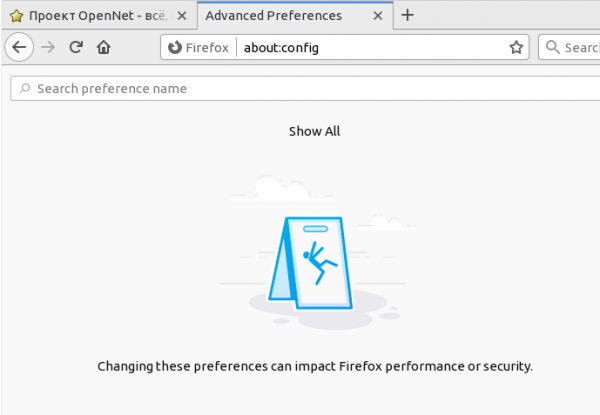
- a new 'about:config' page interface, which is an internal browser service web page written in HTML, CSS, and JavaScript. Page elements can be freely selected with the mouse (including multiple lines at once) and copied to the clipboard without using the context menu. The top search bar is preserved and extended with the ability to add new variables. Additionally, support for search via the built-in mechanism, which is also used for searching on regular pages with step-by-step matching, has been implemented.
For each setting, a button has been added to allow inverting boolean variable values (true/false) or editing string and numeric variables. For user-modified values, a button has been added to revert the changes to the default value.
After opening about:config, by default, elements are not displayed and only the search bar is visible, and to view the entire list, you need to click the 'Show all' button. In the settings the 'general.aboutConfig.enable' option, restore access to the about:config page if it was optionally disabled during the build stage;

- by default, a new TLS certificate viewing interface is available through the service page 'about:certificate' and from the menu 'Tools > Page Info > Security > View Certificate'. The implementation of the certificate viewing interface has been completely rewritten using JavaScript and standard web technologies, and aligned with the styling of Firefox Quantum. Previously, a separate window would open to view certificates, but now the information is displayed in a tab in a form reminiscent of an extension. .
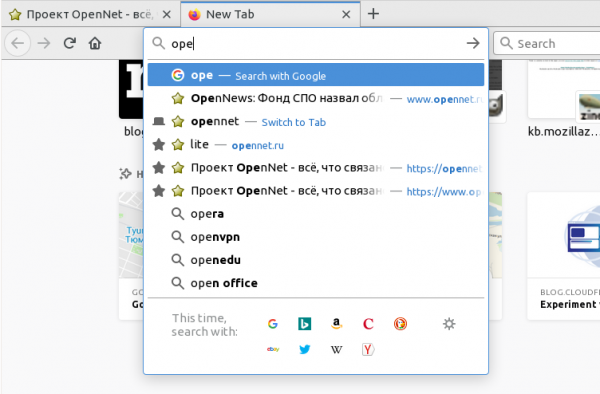
- The redesign of the address bar has undergone the most noticeable change by moving away from displaying recommendation lists across the entire width of the screen in favor of a clearly defined dropdown window. The proposed changes continue the development of the new implementation of the Quantum Bar address bar, which appeared in Firefox 68 and is characterized by a complete rewrite of the code, replacing XUL/XBL with standard Web API. In the first stage, the Quantum Bar's design fully mimicked the old address bar, with changes limited to internal reworking. Now, work has begun to improve the appearance. These changes are currently disabled by default and require activation through the 'browser.urlbar.megabar' setting in about:config.

- Launching the browser in kiosk mode, activated by specifying the '--kiosk' option in the command line, limits operation to full-screen mode only. The display of interface controls, pop-up windows, context menus, and page loading indicators (showing links and the current URL) is blocked. Keyboard input is significantly restricted, for instance, handling of the Alt and Ctrl keys is disabled, preventing users from exiting the browser, switching to another application, or opening a different site. This mode can be used to organize the operation of various standalone terminals, advertising kiosks, demonstration panels, and other systems limited to working with a single site/web application.
- In the built-in system add-on of the browser (previously supplied as Lockbox), the 'about:logins' interface for managing saved passwords, the recognition of subdomains for auto-filling password input forms has been added. Alerts from Firefox Monitor about account compromises are also implemented for users with screen readers.
- Native MP3 decoder has been utilized in builds for Windows, Linux, and macOS.
- In the enhanced tracking protection mode, notifications about blocked code for cryptocurrency mining have been added. The panel displayed when clicking on the shield icon in the address bar shows a counter of blocked trackers.
- For Windows users, the Picture-in-Picture mode is enabled by default, allowing you to detach videos into a floating window that remains visible while browsing. To view in this mode, you need to click the pop-up hint or in the context menu that appears when you right-click on the video, and choose 'Picture in picture' (in YouTube, which uses its own context menu handler, you should click with the right mouse button twice or hold the Shift key while clicking once). On systems other than Windows, the mode can be enabled in about:config using the option 'media.videocontrols.picture-in-picture.enabled'.
- support for nested multilayered page element layout (), which significantly enhances the flexibility of constructing grid-aligned page layouts by providing the ability to define child elements that are attached to parent cells (placing a separate grid within a cell). Nested grids are defined using the value '' in the properties 'grid-template-columns' and 'grid-template-rows'. Support for nested grids has also been added in the DevTools Grid Inspector.
- The property , allowing an element to span all columns, has been added to CSS.
- In the CSS property with the ability to define a bounding visibility area specified using the path() function downward API support (simultaneously with this in the ability to account for the aspect ratio specified using the
- aspect-ratio A method has been added in JavaScript
- , which returns only already fulfilled or rejected promises, ignoring promises that are pending (allows you to wait for a result before running other code). The class
- MathMLElement ), defines elements in the MathML In the DOM, the constructor
- StaticRange() Media Session
- Added API , providing tools for configuring the multimedia playback information block in the notifications area. Through this API, the web application can not only display a notification about the start of playback of a new track but also facilitate control from the notifications area or via the screensaver interface, for example, placing pause, seek, or next track buttons.
- In the API for extension developers error handling during data loading. In pop-ups opened by extensions through the windows.create call, the extension's name is shown instead of the extension's URL ("moz-extension://").
- WebGL has added support for the extension , allowing rendering in multiple viewports with a single call (for example, useful for stereo output in WebXR);
- In the network activity inspection interface, the ability to analyze the stages of network request processing is implemented, showing the time taken for DNS resolution, establishing connection, sending data, and receiving a response separately. This information is provided through a new Timing tab in the right sidebar.
- In the network activity tracking interface by default the WebSocket connection inspection mode with the ability to pause active connections.
- In the Network Monitor, full-text searching has been added in request/response bodies, cookies, and headers, as well as the implementation of blocking specific URL loading by adding filters with necessary patterns.
- In the web console, a has been implemented, allowing broken JavaScript constructs to be entered across multiple lines, executing them not upon pressing Enter but by clicking the Run button. The mode is displayed as a sidebar, triggered by clicking the 'split pane' icon on the right side of the input field or through the Ctrl+B keyboard shortcut.
- In the JavaScript debugger, a of variable values at their place of use in the code has been ensured, and and the ability to disable with breakpoints (devtools.debugger.features.overlay in about:config).
- A corrective update for Firefox 68.2 has been prepared for Android. Recall that the formation of new significant releases of Firefox for Android has been discontinued. As a replacement, Firefox for Android is being developed under the code name Fenix (available as ) a new mobile browser using the GeckoView engine and the Mozilla Android Components library set.
The decrease in the number of critical vulnerabilities is attributed to the categorization of memory issues, such as buffer overflows and access to already freed memory areas, which are now marked as dangerous but not critical. The new release fixes 13 of these issues, which could potentially lead to the execution of malicious code when opening specially crafted pages.
In addition to new features and bug fixes, Firefox 71 addresses , of which 17 (gathered under and ) are marked as potentially capable of leading to the execution of malicious code when opening specially crafted pages. Notably, memory issues such as buffer overflows and access to already freed memory areas are now categorized as dangerous but not critical.
Source: opennet.ru
