

Today, we will introduce you to the features of using SQL Server 2019 with the Unity XT storage system and provide recommendations for virtualizing SQL Server using VMware technology, as well as configuring and managing the basic infrastructure components of Dell EMC.
In 2017, Dell EMC and VMware published the results of a survey on trends and the evolution of SQL Server — 'Transforming SQL Server: Towards Agility and Resiliency' (), which utilized the experience of members of the Professional Association of SQL Server (PASS). The results show that SQL Server database environments are growing in both size and complexity, driven by increasing data volumes and new business requirements. SQL Server databases are now deployed in many companies, supporting critical applications and often serving as a foundation for digital transformation.
Since the time of this survey, Microsoft has released the next generation of the database management system — SQL Server 2019. In addition to enhancing core features of the relational engine and data storage, new services and capabilities have been introduced. For example, SQL Server 2019 includes support for big data workloads utilizing Apache Spark and the Hadoop Distributed File System (HDFS).
The Dell EMC and Microsoft Alliance
Dell EMC and Microsoft have long collaborated on developing solutions for SQL Server. The successful implementation of an integrated database platform, such as Microsoft SQL Server, requires coordination between software functions and the underlying IT infrastructure. This infrastructure includes CPU computing power, memory resources, storage, and networking services. Dell EMC offers infrastructure for the SQL Server platform suitable for any type of workload and applications.
The Dell EMC PowerEdge server lineup offers a variety of processor and memory configurations. These configurations cater to a wide range of workloads, from small enterprise applications to the largest critical systems, such as enterprise resource planning (ERP), data warehousing, advanced analytics, e-commerce, and more. The storage line is designed for managing both unstructured and structured data.
Clients deploying SQL Server 2019 with Dell EMC infrastructure can work with both structured and unstructured data using SQL Server and Apache Spark. SQL Server also supports combinations of client access technologies, inter-server communications, and server-storage communications. The Dell EMC concept is based on a disaggregated model offering an open ecosystem. Organizations can choose from a wide range of standard industry network applications, operating systems, and hardware platforms. This approach provides maximum control over technologies and architectures, leading to significant cost savings and flexibility.
VMware provides virtualization for all critical components of the infrastructure necessary for SQL Server to achieve high performance and operational consistency. In addition to private cloud solutions, VMware currently offers hybrid models for workloads that encompass both private and public cloud architectures.
Many organizations turn to virtualization to reduce infrastructure costs, ensure high availability, and simplify disaster recovery. 94% of SQL Server professionals surveyed report some level of virtualization in their environments. 70% of those using virtualization have chosen VMware. 60% report that their level of SQL Server virtualization is 75% or more. Furthermore, survey results convincingly show that high availability and disaster recovery implemented at the virtualization level have become crucial factors in deciding to virtualize SQL Server databases.
New features of SQL Server 2019
SQL Server 2019 database platform includes a wide range of technologies, features, and services that support mission-critical applications such as analytics, enterprise databases, business intelligence (BI), and scalable online transaction processing (OLTP). The SQL Server platform has gained capabilities for data integration management, data warehousing, reporting, and advanced analytics, along with replication features and management of semi-structured data types. Of course, not all customers or applications require all these features. Moreover, in many cases, it is preferable to separate SQL Server services through virtualization.
Today, organizations often have to rely on large volumes of data from a wide range of continuously increasing datasets. With SQL Server 2019, you can obtain valuable insights almost in real-time from all your data. SQL Server 2019 clusters provide a full-scale environment for working with large datasets, including using machine learning and artificial intelligence capabilities. Key new features and updates in SQL Server 2019 are listed in .
Dell EMC Unity XT midrange storage system
The Dell EMC Unity storage series appeared nearly three years ago, and since then, over 40,000 systems have been sold. Customers appreciate this midrange array for its simplicity, performance, and cost-effectiveness. Dell EMC Unity XT midrange platforms are unified storage solutions that provide low latency, high throughput, and low management costs for SQL Server workloads. All Unity XT systems use a dual-storage processors (SP) architecture to handle input/output and execute data operations in an active/active mode. In Unity XT, the dual SP architecture employs full internal SAS 12 Gbps connectivity and patented multicore architecture to ensure high performance and efficiency. The storage arrays allow for scaling storage capacity with additional shelves.
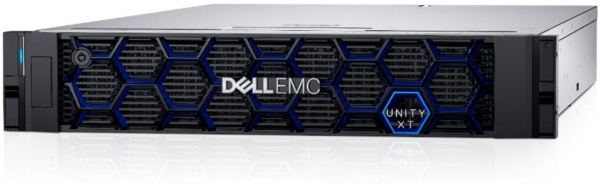
In Dell EMC Unity XT, the new generation of storage systems (both hybrid and fully flash-based), performance has significantly increased, efficiency has improved, and new capabilities and services for multi-cloud environments have been added.
The Unity XT architecture allows for simultaneous data processing, volume reduction, and support for services such as replication without compromising application performance. Compared to the previous generation solution, the performance of Dell EMC Unity XT has doubled, and response times have decreased by 75%. Naturally, Dell EMC Unity supports the NVMe standard.
Storage systems with NVMe drives exhibit their best performance in latency-sensitive applications. For instance, in applications like massive databases, NVMe provides low latency and high peak data transfer speeds. The reduction in latency and increase in parallelism significantly enhance read/write operation performance. It's no surprise that according to IDC's forecast, by 2021, NVMe-connected flash arrays and NVMe-oF (NVMe over Fabric) will account for approximately half of all external storage system sales revenue worldwide.
Storage efficiency is improved by data compression algorithms. Dell EMC Unity XT can reduce data volume by five times. Another key metric is overall system efficiency. Dell EMC Unity XT utilizes 85% of system capacity. Compression and deduplication are performed inline — at the controller level. Data is stored in a compressed format. The system also automates data snapshot management.
User-friendly Unity flash arrays with unified (block and file) access provide consistent response times, integrate with cloud storage services, and support upgrades without data migration. In the basic configuration, this versatile storage system can be set up in 30 minutes.
The data storage technology called 'dynamic pools' enables a transition from static to dynamic memory expansion, providing high operational flexibility and simplicity in increasing system capacity. Dynamic pools save capacity and budget, requiring less time for reconfiguration. Expanding the capacity and performance of Dell EMC Unity does not require data migration.
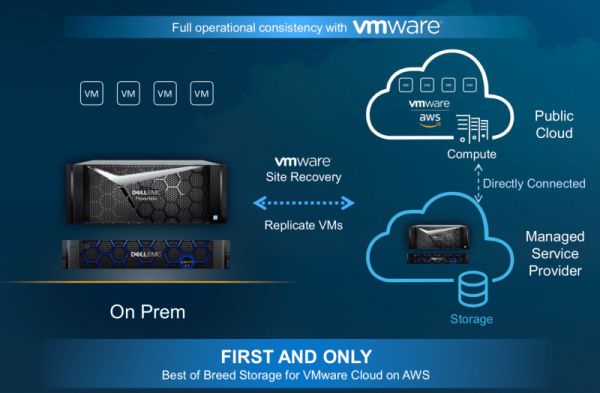
Many companies today use a combination of their local infrastructure and multiple public cloud services. Dell EMC Unity XT can function as a component of the Dell Technologies Cloud environment. This storage system can be utilized in the public cloud and transfer data to a private cloud. Additionally, the Dell EMC Unity XT storage is available as a service. It is one of the cloud storage services offered by Dell EMC Cloud Storage Services.
Cloud storage solutions are becoming increasingly popular as they enhance return on investment by reducing infrastructure costs. The Cloud Storage Services extend customer data centers to the cloud, providing Dell EMC storage (directly connected to public cloud resources) as a service. Third-party providers can offer high-speed connections (with low latency) between the public cloud and Dell EMC Unity, PowerMax, and Isilon systems in the customer's data center.
The Unity XT family includes Unity XT All-Flash systems, Unity XT Hybrid, UnityVSA, and Unity Cloud Edition.
Unified Hybrid and Flash Arrays
The Unity XT Hybrid and Unity XT All-Flash storage systems based on Intel processors implement an integrated architecture for block, file access, and VMware VVols with support for storage networking protocols (NAS), iSCSI, and Fibre Channel (FC). The Unity XT Hybrid and Unity XT All-Flash platforms are ready for NVMe drives.
The Unity XT Hybrid systems support operation in multi-cloud environments. Multi-cloud support means extending the data storage system into the cloud or deploying in the cloud with flexible resource usage options. Multi-cloud storage aims to ensure mobility and data portability between multiple cloud platforms—both private and public. This impacts not only data migration processes but also how applications access data across several public clouds.
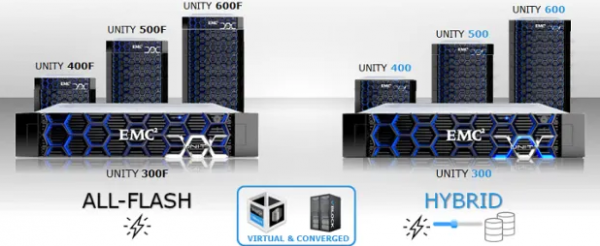
These hybrid arrays provide the following capabilities:
- Scalability up to 16 PB of raw capacity.
- Built-in data reduction features for all flash pools.
- Quick installation and setup (it takes an average of 25 minutes).
Solid-state drive technologies are rapidly evolving, and new revolutionary products are expected to emerge in the market in the coming years. In the meantime, organizations will continue to replace traditional HDDs with solid-state drives to improve performance, management simplicity, and energy efficiency. New generations of flash arrays will feature more advanced storage automation, public cloud integration, and integrated data protection.
Unity XT All-Flash systems deliver high speed, efficiency, and multi-cloud support. Their features include:
- Double the performance.
- Data reduction up to 7:1.
- Quick installation and setup (less than 30 minutes).
UnityVSA
The UnityVSA system is a software-defined storage solution for VMware ESXi virtual environments, utilizing server-based, shared, or cloud storage capacity. UnityVSA HA, a configuration with two UnityVSA storage systems, provides added fault tolerance. UnityVSA storage offers:
- Up to 50 TB of fully functional unified storage capacity.
- Compatibility with Unity XT systems and features.
- Support for high availability systems (UnityVSA HA).
- Connectivity as both NAS and iSCSI.
- Data replication from other Unity XT platforms.
Unity Cloud Edition
To synchronize files and disaster recovery operations with the cloud, the Unity XT family includes the Unity Cloud Edition, which provides:
- Fully functional storage capabilities using a software-defined storage (SDS) solution deployed in the cloud.
- Simple deployment of block and file storage using VMware Cloud on AWS.
- Support for disaster recovery, including testing and analyzing data.
Unity XT All Flash for SQL Server
In the 2017 Unisphere Research report 'Transforming SQL Server: Moving Towards Flexibility and Resilience' () 22% of respondents reported using flash storage technology in production (16%) or planning to do so (6%). 30% use hybrid arrays that include flash memory. 13% use directly attached flash arrays. 13% back up SQL Server databases to flash storage.
Such rapid integration of flash storage for use with SQL Server means that Unity XT All-Flash arrays are particularly well-suited for SQL Server developers and administrators. Unity XT All-Flash systems provide developers and SQL Server administrators with capabilities and performance that go beyond what typical Storage Area Networks (SAN) offer.
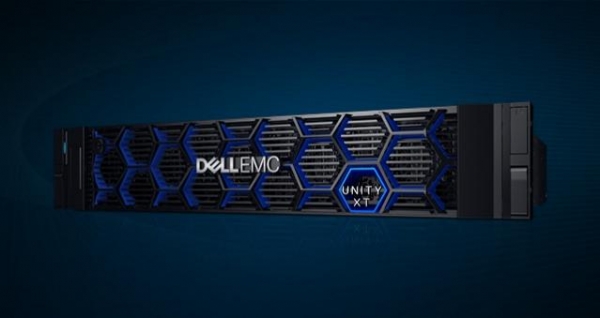
Unity XT All-Flash systems, which are ready for NVMe integration (for even higher performance and lower latency), feature a 2U form factor, support dual-core processors, and include two controllers in an active/active configuration.
Unity XT All-Flash Models
Unity XT
Processors
Memory (per processor)
Max. number of drives
Max. 'raw' capacity (PB)
380F
1 Intel E5-2603 v4
6c/1.7 GHz
64
500
2.4
480F
2 Intel Xeon Silver
4108 8c/1.8 GHz
96
750
4.0
680F
2 Intel Xeon Silver
4116 12c/2.1 GHz
192
1,000
8.0
880F
2 Intel Xeon Gold 6130
16c/2.1 GHz
384
1,500
16.0
Details can be found in the array specifications ().
Storage Pools
Many SQL Server professionals know that all modern storage arrays offer the ability to group disks into larger storage units with fixed RAID protection levels. Separate groups of disks with RAID protection are traditional storage pools. While hybrid Unity XT systems only support traditional pools, Unity XT All-Flash arrays also offer dynamic storage pools. In the case of dynamic storage pools, RAID protection is applied to extents of disks—units of storage smaller than a full disk. Dynamic pools provide greater flexibility in managing and expanding disk pools.
Dell EMC provides recommendations for managing storage pools to achieve maximum performance with minimal complexity. For instance, it is advisable to minimize the number of Unity XT storage pools to reduce complexity and enhance flexibility. However, configuring additional storage pools may be quite reasonable in some cases, including when you need to:
- Support separate workloads with different input/output profiles.
- Allocate resources to achieve specific performance parameters.
- Allocate separate resources for multi-tenancy.
- Create smaller domains for fault isolation
Storage volumes (LUN)
How to find a compromise between management and flexibility when choosing the number of volumes in the array? For maximum flexibility in Unity with SQL Server, it is recommended to create volumes for each database file. In practice, most organizations apply a multi-tiered approach, where critical databases receive maximum flexibility, while less important database files are grouped into fewer larger volumes. We recommend reviewing all requirements for databases and any related applications, as data protection and monitoring technologies depend on the isolation and placement of files.
Managing multiple volumes can often be challenging, especially in virtual environments. Virtualized SQL Server environments are a prime example where it may make sense to place multiple file types on a single volume. The database administrator or storage administrator (or both) should choose the right balance between flexibility and manageability when determining the number of volumes to create.
File Storage
NAS servers host file systems on the Unity XT storage system. File systems can be accessed via SMB or NFS protocols, and thanks to the multi-protocol file system, both protocols can be used simultaneously. To connect the host to SMB, NFS, and multi-protocol file systems, as well as to VMware NFS data stores and VMware virtual volumes, NAS servers use virtual interfaces. File systems and virtual interfaces are isolated within a single NAS server, allowing the use of multiple NAS servers for multi-tenancy. NAS servers automatically failover in the event of a failure if the storage processor goes down. The associated file systems also failover in the event of a failure.
SQL Server 2012 (11.x) and later versions support the Server Message Block (SMB) 3.0 protocol, which allows for sharing a network file for storage. Both for standalone installations and failover clusters, you can set up system databases (master, model, msdb, and tempdb) and user databases of the Database Engine with the SMB storage option. Utilizing SMB storage is a good choice when using Always On Availability Groups for high availability, as it requires access to a highly available network resource.
Creating SMB shared resources for deploying SQL Server with Unity XT storage is a straightforward three-step process: you need to create a NAS server, a file system, and an SMB shared resource. Dell EMC Unisphere Storage Management software includes a setup wizard utility to help with this process. However, when hosting SQL Server workloads on SMB shared resources, it's important to keep in mind several key considerations that are not necessarily related to using SMB shared resources. Microsoft has compiled a list of installation and security issues along with known problems; details can be found in the 'Installing SQL Server with SMB File Storage' section in .
Data Snapshots
Data has become the most important resource for companies, and today, mission-critical environments require not only backups. Applications need to be always online, ensuring uninterrupted operations and updates. They also require high performance and data availability through options like local snapshot replication and remote replication.
The Unity XT storage array offers snapshot capabilities for both blocks and files, utilizing common workflows, operations, and architecture. The Unity snapshot methodology provides a simple and efficient way to protect data. Snapshots simplify data recovery — you can roll back to an earlier snapshot, or you can copy selected data from a previous snapshot. The following table details the retention periods for snapshots for Unity XT systems.
Local and Remote Data Snapshot Storage
Snapshot Type
CLI
UI
REST
Manually
Scheduled
Manually
Scheduled
Manually
Scheduled
Local
1 year
1 year
5 years
4 weeks
100 years
Unlimited
Remote
5 years
255 weeks
5 years
255 weeks
5 years
255 weeks
Snapshots are not a direct substitute for other data protection methods, such as backups. They can only complement traditional backups as a first line of defense for scenarios with low RTO.
The Dell EMC Unity snapshot feature includes data reduction and advanced deduplication. Snapshots also benefit from space savings achieved on the underlying storage resource. When you take a snapshot of a storage resource with data reduction features, the data in the source can be compressed or deduplicated.
Here are some notes regarding database recovery when using snapshots with SQL Server databases:
- All components of the SQL Server database must be protected as a dataset. When the data and log files are on different LUNs, those LUNs must be part of a consistent group. A consistent group ensures that the snapshot will be taken simultaneously on all LUNs in the group. When the data and log files are on multiple shared SMB file resources, the shared resources must reside within the same file system.
- When restoring a SQL Server database from a block-based snapshot, if the SQL Server instance needs to remain connected, use the connection to the Unisphere host. For file-based recovery, an additional SMB share is created using the snapshot as the source. After the volumes are connected, the database can be attached under a different name or replace the existing database with the restored one.
- When performing recovery using the Snapshot Restore method in Unisphere, take the SQL Server instance offline. SQL Server is unaware of the recovery operations. Taking the instance offline ensures that the volumes are not corrupted by write operations to the database before recovery. Once the instance is restarted, the emergency recovery of SQL Server will bring the databases to a consistent state.
- Enable snapshots for multiple storage objects simultaneously, and then before enabling additional snapshots, ensure through system monitoring that it is operating within recommended settings.
Automation and Scheduling of Snapshots
Snapshots in Unity XT can be automated. The following default snapshot options are available in the Unisphere storage management system: default protection, short-term protection, and long-term protection. Each option creates daily snapshots and retains them for different periods.
You can choose one (or both) of the scheduling options — every x hours (from 1 to 24) and daily/weekly. Daily/weekly snapshot scheduling allows you to specify exact times and days for taking snapshots. For each selected option, a retention policy must be set, which can be configured for automatic deletion of the pool or temporary storage.
For more information about Unity snapshots, refer to the .
Thin Clones
A thin clone is a read/write copy of a thin block storage resource, such as a volume, consistent group, or VMware VMFS datastore, that shares blocks with the parent resource. Thin clones are a great way to quickly and compactly present copies of SQL Server databases, something that traditional SQL Server tools cannot achieve. Once a thin clone is presented to a host, the volume can be made operational (online), and the database will be attached using the database attach method in SQL Server.
When using the refresh feature with thin clones, ensure all databases on the thin clone are disabled (taken offline) before performing the refresh operation. Failing to take databases offline before executing a refresh may result in data consistency errors or incorrect data outcomes in SQL Server.
Data Replication
Replication is a software feature that synchronizes data with a remote system on the same object or at a different location. The replication parameters and configuration of Unity allow for the selection of an effective way to meet RTO/RPO requirements for SQL Server databases while maintaining a balance between performance and bandwidth.
When using Dell EMC Unity replication to protect SQL Server databases across multiple volumes, all data and database log volumes should be limited to a single consistent group or file system. Replication is then set up within the group or file system and may include volumes or shared resources from multiple databases. Databases requiring different replication parameters should be placed in separate LUNs, consistent groups, or file systems.
Thin clones are compatible with both synchronous and asynchronous replication. When a thin clone is replicated to the destination, it becomes a complete copy of the volume, consistent group, or VMFS datastore. After replication, the thin clone is a fully independent volume with its own settings.
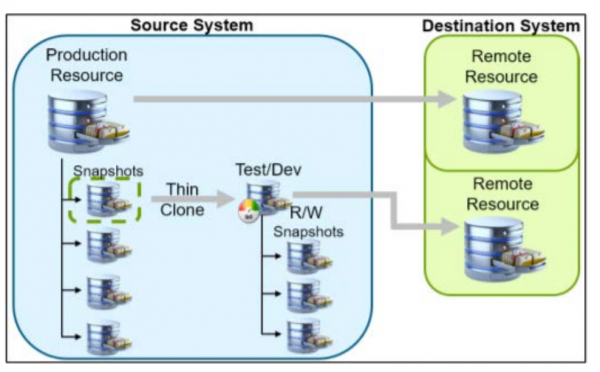
The replication process of a thin clone between the source and target systems.
Replication of the tempdb database is not required, as the file is rebuilt upon restarting SQL Server, and thus the metadata does not align with that of other SQL Server instances. Careful selection of volumes for replication and the contents of those volumes reduces unnecessary replication traffic.
Integrated data copy management in Microsoft SQL Server.
Most modern storage products (including all Dell EMC products) can create 'OS-consistent' copies of files of any type by:
- Consistent write order by the operating system at all levels—from the host to the storage.
- Grouping volumes to maintain the write order for multiple files across different volumes.
With the widespread adoption of scalable storage devices, Microsoft has developed an API for storage vendors. This API allows storage providers to coordinate their actions with SQL Server database software to create 'application-consistent copies' using the Volume Shadow Copy Service (VSS). These copies simulate the interaction between SQL Server and the operating system during scheduled and shutdown operations of SQL Server. All write buffers are flushed, and transactions are paused until all disks are updated and synchronized at a specific point in time, which is logged in SQL.
Dell EMC AppSync software, integrated with Unity XT snapshots, streamlines and automates the process of creating, utilizing, and managing application-consistent copies of operational data. This software is designed for copy management scenarios for database recovery and reuse.
AppSync software automatically discovers application databases, examines the database structure, and maps the file structure across hardware or virtualization layers to the underlying Unity XT storage. It organizes all necessary actions, from creation and verification of copies to mounting snapshots on the target host and starting or restoring the database. AppSync supports and simplifies SQL Server workflows that include updates and recovery of the operational database.
Data reduction and enhanced deduplication.
The Dell EMC Unity family of data storage systems offers multifunctional and easy-to-use data reduction services. Savings are achieved not only on configured primary storage resources but also on snapshots and thin clones of these resources. Snapshots and thin clones inherit the data reduction settings of the primary storage, increasing capacity savings.
Data reduction functionality includes deduplication, compression, and zero block detection, which potentially increases the amount of usable storage space for user objects and internal use. The Unity XT data reduction feature replaces the compression function in Unity OE 4.3 and later versions. Compression is a data reduction algorithm that can decrease the physical capacity footprint required to store a dataset.
Unity XT systems also offer an advanced deduplication feature that can be enabled if data reduction is turned on. Advanced deduplication decreases the capacity needed for user data by retaining only a small number of copies (often just one copy) of Unity data blocks. The deduplication area is one LUN. Keep this in mind when selecting your storage scheme. Fewer LUNs lead to better deduplication, while more LUNs provide increased performance.
Capacity savings from advanced deduplication can yield the greatest returns in most environments, but it also requires the utilization of resources from the Unity array processors. In OE 5.0, advanced deduplication, if enabled, deduplicates any block (compressed or uncompressed). For more information, see .
The following table provides supported configurations for data reduction and advanced deduplication:
Data reduction in Unity (all models) and extended support for deduplication
Unity OE version
Technology
Supported pool type
Supported models
4.3 / 4.4
Data reduction
Flash pool — traditional or dynamic
300, 400, 500, 600, 300F, 400F, 500F, 600F, 350F, 450F, 550F, 650F
4.5
Data reduction
300, 400, 500, 600, 300F, 400F, 500F, 600F, 350F, 450F, 550F, 650F
Data reduction and advanced deduplication*
450F, 550F, 650F
5
Data reduction
300, 400, 500, 600, 300F, 400F, 500F, 600F, 350F, 450F, 550F, 650F, 380, 480, 680, 880, 380F, 480F, 680F, 880F
Data reduction and enhanced deduplication.
450F, 550F, 650F, 380, 480, 680, 880, 380F, 480F, 680F, 880F
* Data reduction is disabled by default and must be enabled before advanced deduplication becomes an available option. Once data reduction is enabled, advanced deduplication is available but is off by default.
Data reduction in Unity and data compression in SQL Server
The release of SQL Server 2008 Enterprise Edition was the first release with built-in data compression capabilities. When compressing at the row and page levels, SQL Server 2008 uses knowledge of the internal database table format to reduce the space occupied by database objects. Reducing space allows for more rows to be stored on a page and more pages in the buffer pool. Since data not stored in the 8k data page format, such as out-of-row data like NVARCHAR (MAX), will not use row or page compression methods, Microsoft introduced the Transact-SQL COMPRESS and DECOMPRESS functions.
These functions utilize a traditional data compression approach (the GZIP algorithm) that must be invoked for each data segment to compress or decompress.
Unity XT compression, which is not exclusive to SQL Server, utilizes a software algorithm to analyze and compress data for storage systems. Since the release of Unity OE 4.1, Unity data compression has been available for block storage volumes and VMFS data stores in the flash storage pool. Starting with Unity OE 4.2, compression is also available for file systems and NFS data stores in flash storage pools.
Choosing a data compression method for SQL Server depends on several factors. These factors include the type of database content, available CPU resources—both on storage and database servers—as well as I/O resources required to maintain SLA. Generally, additional space savings can be expected for data compressed using SQL Server tools, however, data compressed with the TSQL compression function using the GZIP algorithm is unlikely to achieve substantial further volume reduction from Unity XT compression functions, as most benefits are gained from the first applied universal algorithm.
Unity compression provides space savings if the data on the storage object is compressed by at least 25%. Before enabling compression for a storage object, determine if it contains data that can be compressed. Do not enable compression for a storage object if it will not provide capacity savings.
When deciding whether to utilize data volume reduction through Unity, SQL Server database compression, or both, consider the following:
- Data written to the Unity system is confirmed by the host after being saved in the system cache. However, the compression process does not begin until the cache is cleared.
- Savings from compression are achieved not only for Unity XT storage resources but also for snapshots and thin clones of the resource.
- During compression, multiple blocks are aggregated using a sampling algorithm to determine whether the data can be compressed. If the sampling algorithm finds that only minimal savings can be achieved, compression is skipped, and the data is written to the pool as is.
- When data is compressed before being written to storage, the number of operations on it is significantly reduced. Therefore, compression helps decrease the wear on flash memory by reducing the physical volume of data written to the drive.
For more information on row and page compression in SQL Server for tables and indexes, see .
Remember that any compression requires CPU resources. Under high throughput demands, compression can have a noticeable impact on performance. High write rates for OLAP workloads may also diminish the benefits of compression for SQL Server databases.
Dell EMC specialists examined potential savings using real-world data reduction ratios from the Unity array. The group gathered data on VMware virtual machines, file shares, SQL Server databases, Microsoft Hyper-V virtual machines, etc.
The study results showed that the reduction in SQL Server log file size is nearly 10 times less than that of the data file:
- Database size = 1.49: 1 (32.96%)
- Log volume = 12.9: 1 (92.25%)
The SQL Server database was supplied with two volumes. The database files are stored on one volume, while the transaction logs are on another. Utilizing data reduction technology with database volumes can save storage; however, one should consider the performance impact when deciding whether to enable deduplication on database volumes. Although actual database volume reduction may vary depending on the stored data, research results have shown that the storage space for SQL Server transaction logs can .
Best Practices for Data Reduction
Before enabling data reduction on a storage object, consider the following recommendations:
- Use storage system monitoring to ensure it has the available resources to support data reduction.
- Enable data reduction for multiple storage objects at once. Monitor the system to ensure it's operating within recommended modes before enabling it on additional storage objects.
- In Unity XT x80F models, data reduction will provide capacity savings if the data in the storage block is compressed by at least 1%.
Data reduction on earlier Unity x80F models running on OE 5.0 provided savings if the data was compressible by at least 25%.
- Before enabling data reduction on a storage object, determine if the object contains compressible data. Certain types of data, such as video, audio, images, and binary data, usually yield little benefit from compression. Do not enable data reduction on a storage object if space savings are not expected.
- Consider selective compression of file data volumes that typically compress well.
VMware Virtualization
VMware vSphere is an efficient and secure platform for virtualization and cloud environments. The key components of vSphere are VMware vCenter Server and VMware ESXi hypervisor.
vCenter Server is a unified platform for managing vSphere environments. It stands out for its ease of deployment and proactive resource optimization. ESXi is an open-source hypervisor that is installed directly on physical servers. ESXi has direct access to the underlying resources, and its small size of 150 MB minimizes memory requirements. It provides reliable performance for various application workloads and supports powerful virtual machine configurations of up to 128 virtual CPUs, 6 TB of RAM, and 120 devices.
For SQL Server to operate efficiently on modern hardware, the SQL Server Operating System (SQLOS) must 'understand' the hardware structure. With the emergence of multi-core and multi-node Non-Uniform Memory Access (NUMA) systems, understanding the relationships between cores, logical and physical processors has become particularly important.
Processors
A virtual CPU (vCPU) is a virtual central processing unit assigned to a virtual machine. The total number of assigned vCPUs is calculated as:
Total vCPU = (number of virtual sockets) * (number of virtual cores per socket)If stable performance is important, VMware recommends that the total number of vCPUs assigned to all virtual machines does not exceed the total number of physical cores available on the ESXi host, but the number of allocated vCPUs can be increased if monitoring shows that unused CPU resources are available.
In systems with Intel Hyper-Threading technology enabled, the number of logical cores (vCPUs) is twice the number of physical cores. In this case, do not allocate the total number of vCPUs.
Lower-level SQL Server workloads are less affected by latency variability. Thus, these workloads can be run on hosts with a higher ratio of vCPUs to physical cores. Reasonable CPU load levels can increase the overall system throughput, maximize license savings, and maintain adequate performance.
Intel Hyper-Threading typically increases the overall host throughput by 10–30%, suggesting a virtual CPU to physical CPU ratio of 1.1 to 1.3. VMware recommends enabling Hyper-Threading in UEFI BIOS whenever possible so that ESXi can take advantage of this technology. VMware also advises conducting thorough testing and monitoring when using Hyper-Threading for SQL Server workloads.
Memory
Almost all modern servers use a Non-Uniform Memory Access (NUMA) architecture for communication between the main memory and processors. NUMA is a hardware architecture for shared memory that implements the distribution of blocks of physical memory among physical processors. A NUMA node consists of one or more CPU sockets along with a block of dedicated memory.
Over the last decade, NUMA has been a widely discussed topic. The relative complexity of NUMA is due, in part, to implementations from different vendors. In virtualized environments, NUMA complexity is also determined by the number of configuration parameters and levels — from hardware through the hypervisor to the guest operating system, and finally to the SQL Server application. A solid understanding of the NUMA hardware architecture is essential for any database administrator working with a virtualized SQL Server instance.
To achieve greater efficiency on servers with a high core count, Microsoft introduced SoftNUMA. SoftNUMA software allows the available CPU resources within a single NUMA to be divided into multiple SoftNUMA nodes. According to VMware, SoftNUMA is compatible with VMware's virtual NUMA (vNUMA) topology and can further optimize scalability and performance of the database engine for most workloads…
When virtualizing VMware with SQL Server, use:
- Monitoring virtual machines to detect memory resource shortages for SQL Server Database Engine. This issue leads to increased I/O operations and reduced performance.
- To enhance performance, prevent memory conflicts between virtual machines by avoiding excessive memory overloading at the host ESXi level.
- Consider checking the hardware allocation of NUMA physical memory to determine the maximum amount of memory that can be assigned to the virtual machine within the physical NUMA boundaries.
- If achieving adequate performance is a primary goal, consider reserving memory equal to the allocated memory. This setting ensures that the virtual machine only receives physical memory.
Virtualized Storage
Configuring storage in a virtualized environment requires knowledge of the storage infrastructure. Similar to NUMA, it’s important to understand how different I/O levels operate — in this case, from the application in the VM to the physical read and write of information on persistent storage media.
vSphere offers a range of storage configuration options that have beneficial applications in implementing SQL Server with the Unity XT array. VMFS is the most widely used method for data storage in block storage systems such as Unity XT. The Unity XT array comprises physical drives represented by vSphere as logical disks (volumes). Unity XT volumes are formatted as VMFS volumes by the ESXi hypervisor. VMware administrators create one or more virtual disks (VMDK), which are presented to the guest operating system. RDM allows the virtual machine to directly access the Unity XT block storage (via FC or iSCSI) without VMFS formatting. Both VMFS volumes and RDM can provide the same transaction throughput.
For NFS storage for ESXi, Dell EMC recommends using VMware NFS instead of general-purpose NFS file systems. A virtual machine running SQL Server and utilizing VMDK in NFS data storage is unaware of the underlying NFS layer. The guest operating system perceives the virtual machine as a physical server running Windows Server and SQL Server. Shared disks for failover cluster instance configurations in NFS data stores are not supported.
VMware vSphere Virtual Volumes (VVols) provide finer control at the virtual machine level, regardless of the underlying physical storage view (such as volumes or file systems). Array-based replication with VVols is supported starting from VVol 2.0 (vSphere 6.5). A VVol disk can be used instead of an RDM disk to allocate disk resources to a SQL failover cluster instance starting with vSphere 6.7, with support for persistent reservations via SCSI.
Virtual Networks
Networking in the virtual world adheres to the same logical concepts as in the physical world but utilizes software instead of physical cables and switches. The impact of network latency on SQL Server workloads can vary significantly. Monitoring network performance metrics on an existing workload or a well-implemented testing system over a representative period aids in building a virtual network.
When using VMware virtualization with SQL Server, consider the following:
- Both standard and distributed virtual switches provide the necessary functionality required for SQL Server.
- For logical separation of management, vSphere vMotion, and storage traffic, use VLAN tagging and VMware virtual switch port groups.
- VMware strongly recommends enabling jumbo frames on virtual switches where vSphere vMotion traffic or iSCSI traffic is present.
- Overall, adhere to networking guidelines for guest operating systems and hardware.
Conclusion
SQL Server database environments are becoming increasingly large and complex. With SQL Server 2019, Microsoft has enhanced the core features of SQL Server and introduced new ones, such as support for big data workloads using Apache Spark and HDFS. Dell EMC, in collaboration with Microsoft, continues to provide the necessary infrastructure components for SQL Server environments — servers, storage, and networking.
We are observing a significant increase in uptime and a decrease in total cost of ownership (TCO) when storage and database specialists collaborate on infrastructure solutions for SQL Server on shared storage platforms. The Dell EMC Unity XT flash array is a mid-range solution suitable for SQL Server developers and administrators who need high performance and low latency. The Unity XT All-Flash system, designed to work with all flash drives, supports dual-processor CPUs, dual-controller configurations, and multi-core optimization.
Organizations are increasingly virtualizing their SQL Server environments. While virtualization adds another layer of design to the architecture stack, it provides significant benefits. We hope you find some of the most commonly used VMware features and tools in SQL Server environments presented above helpful. We also recommend links to resources for more detailed information.
Useful links
Dell EMC
- (product page)
- (YouTube)
VMware
by Microsoft
Source: habr.com
