

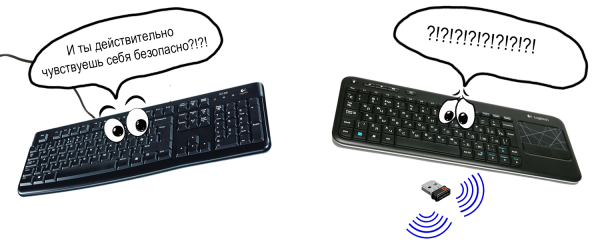
Historically, most employees use wireless keyboards and mice from Logitech. While entering our passwords once again, we at Raccoon Security wondered: how difficult is it to bypass the security mechanisms of wireless keyboards? Our research revealed architectural flaws and software bugs that allow access to the input data. Below is what we found.
Why Logitech?
In our opinion, Logitech's input devices are among the most high-quality and user-friendly available. Most of the devices we possess are based on Logitech's solutions. is a universal dongle receiver that allows you to connect up to 6 devices. All devices compatible with Logitech's Unifying technology are marked with the corresponding logo. The simple-to-use allows you to manage the connection of wireless keyboards to your computer. The process of connecting a keyboard to the Logitech dongle receiver, as well as the technology itself, is detailed, for example, in .
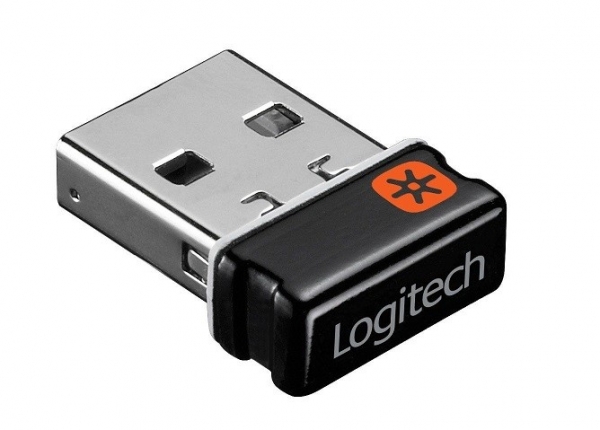
A dongle receiver with Logitech Unifying support
A keyboard can become a source of information for malicious actors. Considering the potential threat, Logitech has implemented AES128 encryption in the wireless keyboard's radio channel. The first thought that might cross a hacker's mind in this scenario is to intercept key data during transmission over the radio channel during the pairing procedure. With the key, one could intercept the keyboard's radio signals and decrypt them. However, users very rarely (or even never) have to link the keyboard using the Unifying procedure, and a hacker with a scanning radio receiver would have to wait a long time. Additionally, the interception process itself is not so straightforward. In the latest research published in June 2019, security expert Markus Mengs revealed a vulnerability in old versions of Logitech USB dongles online. It allows malicious actors with physical access to the devices to obtain encryption keys for the radio channel and inject keystrokes (CVE-2019-13054).
We will talk about our security research on the Logitech dongle based on the NRF24 SoC from Nordic Semiconductor. Let's start, perhaps, with the radio channel.
How data 'flies' in the radio channel
For the time-frequency analysis of the radio signal, we used an SDR receiver based on the Blade-RF device in spectrum analyzer mode (you can also read about this) ).
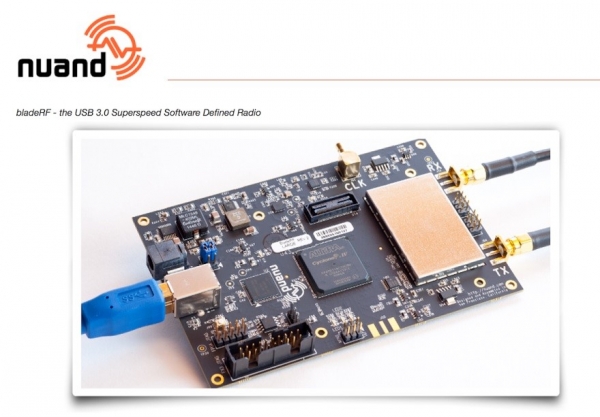
SDR Device Blade-RF
We also considered the possibility of recording the quadrature of the radio signal at an intermediate frequency to analyze them using digital signal processing methods.
The State Commission for Radio Frequencies in the Russian Federation for use by low-power devices in the frequency range of 2400–2483.5 MHz. This is a very 'crowded' range where one can encounter everything: Wi-Fi, Bluetooth, various remote controls, security systems, wireless detectors, mice with keyboards, and other wireless digital devices.
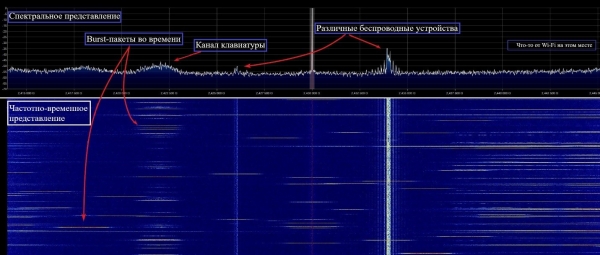
Spectrum of the 2.4 GHz range
The interference situation in this band is quite complex. Nevertheless, Logitech was able to provide reliable and stable reception using the Enhanced ShockBurst protocol in the NRF24 transceiver combined with frequency adaptation algorithms.
Channels in the band are placed at integer MHz positions, as defined in NRF24 Nordic Semiconductor – a total of 84 channels in the frequency grid. The number of simultaneously used frequency channels by Logitech is, of course, less. We identified the use of at least four. Due to the limited bandwidth of the spectrum analyzer used, it was not possible to determine the exact list of used frequency positions, but there was no need for that. The information from the keyboard to the dongle receiver is transmitted in Burst mode (short activations of the transmitter) using two-position frequency modulation GFSK at a symbol rate of 1 Mbps:
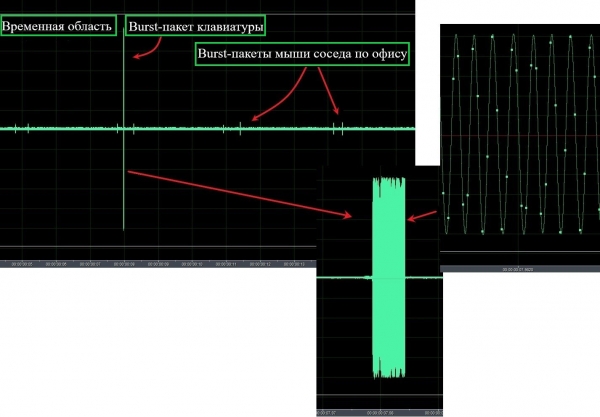
Radio signal of the keyboard in temporal representation
The receiver uses a correlation reception principle, so the transmitted packet includes a preamble and an address part. Error-resistant coding is not used; the data body is encrypted with the AES128 algorithm.
In general, the radio interface of the Logitech wireless keyboard can be characterized as fully asynchronous with statistical multiplexing and frequency adaptation. This means that the keyboard's transmitter switches channels to transmit each new packet. The receiver does not know in advance either the transmission time or the frequency channel, only their list is known. The receiver and transmitter meet on the channel thanks to coordinated algorithms for frequency hopping and listening, as well as the Enhanced ShockBurst acknowledgment mechanisms. We do not know if the channel list is static. Its change is likely due to the frequency adaptation algorithm. Something akin to the PPRCH method (pseudorandom frequency hopping) is hinted at in the use of frequency resources in the range.
Thus, under conditions of frequency-time uncertainty, for guaranteed reception of all keyboard signals, an attacker would need to continuously monitor the entire grid of 84 frequency positions, requiring significant time costs. This clarifies why the vulnerability of key extraction via USB (CVE-2019-13054) is positioned as the ability to inject key presses, rather than providing an attacker with access to the data entered via the keyboard. It is evident that the radio interface of the wireless keyboard is designed quite complexly and ensures reliable radio communication between Logitech devices in a challenging interference environment at the 2.4 GHz range.
A look at the problem from the inside
For our research, we chose one of our Logitech K330 keyboards and the Logitech Unifying dongle.
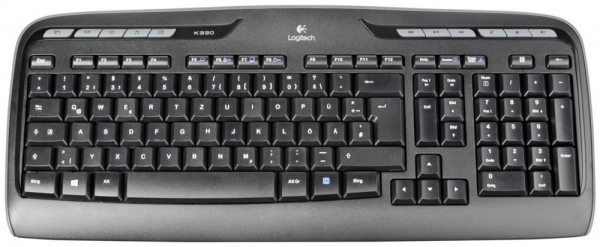
Logitech K330
Let's take a look inside the keyboard. An interesting element for research on the board is the SoC chip NRF24 from Nordic Semiconductor.
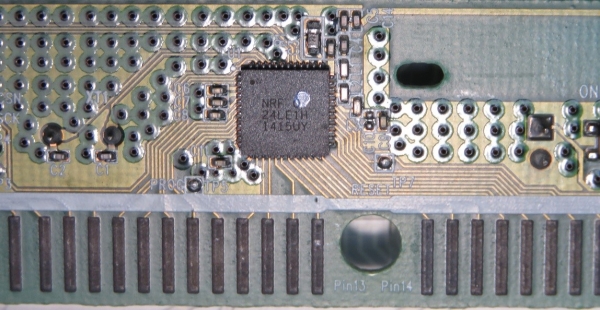
SoC NRF24 on the printed circuit board of the Logitech K330 wireless keyboard
The firmware is stored in internal memory, with reading and debugging mechanisms disabled. Unfortunately, the firmware has not been published in open sources. Therefore, we decided to approach the problem from another angle – to study the internal contents of the Logitech dongle receiver.
The internal structure of the dongle receiver is quite interesting. The dongle is easy to disassemble, features the familiar NRF24 with a built-in USB controller, and can be reprogrammed both via USB and directly with a programmer.
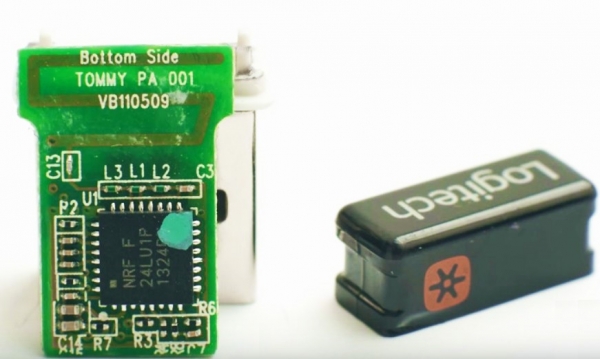
Logitech dongle without case
Since there is a standard mechanism for firmware updates using (from which the updated firmware version can be extracted), there is no need to search for the firmware inside the dongle.
What was done: the firmware RQR_012_005_00028.bin was extracted from the body of the Firmware Update Tool application. To check its integrity, the dongle's controller was connected via a ribbon cable :
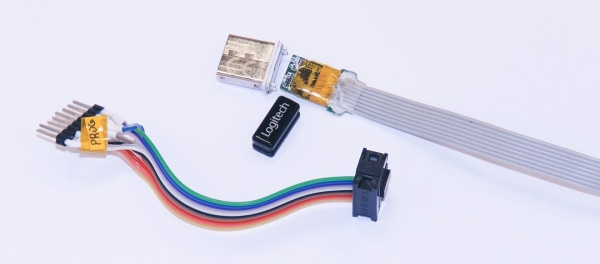
Ribbon cable connection of the Logitech dongle to the ChipProg 48 programmer.
To ensure the integrity of the firmware, it was successfully placed in the controller's memory and worked correctly, with the keyboard and mouse connected to the dongle via Logitech Unifying. It is possible to upload a modified firmware using the standard update mechanism, as no cryptographic protection mechanisms for the firmware are provided. For our research, we used a physical connection to the programmer since this allows for faster debugging.
Firmware analysis and user input attack
The NRF24 chip is designed based on the Intel 8051 computational core in a traditional Harvard architecture. The transceiver acts as a peripheral device for the core and is located in the address space as a set of registers. Documentation on the chip and example source codes can be found online, so disassembling the firmware poses no difficulty. During reverse engineering, we localized the functions for obtaining keystroke data from the radio channel and converting them into HID format for transmission to the host via USB interface. Injection code, which included control interception tools, context preservation and restoration, and functional code, was placed in the free memory addresses.
The packet of key press or release signals accepted from the radio channel by the dongle is decoded, transformed into a standard HID report, and sent to the USB interface as if from a regular keyboard. For this study, we are particularly interested in the part of the HID report that contains the byte of modifier flags and the array of 6 bytes with the key press codes (for reference, information about HID ).
Structure of the HID report:
// Keyboard HID report structure.
// See https://flylib.com/books/en/4.168.1.83/1/ (last access 2018 december)
// "Reports and Report Descriptors", "Programming the Microsoft Windows Driver Model"
typedef struct{
    uint8_t Modifiers;
    uint8_t Reserved;
    uint8_t KeyCode[6];
}HidKbdReport_t;
Immediately before transmitting the HID structure to the host, the injected code gains control, copies 8 bytes of native HID data into memory, and sends it over to the auxiliary radio channel in clear text. In the code, this looks like:
//~~~~~~~~~ Send data via radio ~~~~~~~~~~~~~~~~~~~~~~~~~>
// Profiling have shown time execution ~1.88 mSec this block of code
SaveRfState();                  // save transceiver state
RfInitForTransmition(TransmitRfAddress);        // configure for special trnsmition
hal_nrf_write_tx_payload_noack(pDataToSend,sizeof(HidKbdReport_t)); // Write payload to radio TX FIFO
CE_PULSE();                 // Toggle radio CE signal to start transmission
RestoreRfState();               // restore original transceiver state
//~~~~~~~~~ Send data via radio ~~~~~~~~~~~~~~~~~~~~~~~~~<
The auxiliary channel is organized on the frequency we set with specific manipulation speed characteristics and packet structure.
Operation of the transceiver in the chip is based on a state graph, into which the Enhanced ShockBurst protocol is seamlessly integrated. We determined that right before transmitting the HID data to the USB interface of the host, the transceiver was in the IDLE state. This allows for its safe reconfiguration to operate in the auxiliary channel. The injected code captures control, saves the original configuration of the transceiver in its entirety, and switches it to a new transmission mode for the auxiliary channel. The acknowledgment mechanism of Enhanced ShockBurst is disabled in this mode, and HID data is transmitted openly into the radio air. The structure of the packet in the auxiliary channel is shown in the figure below; the signal waveforms are obtained after demodulation and before data clock synchronization restoration. The address value is chosen for visual identification convenience of the packet.
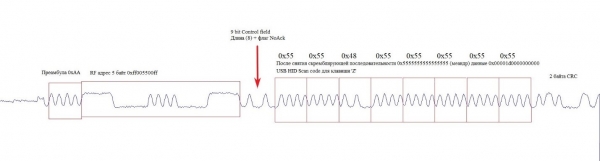
Demodulated signal of the Burst packet in the auxiliary channel
After completing the packet transmission to the auxiliary channel, the injected code restores the state of the transceiver. It is now again ready to operate in normal mode within the context of the original firmware.
In the frequency and time-frequency domains, the auxiliary channel appears as shown in the figure:
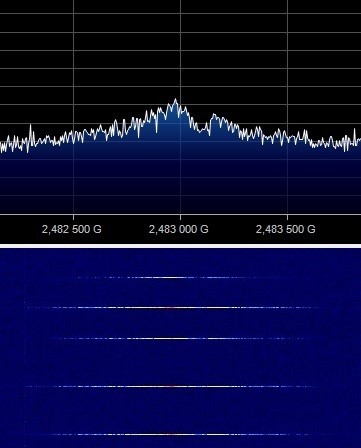
Spectral and time-frequency representation of the auxiliary channel
To test the operation of the NRF24 chip with modified firmware, we assembled a stand that included a Logitech dongle with altered firmware, a wireless keyboard, and a receiver built on the basis of a Chinese module with an NRF24 chip.
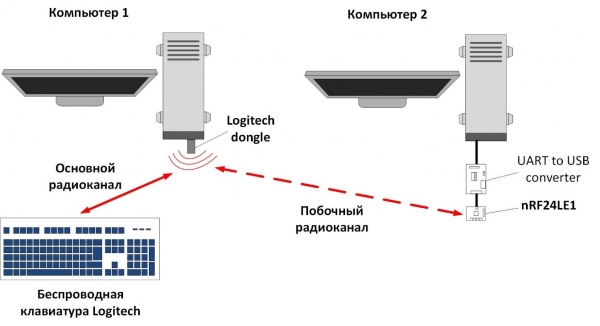
Diagram for intercepting the radio signal of the Logitech wireless keyboard
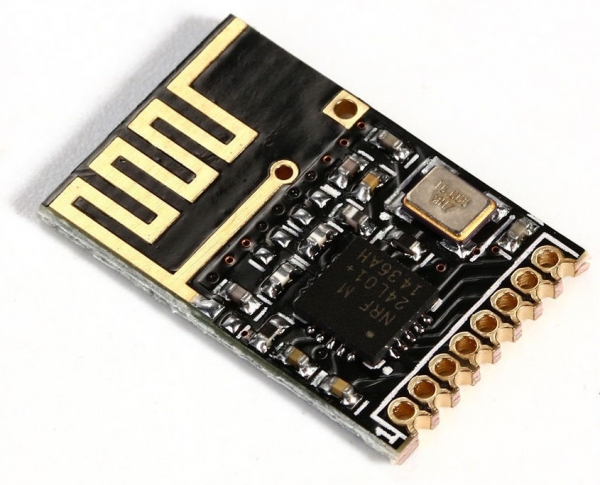
NRF24 based module
On the stand, during normal operation of the keyboard after connecting it to the Logitech dongle, we observed the transmission of unencrypted data about keystrokes in a secondary radio channel and normal transmission of encrypted data in the main radio interface. Thus, we managed to enable direct interception of user keyboard input:
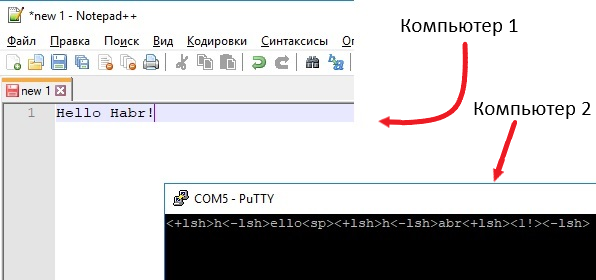
Result of intercepting keyboard input
The injected code introduces slight delays in the operation of the dongle firmware. However, these are too minor for the user to notice.
As you can understand, any Logitech keyboard compatible with Unifying technology can be used for such an attack vector. Since the attack targets the Unifying receiver, which is included with most Logitech keyboards, it does not depend on the specific keyboard model.
Conclusion
The results of the study suggest the potential use of the considered scenario by attackers: if a hacker replaces the victim's dongle receiver for the Logitech wireless keyboard, they will be able to access the victim's account passwords with all the ensuing consequences. It is also worth remembering that injecting keystrokes is possible, which means executing arbitrary code on the victim's computer presents no difficulty.
What if the attacker could remotely modify the firmware of any Logitech dongle via USB? Then, from closely located dongles, a network of relays could be formed to increase the distance for data leakage. Although a 'financially equipped' attacker would find that modern radio reception means with highly selective systems, sensitive receivers with fast frequency switching times, and directional antennas would allow them to 'listen' to keyboard input and keystrokes even from a neighboring building.
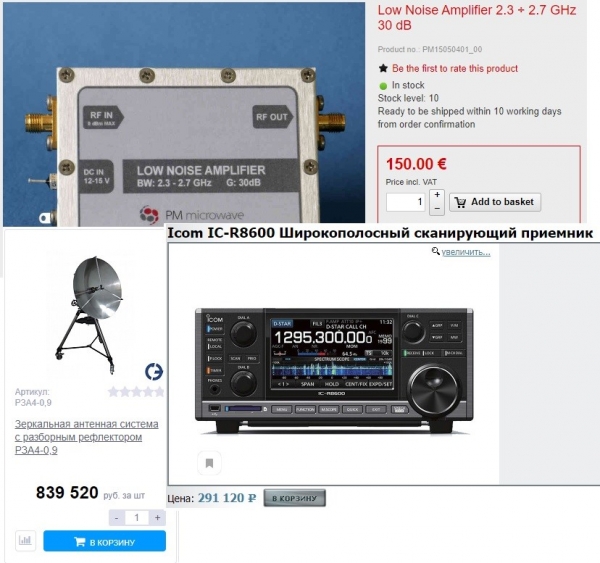
Professional radio reception equipment
Since the wireless transmission channel of Logitech keyboards is well protected, the discovered attack vector requires physical access to the receiver, significantly limiting the attacker. The only potential protection in this case would be the use of cryptographic protection mechanisms for the receiver's firmware, such as signature verification of the firmware loaded on the receiver side. Unfortunately, NRF24 does not support this, making it impossible to implement protection within the current device architecture. So, take care of your dongles, as the described attack vector requires physical access to them.

Raccoon Security is a specialized team of experts from the NTTS 'Vulkan' in the fields of practical information security, cryptography, circuit engineering, reverse engineering, and low-level software development.
Source: habr.com
