

Beware of operations, buffers that may cause issues...
Let's consider some universal approaches to optimizing queries in PostgreSQL using a small example query. Whether to use them or not is your choice, but it's worth knowing about them.
In some future versions of PG, the situation may change with the 'smarter' query planner, but for 9.4/9.6 it looks roughly the same as the examples here.
I'll take a quite real query:
SELECT
  TRUE
FROM
  "Document" d
INNER JOIN
  "DocumentExtension" doc_ex
    USING("@Document")
INNER JOIN
  "DocumentType" t_doc ON
    t_doc."@DocumentType" = d."DocumentType"
WHERE
  (d."Face3" = 19091 or d."Employee" = 19091) AND
  d."$Draft" IS NULL AND
  d."Deleted" IS NOT TRUE AND
  doc_ex."State"[1] IS TRUE AND
  t_doc."DocumentType" = 'WorkPlan'
LIMIT 1;
on table and field namesYou can have different opinions about 'Russian' names of fields and tables, but it's a matter of taste. Since are enclosed in quotes , we prefer naming objects clearly and understandably to avoid misunderstandings.Let's look at the resulting plan:
144ms and almost 53K buffers
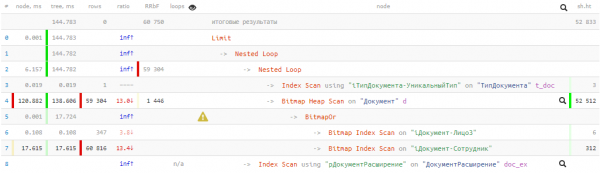
— meaning more than 400MB of data! And we will be lucky if all of them are in the cache by the time of our query; otherwise, it will take significantly longer to read from the disk. The algorithm is the most important!
To optimize any query, you first need to understand what it is supposed to do.
We'll leave the development of the database structure out of this article for now, and agree that we can relatively 'cheaply'
rewrite the query and/or apply some necessary indexes So, the query:.
— checks for the existence of at least one document
— in the state we need and of a specific type
— where the author or executor is the employee we need
JOIN + LIMIT 1
Developers often find it easier to write a query that first joins a large number of tables and then retrieves a single record from that multitude. But easier for the developer does not mean more efficient for the database.
In our case, there were only 3 tables — and what an effect...
Let's start by eliminating the join with the 'DocumentType' table, and at the same time let the database know that
the record type is unique (we know this, but the planner is not aware yet): (we know this, but the planner is still unaware):
WITH T AS (
  SELECT
    "@DocumentType"
  FROM
    "DocumentType"
  WHERE
    "DocumentType" = 'WorkPlan'
  LIMIT 1
)
...
WHERE
  d."DocumentType" = (TABLE T)
...
Yes, if the table/CTE consists of a single field with a single record, it can be written in PG like this instead of
d."DocumentType" = (SELECT "@DocumentType" FROM T LIMIT 1)Lazy calculations in PostgreSQL queries
BitmapOr vs UNION
In some cases, Bitmap Heap Scan can be very costly for us — for instance, in our situation, where a significant number of records match the required condition. We obtained this due to the OR condition transformed into BitmapOr-operation in the plan.
Let's return to the original task — we need to find a record that corresponds to any of the conditions — that is, there's no need to search through all 59K records for both conditions. There's a way to process one condition, and only move to the second when nothing was found for the first. We will use such a construct:
(
  SELECT
    ...
  LIMIT 1
)
UNION ALL
(
  SELECT
    ...
  LIMIT 1
)
LIMIT 1
"Outer" LIMIT 1 guarantees that the search will stop upon finding the first record. If it is found in the first block, the execution of the second will not occur (never executed in the plan).
Hiding complex conditions under CASE
There is a very inconvenient point in the original query — checking the status in the related table "DocumentExtension". Regardless of the truth of the other conditions in the expression (for instance, d."Deleted" IS NOT TRUE), this join is always executed and "costs resources". Whether more or less will be spent depends on the size of this table.
However, we can modify the query so that the search for the related record occurs only when it is genuinely necessary:
SELECT
  ...
FROM
  "Document" d
WHERE
  ... /*index cond*/ AND
  CASE
    WHEN "$Draft" IS NULL AND "Deleted" IS NOT TRUE THEN (
      SELECT
        "Status"[1] IS TRUE
      FROM
        "DocumentExtension"
      WHERE
        "@Document" = d."@Document"
    )
  END
Since we don’t need any of the fields from the related table for the result , we have the opportunity to turn the JOIN into a subquery condition.We will leave the indexed fields outside the CASE, moving the simple conditions into the WHEN block — and now the "heavy" query only executes when moving into THEN.
My surname is "Total"
We collect the resulting query with all the mechanics described above:
We are assembling the resulting query with all the mechanics described above:
WITH T AS (
  SELECT
    "@DocumentType"
  FROM
    "DocumentType"
  WHERE
    "DocumentType" = 'WorkPlan'
)
  (
    SELECT
      TRUE
    FROM
      "Document" d
    WHERE
      ("Person3", "DocumentType") = (19091, (TABLE T)) AND
      CASE
        WHEN "$Draft" IS NULL AND "Deleted" IS NOT TRUE THEN (
          SELECT
            "Status"[1] IS TRUE
          FROM
            "DocumentExtension"
          WHERE
            "@Document" = d."@Document"
        )
      END
    LIMIT 1
  )
UNION ALL
  (
    SELECT
      TRUE
    FROM
      "Document" d
    WHERE
      ("DocumentType", "Employee") = ((TABLE T), 19091) AND
      CASE
        WHEN "$Draft" IS NULL AND "Deleted" IS NOT TRUE THEN (
          SELECT
            "Status"[1] IS TRUE
          FROM
            "DocumentExtension"
          WHERE
            "@Document" = d."@Document"
        )
      END
    LIMIT 1
  )
LIMIT 1;
Fitting [to] indexes
A keen eye noticed that the indexed conditions in the UNION sub-blocks vary slightly — this is because we already have suitable indexes on the table. If they did not exist, it would be worth creating them: Document(Person3, DocumentType) and Document(DocumentType, Employee).
on the order of fields in ROW conditionsFrom the planner's perspective, of course, one could also write (A, B) = (constA, constB), and (B, A) = (constB, constA). But when written in the order of fields in the index, such a query is just easier to debug later.
What's in the plan?
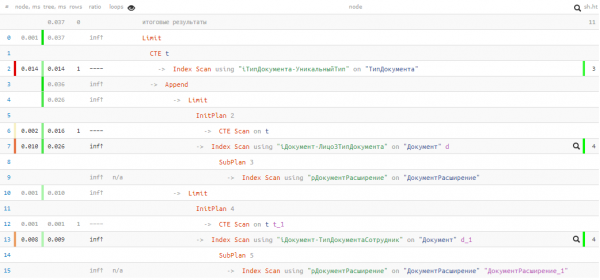
Unfortunately, we were unlucky, and nothing was found in the first UNION block, so the second one went for execution nonetheless. But even then — just 0.037ms and 11 buffers!
We accelerated the query and reduced the "data pumping" in memory by several thousand times, using quite simple techniques — a decent result with a little copying/pasting. 🙂
Source: habr.com
