

Hello, Habr! For several years, the LEGO Education WeDo 2.0 learning kit and the Scratch programming language have developed in parallel. However, earlier this year, Scratch added support for physical objects, including LEGO Education modules. In this article, we will discuss how this combination can be used for teaching robotics and what it offers to students and educators.
The primary goal of studying robotics and programming is not just about teaching design and coding, but also about developing universal skills. Above all, project thinking, which received little attention in schools during the 1990s and 2000s, is now actively being promoted across all school subjects. Defining tasks, making hypotheses, step-by-step planning, conducting experiments, and analysis — these are fundamental components of nearly every modern profession. However, it’s challenging to cultivate them within the standard school subjects, which heavily emphasize rote memorization.
Robotics facilitates the understanding of other school subjects by visually demonstrating physical laws in action. For instance, elementary school teacher Yulia Panyatovskaya us how her students built their first model — a headless tadpole, wrote a program for its movement, and launched it. When the tadpole didn’t move, the children began looking for technical faults but ultimately concluded that the issue lay not in the code or assembly, but in the fact that the tadpole's movement method was unsuitable for land.
To achieve such visibility and simplify students' work, the software in educational kits is a simplified version of design programs. However, they are not suitable for teaching the fundamentals of programming. This deficiency can be remedied by working with LEGO Education kits using third-party software: you can program WeDo 2.0 using the educational language Scratch.
Capabilities of LEGO Education WeDo 2.0
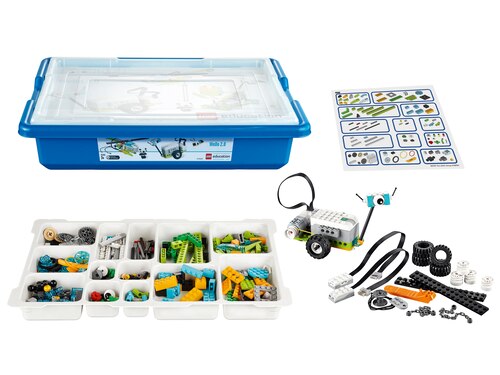
The basic LEGO Education WeDo 2.0 kit is designed for children aged 7-10 years. It includes: Smart Hub WeDo 2.0, an electric motor, motion and tilt sensors, LEGO Education components, sorting trays and stickers, WeDo 2.0 software, a teacher's guide, and assembly instructions for the basic models.
For each model, we have outlined which concepts from different sciences they explain. For example, using the 'Player' makes it convenient to explain the nature of sound and the concept of friction to children, while the 'Dancing Robot' can be used to illustrate mechanics of movement. Tasks can vary, be created by the educator 'on the fly', and can have multiple solutions, which helps children improve their skills in finding cause-and-effect relationships.
In addition to robotics lessons and explanations of physical laws, the set can be used for programming, as writing code that 'animates' physical objects is far more interesting than creating something virtual.
Software for the LEGO Education WeDo 2.0 set or Scratch
WeDo 2.0 employs LabVIEW technology from National Instruments; the interface consists solely of colorful icons with pictures that are arranged in a linear sequence using drag-and-drop.

Using this software, children learn to build sequential chains of actions — but this is still far from real programming, and transitioning to 'standard' languages later on may pose significant challenges. WeDo 2.0 is a convenient starting point for learning programming, but its capabilities are limited for more complex tasks.
This is where Scratch comes in — a visual programming language aimed at students aged 7-10. Programs written in Scratch consist of colorful graphical blocks that can control graphical objects (sprites).
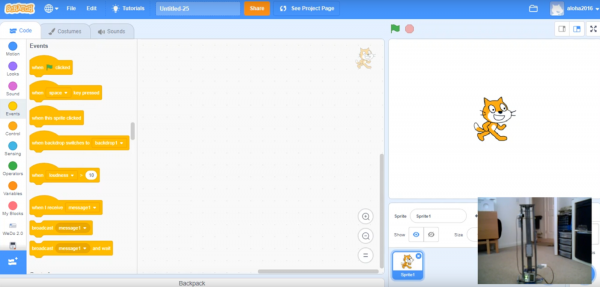
By setting various values and linking blocks together, one can create games, animations, and cartoons. Scratch allows learners to explore concepts of structural, object-oriented, and event-driven programming, introducing cycles, variables, and logical expressions.
Scratch is slightly more complex to learn but much closer to textual programming languages than WeDo's proprietary software, as it follows a classic hierarchy typical of textual languages (the program reads from top to bottom) and requires proper indentation when using various operators (while, if…else, etc.). It's also important that the command text appears on the programming block, and if we remove the 'colorfulness', we get a code that is nearly indistinguishable from classic languages. Therefore, it will be much easier for a child to transition from Scratch to 'adult' languages.

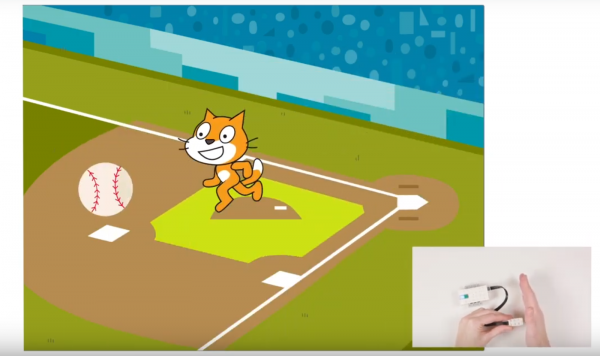
For a long time, commands written in Scratch only allowed working with virtual objects, but in January 2019, version 3.0 was released, which supports physical objects (including LEGO Education WeDo 2.0 modules) using the Scratch Link app. Now, the same games and cartoons can interact using motors and sensors.
Unlike WeDo 2.0's proprietary software, Scratch offers more capabilities: the basic software allows integrating only one custom sound, does not enable the creation of custom procedures and functions (that is, combining commands into one block), while Scratch has no such limitations. This provides greater freedom and opportunities for both students and teachers.
Learning with LEGO Education WeDo 2.0
A standard lesson includes discussing the task, constructing, programming, and reflection.
The task can be introduced through an animated presentation, which is included in the materials package. Then, the children should formulate hypotheses regarding how the given mechanism works.
In the second stage, children focus on assembling the LEGO robot. Typically, students work in pairs, but individual or group work is also possible. Each of the 16 step-by-step projects comes with detailed instructions. Additionally, 8 open projects provide complete creative freedom in choosing solutions to the assigned tasks.
During the programming phase, it is essential to start with WeDo 2.0's proprietary software. Once the children master it and learn to work with blocks and models, they can logically transition to Scratch.
The final stage involves analyzing what has been done, constructing tables and graphs, and conducting experiments. At this stage, a task can be assigned for model refinement or the enhancement of mechanical or software components.
Useful Materials
- on LEGO WeDo 2.0 for Teachers
- on LEGO WeDo 2.0
- Official Scratch
- Extension for working with physical objects (including WeDo 2.0) in Scratch
- WeDo 2.0.
- 11 lessons using LEGO Education WeDo 2.0 sets
- for assembling WeDo 2.0 models
Source: habr.com
