

"An idea is worth nothing" — this mantra has probably been heard by every game designer. Only the concept and implementation matter. Only on paper or on a computer screen does the idea begin to take on meaning and form. And I wondered: are there any basic principles for turning an idea into a concept?
Inside is a translation with brief theory and practical advice for anyone who is waiting for inspiration or doesn't know where to start.
Take a pen and paper, let’s get to work. While reading this article, write down all the ideas that come to mind. I ask this because I want to convey one important thought: game design is what you do, not what you ponder. To become a more effective professional, you need to study how you work.
If you have a brand-new notebook, fill its first pages. Now everything is ruined, it has lost its sacred inviolability. Perhaps there are bad ideas in it. Awesome!
Here’s a thought: everything written about game design, if there’s no clearly expressed opinion from the author, is useless. Did you catch the essence?
Of course, I’m joking, and not kindly. If you're not a researcher interested in exploring game design, then most of what’s written is unlikely to be practically helpful. Books and articles imply that there is some correct way, formula, or guide in game design. In reality, no one knows what they’re doing. And more importantly, the value of designers lies in the fact that they work in a unique key. There are many different viewpoints and approaches, and not every game designer will be able to solve a specific problem.
I want to help you find your own design voice and style. Let’s talk about the basics so that you can transition from being a person with ideas to one who solves problems. Being first is fun, but the second one gets paid.
The article is divided into two parts. In the first, I share my philosophy. In the second, I describe practical tools to help you establish your own workflow. If I were you, I would skip the first part and go straight to the second to jump into practice. But strangely enough, some people love guides and theory.
There's one question: why read yet another article about game design when so much has already been written on the subject? If you stop reading right now, please don't forget that really motivate, on YouTube games, and are done in hindsight. Work needs to be done now: turn on your computer and get to work. Waiting for inspiration is an unproductive, energy-consuming, and too unreliable approach.
Want to know why I'm against pondering? Then let's start.
Part 1: game design = practice
Experienced game developers have a joke. It’s about newcomers with amazing game ideas they want to create. But these guys have no idea how much work it takes to make it happen. We've all read about the guy looking for programmers, artists, and composers to create an MMORPG. Meanwhile, he has only a couple of paragraphs about a game that is very similar to those he plays.
In some sense, I find this joke funny, and I agree with it. Of course, ideas alone are worthless if they're not brought to life, if they're not specific enough or too ambitious. But any idea can be a gem from which a designer can create a great game.
But ideas by themselves are not a sturdy foundation for development. They can be a good starting point. The important thing is that the idea propels you to start working. Notice this thought: the idea propels you to start working. The work itself has nothing to do with it.
It's pointless to ponder game design
unless your goal is to waste time. Thinking about a game in your off hours makes no sense. Ideas are vague, and in your mind, they can seem great. Once you write them down, you start to see the flaws: where details are lacking, what's fundamentally wrong, and so on. Here's an example: initially, the idea for this article was very good, and look at it now.
Of course, you shouldn’t prevent ideas from forming in your mind. But as soon as they seem worthwhile, turn them into concepts.
What does this mean in practice? It's simple: write them down Ideas. This is why you need a pen and paper. If you haven't gotten them yet, take a few seconds to do so.
Concept
As you jot down ideas, you first confront an unpleasant and bitter truth: on paper, they don't seem as good anymore. This is where the work begins — transforming idea downward API support (simultaneously with this in concept.
A concept is a detailed description of an idea. Try to outline all its variables without getting into too much detail. Set the necessary conditions, features, relationships, and so on, until you feel you've thoroughly examined your idea. This results in the initial concept.
Example (based on )
Idea: you can play tic-tac-toe in real-time.
Initial concept: players are assigned a symbol (X or O), and they choose which one to control by pressing R or L on the gamepad. Everything else follows the standard rules of tic-tac-toe.
Challenges:
- Clarity. It's hard to know which symbol you'll control next.
- Players can quickly find themselves in a deadlock, which is undesirable.
Revised concept: players are assigned a symbol (X or O), and they control a hand whose color matches the color of the symbol. They can choose any symbol. Everything else follows the standard rules of tic-tac-toe.
The revised concept addresses the issue of deadlock and ensures clarity of rules. To find this solution, I had to describe the problem, create a prototype, conduct playtests, and refine the concept.
Design
Design is a detailed description of the concept. At this stage, you describe the implementation of all variables. By analyzing each part of your concept, you'll encounter questions and issues again. You need to resolve these to better understand the system you're trying to build.
A quality core idea will never be lost due to new ideas. Quite the opposite. Look at what your current design offers, swap its parts around, consider them sequentially, experiment with the parameters. It's cheaper and faster this way. Introducing new ideas to solve existing issues only creates a heap of extra tasks and increases the cost of the process. Instead, you can simply break down the idea into pixels that move across the screen.
Part 2: tools
2.1 Visualization
Mind map
For brainstorming
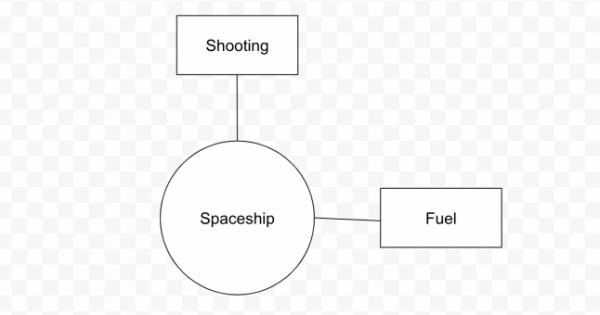
A mind map (or relationship diagram) helps formulate ideas. It's simple: draw a circle and write a basic concept inside it. For example, "spaceship." Then draw a line, write another word associated with the first, and so on. In this case, words like "shooting" and "fuel" would fit. This approach helps visualize the thematic space of game design. It can also be applied to mechanics to understand how they are interconnected.
This is how a design tree is created. How strong are the connections between the various branches? The design should be robust and reliable. Otherwise, there may be too many different features and independent systems. Will you be able to implement them? How many goals do they have?
For order
A mind map also helps organize ideas and track how different elements interact with each other. A visual representation of the interconnections of existing things and their places within the system allows for the construction of an overall design logic. The first includes the second, the second includes the third, and so on.
Is such a connection necessary? Can any elements be removed without harming the game?
There are many other tools for brainstorming and displaying ideas, but game designers find it quite easy to formulate the initial idea. Inspiration can be found anywhere. Start a game you enjoy and build its mind map. What if you swapped some elements around? Could that lead to a new game you'd like to create? Or perhaps you'll discover the seed of a new idea? Don't wait for inspiration; make it come.
2.2 Implementation
These tools are based on rational game design, which Chris McEntyre discussed in . However, I always procrastinate finishing articles and slightly modified the principles described there to better fit my workflow. Try to do the same.
accounts
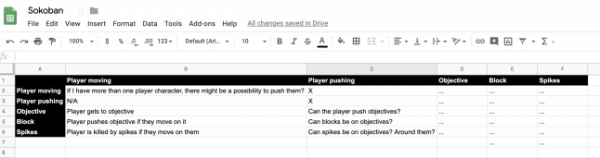
You can use Excel or any other tool to create such tables. First, all our mechanics need to be condensed into simple descriptions. Then we place them in the first column. We proceed similarly with the first row.
The task here is very simple. You need to go through the columns and mark the relationships with the elements in each row. Analyze each mechanic and obtain all their combinations.
During the process, we record how our mechanics interact with each other. Are they compatible? Or not? What problems might arise?
A very convenient approach. If a new mechanic appears, you can compare it with what is already implemented in the game. And you'll see how many interesting connections it generates. Too few? Maybe it’s not worth introducing it? The decision is yours.
As usual, everything needs to be recorded to track your understanding of your own system. This helps realize which elements should be developed and which do not deserve attention. It's impossible to do this in your head; everything needs to be transferred to paper.
User stories
User stories reflect your title’s gameplay perfectly. They follow a single sentence format:
As a [role], I want to [action]
This tool works in two directions: understanding game design and understanding the player. From the game designer's perspective, you can express your intentions in simple sentences and clearly indicate what you want to create. From the player's perspective, you can understand what you would like to do in the game. The latter will reveal missing elements that you have yet to implement in your design. Plus, you will pay attention to what needs to be better developed.
Example
Imagine that you are creating an RPG survival game. The player has a hunger meter that can end the entire gameplay. This scenario generates such stories:
As a game designer, I want the player to use resources wisely.
As a player, I want to freely explore the world.
As you can see, in this case, the stories contradict each other. Given this, you can make access to new territories free. However, the player must keep an eye on their resources to be able to buy food and water.
Cards
You need to create cards or any virtual equivalent. List all core mechanics and axioms of your game.
Suppose you are making a platformer. One card will state ‘You can jump’, another – ‘You can run’. Yet another – ‘You will die if you touch a snake’.
Let's lay all the cards on the table. Shuffle them if you wish. Remove one of them.
What does the game look like now? What if a player can't jump? How can this issue be resolved? Is it possible to use a different mechanic? Has the game become more interesting?
Remove another card or create a new one and place it with the others. Try different options. Describe the resulting games on paper.
This is a super useful tool for brainstorming. It works great when you're stuck on the design and don't know what to do next. Perhaps in such a situation, you should remove an element that you really like to see how the design can evolve under that condition.
Create your own tools
Often I take well-known tools and adapt them for myself. I choose what works for me. It doesn't matter which tool I ultimately use — they serve as machines for thought, through which I filter ideas to get results.
Concept → Pass it through your tool → New concept
Try creating a tool that helps find appealing concepts for your game. And use it.
Prototyping
People can't play your ideas. They can't play your notes. They can only play your games. And that's the only way to truly evaluate your design.
If you lack the necessary technical knowledge and colleagues, it's time to address this issue. If you work in a team and are assisted by programmers, ensure they can quickly transfer your ideas to the screen. If production is stuck, speed it up; that's your job.
Examples
It doesn't matter which tool you use. The main thing is to turn your ideas into a game; test and iterate them as soon as possible.
Put effort into organizing your prototypes and giving them the right names — this is a useful practice. This way, you'll have reusable projects and blocks that can be copied from one project to another. It's not the most elegant approach, but that's not so important: focus on conveying your ideas and turning them into a game.
Finally, I want to remind you of an important principle: the focus is on the work. Ideas are just part of the process. Choose tools that will allow you to articulate, communicate, and maintain flexibility, so you can iterate and change your strategy as needed.
If you read this article without picking up a pen and paper, you missed the point.
Source: habr.com
