

It seems I have a karma like this: to implement standard tasks in various non-trivial ways. If someone has a different perspective on the problem, please join the discussion for further exploration of the issue.
One fine morning, an interesting task arose: to assign rights to user groups on different shares containing subfolders for projects with document folders. Everything was going well, and a script was written to assign rights to the folders. Then it became apparent that the groups needed to include users from different domains, from different forests (). Let's say the share itself is located on a Synology device registered in the FB domain, forest PSI. The task is to allow users domains from another forest to access the contents of this share, and that access needs to be very selective.
The technical specifications eventually shaped up as follows:
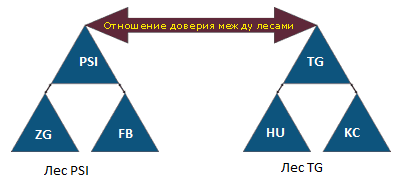
- 2 forests: PSI Forest, TG Forest.

- Each forest has 3 domains: PSI (ZG, PSI, FB); TG (TG, HU, KC).
- Between the forests, there are trust relationships; Synology can see all Security groups in all forests.
- On shares and folders/subfolders, domain FB admin accounts with Full Control rights must be present.
- The names of the share folders should be systematized. The project IDs were coordinated by the management, and I decided to tie the names of the Security groups to the project IDs.
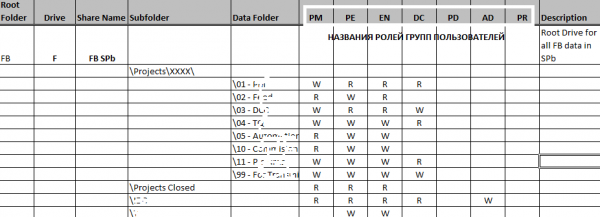
- Project folders in the system shares must contain a pre-prepared structure in an .xlsx file, with the corresponding access privileges (R/RW/NA, where NA means no access).

- There should be the ability to restrict the rights of users/group members of one project to only certain directories of that project. For other directories/projects, the user may not have access based on group membership.
- When creating a project folder, groups in the respective domains with names corresponding to the project IDs should be automatically created as much as possible.
Notes on the technical specifications
- Setting up trust relationships is not included in the scope of the technical specifications.
- The project ID contains numbers and Latin letters.
- User roles for projects across all domains have standard names.
- An .xlsx file with folders and access rights (access matrix) is prepared before the implementation of the entire project.
- During project implementation, it is possible to create user groups in the respective domains.
- Automation is achieved by utilizing the built-in administration tools of MS Windows.
Implementation of the technical assignment.
After formalizing the requirements, a tactical pause was taken to test the methods of creating directories and assigning permissions to them. Only PowerShell was intended to be used to keep the project simple. As I mentioned earlier, the script algorithm was envisioned to be quite simple:
- We register groups with names derived from the project ID (for example, KC40587) and the corresponding roles indicated in the access matrix: KC40587-EN for the engineer; KC40587-PM for the product manager, etc.
- We obtain the SIDs of the created groups.
- We register the project folder and the corresponding set of directories (the list of subfolders depends on the share where it is created and is defined in the access matrix).
- We assign permissions on the new subdirectories of the project to the groups according to the access matrix.
Challenges encountered at the first stage include:
- A lack of understanding regarding how to set the access matrix in the script (currently a multidimensional array is implemented, but a way to fill it based on the contents of the .xlsx file/access matrix is being sought).

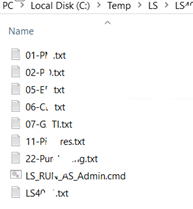
- An inability to set access rights in SMB shares on Synology storage using PowerShell (https://social.technet.microsoft.com/Forums/en-US/3f1a949f-0919-46f1-9e10-89256cf07e65/error-using-setacl-on-nas-share?forum=winserverpowershell), which wasted a lot of time and required adaptation to scripts using the icacls permission editing utility, necessitating the creation of an intermediate storage for text and cmd files.
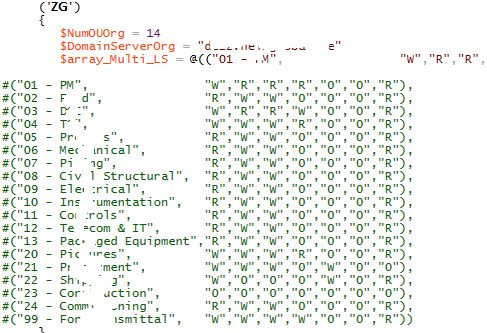
In the current mode, the execution of cmd files is controlled manually, as needed for registering the folder for the project.
It also turned out that the script needed to run for group registration in other forests (termed Cross-domains), and the relationships may not be one-to-one but instead one-to-many.
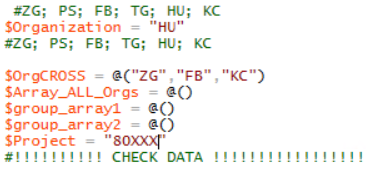
This means that access to resources in a certain domain can now be claimed by groups from other cross-domains, including neighboring forests. To ensure uniformity, a decision was made to create a symmetrical structure in the OUs of all serviced domains across all forests (black vertical ovals). As they say, in the army, everything must be disorganized but uniform.
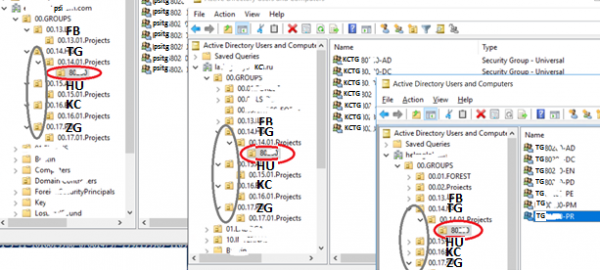
Thus, when registering the project 80XXX in the TG domain, the script performs:
1. creation of the corresponding OU (red horizontal ovals) in this domain and cross-domains, that is, those domains whose employees should have access to this resource.
2. filling the OU with groups named in the format -, where:
- SRC_domain – cross-domain, the employees of which will have access to the resources of the DST domain
- DST_domain – the domain to the resources of which access should be granted, that is, the reason for all this setup
- — project number
- ROLES – names of the roles listed in the access matrix.
3. reading the SID array of all groups from all involved domains and saving it for later data transfer to a file that defines permissions for a specific subfolder of the project
4. generating source files (parameter /restore) with the set of permissions for use with the icacKC utility in the executable mode 'icacKC "as-nasNNKCProjects" /restore C:TempKCKC40XXKC40XX.txt'
5. creating a CMD file that combines all the icacls commands for all project folders
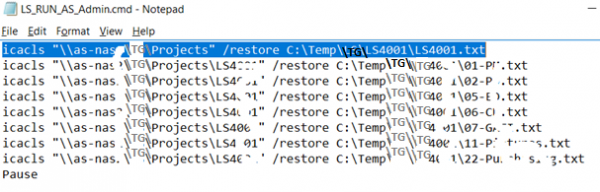
As mentioned earlier, the executable file is run manually and the evaluation of execution results is also performed manually.
The difficulties encountered in the end:
- if the project folder is already filled with a large number of files, executing the icacls command on the existing volumes can take considerable time, and in some cases led to failure (for example, in the presence of long file paths);
- in addition to the /restore parameter, it was necessary to add lines with the /reset parameter in case the folders were not created but transferred from already existing folders, with inheritance rights turned off from the root;
- part of the script for creating groups had to be executed on an arbitrary DC of each forest, the problem relates to the administrative account permissions for each tree.
Overall conclusion: it's quite strange that there are currently no utilities on the market with similar functionality. A realization of similar functionality based on the SharePoint portal seems possible.
It is also unclear why there is no capability to use PoSH utilities for setting folder permissions on Synology devices.
I am willing to share the script, creating a project on GitHub if anyone is interested.
Source: habr.com
