

Hello Habr! In this article, we will discuss whether it's worth organizing RAID arrays based on solid-state solutions like SATA SSDs and NVMe SSDs, and whether it really provides significant benefits. We decided to delve into this issue by examining the types and kinds of controllers that allow this to be done, as well as the application areas for such configurations.

One way or another, each of us has heard definitions like “RAID,” “RAID array,” or “RAID controller” at least once in our lives, but it's unlikely that we gave them much thought, as the average PC enthusiast probably isn't very interested in these terms. However, high speeds from internal drives and their reliability are something everyone desires. After all, no matter how powerful a computer's components are, the speed of the storage device becomes a bottleneck when it comes to the overall performance of a PC and server.
This was the case until modern NVMe SSDs with comparable capacities of 1TB or more replaced traditional HDDs. Previously, a typical PC setup often included a combination of SATA SSDs and a couple of high-capacity HDDs, but today it's starting to shift to another solution — NVMe SSDs paired with a couple of high-capacity SATA SSDs. In corporate servers and cloud environments, many have successfully transitioned to SATA SSDs simply because they are faster than traditional hard drives and can handle a larger number of input/output operations simultaneously.

However, the fault tolerance of the system still remains at a relatively low level: we can't predict with precision, even to the week, when a certain solid-state drive will fail. While HDDs “die” gradually, allowing for warning signs to take action, SSDs “die” suddenly and without warnings. So now is the time to understand why this is even necessary. Is it worth organizing RAID arrays based on solid-state solutions like SATA SSDs and NVMe SSDs, and will it provide significant benefits?
What is the purpose of a RAID array?
The very word "array" implies that multiple drives (HDD and SSD) are used for its creation, which are combined by a RAID controller and recognized by the OS as a single data storage unit. The primary purpose that RAID arrays solve is the minimization of data access time, enhancing read/write speeds and reliability, achieved through the capability of quick recovery in case of failure. By the way, using RAID for home backups is not essential at all. However, if you have your own home server that requires constant access 24/7, that's a different matter.
There are over a dozen levels of RAID arrays, each differing in the number of drives used and having its own advantages and disadvantages: for example, RAID 0 allows for high performance without fault tolerance, RAID 1 establishes automatic data mirroring without speed gains, while RAID 10 combines the capabilities of the aforementioned. RAID 0 and 1 are the simplest (since they do not require software computations) and, as a result, the most popular. Ultimately, the choice of one RAID level over another depends on the tasks assigned to the disk array and the capabilities of the RAID controller.
Home and corporate RAID: what's the difference?
The foundation of any modern business is large volumes of data that must be reliably stored on company servers. Moreover, as we mentioned earlier, there should be continuous access 24/7 to them. It is clear that along with the "hardware," the software part is also essential, but in this case, we are indeed talking about equipment that ensures reliable storage and processing of information. No software can save a company from bankruptcy if the "hardware" does not meet the tasks assigned to it.
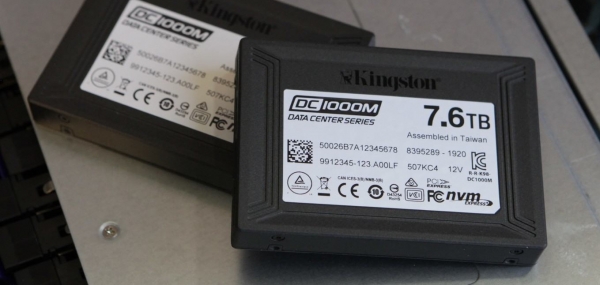
For these tasks, any hardware manufacturer offers so-called corporate devices. For Kingston, this means powerful solid-state solutions in the form of SATA models. and , as well as the NVMe models DC1000M U.2 NVMe, DCU1000 U.2 NVMe, and DCP-1000 PCI-e, designed for use in data centers and supercomputers. Arrays of such drives are typically used in conjunction with hardware controllers.
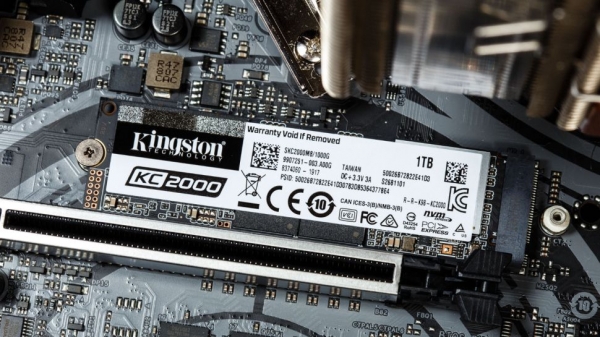
For the consumer market (that is, for home PCs and NAS servers), drives such as NVMe PCIe, but in this case there is no need to purchase a hardware controller. You can rely on the one built into the motherboard of the PC or NAS server, unless you plan to build a home server for atypical tasks (such as creating a small home hosting for friends, for example). Additionally, home RAID arrays generally do not involve hundreds or thousands of drives, typically limited to two, four, and eight devices (most often SATA).
Types of RAID controllers
There are three types of RAID controllers based on the principles of implementing RAID arrays:
1. Software, where the management of the array is handled by the CPU and DRAM (that is, the execution of the software code occurs on the processor).
2. Integrated, that is, built into the motherboards of PCs or NAS servers.
3. Hardware (modular), which are discrete expansion cards for PCI/PCIe slots of motherboard systems.
What is their fundamental difference from each other? Software RAID controllers are inferior to integrated and hardware ones in terms of performance and fault tolerance, but they do not require special hardware to operate. However, it is important to ensure that the host system's processor is powerful enough to run the RAID software without negatively impacting the performance of applications that also run on the host. Integrated controllers usually come with their own cache memory and utilize some CPU resources.
Hardware ones have their own cache memory and built-in processors to execute software algorithms. Generally, they allow the implementation of all types of RAID levels and support various types of storage devices simultaneously. For instance, modern hardware controllers from Broadcom can connect SATA, SAS, and NVMe devices at the same time, which means you don't have to change the controller when upgrading servers: specifically, when switching from SATA SSDs to NVMe SSDs, controllers will not need to be replaced.
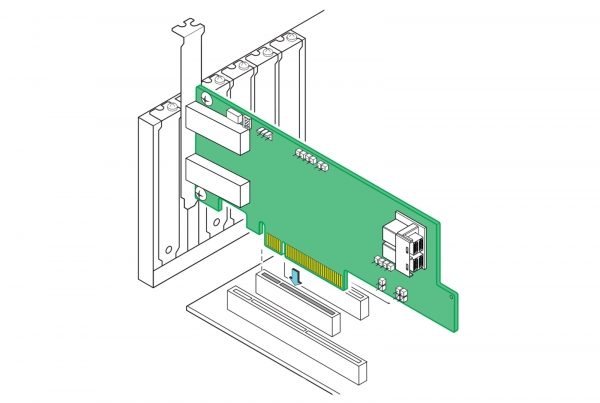
On this note, we have approached the typology of controllers themselves. If there are three-mode controllers, should there be others? In this case, the answer to this question will be affirmative. Depending on their functions and capabilities, RAID controllers can be divided into several types:
1. Standard controllers with RAID functionality
In the entire hierarchy, this is the simplest controller, which allows combining HDDs and SSDs into RAID arrays of levels '0', '1', or '0+1'. This is realized programmatically at the firmware level. However, such devices are unlikely to be recommended for use in the corporate segment, as they lack cache and do not support arrays of levels '5', '3', etc. But they are quite suitable for entry-level home servers.
2. Controllers working in tandem with other RAID controllers
This type of controller can work alongside integrated controllers on motherboards. It operates on the following principle: the discrete RAID controller handles 'logical' tasks, while the built-in one manages data transfer between storage devices. However, there is a nuance: the simultaneous operation of such controllers is only possible on compatible motherboards, which significantly narrows their area of application.
3. Standalone RAID controllers
These discrete solutions contain all the necessary chips for operation with enterprise-class servers, featuring their own BIOS, cache memory, and processors for quick error correction and checksum calculations. Moreover, they meet high reliability standards in manufacturing and have high-quality memory modules.
4. External RAID controllers
It is easy to guess that all the controllers listed above are internal and receive power through the motherboard's PCIe connector. What does this imply? It means that a motherboard failure can lead to RAID array malfunctions and data loss. External controllers, on the other hand, avoid this problem as they are housed in a separate enclosure with an independent power supply. In terms of reliability, these controllers provide the highest level of data storage.
, Microsemi Adaptec, Intel, IBM, Dell, and Cisco are just some of the companies currently offering hardware RAID controllers.
Operating modes of RAID controllers SAS/SATA/NVMe
The main task of tri-mode HBA and RAID controllers (or controllers with Tri-Mode function) is to create hardware RAID based on NVMe. Broadcom’s 9400 series controllers can do this, for example, . It is classified as a standalone type of RAID controller, equipped with four SFF-8643 connectors, and thanks to Tri-Mode support, it allows SATA/SAS and NVMe drives to be connected simultaneously. Moreover, it is also one of the most energy-efficient controllers on the market (consuming only 17 watts of power, which is less than 1.1 watts per each of the 16 ports).
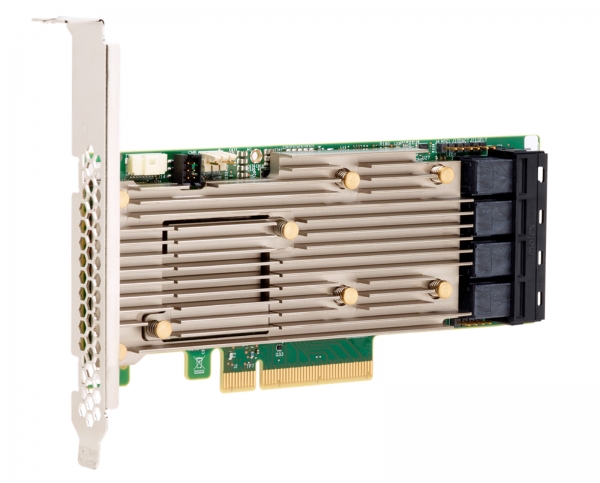
The connection interface is a PCI Express x8 version 3.1, which allows for a bandwidth of 64 Gbit/s (with controllers for PCI Express 4.0 expected to be available in 2020). The 16-port controller is based on a dual-core chip and 72-bit DDR4-2133 SDRAM (4 GB), as well as the capability to connect up to 240 SATA/SAS drives or up to 24 NVMe devices. Regarding RAID array organization, it supports levels "0", "1", "5", and "6", as well as "10", "50", and "60". Incidentally, the cache memory of other controllers in the 9400 series is protected from power failures by an additional CacheVault CVPM05 module.
The three-mode technology is based on the SerDes data transformation function, which converts data from a serial representation in SAS/SATA interfaces into a parallel form in PCIe NVMe and vice versa. This means that the controller synchronizes speeds and protocols to seamlessly work with any of the three types of storage devices. This provides a continuous way to scale the infrastructure of data centers: users can utilize NVMe without significant changes to other system configurations.
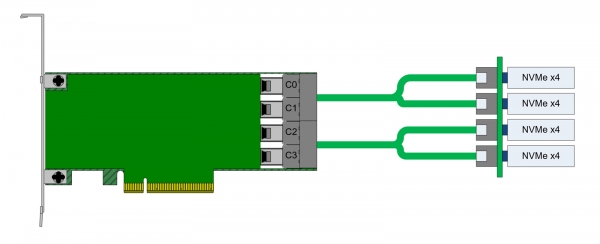
However, when planning configurations with NVMe drives, it’s essential to consider that NVMe solutions use 4 PCIe lanes for connections, meaning each drive utilizes all lines of the SFF-8643 ports. Consequently, only four NVMe drives can be directly connected to the MegaRAID 9460-16i controller. Alternatively, you can use two NVMe solutions while simultaneously connecting eight SAS drives (see the connection diagram below).
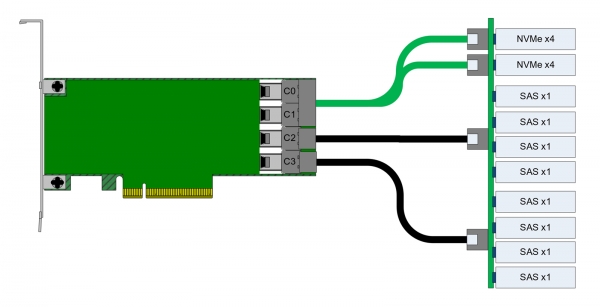
The diagram shows the use of connector '0' (C0 / Connector 0) and connector '1' for NVMe connections, as well as connectors '2' and '3' for SAS connections. This arrangement can be reversed, but each x4 NVMe drive must be connected using adjacent lanes. The controller's operating modes are set through the StorCLI configuration utilities or the Human Interface Infrastructure (HII), which operates in a UEFI environment.
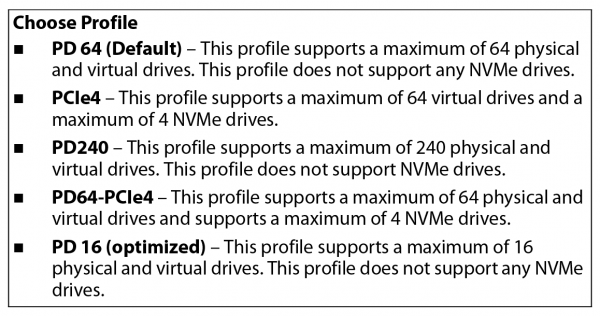
The default mode is the 'PD64' profile (supporting only SAS / SATA). As mentioned above, there are three profiles in total: 'SAS / SATA only mode' (PD240 / PD64 / PD 16), 'NVMe only mode' (PCIe4), and a mixed mode in which all types of drives can operate: 'PD64-PCIe4' (supporting 64 physical and virtual disks with 4 NVMe drives). In mixed mode, the specified profile value should be 'ProfileID=13'. It’s worth noting that the selected profile is saved as primary and is not reset even when reverting to factory settings via the Set Factory Defaults command. It can only be changed manually.
Is it worth creating a RAID array on SSDs?
So, we already understand that RAID arrays are key to high performance. But is it worth building a RAID from solid-state drives for home and corporate use? Many skeptics argue that the speed increase is not significant enough to justify spending on NVMe drives. But is that really the case? Probably not. The biggest limitation for using SSDs in RAID (both at home and in corporate settings) may simply be the price. After all, the cost per gigabyte for HDDs is significantly lower.
Connecting multiple solid-state 'disks' to a RAID controller to create an SSD array in certain configurations can have a huge impact on performance. However, it is important to remember that maximum performance is limited by the bandwidth of the RAID controller itself. The RAID level that offers the best speed performance is RAID 0.
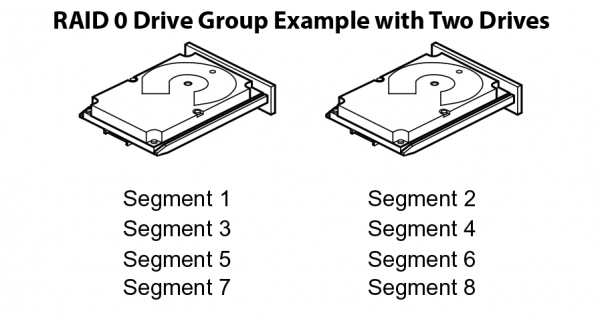
Organizing a standard RAID 0 with two SSDs, where data is striped into fixed blocks and alternated between solid-state storage units, will lead to doubling performance (compared to the speeds of a single SSD). Meanwhile, a RAID 0 array with four solid-state drives will be four times faster than the slowest SSD in the array (depending on the bandwidth limitation at the RAID controller level).
Simply put, SATA SSDs are about 3 times faster than traditional SATA HDDs. NVMe solutions are even more efficient — more than 10 times faster. Assuming two hard drives in RAID 0 will show doubled performance, increasing it by 50%, two SATA SSDs will be 6 times faster, while two NVMe SSDs will be 20 times faster. Specifically, a single Kingston KC2000 NVMe PCIe drive can reach sequential read and write speeds of up to 3200 MB/s, which in RAID 0 will achieve an impressive 6 GB/s. Additionally, the random read/write speeds for 4 KB blocks will jump from 350,000 IOPS to 700,000 IOPS. However... at the same time, RAID 0 does not provide us with redundancy.
It can be said that redundancy in storage is generally not required in a home environment, which is why RAID 0 becomes the most suitable configuration for SSDs. This is a reliable way to achieve a significant performance boost as an alternative to using technologies like Intel Optane-based solid-state drives. We will discuss how SSD solutions perform in the most popular types of RAID ("1", "5", "10", "50") in our next material.
This article was prepared with support from our colleagues at Broadcom, who provide their controllers to Kingston engineers for testing with enterprise-class SATA/SAS/NVMe drives. Thanks to this friendly symbiosis, customers can be confident in the reliability and stability of Kingston drives with HBA and RAID controllers produced. .
Additional information about Kingston products can be found of the company.
Source: habr.com
