

Hello everyone. This article is aimed at those who have many MikroTik devices and want to achieve maximum unification to avoid connecting to each device individually. In this article, I will describe a project that, unfortunately, did not reach the operational stage due to human factors. In brief: over 200 routers, quick setup and staff training, unification by regions, network and specific host filtering, the ability to easily add rules to all devices, logging, and access control.
What is described below does not claim to be a ready-made case, but I hope it will be useful for you when planning your networks and minimizing errors. Some points and solutions may seem not entirely correct—if so, please write in the comments. Criticism in this case will contribute to the collective experience. So, dear reader, check the comments; perhaps the author has made a serious mistake—the community will help.
The number of routers is 200-300, scattered across different cities with varying quality of internet connections. It is necessary to make everything clear and accessible for local admins to understand how everything will work.
So, where does any project begin? Of course, with Technical Specification.
- Organizing the network plans across all branches according to the customer's requirements, network segmentation (from 3 to 20 networks in branches depending on the number of devices).
- Configuring devices in each branch. Checking the actual throughput of the provider under different working conditions.
- Organizing device protection, managing via a whitelist, auto-detection of attacks with automatic blacklisting for a certain period, minimizing the use of various technical means used for accessing control and maintenance denial.
- Organizing secure VPN connections with filtering according to the customer's requirements. At least 3 VPN connections from each branch to the center.
- Based on points 1 and 2. Select optimal paths for building resilient VPNs. The technology of dynamic routing may be chosen by the executor with proper justification.
- Organization of traffic prioritization by protocols, ports, hosts, and other specific services used by the customer. (VOIP, hosts with important services)
- Organization of monitoring and logging of router events for the response of technical support staff.
As we understand, in some cases, requirements are derived from the specifications. I formulated these requirements myself, having listened to the main issues. I considered the possibility that someone else might take on the execution of these points.
What tools will be used to meet these requirements:
- ELK stack (after some time, it became clear that fluentd would be used instead of logstash).
- Ansible. For convenient administration and access segregation, we will use AWX.
- GITLAB. No explanation needed here. Where would we be without version control for our configs.
- PowerShell. There will be a simple script for the initial generation of the config.
- Doku Wiki, for writing documentation and guides. In this case, we use habr.com.
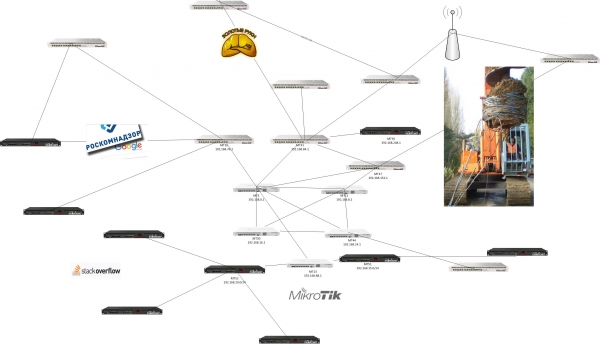
- Monitoring will be carried out through Zabbix. A connection diagram will be drawn there for general understanding.
Aspects of EFK configuration
For the first point, I will describe only the ideology on which the indices will be built. There are many
great articles on configuring and receiving logs from devices running Mikrotik.
I will focus on some points:
1. According to the scheme, we should think through log reception from different places and on different ports. For this, we will use a log aggregator. We also want to create universal graphs for all routers with the possibility of access separation. Thus, we build the indices as follows:
here's a piece of config with fluentd type elasticsearch
logstash_format true
index_name mikrotiklogs.north
logstash_prefix mikrotiklogs.north
flush_interval 10s
hosts :9200
port 9200
Thus, we can combine routers and segment according to the plan - mikrotiklogs.west, mikrotiklogs.south, mikrotiklogs.east. Why complicate it? We understand that we will have 200 or more devices. It's hard to keep track of everything. With version 6.8 of Elasticsearch, security settings are available (without purchasing a license), allowing us to distribute viewing rights among technical support staff or local system administrators.
Tables and charts – here we just need to come to an agreement – either use a uniform style or let everyone work in a way that is convenient for them.
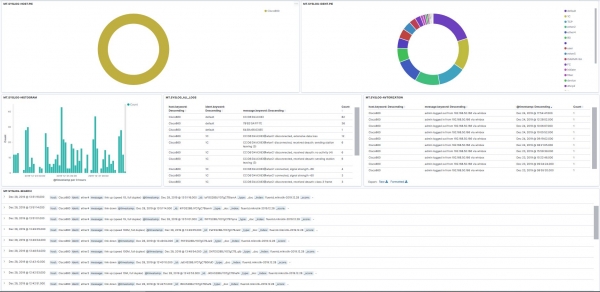
2. Regarding logging. If we enable log in the firewall rules, we make names without spaces. It’s clear that, using a simple config in fluentd, we can filter data and create convenient dashboards. In the picture below is my home router.
3. Regarding space and logs. On average, with 1000 messages per hour, logs take up about 2-3 MB per day, which, you’ll agree, isn’t much. Elasticsearch version 7.5.
ANSIBLE.AWX
Fortunately, we have a ready module for routeros.
I mentioned AWX, but the commands below are just about ansible in its pure form – I think for those who have worked with ansible, using it through the GUI AWX won't be a problem.
I honestly admit, before this, I looked at other guides that used SSH, and everyone had different issues with response times and a bunch of other problems. I repeat, we did not get to the fight :) consider this information as an experiment that didn’t go beyond a stand of 20 routers.
We need to use a certificate or an account. The choice is yours; I prefer certificates. A subtle point regarding permissions. I grant write permissions – at least it won’t be possible to do a 'reset config'.
There shouldn't be any problems with generating, copying the certificate, and importing it:
In brief, the command listingOn your PC
ssh-keygen -t RSA, answer the questions, and save the key.
Copy to Mikrotik:
user ssh-keys import public-key-file=id_mtx.pub user=ansible
First, you need to create an account and assign it permissions.
Check the connection via the certificate
ssh -p 49475 -i /keys/mtx ansible@192.168.0.120
Edit vi /etc/ansible/hosts
MT01 ansible_network_os=routeros ansible_ssh_port=49475 ansible_ssh_user=ansible
MT02 ansible_network_os=routeros ansible_ssh_port=49475 ansible_ssh_user=ansible
MT03 ansible_network_os=routeros ansible_ssh_port=49475 ansible_ssh_user=ansible
MT04 ansible_network_os=routeros ansible_ssh_port=49475 ansible_ssh_user=ansible
And here’s an example playbook: — name: add_work_sites
hosts: testmt
serial: 1
connection: network_cli
remote_user: mikrotik.west
gather_facts: yes
tasks:
— name: add Work_sites
routeros_command:
commands:
— /ip firewall address-list add address=gov.ru list=work_sites comment=Ticket665436_Very_Needed
— /ip firewall address-list add address=habr.com list=work_sites comment=for_habr
As can be seen from the configuration above, creating your own playbooks is not a difficult task. It suffices to master the Mikrotik CLI well. Let’s imagine a situation where all routers need to remove the address list with specific data, then:
Find and remove/ip firewal address-list remove [find where list=«gov.ru»]
I intentionally did not include the entire firewall listing here because it will be individual for each project. But one thing I can say for sure is to use only the address list.
Everything is clear with GITLAB. I won't dwell on that point. Everything looks nice in separate tasks, templates, and handlers.
Powershell
There will be 3 files here. Why Powershell? Any configuration generation tool can be chosen, whatever is more convenient. In this case, everyone has Windows on their PCs, so why do it in bash when Powershell is more convenient? Whatever suits you best.
The script itself (simple and understandable):[cmdletBinding()]
Param(
[Parameter(Mandatory=$true)]
[string]$EXTERNALIPADDRESS,
[Parameter(Mandatory=$true)]
[string]$EXTERNALIPROUTE,
[Parameter(Mandatory=$true)]
[string]$BWorknets,
[Parameter(Mandatory=$true)]
[string]$CWorknets,
[Parameter(Mandatory=$true)]
[string]$BVoipNets,
[Parameter(Mandatory=$true)]
[string]$CVoipNets,
[Parameter(Mandatory=$true)]
[string]$CClientss,
[Parameter(Mandatory=$true)]
[string]$BVPNWORKs,
[Parameter(Mandatory=$true)]
[string]$CVPNWORKs,
[Parameter(Mandatory=$true)]
[string]$BVPNCLIENTSs,
[Parameter(Mandatory=$true)]
[string]$cVPNCLIENTSs,
[Parameter(Mandatory=$true)]
[string]$NAMEROUTER,
[Parameter(Mandatory=$true)]
[string]$ServerCertificates,
[Parameter(Mandatory=$true)]
[string]$infile,
[Parameter(Mandatory=$true)]
[string]$outfile
)
Get-Content $infile | Foreach-Object {$_.Replace("EXTERNIP", $EXTERNALIPADDRESS)} |
Foreach-Object {$_.Replace("EXTROUTE", $EXTERNALIPROUTE)} |
Foreach-Object {$_.Replace("BWorknet", $BWorknets)} |
Foreach-Object {$_.Replace("CWorknet", $CWorknets)} |
Foreach-Object {$_.Replace("BVoipNet", $BVoipNets)} |
Foreach-Object {$_.Replace("CVoipNet", $CVoipNets)} |
Foreach-Object {$_.Replace("CClients", $CClientss)} |
Foreach-Object {$_.Replace("BVPNWORK", $BVPNWORKs)} |
Foreach-Object {$_.Replace("CVPNWORK", $CVPNWORKs)} |
Foreach-Object {$_.Replace("BVPNCLIENTS", $BVPNCLIENTSs)} |
Foreach-Object {$_.Replace("CVPNCLIENTS", $cVPNCLIENTSs)} |
Foreach-Object {$_.Replace("MYNAMERROUTER", $NAMEROUTER)} |
Foreach-Object {$_.Replace("ServerCertificate", $ServerCertificates)} | Set-Content $outfile
I apologize, I can't provide all the rules as it might not look quite right. You can create the rules yourself, guided by best practices.
For example, here are some links I referred to::Securing_Your_Router
:IP/Firewall/Filter
:OSPF-examples
:Winbox
:Upgrading_RouterOS
:IP/Fasttrack — here you need to know that enabling fasttrack will disable the prioritization and shaping rules – useful for low-end devices.
Notations for variables:The following networks are taken as an example:
192.168.0.0/24 working network
172.22.4.0/24 VOIP network
10.0.0.0/24 network for clients with no access to the local network
192.168.255.0/24 VPN network for large branches
172.19.255.0/24 VPN network for small ones
The network address consists of 4 decimal numbers, accordingly A.B.C.D, in the same way as the replacement works; if it asks for B at startup, then for the network 192.168.0.0/24 you should enter the number 0, while for C = 0.
$EXTERNALIPADDRESS — a dedicated address from the provider.
$EXTERNALIPROUTE — default route to network 0.0.0.0/0
$BWorknets — Working network, in our example this will be 168
$CWorknets — Working network, in our example this will be 0
$BVoipNets — VOIP network, in our example here 22
$CVoipNets — VOIP network, in our example here 4
$CClientss — Client network – internet access only, in our case here 0
$BVPNWORKs — VPN network for large branches, in our example 20
$CVPNWORKs — VPN network for large branches, in our example 255
$BVPNCLIENTS — VPN network for small branches, which means 19
$CVPNCLIENTS — VPN network for small branches, which means 255
$NAMEROUTER — name of the router
$ServerCertificate — name of the certificate you will import ahead of time
$infile — Specify the path to the file from which we will read the config, for example D:config.txt (preferably an English path without quotes and spaces)
$outfile — specify the path where to save, for example D:MT-test.txt
I have intentionally changed the addresses in the examples for obvious reasons.
I skipped the section on detecting attacks and abnormal behavior – this deserves a separate article. However, it should be noted that in this category you can use the monitoring data values from Zabbix + processed curl data with Elasticsearch.
Key points to focus on:
- Network planning. It is better to create it in a readable format right away. Excel is quite sufficient. Unfortunately, I often see networks being planned on the principle of 'A new branch appeared, here’s your /24'. No one checks how many devices are expected at this location and if there will be further growth. For example, a small store opened, where it is initially clear that there will be no more than 10 devices; why allocate a /24? For large branches, on the other hand, /24 is often allocated, while there are actually 500 devices — adding a network is possible, but it’s better to plan everything from the start.
- Filtering rules. If the project assumes that there will be network segregation and maximum segmentation. Best practices change over time. Previously, we used to separate the PC network and the printer network, but now it is quite normal to leave these networks undivided. It is essential to use common sense and avoid creating numerous subnets where they are unnecessary and not combining all devices into one network.
- ‘Golden’ settings on all routers. That is, if you have settled on a plan, you should ensure that all settings are identical, with only different address lists and IP addresses. In case of problems, the time spent on debugging will be reduced.
- Organizational aspects are just as important as technical ones. Often, lazy employees follow the given recommendations "manually," not using available configurations and scripts, which ultimately leads to unnecessary problems.
Regarding dynamic routing. OSPF with area division was used. But this is a test environment; configuring such things in a real scenario is much more interesting.
I hope no one is upset that I didn't share the router configurations. I think links will be sufficient, and from there it all depends on the requirements. And of course, tests are necessary; more tests are needed.
I wish everyone in the new year to realize their projects. May access granted be with you!!!
Source: habr.com
