

This implementation was inspired by Alexander Koryukin with his post "«.
And a comment in one of Kirill Kazakov's VK groups:
Well, that’s not secure at all. I would rather write a Telegram bot that only accepts commands to wake up from my account.
I decided to write such a bot.
So, the first thing you need to do is create a bot in Telegram.
- Search for the account named @botfather
- Click on the Start button at the bottom of the screen
- Then we type the command /newbot
Next, we answer two simple questions:
- The first question is the name of the bot being created MyMikrotikROuter
- The second question is the nickname of the bot (must end with bot) MikrotikROuter_bot
In response, we will receive the token for our bot, in my case it is:
Use this token to access the HTTP API: 265373548:AAFyGCqJCei9mvcxvXOWBfnjSt1p3sX1XH4

Then, we need to find our bot by name in the search @MikrotikROuter_bot and click the Start button.
After that, you need to open a browser and enter the following line:
https://api.telegram.org/botXXXXXXXXXXXXXXXXXX/getUpdates
Where XXXXXXXXXXXXXXXXXX is your bot's token.
A page similar to the following will open:

We find the following text on it:
"chat":{ "id":631290,
So, we have all the necessary information to write scripts for Mikrotik, namely:
Bot token: 265373548:AAFyGCqJCei9mvcxvXOWBfnjSt1p3sX1XH4
Chat ID where it should send messages: 631290
For verification, we can visit via browser:
https://api.telegram.org/bot265373548:AAFyGCqJCei9mvcxvXOWBfnjSt1p3sX1XH4/sendmessage?chat_id=631290&text=test
We should get the result:

For our convenience, let's immediately add commands for the bot:
Find the account named @botfather
Then we type the command /setcommands
- It will ask which bot
We write:
@MikrotikROuter_bot
Add commands:
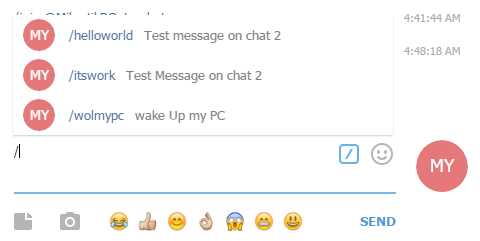
- helloworld< — Test message on chat 1
- itsworking — Test Message on chat 2
- wolmypc — wake Up my PC
Now if we type "/" in the chat, we should get:
Now we move on to MikroTik.
In RouterOS, there is a console utility for copying files via ftp or http/https, called fetch, which we will use.
Open terminal and type:
/tool fetch url="https://api.telegram.org/bot265373548:AAFyGCqJCei9mvcxvXOWBfnjSt1p3sX1XH4/sendmessage?chat_id=631290&text=test " keep-result=no
Note that in MikroTik a "" is necessary for escaping the character "?" in the URL.
We should get the result:

Now we move on to the scripts:
helloworld
system script add name="helloworld" policy=read source={/tool fetch url="https://api.telegram.org/bot265373548:AAFyGCqJCei9mvcxvXOWBfnjSt1p3sX1XH4/sendmessage?chat_id=631290&text=Hello,world!" keep-result=no}
itsworking
system script add name="itsworking" policy=read source={/tool fetch url="https://api.telegram.org/bot265373548:AAFyGCqJCei9mvcxvXOWBfnjSt1p3sX1XH4/sendmessage?chat_id=631290&text=Test OK, it's Working" keep-result=no}
wolmypc
system script add name="wolmypc" policy=read source="/tool wol mac=XX:XX:XX:XX:XX:XX interface=ifname
    /tool fetch url="https://api.telegram.org/boXXXXXXXXXXXXXXXXXXX?chat_id=631290&text=wol OK" keep-result=no"
Don't forget to specify the correct MAC and interface name, as well as the bot token and chat_id.
Now let me explain what they do:
The script "helloworld" sends the message: "Hello, world!" to our chat with the bot.
The script "itsworking" sends the message: "Test OK, it’s Working!" to our chat with the bot.
These scripts are for demonstration purposes.
I've added the script "wolmypc" as one possible implementation.
Upon execution of the script, the bot will write in the chat "wol OK".
In essence, any script can be run.
Creating a task:
Telegram.src
/system scheduler
add interval=30s name=Telegram on-event=":tool fetch url=("https://api.telegr
    am.org/".$botID."/getUpdates") ;r
    n:global content [/file get [/file find name=getUpdates] contents] ;r
    n:global startLoc 0;r
    n:global endLoc 0;r
    nr
    n:if ( [/file get [/file find name=getUpdates] size] > 50 ) do={r
    nr
    n:set startLoc  [:find $content "update_id" $lastEnd ] ;r
    n:set startLoc ( $startLoc + 11 ) ;r
    n:local endLoc [:find $content "," $startLoc] ;r
    n:local messageId ([:pick $content $startLoc $endLoc] + (1));r
    n:put [$messageId] ;r
    n:#log info message="updateID $messageId" ;r
    nr
    n:set startLoc  [:find $content "text" $lastEnd ] ;r
    n:set startLoc ( $startLoc  + 7 ) ;r
    n:local endLoc [:find $content "," ($startLoc)] ;r
    n:set endLoc ( $endLoc - 1 ) ;r
    n:local message [:pick $content ($startLoc + 2) $endLoc] ;r
    n:put [$message] ;r
    n:#log info message="message $message ";r
    nr
    n:set startLoc  [:find $content "chat" $lastEnd ] ;r
    n:set startLoc ( $startLoc + 12 ) ;r
    n:local endLoc [:find $content "," $startLoc] ;r
    n:local chatId ([:pick $content $startLoc $endLoc]);r
    n:put [$chatId] ;r
    n:#log info message="chatID $chatId ";r
    nr
    n:if (($chatId = $myChatID) and (:put [/system script find name=$messa
    ge] != "")) do={r
    n:system script run $message} else={:tool fetch url=("https://api.teleg
    ram.org/".$botID."/sendmessage?chat_id=".$chatId."&text=I can't t
    alk with you. ") keep-result=no} ;r
    n:tool fetch url=("https://api.telegram.org/".$botID."/getUpdates?
    offset=$messageId") keep-result=no; r
    n} r
    n" policy=
    ftp,reboot,read,write,policy,test,password,sniff,sensitive,romon
    start-date=nov/02/2010 start-time=00:00:00

add name=Telegram-startup on-event=":delay 5r
    n:global botID "botXXXXXXXXXXXXXXXXXX" ;r
    n:global myChatID "631290" ;r
    n:global startLoc 0;r
    n:global endLoc 0;r
    n:tool fetch url=("https://api.telegram.org/".$botID."/getUpdates")
    ;" policy=
    ftp,reboot,read,write,policy,test,password,sniff,sensitive,romon
    start-time=startup
Readable viewIt's unclear why, but the working script doesn't disclose global data; I added the script upon system boot.
Telegram-startup
:delay 5
:global botID "botXXXXXXXXXXXXXXXXXX" ;   token bot
:global myChatID "xxxxxx" ;                               chat_id
:global startLoc 0;
:global endLoc 0;
:tool fetch url=("https://api.telegram.org/".$botID."/getUpdates") ;
Telegram
:tool fetch url=("https://api.telegram.org/".$botID."/getUpdates") ;
:global content [/file get [/file find name=getUpdates] contents] ;
:global startLoc 0;
:global endLoc 0;

:if ( [/file get [/file find name=getUpdates] size] > 50 ) do={

:set startLoc  [:find $content "update_id" $lastEnd ] ;
:set startLoc ( $startLoc + 11 ) ;
:local endLoc [:find $content "," $startLoc] ;
:local messageId ([:pick $content $startLoc $endLoc] + (1));
:put [$messageId] ;
#:log info message="updateID $messageId" ;

:set startLoc  [:find $content "text" $lastEnd ] ;
:set startLoc ( $startLoc  + 7 ) ;
:local endLoc [:find $content "," ($startLoc)] ;
:set endLoc ( $endLoc - 1 ) ;
:local message [:pick $content ($startLoc + 2) $endLoc] ;
:put [$message] ;
#:log info message="message $message ";

:set startLoc  [:find $content "chat" $lastEnd ] ;
:set startLoc ( $startLoc + 12 ) ;
:local endLoc [:find $content "," $startLoc] ;
:local chatId ([:pick $content $startLoc $endLoc]);
:put [$chatId] ;
#:log info message="chatID $chatId ";

:if (($chatId = $myChatID) and (:put [/system script find name=$message] != "")) do={
:system script run $message} else={:tool fetch url=("https://api.telegram.org/".$botID."/sendmessage?chat_id=".$chatId."&text=I can't talk with you. ") keep-result=no} ;
:tool fetch url=("https://api.telegram.org/".$botID."/getUpdates?offset=$messageId") keep-result=no;
}
How it works
We download our messages "getUpdates" every 30 seconds, then parse to find out update_id (message number) and text (our commands) and chat_id . By default, getUpdates returns 1 to 100 messages; for convenience, after reading the commands, we delete the message. According to the Telegram API, to read a message, you need the message number + 1.
/getUpdates?offset=update_id + 1
Everything has been tested on Mikrotik rb915 RouterOS 6.37.1
If many commands are sent at once, they will all be executed in turn with a 30-second interval.
P.S. Huge thanks to Kirill Kazakov for the idea and my friend Alexander for the help with the scripts.
Links
:Scripting
upd:
03:11:16
I improved the scripts:
Added a check for chat_id
A foolproof check - if someone sends a message to our bot, it will reply: » I can’t talk with you. «, it will respond similarly if it does not recognize the command.
Upon executing the command, the bot sends a message in the chat (see the wolmypc script)
UPD
Found from that files with more than ~ 14 messages stop being processed by the find command (Mikrotik limitations). Therefore, in the future I will rewrite the script in Lua. Thanks for that, I didn't know about Lua.
UPD 12.08.2016
it seems Telegram has slightly changed the 'output' of getUpdate. Now in the main script, the message offset needs to be changed from 2 to 1
changes
:local message [:pick $content ($startLoc + 2) $endLoc] ;

replace with:

:local message [:pick $content ($startLoc + 1) $endLoc] ;
Source: habr.com
