

Happy belated holiday to everyone. This topic is a better version of what I wrote back in 2016 here. .
We upload the script to Mikrotik, change the BotID and ChatID to our own, and create a schedule for it. We set the 'Start Time' parameter to startup (Running the script at startup).
'Interval': 00:00:00
Everything else remains the same.
Telegram-v2
:delay 10 :global mtIdentity [/system identity get name]; :global botID "botXXXXXXXXX:XXXXXXXXXXXXXXXXXXXXXXXXX"; :global myChatID "YYYYYY"; :local chatId 0; :local messageId 0;:local parse do={ :local startLoc ([:find $content $variable -1] + [:len $variable] + 2); :local commaLoc ([:find $content "," $startLoc] - 1 + 1); :local braceLoc ([:find $content "}" $startLoc] - 1 + 1); :local endLoc $commaLoc; :local startSymbol [:pick $content $startLoc]; :if ($braceLoc != 0 and ($commaLoc = 0 or $braceLoc < $commaLoc) ) do={ :set endLoc $braceLoc; }; :if ($startSymbol = "{") do={ :set endLoc ($braceLoc + 1); }; :if ($quotas = true) do={ :set startLoc ($startLoc + 1); :set endLoc ($endLoc - 1); } :if ($endLoc 30) do={ :set messageId ([$parse content=$content variable="update_id"] + 1); :local message [$parse content=$content variable="text" quotas=true]; :local chat [$parse content=$content variable="chat"]; :local chatId [$parse content=$chat variable="id"]; :if (($chatId = $myChatID) and ([/system script find name=$message] != "")) do={ :system script run $message; } else={ :tool fetch url=("https://api.telegram.org/$botID/sendmessage?chat_id=$chatId&text=$mtIdentity: Unknown command: $message") keep-result=no; } } } on-error={} };
Over a couple of years of usage, a bug was identified; for some unknown reason, weaker Mikrotik devices stop the script, while it runs continuously on more powerful ones.For these purposes, I devised a workaround called WatchDog. Here, we change the script name to the one specified above and set the restart interval to 5 minutes. Every 5 minutes, our "WatchDog" will check the script, and if it is not running, it will start it.
WatchDogT.me
:global scriptname "t.me"; :if ([:len [/system script job find script=$"scriptname"]] > 0) do={ :log info "$scriptname Already Running - killing old script before continuing"; :foreach counter in=[/system script job find script=$"scriptname"] do={ /system script job remove $counter; } } /system script run $scriptname;
And for dessert, the script is taken from the Mikrotik forum.It sends important topics from the log to our Telegram.
It sends important topics from the log to our Telegram.
We set the script in the schedule and specify the restart interval every 5 minutes, changing the BotID and ChatID to our own.
Notify-log
:global lastTime
:global output
:global mtIdentity [ /system identity get name];
:global botID "botXXXXXXXXX:XXXXXXXXXXXXXXXXXXXXXXXXX" ;
:global myChatID "YYYYYY" ;

:local LogGet [ :toarray [ /log find topics~"critical" || message~"login failure" || message~"[Ff]ailure" ] ] ;
:local LogtLineCount [ :len $LogGet ] ;
if ($LogtLineCount > 0) do={
   :local currentTime "$[ /log get [ :pick $LogGet ($LogtLineCount -1) ] time ]";
   :if ([:len $currentTime] = 10 ) do={
      :set currentTime [ :pick $currentTime 0 10 ];
   }
   :set output "$currentTime - $[/log get [ :pick $LogGet ($LogtLineCount-1) ] message ]";
   :if (([:len $lastTime]  0) && ($lastTime != $currentTime))) do={
      :set lastTime $currentTime ;
         :tool fetch url=("https://api.telegram.org/$botID/sendmessage?chat_id=$myChatID&text="$mtIdentity" :  $output") keep-result=no
   }
}
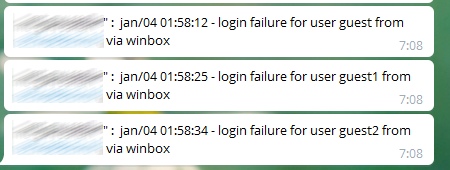
We will get the result:
Source: habr.com
