

Hello, Habr!
After reading the publication , I was surprised that a way to enable sequential downloading of files without additional software like BEncode Editor, hasn’t been published yet—it's simple and quick—literally just two clicks.
So:
We're enabling sequential downloading of parts of files and sequential downloading of files from the torrent list.
1. Download uTorrent.
2. Hold down the key combination [Shift]+[F2], don’t release the keys.
3. Click while holding the [Shift]+[F2] keys: Options -> Preferences -> Advanced.
You will see the settings for uTorrent with the parameters bt.sequential_download and bt.sequential_files already open for modification.
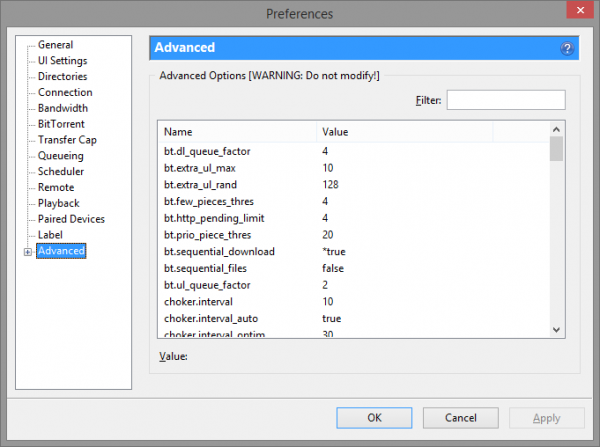
4. Change the value of the first parameter to true—and you will get sequential downloading of parts of files—which is exactly what you need for watching movies while they download. If you wish, change the value of the second parameter to true as well—and you will achieve sequential downloading of files in the torrent list (this is useful, for instance, for downloading series—episodes will download in order, starting with the first).
Voila!
Enjoy watching and all that.
Tested on uTorrent version for Windows 3.4.2.
If it works under Unix—please let me know in the comments.
Source: habr.com
