

An article about how I managed to connect VPN server behind the NAT of my home provider (without a public IP address). Let me clarify that the functionality of this implementation directly depends on the type of NAT used by your provider, as well as the router.
So, I had the need to connect from my Android smartphone to my home computer, both devices connected to the Internet through provider NATs, plus the computer is connected through a home router, which also NATed the connections.
The classic scheme using a rented VPS/VDS with a public IP address, as well as renting a public IP address from the provider, was not considered for several reasons.
Taking into account the experience from previous articles, conducting several experiments with STUNs and provider NATs. I decided to conduct a small experiment, executing a command on the home router running OpenWRT firmware:
$ stun stun.sipnet.ruI received the result:
STUN client version 0.97
Primary: Independent Mapping, Independent Filter, random port, will hairpin
Return value is 0x000002
Literal translation:
Independent Mapping — independent mapping
Independent Filter — independent filter
random port — random port
will hairpin — will hairpin
Executing a similar command on my PC, I received:
STUN client version 0.97
Primary: Independent Mapping, Port Dependent Filter, random port, will hairpin
Return value is 0x000006
Port Dependent Filter — port dependent filter
The difference in the output results indicated that the home router was contributing to the process of translating packets from the Internet, which was manifested in the fact that when executing the command on the computer:
stun stun.sipnet.ru -p 11111 -vI received the result:
…
MappedAddress = XX.1XX.1X4.2XX:4398
…
At that moment, a UDP session opened for a short time; if a UDP request was sent at that moment (for example: netcat XX.1XX.1X4.2XX 4398 -u), the request reached the home router, as confirmed by TCPDump running on it, but the request did not reach the computer — IPtables as the NAT translator on the router dropped it.
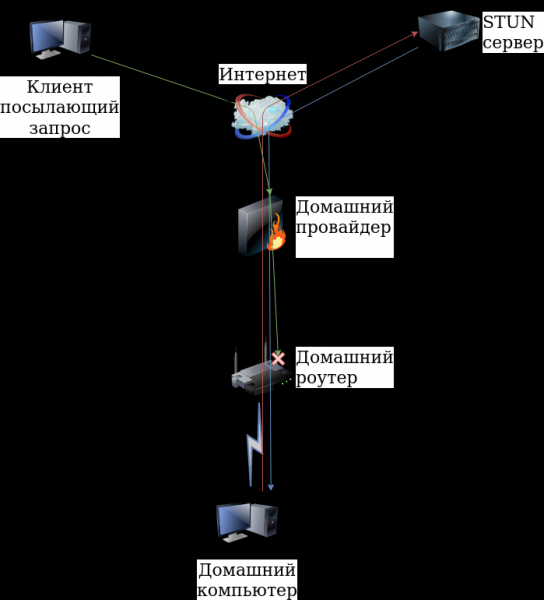
But the mere fact that the UDP request passed through the provider's NAT gave hope for success. Since the router is under my jurisdiction, I resolved the issue by redirecting UDP/11111 port to the computer:
iptables -t nat -A PREROUTING -i eth1 -p udp -d 10.1XX.2XX.XXX --dport 11111 -j DNAT --to-destination 192.168.X.XXXThis allowed me to initiate a UDP session and receive requests from the Internet from any IP address. At this point, I launched the OpenVPN server (after configuring it) listening on UDP/11111 port, set the external IP address and port (XX.1XX.1X4.2XX:4398) on my smartphone, and successfully connected from my smartphone to my computer. However, in this implementation, there was a problem; I needed to maintain the UDP session until the OpenVPN client connected to the server. I did not like the option of periodically running the STUN client — I didn't want to unnecessarily burden the STUN servers.
I also noticed the entry "will hairpin — will hairpin"; this mode
Hairpinning allows one machine in a local network behind NAT to access another machine in the same network using the external address of the router.
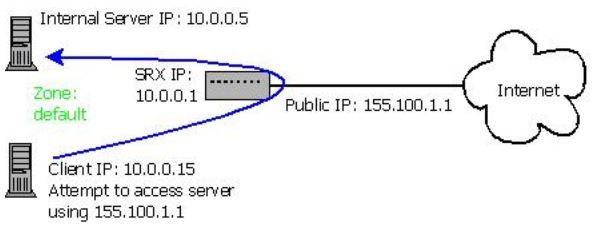
Ultimately, I simplified the problem of maintaining the UDP session — I launched the client on the same computer as the server.
It worked like this:
- I launched the STUN client with local port 11111
- received a response with the external IP address and port XX.1XX.1X4.2XX:4398
- sent data with the external IP address and port to the email (any other service could be used), configured on the smartphone
- launched the OpenVPN server on the computer listening on UDP/11111 port
- launched the OpenVPN client on the computer specifying XX.1XX.1X4.2XX:4398 for connection
- at any time, I launched the OpenVPN client on the smartphone specifying the IP address and port (in my case, the IP address did not change) for connection
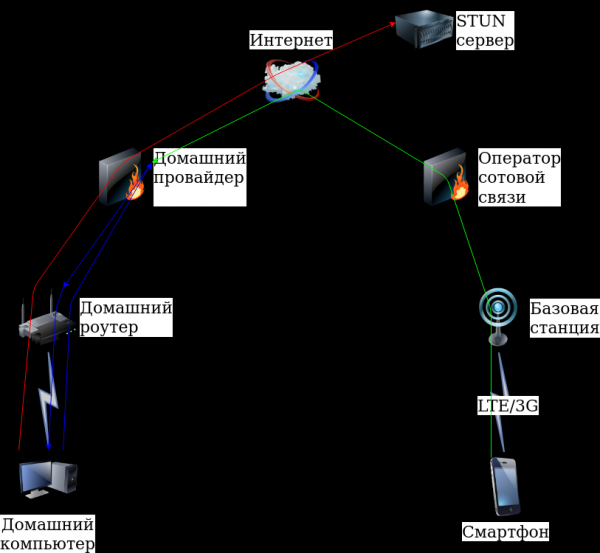
Thus, I gained the ability to connect to my computer from the smartphone. This implementation allows any OpenVPN client to connect.
Practice
You will need:
# apt install openvpn stun-client sendemailAfter writing a couple of scripts, a couple of configuration files, and generating the necessary certificates (as the client on the smartphone works only with certificates), I ended up with a standard implementation of the OpenVPN server.
The main script on the computer
# cat vpn11.sh#!/bin/bash
until [[ -n "$iftosrv" ]]; do echo "$(date) Определяю сетевой интерфейс"; iftosrv=`ip route get 8.8.8.8 | head -n 1 | sed 's|.*dev ||' | awk '{print $1}'`; sleep 5; done
ABSOLUTE_FILENAME=`readlink -f "$0"`
DIR=`dirname "$ABSOLUTE_FILENAME"`
localport=11111
until [[ $a ]]; do
address=`stun stun.sipnet.ru -v -p $localport 2>&1 | grep "MappedAddress" | sort | uniq | head -n 1 | sed 's/:/ /g' | awk '{print $3" "$4}'`
ip=`echo "$address" | awk {'print $1'}`
port=`echo "$address" | awk {'print $2'}`
srv="openvpn --config $DIR/server.conf --port $localport --daemon"
$srv
echo "$(date) Сервер запущен с внешним адресом $ip:$port"
$DIR/sendemail.sh "OpenVPN-Server" "$ip:$port"
sleep 1
openvpn --config $DIR/client.conf --remote $ip --port $port
echo "$(date) Cоединение клиента с сервером разорвано"
for i in `ps xa | grep "$srv" | grep -v grep | awk '{print $1}'`; do
kill $i && echo "$(date) Завершен процесс сервера $i ($srv)"
done
echo "Жду 15 сек"
sleep 15
doneThe script to send data to email:
# cat sendemail.sh #!/bin/bash
from="От кого"
pass="Пароль"
to="Кому"
theme="$1"
message="$2"
server="smtp.yandex.ru:587"
sendEmail -o tls=yes -f "$from" -t "$to" -s "$server" -xu "$from" -xp "$pass" -u "$theme" -m "$message"Server configuration file:
# cat server.confproto udp
dev tun
ca /home/vpn11-srv/ca.crt
cert /home/vpn11-srv/server.crt
key /home/vpn11-srv/server.key
dh /home/vpn11-srv/dh2048.pem
server 10.2.0.0 255.255.255.0
ifconfig-pool-persist ipp.txt
tls-server
tls-auth /home/vpn11-srv/ta.key 0
tls-timeout 60
auth SHA256
cipher AES-256-CBC
client-to-client
keepalive 10 30
comp-lzo
max-clients 10
user nobody
group nogroup
persist-key
persist-tun
log /var/log/vpn11-server.log
verb 3
mute 20Client configuration file:
# cat client.confclient
dev tun
proto udp
ca "\/home\/vpn11-srv\/ca.crt"
cert "\/home\/vpn11-srv\/client1.crt"
key "\/home\/vpn11-srv\/client1.key"
tls-client
tls-auth "\/home\/vpn11-srv\/ta.key" 1
auth SHA256
cipher AES-256-CBC
auth-nocache
comp-lzo
user nobody
group nogroup
persist-key
persist-tun
log \/var\/log\/vpn11-clent.log
verb 3
mute 20
ping 10
ping-exit 30Certificates were generated by from one of the authors..
Starting the script:
# ./vpn11.shFirst making it executable
# chmod +x vpn11.shOn the smartphone side
Installing the application OpenVPN for Android, copying the configuration file, certificates, and setting it up resulted in:
On the smartphone, I'm checking the mail
I correct the port number in the settings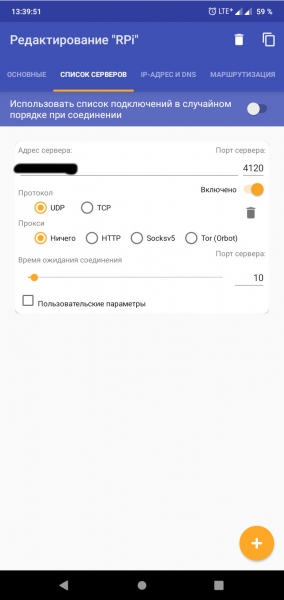
I start the client and connect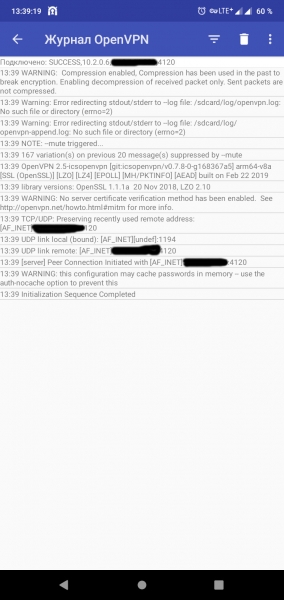
While writing this article, I transferred the configuration from the computer to Raspberry Pi 3 and tried to run it all on an LTE modem, but it didn't work! The result of the command
# stun stun.ekiga.net -p 11111STUN client version 0.97
Primary: Independent Mapping, Port Dependent Filter, random port, will hairpin
Return value is 0x000006
the value Port Dependent Filter did not allow the system to start.
But my home provider had no problem allowing the system to run on Raspberry Pi 3.
In conjunction with the webcam, using VLC for
creating an RTSP stream from the webcam
$ cvlc v4l2:\/\/dev\/video0:chroma=h264 :input-slave=alsa:\/\/hw:1,0 --sout '#transcode{vcodec=x264,venc=x264{preset=ultrafast,profile=baseline,level=31},vb=2048,fps=12,scale=1,acodec=mpga,ab=128,channels=2,samplerate=44100,scodec=none}:rtp{sdp=rtsp:\/\/10.2.0.1:8554\/}' --no-sout-all --sout-keepand VLC on the smartphone for viewing (stream rtsp:\/\/10.2.0.1:8554\/), it turned out to be a decent remote video surveillance system. You can also set up Samba, route traffic through VPN, remotely control the computer, and much more...
Output
As practice has shown, it's possible to set up a VPN server without an external IP address that requires payment, just like with a rented one. VPS/VDS. But it all depends on the provider. Of course, I would like to get more information about different providers and types of NATs used, but this is just the beginning...
Thank you for your attention!
Source: habr.com
