

A crucial part of vulnerability management is a deep understanding and securing the supply chain of the software components that build modern systems. Teams practicing agile methodologies and DevOps widely use libraries and frameworks with open source to reduce development time and costs. However, this has a flip side: the risk of inheriting other people's mistakes and vulnerabilities.
Clearly, the team must know which open source components are included in its applications, ensure that trusted versions are downloaded from trusted sources, and load updated components after fixing newly discovered vulnerabilities.
In this post, we will explore the use of OWASP Dependency Check to halt the build process in case of serious issues detected in your code.
The book 'Security in Agile Projects' describes it this way. OWASP Dependency Check is a free scanner that catalogs all open source components used in an application and highlights any vulnerabilities present. It has versions for Java, .NET, Ruby (gemspec), PHP (composer), Node.js, and Python, as well as for some C/C++ projects. Dependency Check integrates with common build tools, including Ant, Maven, and Gradle, as well as continuous integration servers like Jenkins.
Dependency Check reports all components with known vulnerabilities from the National Vulnerability Database (NVD) by NIST, and it is updated based on data from NVD news feeds.
Fortunately, all of this can be done automatically using tools like the OWASP Dependency Check project or commercial programs like , , , by Sonatype or .
These tools can be integrated into build pipelines to automatically generate a list of open source dependencies, identify outdated library versions and libraries containing known vulnerabilities, and halt the build process should serious issues be detected.
OWASP Dependency Check
To test and demonstrate the functionality of Dependency Check, we will use this repository .
To view the HTML report, you need to configure the nginx web server on your gitlab-runner.
An example of a minimal nginx config:
server {
    listen       9999;
    listen       [::]:9999;
    server_name  _;
    root         /home/gitlab-runner/builds;

    location / {
        autoindex on;
    }

    error_page 404 /404.html;
        location = /40x.html {
    }

    error_page 500 502 503 504 /50x.html;
        location = /50x.html {
    }

}
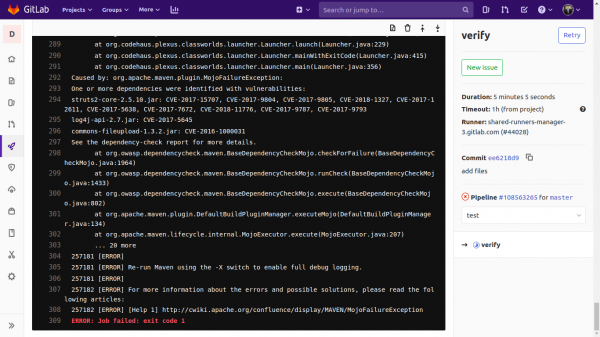
At the end of the build, you can see a picture like this:
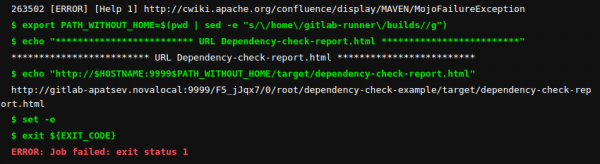
We click the link and see the Dependency Check report.
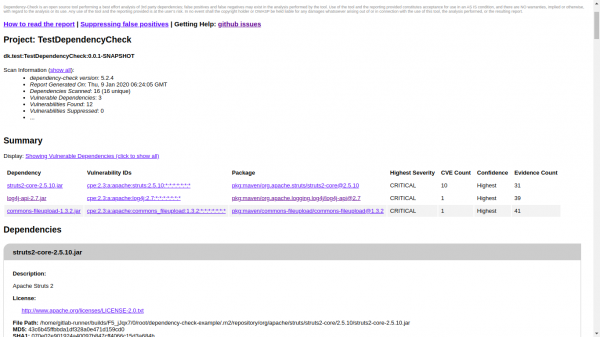
The first screenshot shows the top part of the report with a brief summary.
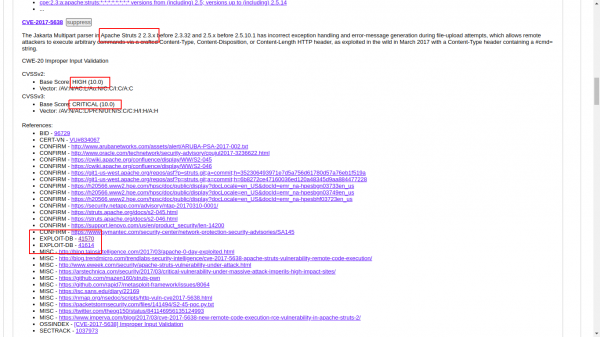
The second screenshot details CVE-2017-5638. Here we see the CVE level and links to exploits.
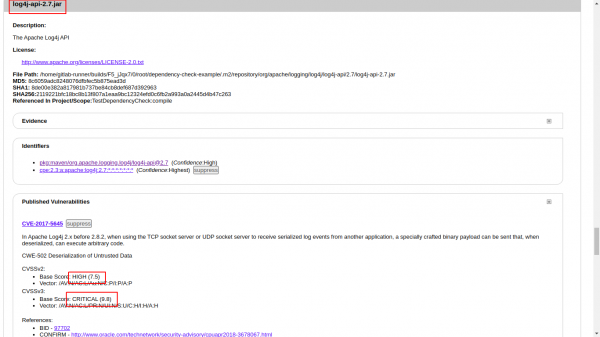
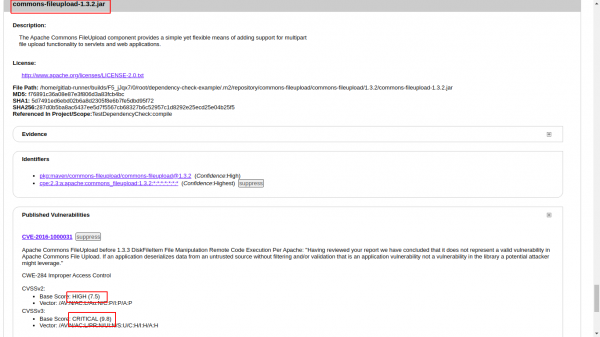
The third screenshot shows details of log4j-api-2.7.jar. We see that the CVE levels are 7.5 and 9.8.
The fourth screenshot shows details of commons-fileupload-1.3.2.jar. We see that the CVE levels are 7.5 and 9.8.
If you want to use GitLab Pages, it won't work — a failed task will not create an artifact.
Example here .
Build output: no artifacts, I don't see an HTML report. Need to try Artifact: always
Regulating CVE vulnerability levels
The most important line in the gitlab-ci.yaml file:
mvn $MAVEN_CLI_OPTS test org.owasp:dependency-check-maven:check -DfailBuildOnCVSS=7With the failBuildOnCVSS parameter, you can regulate the CVE vulnerability levels that need to be addressed.
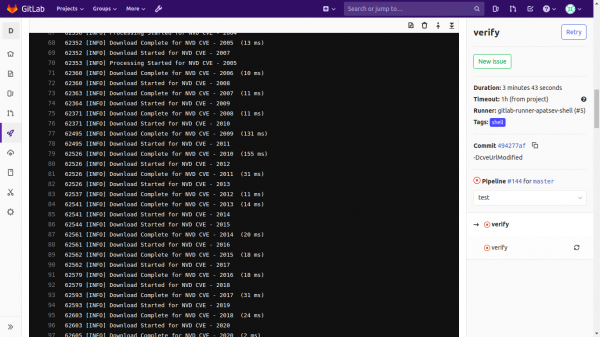
Downloading the vulnerability database (NVD) NIST from the internet
You noticed that it is constantly downloading vulnerability databases (NVD) NIST from the internet:
You can use the utility for downloading
Let's install and run it.
yum -y install yum-plugin-copr
yum copr enable antonpatsev/nist_data_mirror_golang
yum -y install nist-data-mirror
systemctl start nist-data-mirror
Nist-data-mirror downloads CVE JSON NIST to /var/www/repos/nist-data-mirror/ upon startup and updates the data every 24 hours.
To download the CVE JSON NIST, you need to configure the nginx web server (for example, on your gitlab-runner).
An example of a minimal nginx config:
server {
    listen       12345;
    listen       [::]:12345;
    server_name  _;
    root         /var/www/repos/nist-data-mirror/;

    location / {
        autoindex on;
    }

    error_page 404 /404.html;
        location = /40x.html {
    }

    error_page 500 502 503 504 /50x.html;
        location = /50x.html {
    }

}
To avoid making a long line where mvn is executed, let's extract the parameters into a separate variable DEPENDENCY_OPTS.
The final minimal config .gitlab-ci.yml will look like this:
variables:
  MAVEN_OPTS: "-Dhttps.protocols=TLSv1.2 -Dmaven.repo.local=$CI_PROJECT_DIR/.m2/repository -Dorg.slf4j.simpleLogger.log.org.apache.maven.cli.transfer.Slf4jMavenTransferListener=WARN -Dorg.slf4j.simpleLogger.showDateTime=true -Djava.awt.headless=true"
  MAVEN_CLI_OPTS: "--batch-mode --errors --fail-at-end --show-version -DinstallAtEnd=true -DdeployAtEnd=true"
  DEPENDENCY_OPTS: "-DfailBuildOnCVSS=7 -DcveUrlModified=http://localhost:12345/nvdcve-1.1-modified.json.gz -DcveUrlBase=http://localhost:12345/nvdcve-1.1-%d.json.gz"

cache:
  paths:
    - .m2/repository

verify:
  stage: test
  script:
    - set +e
    - mvn $MAVEN_CLI_OPTS install org.owasp:dependency-check-maven:check $DEPENDENCY_OPTS || EXIT_CODE=$?
    - export PATH_WITHOUT_HOME=$(pwd | sed -e "s//home/gitlab-runner/builds//g")
    - echo "************************* URL Dependency-check-report.html *************************"
    - echo "http://$HOSTNAME:9999$PATH_WITHOUT_HOME/target/dependency-check-report.html"
    - set -e
    - exit ${EXIT_CODE}
  tags:
    - shell
Source: habr.com
