

We often have to work with SSL certificates. Let's recall the process of creating and installing a certificate (generally speaking, for most cases).
- Find a provider (a site where we can buy SSL).
- Generate CSR.
- Send it to the provider.
- Confirm ownership of the domain.
- Obtain the certificate.
- Convert the certificate into the required format (optional). For example, from pem to PKCS #12.
- Install the certificate on the web server.
Relatively quick, not difficult, and clear. This option works fine if we have a maximum of a dozen projects. But what if there are more, and each has at least three environments? The classic dev — staging — production. In this case, it's worth considering automating this process. I propose to delve a bit deeper into the problem and find a solution that will minimize the time spent on creating and managing certificates in the future. The article will include a problem analysis and a brief guide to replication.
I should clarify: our company's main specialization is .net, and accordingly IIS and other Windows-related aspects. Therefore, the ACME client and all actions associated will also be described from a Windows usage perspective.
Who is this relevant for and some initial data
Company K represented by the author. URL (for example): company.tld
Project X — one of our projects, during which I concluded that we really need to move towards maximizing time efficiency when working with certificates. This project has four environments: dev, test, staging, and production. Dev and test are on our side, while staging and production are on the client's side.
The feature of the project is that it has a large number of modules available as subdomains.
So, we have the following picture:
Dev
Test
Staging
Production
projectX.dev.company.tld
projectX.test.company.tld
staging.projectX.tld
projectX.tld
module1.projectX.dev.company.tld
module1.projectX.test.company.tld
module1.staging.projectX.tld
module1.projectX.tld
module2.projectX.dev.company.tld
module2.projectX.test.company.tld
module2.staging.projectX.tld
module2.projectX.tld
…
…
…
…
moduleN.projectX.dev.company.tld
moduleN.projectX.test.company.tld
moduleN.staging.projectX.tld
moduleN.projectX.tld
A purchased wildcard certificate is used for production, which raises no issues. However, it only covers the first level of the subdomain. Consequently, if there's a certificate for *.projectX.tld — it will work for staging.projectX.tld, but not for module1.staging.projectX.tld. Buying a separate one is not appealing.
And this is just an example of one project from one company. Naturally, there is more than one project.
The common reasons for addressing this issue look something like this:
- Relatively recently Google suggested reducing the maximum validity period of SSL certificates.. With all the ensuing consequences.
- Ease the process of issuance and maintenance SSL for the internal needs of projects and the company as a whole.
- Centralized storage of certificate records, which partially resolves the issue of domain verification via DNS and subsequent automatic renewal, as well as addresses trust issues with clients. After all, a CNAME on the company's server partner/executor is more trustworthy than an external resource.
- And finally, in this case, the phrase 'better to have than not to have' fits perfectly.
Choosing an SSL provider and preparatory steps
Among the available options for free SSL certificates, cloudflare and letsencrypt were considered. DNS for this (and some other projects) is hosted on cloudflare, but I'm not a fan of using their certificates. Therefore, we decided to use letsencrypt.
To create wildcard SSL certificate requires domain ownership verification. This procedure involves creating a specific DNS record (TXT or CNAME), which is then verified during the certificate issuance process. In Linux, there is a utility — certbot, which allows for partial (or complete for some DNS providers) automation of this process. For Windows, among the found and verified options of ACME clients, I chose WinACME..
Now that the domain record is created, let's move on to generating the certificate:
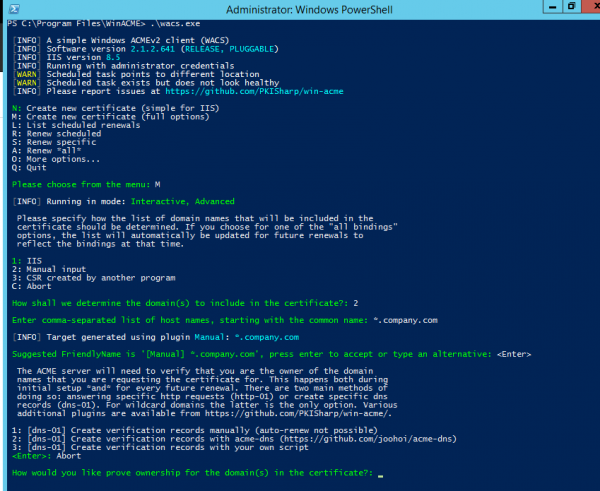
We are interested in the last output, namely — the available options for domain ownership verification for issuing a wildcard certificate:
- Manual creation of DNS records (automatic renewal is not supported)
- Creating DNS records using acme-dns server (more details can be read here.
- Creating DNS records using your own script (similar to the cloudflare plugin for certbot).
At first glance, the third option seems quite suitable, but what if the DNS provider does not support this functionality? We need a general case. And the general case is CNAME records, which are supported by all. Therefore, we will stick with option 2 and proceed to configure our ACME-DNS server.
Configuring the ACME-DNS server and the process of issuing the certificate.
For example, I created the domain 2nd.pp.ua, and I will use it later.
A mandatory requirement for the correct functioning of the server is to create NS and A records for its domain. The first unpleasant issue I encountered is that Cloudflare (at least in free mode) does not allow you to create both NS and A records for the same host at the same time. It's not that this is a problem, but it can be done in BIND. Support replied that their panel does not allow it. No worries, we will create two records:
acmens.2nd.pp.ua. IN A 35.237.128.147
acme.2nd.pp.ua. IN NS acmens.2nd.pp.ua.
At this stage, the host should resolve acmens.2nd.pp.ua.
$ ping acmens.2nd.pp.ua
PING acmens.2nd.pp.ua (35.237.128.147) 56(84) bytes of data
Here is acme.2nd.pp.ua will not resolve, as the DNS server serving it has not been started yet.
Records have been created, now we proceed to configure and start the ACME-DNS server. It will run on my Ubuntu server in docker a container, but it can be launched anywhere Golang is available. Windows will work fine too, but I still prefer Linux servers.
We create the necessary directories and files:
$ mkdir config
$ mkdir data
$ touch config/config.cfg
We will use Vim, your favorite text editor, to insert a sample into config.cfg configuration.
For successful operation, it is sufficient to adjust the general and api sections:
[general]
listen = "0.0.0.0:53"
protocol = "both"
domain = "acme.2nd.pp.ua"
nsname = "acmens.2nd.pp.ua"
nsadmin = "admin.2nd.pp.ua"
records =
    "acme.2nd.pp.ua. A 35.237.128.147",
    "acme.2nd.pp.ua. NS acmens.2nd.pp.ua.",                                                                                                                                                                                                  ]
...
[api]
...
tls = "letsencrypt"
…
Also, optionally, we will create a docker-compose file in the main service directory:
version: '3.7'
services:
  acmedns:
    image: joohoi/acme-dns:latest
    ports:
      - "443:443"
      - "53:53"
      - "53:53/udp"
      - "80:80"
    volumes:
      - ./config:/etc/acme-dns:ro
      - ./data:/var/lib/acme-dns
Done. You can start it.
$ docker-compose up -d
At this stage, the host should start resolving acme.2nd.pp.ua, and a 404 should appear at https://acme.2nd.pp.ua
$ ping acme.2nd.pp.ua
PING acme.2nd.pp.ua (35.237.128.147) 56(84) bytes of data.

$ curl https://acme.2nd.pp.ua
404 page not found
If this does not appear— docker logs -f is helpful, fortunately, the logs are quite readable.
We can proceed to create the certificate. Open PowerShell as an administrator and run winacme. We are interested in the following choices:
- M: Create new certificate (full options)
- 2: Manual input
- 2: [dns-01] Create verification records with acme-dns (https://github.com/joohoi/acme-dns)
- When asked for the link to the ACME-DNS server, we input the URL of the created server (https). URL of the acme-dns server: https://acme.2nd.pp.ua
The client issues a record to be added to the existing DNS server (this procedure is one-time):
[INFO] Creating new acme-dns registration for domain 1nd.pp.ua

Domain:              1nd.pp.ua
Record:               _acme-challenge.1nd.pp.ua
Type:                   CNAME
Content:              c82a88a5-499f-464f-96e4-be7f606a3b47.acme.2nd.pp.ua.
Note:                   Some DNS control panels add the final dot automatically.
                           Only one is required.
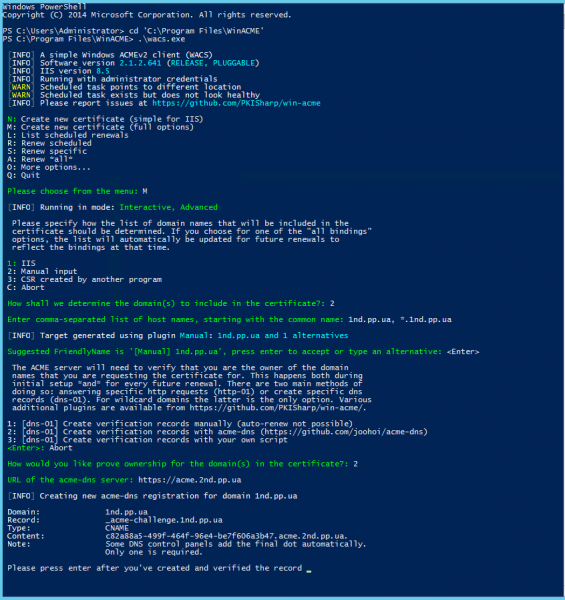
We create the necessary record and ensure it was created correctly:

$ dig CNAME _acme-challenge.1nd.pp.ua +short
c82a88a5-499f-464f-96e4-be7f606a3b47.acme.2nd.pp.ua.
We confirm that we created the required record in winacme and continue the certificate creation process:
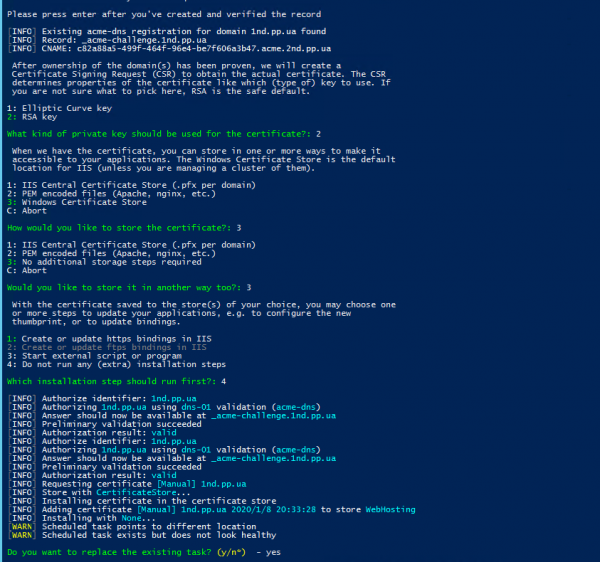
How to use certbot as a client is described here.
At this point, the certificate creation process is complete and can be installed on the web server for use. If a task is created in the scheduler during the certificate creation, the certificate renewal process will occur automatically in the future.
Source: habr.com
