

Hello, Habr! I present to your attention the translation of the article. by Christopher Kuech.
Object-oriented and functional programming paradigms may seem at odds with each other, but both are equally supported in PowerShell. Almost all programming languages, whether functional or not, have means for advanced name and value binding; Classes, like structs and records, are just one approach. If we limit our use of Classes to name and value binding and avoid such 'heavy' object-oriented programming concepts as inheritance, polymorphism, or mutability, we can leverage their benefits without complicating our code. Furthermore, by adding immutable type conversion methods, we can enrich our functional code with Classes.
The Magic of Casting
Casting is one of the most powerful features in PowerShell. When you cast a value, you rely on the implicit initialization and validation capabilities that the environment adds to your application. For instance, a simple string cast to [xml] will pass it through the parser code and generate a complete XML tree. We can use Classes in our code for the same purpose.
Casting Hash Tables
If you don't have a constructor, you can still proceed without one by using a hash table cast to your class type. Don't forget to leverage validation attributes to fully utilize this pattern. Additionally, we can use typed properties of the class to trigger even deeper initialization and validation logic.
class Cluster {
    [ValidatePattern("^[A-z]+$")]
    [string] $Service
    [ValidateSet("TEST", "STAGE", "CANARY", "PROD")]
    [string] $FlightingRing
    [ValidateSet("EastUS", "WestUS", "NorthEurope")]
    [string] $Region
    [ValidateRange(0, 255)]
    [int] $Index
}

[Cluster]@{
    Service       = "MyService"
    FlightingRing = "PROD"
    Region        = "EastUS"
    Index         = 2
}
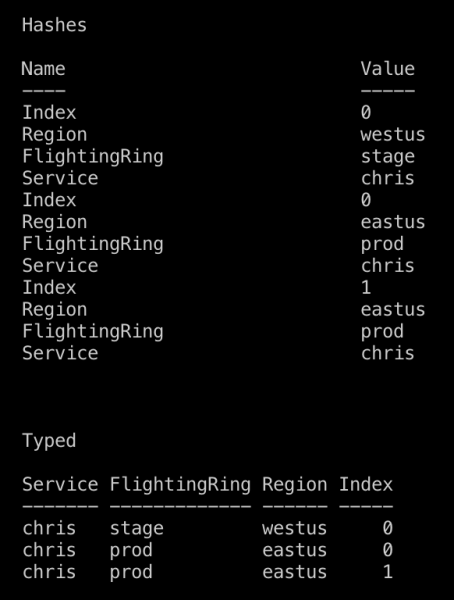
Moreover, casting helps achieve clean output. Compare the output of an array of hash tables Cluster passed to Format-Table with what you'll get if you cast these hash tables to a class first. Class properties are always listed in the order they are defined. Remember to add the hidden keyword before any properties that should not be visible in the output.
Casting Values
If you have a constructor with a single argument, casting the value to your class type will pass the value to your constructor, where you can initialize an instance of your class.
class Cluster {
    [ValidatePattern("^[A-z]+$")]
    [string] $Service
    [ValidateSet("TEST", "STAGE", "CANARY", "PROD")]
    [string] $FlightingRing
    [ValidateSet("EastUS", "WestUS", "NorthEurope")]
    [string] $Region
    [ValidateRange(0, 255)]
    [int] $Index

    Cluster([string] $id) {
        $this.Service, $this.FlightingRing, $this.Region, $this.Index = $id -split "-"
    }
}

[Cluster]"MyService-PROD-EastUS-2"
Casting to a string
You can also override the class method [string] ToString() to define the logic for the string representation of the object, for example, by using string interpolation.
class Cluster {
    [ValidatePattern("^[A-z]+$")]
    [string] $Service
    [ValidateSet("TEST", "STAGE", "CANARY", "PROD")]
    [string] $FlightingRing
    [ValidateSet("EastUS", "WestUS", "NorthEurope")]
    [string] $Region
    [ValidateRange(0, 255)]
    [int] $Index

    [string] ToString() {
        return $this.Service, $this.FlightingRing, $this.Region, $this.Index -join "-"
    }
}

$cluster = [Cluster]@{
    Service       = "MyService"
    FlightingRing = "PROD"
    Region        = "EastUS"
    Index         = 2
}

Write-Host "We just created a model for '$cluster'"
Casting serialized instances
Casting allows safe deserialization. The examples below will result in an error if the data does not meet our specification in Cluster.
# Валидация сериализованных данных

[Cluster]$cluster = Get-Content "./my-cluster.json" | ConvertFrom-Json
[Cluster[]]$clusters = Import-Csv "./my-clusters.csv"
Casts in your functional code
Functional programs first define data structures, then implement the program as a sequence of transformations on immutable data structures. Despite the contradictory impression, classes actually help in writing functional code due to type conversion methods.
Am I writing functional Powershell?
Many people coming from C# or a similar background write Powershell that resembles C#. By doing so, you forgo using functional programming concepts and are likely to gain more by immersing yourself in object-oriented programming in Powershell or learning functional programming better.
If you heavily rely on transforming immutable data using pipes (|), Where-Object, ForEach-Object, Select-Object, Group-Object, Sort-Object, etc. — you have a more functional style, and using Powershell classes in a functional way will help you.
Functional use of classes
Classes, although they use an alternative syntax, are merely a mapping between two domains. In the pipeline, you can map an array of values using ForEach-Object.
In the example below, the Node constructor is executed each time a cast to Datum occurs, allowing us to avoid writing a substantial amount of code. As a result, our pipeline focuses on the declarative data query and aggregation, while our classes handle data parsing and validation.
# Пример комбинирования классов с конвейерами для separation of concerns в конвейерах

class Node {
    [ValidateLength(3, 7)]
    [string] $Name
    [ValidateSet("INT", "PPE", "PROD")]
    [string] $FlightingRing
    [ValidateSet("EastUS", "WestUS", "NorthEurope", "WestEurope")]
    [string] $Region
    Node([string] $Name) {
        $Name -match "([a-z]+)(INT|PPE|PROD)([a-z]+)"
        $_, $this.Service, $this.FlightingRing, $this.Region = $Matches
        $this.Name = $Name
    }
}

class Datum {
    [string] $Name
    [int] $Value
    [Node] $Computer
    [int] Severity() {
        $this.Name -match "[0-9]+$"
        return $Matches[0]
    }
}

Write-Host "Urgent Security Audit Issues:"
Import-Csv "./audit-results.csv" `
    | ForEach-Object {[Datum]$_} `
    | Where-Object Value -gt 0 `
    | Group-Object {$_.Severity()} `
    | Where-Object Name -lt 2 `
    | ForEach-Object Group `
    | ForEach-Object Computer `
    | Where-Object FlightingRing -eq "PROD" `
    | Sort-Object Name, Region -Unique
Class packaging for reuse
Nothing is as good as it seems
Unfortunately, classes cannot be exported by modules in the same way that functions or variables can; but there are a few workarounds. Suppose your classes are defined in the file ./my-classes.ps1
You can dot-source a class file: . ./my-classes.ps1. This will execute my-classes.ps1 in your current scope and define all the classes from the file there.
You can create a Powershell module that exports all your custom APIs (cmdlets) and set the ScriptsToProcess variable = "./my-classes.ps1" in your module's manifest, with the same result: ./my-classes.ps1 will execute in your environment.
Whichever option you choose, remember that the Powershell type system cannot resolve types with the same name loaded from different places.
Even if you load two identical classes with the same properties from different locations, you risk encountering issues.
Path forward
The best way to avoid problems with type resolution is to never expose your classes to users. Instead of expecting the user to import a specific type defined in the class, export a function from your module that eliminates the need to directly reference the class. For Cluster, we can export the New-Cluster function, which will support user-friendly parameter sets and return Cluster.
class Cluster {
    [ValidatePattern("^[A-z]+$")]
    [string] $Service
    [ValidateSet("TEST", "STAGE", "CANARY", "PROD")]
    [string] $FlightingRing
    [ValidateSet("EastUS", "WestUS", "NorthEurope")]
    [string] $Region
    [ValidateRange(0, 255)]
    [int] $Index
}

function New-Cluster {
    [OutputType([Cluster])]
    Param(
        [Parameter(Mandatory, ParameterSetName = "Id", Position = 0)]
        [ValidateNotNullOrEmpty()]
        [string] $Id,
        [Parameter(Mandatory, ParameterSetName = "Components")]
        [string] $Service,
        [Parameter(Mandatory, ParameterSetName = "Components")]
        [string] $FlightingRing,
        [Parameter(Mandatory, ParameterSetName = "Components")]
        [string] $Region,
        [Parameter(Mandatory, ParameterSetName = "Components")]
        [int] $Index
    )

    if ($Id) {
        $Service, $FlightingRing, $Region, $Index = $Id -split "-"
    }

    [Cluster]@{
        Service       = $Service
        FlightingRing = $FlightingRing
        Region        = $Region
        Index         = $Index
    }
}

Export-ModuleMember New-Cluster
Further reading
Source: habr.com
