


Welcome! You are in the sixth lesson of the course . On we have mastered the basics of working with NAT technology on , and we have also released our test user to the Internet. Now it’s time to ensure the user's security in this vast space. In this lesson, we will explore the following security profiles: Web Filtering, Application Control, and HTTPS inspection.
To start getting acquainted with security profiles, we need to understand one more thing—inspection modes.
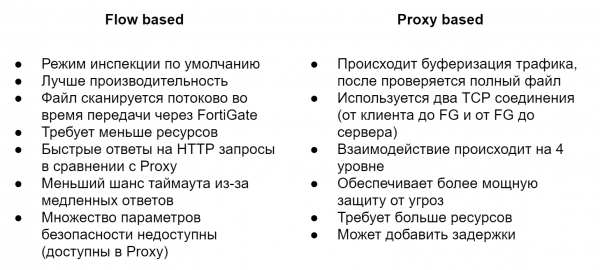
By default, Flow Based mode is used. It checks files as they pass through FortiGate without buffering. As soon as the packet arrives, it is processed and forwarded without waiting for the entire file or webpage. It requires fewer resources and provides higher performance than Proxy mode, but not all security functionalities are available in it. For example, data loss prevention (DLP) can only be used in Proxy mode.
Proxy mode works differently. It creates two TCP connections, one between the client and FortiGate, the other between FortiGate and the server. This allows it to buffer traffic, meaning it can receive the entire file or webpage. Scanning files for various threats begins only after the whole file has been buffered. This allows for additional capabilities that are not available in Flow Based mode. As you can see, this mode is somewhat the opposite of Flow Based—security is the main focus here, while performance takes a back seat.
People often ask— which mode is better? However, there is no universal answer. It is always individual and depends on your needs and objectives. I will further demonstrate the differences between security profiles in Flow and Proxy modes throughout the course. This will help you compare functionalities and decide which one suits you best.
Let’s move on to the security profiles and first explore Web Filtering. It helps control or monitor which websites users visit. I believe there is no need to delve into the necessity of such a profile in today's reality. Let’s find out how it works.
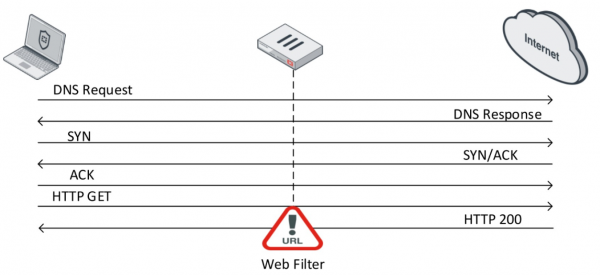
Once a TCP connection is established, the user requests content from a specific website using a GET request.
If the web server responds positively, it sends the information about the website in reply. This is where the web filter comes into play. It checks the content of this response. During this check, FortiGate sends a request in real-time to the FortiGuard Distribution Network (FDN) to determine the category of the website. Once the category of the specific website is identified, the web filter takes specific actions based on settings.
In Flow mode, three actions are available:
- Allow — permit access to the website
- Block — deny access to the website
- Monitor — allow access to the website and log this action
In Proxy mode, two additional actions are available:
- Warning — issue a warning to the user that they are attempting to visit a specific resource and give them the choice to continue or leave the website
- Authenticate — request user credentials — this allows certain groups to gain access to blocked categories of websites.
On the website you can explore all categories and subcategories of the web filter, as well as find out to which category a specific website belongs. In general, for users of Fortinet solutions, this is quite a useful site; I recommend checking it out in your free time.
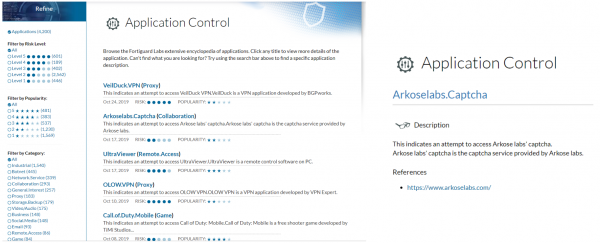
Not much can be said about Application Control. As the name suggests, it allows for controlling application usage. It does this using patterns of various applications, known as signatures. Based on these signatures, it can identify specific applications and apply certain actions to them:
- Allow — permit
- Monitor — allow and log this action
- Block — deny
- Quarantine — log the event and block the IP address for a specified time
You can also view existing signatures on the website .
Now let's examine the HTTPS inspection mechanism. According to statistics from the end of 2018, the share of HTTPS traffic exceeded 70%. This means that without using HTTPS inspection, we will only be able to analyze about 30% of the traffic flowing through the network. First, let's look at how HTTPS works in broad strokes.
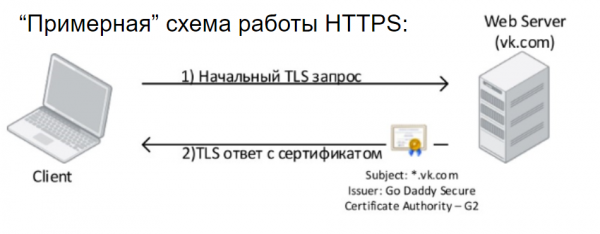
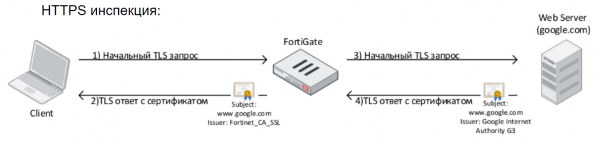
The client initiates a TLS request to the web server and receives a TLS response, along with a digital certificate that must be trusted by the user. This is the essential information we need to know about how HTTPS works; in reality, its mechanics are much more complex. After a successful TLS handshake, data transmission begins in an encrypted format. This is beneficial, as no one can access the data exchanged with the web server.
However, for corporate security professionals, this poses a significant headache, as they cannot see this traffic or inspect its content using antivirus software, intrusion prevention systems, DLP systems, or anything else. This also negatively impacts the quality of application and web resource identification within the network — precisely the topic of our lesson. The technology designed to address this issue is HTTPS inspection. Its essence is quite simple — basically, the device performing HTTPS inspection orchestrates a Man In The Middle attack. It looks something like this: FortiGate intercepts the user's request, establishes an HTTPS connection with it, and then initiates an HTTPS session with the resource the user requested. The user’s computer will display a certificate issued by FortiGate, which must be trusted for the browser to allow the connection.
In fact, HTTPS inspection is quite a complex matter and has numerous limitations, but we will not discuss this in the context of this course. I will just add that implementing HTTPS inspection is not a quick task; it typically takes about a month. It is necessary to gather information about required exceptions, make the appropriate settings, collect user feedback, and adjust the settings.
The theoretical content, as well as the practical part, is presented in this video lesson:
In the next lesson, we will explore other security profiles: antivirus and intrusion prevention systems. To avoid missing it, keep an eye on updates from the following channels:
Source: habr.com
