

To fully master Kubernetes, you need to understand the various methods of scaling cluster resources: this is one of Kubernetes' main tasks. We have prepared a high-level overview of horizontal and vertical autoscaling mechanisms and resizing of clusters, along with recommendations on how to use them effectively.
The article was translated by the team that implemented autoscaling in .
Why it’s important to consider scaling
– a tool for resource management and orchestration. Of course, it’s nice to experiment with cool deployment, monitoring, and pod management features (the pod module is a group of containers that are launched in response to a request).
However, it is also crucial to think about the following questions:
- How to scale modules and applications?
- How to keep containers running and efficient?
- How to respond to constant changes in code and user workloads?
Configuring Kubernetes clusters for resource and performance balancing can be a challenging task, requiring expert knowledge of Kubernetes' inner workings. The workload on your application or services can fluctuate throughout the day or even within an hour, so balancing should be viewed as an ongoing process.
Levels of Kubernetes Autoscaling
Effective autoscaling requires coordination between two levels:
- Pod level, which includes horizontal (Horizontal Pod Autoscaler, HPA) and vertical autoscaling (Vertical Pod Autoscaler, VPA). This scales the available resources for your containers.
- Cluster level, managed by the cluster autoscaler system (Cluster Autoscaler, CA), which increases or decreases the number of nodes within the cluster.
Horizontal autoscaling module (HPA)
As the name suggests, HPA scales the number of pod replicas. As triggers for changing the number of replicas, most DevOps professionals use CPU and memory load. However, it is possible to scale the system based on , their or even .
High-level overview of how HPA works:
- HPA continuously checks the metric values set at installation with a default interval of 30 seconds.
- HPA attempts to increase the number of pods if the specified threshold is reached.
- HPA updates the number of replicas within the deployment/replication controller.
- The deployment/replication controller then deploys all necessary additional pods.
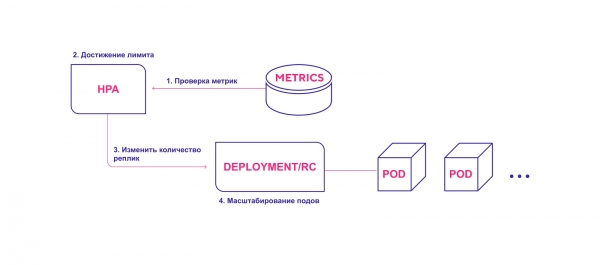
HPA initiates the pod deployment process when the metric threshold is achieved.
When using HPA, consider the following:
- The default HPA check interval is 30 seconds. It is set by the flag horizontal-pod-autoscaler-sync-period in the controller manager.
- The default relative error is 10%.
- After the last increase in the number of pods, HPA waits for the metrics to stabilize for three minutes. This interval is set by the flag horizontal-pod-autoscaler-upscale-delay.
- After the last decrease in the number of pods, HPA waits for stabilization for five minutes. This interval is set by the flag horizontal-pod-autoscaler-downscale-delay.
- HPA works best with deployment objects rather than replication controllers. Horizontal autoscaling is incompatible with rolling updates that directly manipulate replication controllers. When deploying, the number of replicas directly depends on the deployment objects.
Vertical pod autoscaling
Vertical autoscaling (VPA) allocates more (or less) CPU or memory for existing pods. It is suitable for both stateful and stateless pods but is primarily intended for stateful services. However, you can apply VPA to stateless pods if you need to automatically adjust the initially allocated resources.
VPA also responds to OOM (out of memory) events. Changing the CPU time and memory allocation requires restarting the pods. During the restart, VPA adheres to the distribution budget (), to ensure the minimum required number of pods.
You can set the minimum and maximum resource limits for each module. For instance, you can restrict the maximum allocated memory to 8 GB. This is useful if the current nodes cannot allocate more than 8 GB of memory for the container. Detailed specifications and operation mechanisms are described in .
Additionally, VPA has an interesting recommendation feature (VPA Recommender). It tracks resource usage and OOM events of all modules to suggest new values for memory and CPU time based on an intelligent algorithm that takes historical metrics into account. There is also an API that accepts a pod descriptor and returns the suggested resource values.
It’s important to note that VPA Recommender does not track resource limits. This can lead to a module monopolizing resources within nodes. It’s better to set a cap at the namespace level to avoid excessive memory or CPU time consumption.
High-level operation scheme of VPA:
- VPA continuously checks the metric values specified during installation, at a default interval of 10 seconds.
- If the specified threshold is reached, VPA attempts to change the allocated amount of resources.
- VPA updates the resource amount within the deployment/replication controller.
- Upon restarting the modules, the new resources are applied to the created instances.
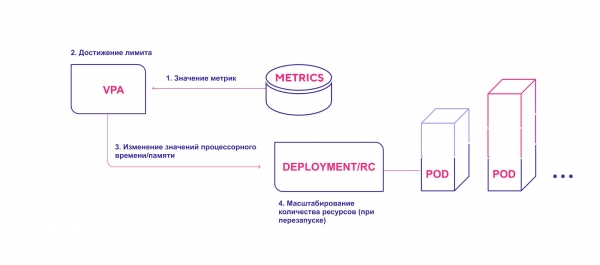
VPA adds the necessary amount of resources.
Keep the following points in mind when using VPA:
- Scaling requires mandatory pod restarts. This is necessary to avoid unstable operation after making changes. For reliability, modules restart and distribute across nodes based on newly allocated resources.
- VPA and HPA are currently incompatible with each other and cannot operate on the same pods. If you apply both scaling mechanisms in a single cluster, ensure that their configurations do not allow them to activate on the same objects.
- VPA configures container resource requests based solely on their past and current usage. It does not set resource usage limits. Issues may arise with applications behaving incorrectly as they begin to consume more resources, leading Kubernetes to shut down the pod.
- VPA is still in the early stages of development. Be prepared for the possibility that the system may undergo some changes in the near future. You can read about and . The plans include implementing collaboration between VPA and HPA, as well as deploying modules with a vertical autoscaling policy for them (e.g., a special label ‘requires VPA’).
Kubernetes Cluster Autoscaling
Cluster Autoscaler (CA) adjusts the number of nodes based on the number of pending pods. The system periodically checks for pending pods and increases the cluster size if more resources are required and if the cluster does not exceed set limits. CA interacts with the cloud service provider to request additional nodes or release idle ones. The first public version of CA was introduced in Kubernetes 1.8.
High-level CA operation scheme:
- CA checks for pods in a pending state with a default interval of 10 seconds.
- If one or more pods are pending due to insufficient available resources in the cluster for scheduling them, it attempts to prepare one or more additional nodes.
- When the cloud service provider allocates the required node, it joins the cluster and is ready to serve the pods.
- The Kubernetes scheduler distributes pending pods to the new node. If some pods still remain pending after this, the process repeats — and new nodes are added to the cluster.
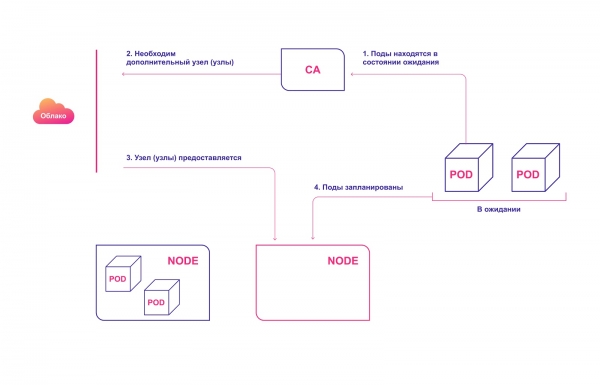
Automatic node provisioning in the cloud
Consider the following when using CA:
- CA ensures that all pods in the cluster have a place to run, regardless of CPU load levels. Additionally, it tries to ensure that there are no unnecessary nodes in the cluster.
- CA registers the need for scaling in about 30 seconds.
- Once a node becomes unnecessary, CA defaults to waiting 10 minutes before scaling down the system.
- In the automatic scaling system, there is the concept of expanders. These are various strategies for selecting a group of nodes to which new nodes will be added.
- Use this option responsibly cluster-autoscaler.kubernetes.io/safe-to-evict (true). If many pods are scheduled or if they are scattered across nodes, you will significantly lose the ability to scale down the cluster.
- Use , to prevent the removal of pods, which could cause part of your application to fail completely.
How Kubernetes automatic scaling systems interact with each other
For ideal harmony, both pod-level (HPA/VPA) and cluster-level scaling should be applied. They interact relatively easily with each other:
- HPA or VPA adjusts the replicas of pods or the resources allocated for existing pods.
- If there are not enough nodes for planned scaling, CA detects pods in a pending state.
- CA allocates new nodes.
- Modules are distributed across the new nodes.
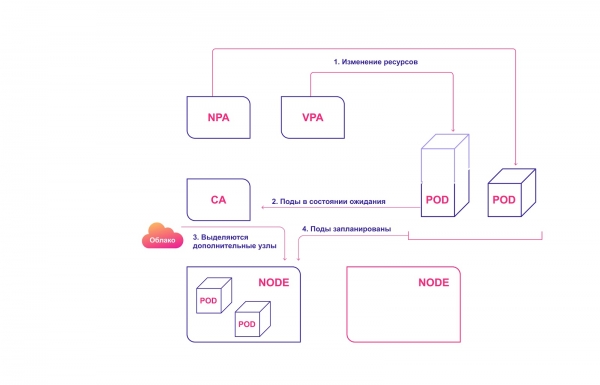
Collaborative scaling systems in Kubernetes
Common mistakes in Kubernetes automatic scaling
There are several typical problems that DevOps encounter when trying to implement automatic scaling.
HPA and VPA depend on metrics and some historical data. If insufficient resources are allocated, modules will be offloaded and will not be able to generate metrics. In this case, automatic scaling will never occur.
The scaling operation itself is time-sensitive. We want modules and clusters to scale quickly—before users notice any issues or failures. Therefore, the average scaling time for pods and clusters should be taken into account.
The ideal scenario is 4 minutes:
- 30 seconds. Target metric updates: 30–60 seconds.
- 30 seconds. HPA checks metric values: 30 seconds.
- Less than 2 seconds. Pods are created and go into a pending state: 1 second.
- Less than 2 seconds. CA sees the pending modules and sends calls to prepare the nodes: 1 second.
- 3 minutes. The cloud provider allocates nodes. K8s waits until they are ready: up to 10 minutes (depending on several factors).
The worst (more realistic) scenario is 12 minutes:
- 30 seconds. Updating target metrics.
- 30 seconds. HPA checks metric values.
- Less than 2 seconds. Pod modules are created and transition to a pending state.
- Less than 2 seconds. CA sees pending modules and issues calls to prepare nodes.
- 10 minutes. The cloud provider allocates nodes. K8s waits until they are ready. The wait time depends on several factors, such as provider latency, OS latency, and auxiliary tool operation.
Do not confuse the scaling mechanisms of cloud providers with our CA. The latter operates within the Kubernetes cluster, while the cloud provider's mechanism works based on node distribution. It is unaware of what happens with your pods or applications. These systems operate in parallel.
How to manage scaling in Kubernetes
- Kubernetes is a resource management and orchestration tool. Managing pods and cluster resources is a key milestone in mastering Kubernetes.
- Master the logic of pod scalability considering HPA and VPA.
- CA should only be used if you have a good understanding of your pods and containers' needs.
- To optimally configure the cluster, it's essential to understand how different scaling systems work together.
- When evaluating scaling time, consider both worst-case and best-case scenarios.
Source: habr.com
