

At RIT 2019, our colleague Alexander Korotkov presented on the automation of development at CIAN: to simplify life and work, we use our own platform Integro. It tracks the lifecycle of tasks, relieves developers of routine operations, and significantly reduces the number of bugs in production. In this post, we will complement Alexander's report and share how we transitioned from simple scripts to integrating open source products through our own platform, as well as what a separate automation team is working on.
Zero level
"There is no zero level, I don't know that"
Master Shifu from the animated film 'Kung Fu Panda'
Automation at CIAN began 14 years after the company was founded. At that time, the development team had 35 people. Hard to believe, right? Of course, in some form, automation did exist, but a separate direction for continuous integration and code delivery began to take shape in 2015.
At that time, we had a huge monolith made of Python, C#, and PHP, deployed on Linux/Windows servers. To deploy this monster, we had a set of scripts that we ran manually. There was also the building of the monolith, which brought pain and suffering due to conflicts when merging branches, fixing defects, and rebuilding 'with a different set of tasks in the build.' Simplified, the process looked like this:
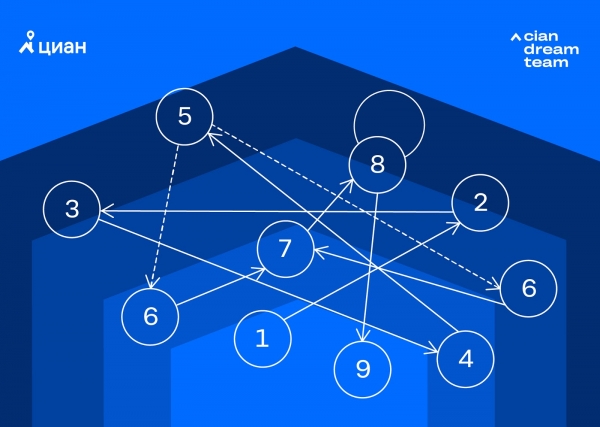
We were not satisfied with this, and we wanted to build a repeatable, automated, and managed process for building and deploying. For this, we needed a CI/CD system, and we were choosing between the free version of TeamCity and free Jenkins, as we had experience with both and they suited us in terms of functionality. We chose TeamCity as the fresher product. At that time, we were not yet using microservices architecture and did not anticipate a large number of tasks and projects.
We come to the idea of our own system
The implementation of Teamcity removed only part of the manual work: there remained the creation of Pull Requests, advancing tasks through statuses in Jira, and selecting tasks for release. Teamcity could not handle this. A path for further automation needed to be chosen. We considered options for working with scripts in Teamcity or switching to third-party automation systems. Ultimately, we decided that we needed the maximum flexibility that only our own solution could provide. This is how the first version of our internal automation system named Integro came to be.
Teamcity automates the process of building and deploying, while Integro focuses on high-level automation of development processes. It was necessary to combine the work with tasks in Jira with the processing of related source code in Bitbucket. At this stage, Integro began to develop its own workflows for handling different types of tasks.
Due to the increase in automation within business processes, the number of projects and runs in Teamcity rose. This led to a new problem: one free instance of Teamcity was insufficient (3 agents and 100 projects), so we added another instance (another 3 agents and 100 projects), and then more. Ultimately, we ended up with a system of several clusters that was difficult to manage.
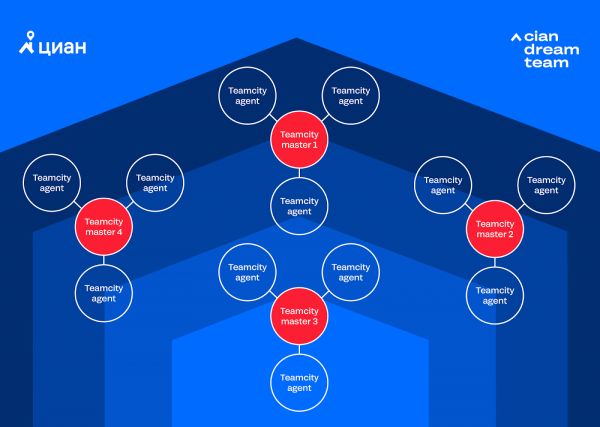
When the question of a fourth instance arose, we realized that continuing in this manner was unsustainable, as the combined costs for supporting four instances were becoming unmanageable. The question then arose of purchasing a paid Teamcity or opting for the free Jenkins. We conducted calculations concerning the instances and plans for automation, and decided that we would transition to Jenkins. After a couple of weeks, we moved to Jenkins and alleviated part of the headache associated with supporting multiple Teamcity instances. This allowed us to focus on developing Integro and tailoring Jenkins to our needs.
With the rise of basic automation (in the form of automatic Pull Request creation, collecting and publishing Code coverage, and other checks), there has been a strong desire to minimize manual releases and hand this work over to robots. In addition, the company began migrating to microservices, which required frequent releases, and they needed to be done separately from one another. This gradually led us to automatic releases of our microservices (the monolith is still released manually due to the complexity of the process). However, as is often the case, a new challenge arose.
Automating Testing
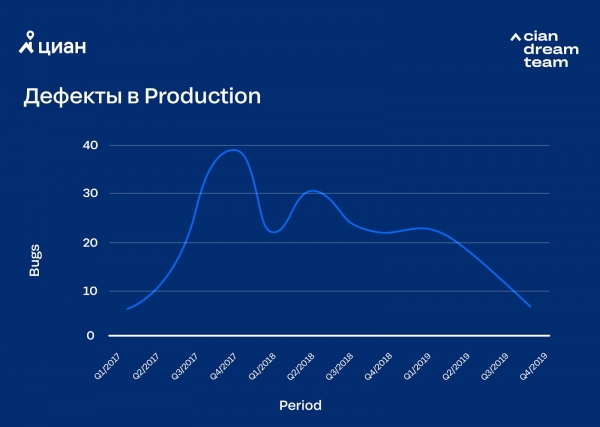
Due to the automation of releases, development processes have accelerated, partly by skipping some testing stages. This led to a temporary loss of quality. It sounds trivial, but along with speeding up releases, we needed to change our product development methodology. We had to think about automating testing, instilling personal responsibility (here it’s about 'acknowledging the idea in one's mind' rather than monetary penalties) in developers for the code they produce and the bugs therein, as well as making decisions on whether to deploy or not through automatic deployment.
By addressing quality issues, we arrived at two important decisions: we started conducting canary testing and implemented automatic error background monitoring with automatic responses to its exceedance. The first decision allowed us to catch obvious errors before the code fully entered production, while the second reduced the response time to issues in production. Errors do occur, of course, but we spend most of our time and effort not on fixing, but on minimizing.
Automation Team
We currently have a staff of 130 developers, and we continue . The Continuous Integration and Delivery team (hereafter referred to as the Deploy and Integration team or DI) consists of 7 people and works in 2 directions: developing the Integro automation platform and DevOps.
DevOps is responsible for the Dev/Beta environments of the CIAN site and the Integro environment, assisting developers in problem-solving and developing new approaches for scaling environments. The Integro development team focuses on Integro itself as well as related services, such as plugins for Jenkins, Jira, and Confluence, while also developing auxiliary utilities and applications for developer teams.
The DI team works alongside the Platform team, which is engaged in developing architecture, libraries, and development approaches within the company. Additionally, any developer within CIAN can contribute to automation, for instance, by creating micro-automations tailored to the team's needs or sharing innovative ideas on how to improve automation further.
The Layered Cake of Automation at CIAN
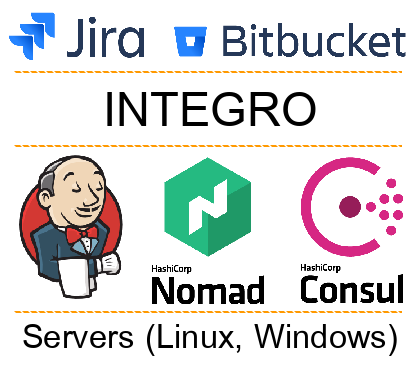
All systems involved in automation can be divided into several layers:
- External systems (Jira, Bitbucket, etc.). Development teams work with these.
- The Integro Platform. Developers typically do not interact with it directly, but it underpins all automation operations.
- Delivery, orchestration, and discovery services (such as Jenkins, Consul, Nomad). These services help us deploy code on servers and ensure service interoperability.
- Physical layer (servers, OS, related software). Our code operates at this level, which can include physical servers or virtual machines (LXC, KVM, Docker).
Based on this concept, we divide responsibilities within the DI team. The first two layers are under the responsibility of the Integro development direction, while the last two layers fall under the responsibility of DevOps. This division allows us to focus on tasks without hindering interaction, as we are located close to each other and continuously exchange knowledge and experience.
Integro
Let’s focus on Integro and start with the tech stack:
- CentOs 7
- Docker + Nomad + Consul + Vault
- Java 11 (the old Integro monolith will remain on Java 8)
- Spring Boot 2.X + Spring Cloud Config
- PostgreSql 11
- RabbitMQ
- Apache Ignite
- Camunda (embedded)
- Grafana + Graphite + Prometheus + Jaeger + ELK
- Web UI: React (CSR) + MobX
- SSO: Keycloak
We adhere to the microservices development principle, although we do have legacy in the form of an early version of Integro's monolith. Each microservice runs in its own Docker container, and services communicate with each other via HTTP requests and RabbitMQ messages. Microservices discover each other through Consul and make requests to it, passing authorization through SSO (Keycloak, OAuth 2/OpenID Connect).
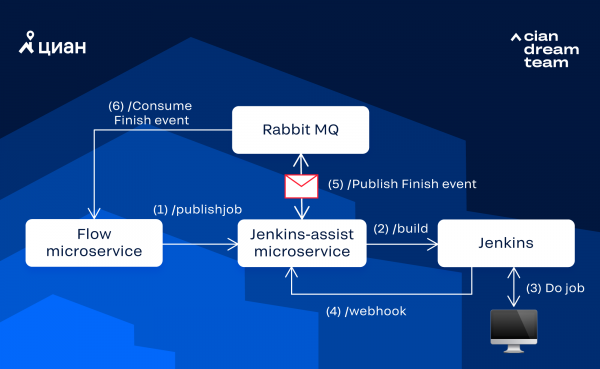
As a real example, let's consider the interaction with Jenkins, which consists of the following steps:
- The workflow management microservice (hereinafter referred to as the Flow microservice) wants to trigger a build in Jenkins. To do this, it finds the IP:PORT of the microservice integrated with Jenkins (hereinafter referred to as the Jenkins microservice) through Consul and sends it an asynchronous request to start the build in Jenkins.
- After receiving the request, the Jenkins microservice forms and returns a Job ID in response, which can later be used to identify the result of the operation. At the same time, it initiates the build in Jenkins via a REST API call.
- Jenkins performs the build, and upon completion, sends a webhook with the execution results to the Jenkins microservice.
- The Jenkins microservice, upon receiving the webhook, forms a message about the request processing completion and attaches the execution results to it. The formed message is sent to the RabbitMQ queue.
- Through RabbitMQ, the published message reaches the Flow microservice, which learns about the result of processing its task by matching the Job ID from the request and the received message.
Currently, we have about 30 microservices, which can be divided into several groups:
- Configuration management.
- User notification and interaction (messengers, email).
- Working with source code.
- Integration with deployment tools (Jenkins, Nomad, Consul, etc.).
- Monitoring (of releases, errors, etc.).
- Web utilities (UI for managing test environments, collecting statistics, etc.).
- Integration with task trackers and similar systems.
- Workflow management for different tasks.
Task workflow
Integro automates actions related to the task lifecycle. Simplified, we will understand the task lifecycle as the task workflow in Jira. In our development processes, there are several variations of the workflow depending on the project, task type, and options selected for a particular task.
Let's consider the workflow that we use most often:
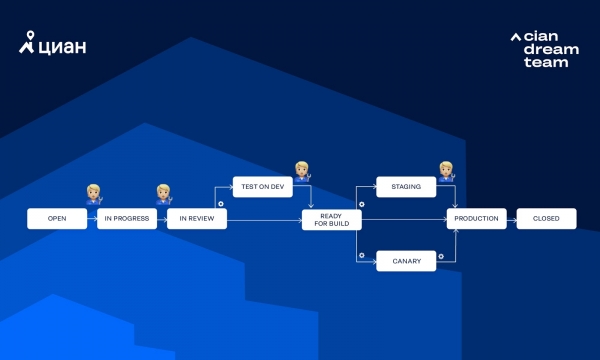
In the diagram, the gear indicates that the transition is automatically triggered by Integro, while the figure of a person means that the transition is manually triggered by a human. Let's consider several paths that a task can take in this workflow.
Fully manual testing on DEV+BETA without canary tests (typically how we release a monolith):
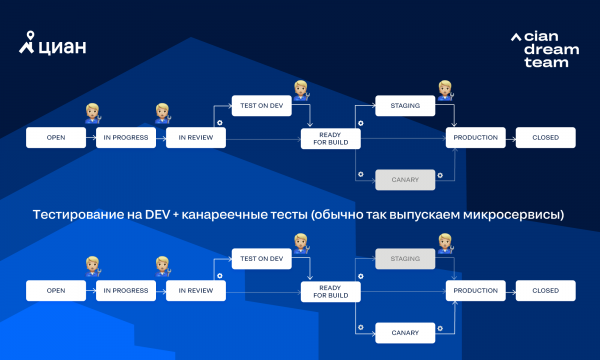
There may be other combinations of transitions. Sometimes the path a task will take can be chosen through options in Jira.
Task Movement
Let's review the main steps involved in moving a task through the workflow 'Testing on DEV + canary tests':
1. A developer or PM creates a task.
2. The developer takes the task into work. Upon completion, they move it to the IN REVIEW status.
3. Jira sends a Webhook to the Jira microservice (responsible for Jira integration).
4. The Jira microservice sends a request to the Flow service (responsible for internal workflows where the work is done) to start the workflow.
5. Inside the Flow service:
- Reviewers are assigned to the task (Users microservice, which knows everything about the users + Jira microservice).
- Through the Source microservice (which knows about repositories and branches, but does not work with the code itself), repositories containing the branch of our task are searched (to simplify the search, the branch name matches the task number in Jira). Most often, the task has only one branch in one repository, which simplifies queue management for deployment and reduces coupling between repositories.
- For each found branch, the following sequence of actions is performed:
i) Merging the master branch (Git microservice for working with the code).
ii) The branch is locked from changes by the developer (Bitbucket microservice).
iii) A Pull Request is created for this branch (Bitbucket microservice).
iv) A message about the new Pull Request is sent to the developers' chats (Notify microservice for notifications).
v) The build, testing, and deployment of the task on DEV are initiated (Jenkins microservice for working with Jenkins).
vi) If all previous points are successfully completed, Integro places its Approval in the Pull Request (Bitbucket microservice). - Integro awaits Approval in the Pull Request from the assigned reviewers.
- Once all necessary Approvals have been received (including successfully passing automated tests), Integro moves the task to the Test on Dev status (Jira microservice).
6. Testers conduct task testing. If there are no issues, they move the task to the status Ready For Build.
7. Integro detects that the task is ready for release and initiates its deployment in canary mode (Jenkins microservice). Readiness for release is determined by a set of rules. For example, the task is in the required status, there are no blockages on other tasks, there are currently no active deployments of this microservice, etc.
8. The task is moved to the status Canary (Jira microservice).
9. Jenkins, through Nomad, initiates the deployment of the task in canary mode (usually 1-3 instances) and notifies the release monitoring service (DeployWatch microservice) about the deployment.
10. The DeployWatch microservice collects error background data and responds to it if necessary. If the error background exceeds a certain threshold (which is calculated automatically), developers are notified via the Notify microservice. If the developer does not respond within 5 minutes (by clicking Revert or Stay), an automatic rollback of the canary instances is initiated. If the threshold is not exceeded, the developer must manually initiate the deployment of the task to Production (by clicking a button in the UI). If the developer does not initiate the deployment to Production within 60 minutes, the canary instances will also be rolled back for safety.
11. After the deployment to Production is initiated:
- The task is moved to the status Production (Jira microservice).
- The Jenkins microservice starts the deployment process and notifies the DeployWatch microservice about the deployment.
- The DeployWatch microservice checks that all containers on Production have been updated (there have been cases where not all were updated).
- A notification about the results of the deployment in Production is sent via the Notify microservice.
12. Developers will have 30 minutes to initiate a rollback of the task from Production in case of detecting incorrect behavior of the microservice. After this time, the task will be automatically merged into master (Git microservice).
13. After a successful merge into master, the status of the task will be changed to Closed (Jira microservice).
The scheme does not claim to be fully detailed (in reality, there are more steps), but it allows assessing the level of integration into processes. We do not consider this scheme ideal and are improving the processes of automated release management and deployment.
What's Next
We have big plans for automating our processes, such as eliminating manual operations during monolith releases, improving monitoring during automatic deployments, and enhancing collaboration with developers.
But we'll pause here for now. We've only touched on many topics in the automation review superficially and haven't addressed some at all, so we’re happy to answer any questions. We look forward to suggestions on what to explore in detail—please write in the comments.
Source: habr.com
