

— a simple and effective tool for backing up PostgreSQL to the cloud. In terms of its core functionality, it is the successor of the popular tool , but rewritten in Go. However, WAL-G has one important new feature — delta backups. Delta backups store the file pages that have changed since the last backup version. WAL-G implements many technologies for parallelizing backups. WAL-G operates much faster than WAL-E.
You can read more about how wal-g works in the article:
The S3 storage protocol has become popular for data storage. One of the advantages of S3 is the ability to access it via API, allowing for flexible interaction with the storage, including public read access, while information updates to the storage are performed only by authorized individuals.
There are both open and private implementations of storages that operate on the S3 protocol. Today, we will look at a popular solution for organizing small storages — Minio.
For testing wal-g, one PostgreSQL server is sufficient, and Minio is used as a replacement for S3.
Minio Server
Installing Minio
yum -y install yum-plugin-copr
yum copr enable -y lkiesow/minio
yum install -y minio
Edit AccessKey and SecretKey in /etc/minio/minio.conf
vi /etc/minio/minio.confIf you are not using nginx in front of Minio, you will need to change
--address 127.0.0.1:9000--address 0.0.0.0:9000Start Minio
systemctl start minioAccess the Minio web interface and create a bucket (for example, pg-backups).
Database Server
I (Anton Patsev) build WAL-G in rpm. , .
For those who do not use an RPM-based system, please refer to the official installation instructions.
Along with the wal-g binary in rpm, there are scripts that import variables from the file /etc/wal-g.d/server-s3.conf.
backup-fetch.sh
backup-list.sh
backup-push.sh
wal-fetch.sh
wal-g-run.sh
wal-push.sh
Install wal-g.
yum -y install yum-plugin-copr
yum copr enable -y antonpatsev/wal-g
yum install -y wal-g
Check the version of wal-g.
wal-g --version
wal-g version v0.2.14
Edit /etc/wal-g.d/server-s3.conf according to your needs.
Configuration files and data files used by the database cluster are traditionally stored together in the cluster's data directory, which is usually referred to as PGDATA
#!/bin/bash

export PG_VER="9.6"

export WALE_S3_PREFIX="s3://pg-backups" # бакет, который мы создали в S3
export AWS_ACCESS_KEY_ID="xxxx" # AccessKey из /etc/minio/minio.conf
export AWS_ENDPOINT="http://ip-адрес-сервера-minio:9000"
export AWS_S3_FORCE_PATH_STYLE="true"
export AWS_SECRET_ACCESS_KEY="yyyy" # SecretKey из /etc/minio/minio.conf

export PGDATA=/var/lib/pgsql/$PG_VER/data/
export PGHOST=/var/run/postgresql/.s.PGSQL.5432 # Сокет для подключения к PostgreSQL

export WALG_UPLOAD_CONCURRENCY=2 # Кол-во потоков для закачки
export WALG_DOWNLOAD_CONCURRENCY=2 # Кол-во потоков для скачивания
export WALG_UPLOAD_DISK_CONCURRENCY=2 # Кол-во потоков на диске для закачки
export WALG_DELTA_MAX_STEPS=7
export WALG_COMPRESSION_METHOD=brotli # Какой метод сжатия использовать.
When setting up WAL-G, you specify WALG_DELTA_MAX_STEPS — the maximum number of steps that the delta backup can lag behind the base backup, and you define the delta copy policy. You either make a copy from the latest existing delta or create a delta from the initial full backup. This is necessary in case the same component of the database is constantly changing with the same data.
Installing the database.
yum install -y https://download.postgresql.org/pub/repos/yum/reporpms/EL-7-x86_64/pgdg-redhat-repo-latest.noarch.rpm
yum install -y postgresql96 postgresql96-server mc
Initializing the database.
/usr/pgsql-9.6/bin/postgresql96-setup initdb
Initializing database ... OK
If you are testing on one server, you need to reconfigure the wal_level parameter to archive for PostgreSQL versions less than 10, and to replica for PostgreSQL version 10 and above.
wal_level = archiveWe will back up the WAL archives every 60 seconds using PostgreSQL itself. In production, you will have a different value for archive_timeout.
archive_mode = on
archive_command = '/usr/local/bin/wal-push.sh %p'
archive_timeout = 60 # The archive_command will be executed every 60 seconds.
Starting PostgreSQL
systemctl start postgresql-9.6In a separate console, check the PostgreSQL logs for errors: (replace postgresql-Wed.log with the current one).
tail -fn100 /var/lib/pgsql/9.6/data/pg_log/postgresql-Wed.logAccessing psql.
su - postgres
psql
Creating a database in psql.
Creating a table in the database test1.
create database test1;Switching to the database test.
postgres=# c test1;Creating the table indexing_table.
test1=# CREATE TABLE indexing_table(created_at TIMESTAMP WITH TIME ZONE DEFAULT NOW());Adding data.
Starting data insertion. Waiting for 10-20 minutes.
#!/bin/bash
# postgres
while true; do
psql -U postgres -d test1 -c "INSERT INTO indexing_table(created_at) VALUES (CURRENT_TIMESTAMP);"
sleep 60;
done
Make sure to take a full backup.
su - postgres
/usr/local/bin/backup-push.sh
Viewing records in the table of the database test1
select * from indexing_table;
2020-01-29 09:41:25.226198+
2020-01-29 09:42:25.336989+
2020-01-29 09:43:25.356069+
2020-01-29 09:44:25.37381+
2020-01-29 09:45:25.392944+
2020-01-29 09:46:25.412327+
2020-01-29 09:47:25.432564+
2020-01-29 09:48:25.451985+
2020-01-29 09:49:25.472653+
2020-01-29 09:50:25.491974+
2020-01-29 09:51:25.510178+
The row represents the current time.
Checking the list of full backups
/usr/local/bin/backup-list.shTesting restoration
Full restoration by applying all available WAL.
Stopping PostgreSQL.
Deleting everything from the folder /var/lib/pgsql/9.6/data.
Running the script /usr/local/bin/backup-fetch.sh as the postgres user.
su - postgres
/usr/local/bin/backup-fetch.sh
Backup extraction complete.
Adding recovery.conf to the folder /var/lib/pgsql/9.6/data with the following content.
restore_command = '/usr/local/bin/wal-fetch.sh "%f" "%p"'Starting PostgreSQL. PostgreSQL will initiate the recovery process from the archived WAL, and only then will the database open.
systemctl start postgresql-9.6
tail -fn100 /var/lib/pgsql/9.6/data/pg_log/postgresql-Wed.log
Restoration to a specific time.
If we want to restore the database to a specific minute, we add the recovery_target_time parameter in recovery.conf — specifying the time to which we want to restore the database.
restore_command = '/usr/local/bin/wal-fetch.sh "%f" "%p"'
recovery_target_time = '2020-01-29 09:46:25'
After the restoration, we check the indexing_table.
 2020-01-29 09:41:25.226198+00
 2020-01-29 09:42:25.336989+00
 2020-01-29 09:43:25.356069+00
 2020-01-29 09:44:25.37381+00
 2020-01-29 09:45:25.392944+00
Starting PostgreSQL. PostgreSQL will initiate the recovery process from the archived WAL, and only then will the database open.
systemctl start postgresql-9.6
tail -fn100 /var/lib/pgsql/9.6/data/pg_log/postgresql-Wed.log
Testing
We generate a 1GB database as described here.
We request the size of the bucket after generating 1GB of data.
postgres=# SELECT pg_size_pretty(pg_database_size('test1'));
pg_size_pretty
----------------
1003 MB
s4cmd — a free command-line tool for working with data stored in Amazon S3. The utility is written in Python, allowing it to be used on both Windows and Linux operating systems.
Installing s4cmd
pip install s4cmdLZ4
s4cmd --endpoint-url=http://server-ip-address-minio:9000 --access-key=xxxx --secret-key=yyyy du -r s3://pg-backups
840540822       s3://pg-backups/wal_005/
840 MB in lz4 format just for WAL logs

Full backup with lz4 - 1GB data
time backup_push.sh
real 0m18.582s

Size of the S3 bucket after the full backup

581480085       s3://pg-backups/basebackups_005/
842374424   s3://pg-backups/wal_005
581 MB is the size of the full backup
LZMA
After generating 1GB of data
338413694       s3://pg-backups/wal_005/
338 MB of logs in lzma format

Time taken for generating the full backup
time backup_push.sh
real    5m25.054s

Size of the bucket in S3
270310495       s3://pg-backups/basebackups_005/
433485092   s3://pg-backups/wal_005/

270 MB is the size of the full backup in lzma format
Brotli.
After generating 1GB of data
459229886       s3://pg-backups/wal_005/
459 MB of logs in brotli format

Time taken for generating the full backup
real    0m23.408s

Size of the bucket in S3
312960942       s3://pg-backups/basebackups_005/
459309262   s3://pg-backups/wal_005/

312 MB is the size of the full backup in brotli format
Comparison of results in the chart.
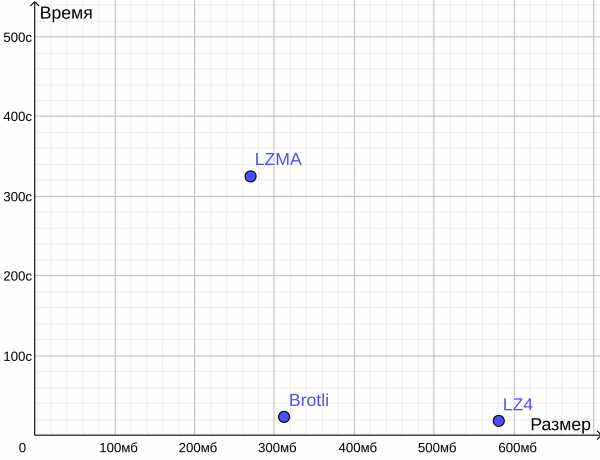
As we can see, Brotli is comparable in size to LZMA, but the backup is completed in the time it takes for LZ4.
Chat for the Russian-speaking PostgreSQL community:
Please give a star on Github if you are using
Source: habr.com
