

Every few years, the software development industry experiences a paradigm shift. One such phenomenon is the growing interest in the microservices concept. Although microservices are not a brand-new technology, their popularity has skyrocketed in recent times.
Large monolithic services are now being replaced by independent, autonomous microservices. A microservice can be viewed as an application that serves a single, very specific purpose. For example, it could be a relational database, an Express application, or a Solr service.
Today, it is hard to imagine developing a new software system without using microservices. This situation, in turn, leads us to the Docker platform.
Docker
Platform , in the development and deployment of microservices, has become almost an industry standard. The project website states that Docker is the only independent containerization platform that enables organizations to effortlessly create, distribute, and run any applications in any environments—from hybrid clouds to edge systems.
Docker Compose
Technology is intended for configuring multi-container applications. A Docker Compose project can include as many Docker containers as the creator of the project needs.
When working with Docker Compose to configure application services and manage their interactions, a YAML file is used. Thus, Docker Compose is a tool for describing and launching multi-container Docker applications.
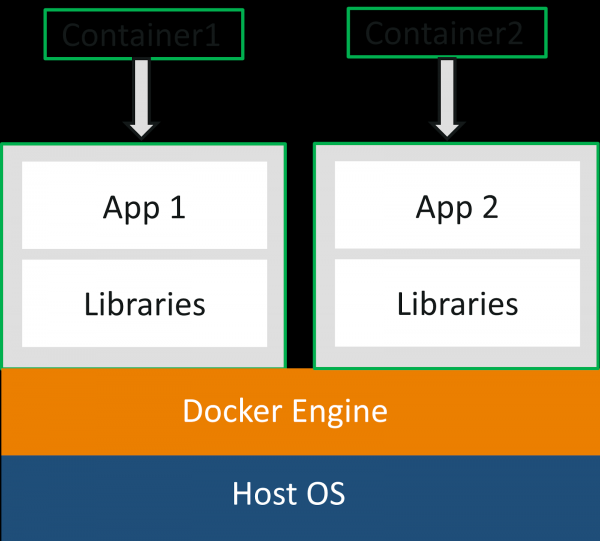
Two containers running on the host system
GNU Make
Program make, in essence, is a tool for automating the build of programs and libraries from source code. Overall, one can say that make applies to any process that involves executing arbitrary commands to transform some raw materials into a resultant form or goal. In our case, commands docker-compose will be transformed into abstract targets ().
To inform the program make about what we want from it, we will need a file Makefile.
In our Makefile that will contain standard commands docker and docker-compose, which are designed to solve a variety of tasks. Specifically, this includes building a container, starting it, stopping it, restarting it, managing user access to the container, working with container logs, and addressing other similar tasks.
Typical Use Cases for Docker Compose
Imagine a typical web application with the following components:
- A TimescaleDB (Postgres) database.
- An Express.js application.
- Ping (just a container that does nothing special).
This application will require 3 Docker containers and a file docker-compose, containing instructions for managing these containers. Each container will have different interaction points. For example, with the container timescale , one can interact somewhat like one would with databases. Specifically, it allows for the following actions:
- Accessing the Postgres shell.
- Importing and exporting tables.
- Creating
pg_dumptables or databases.
The Express.js application container, expressjs, may have the following capabilities:
- Providing fresh data from the system log.
- Accessing the shell to execute certain commands.
Interacting with containers
Once we've set up the connection between containers using Docker Compose, it's time to establish interactions with these containers. Within the Docker Compose system, there is a command docker-compose, which supports the option -f, allowing the system to operate based solely on the containers mentioned in the file docker-compose.yml.
By utilizing this option, we can restrict interactions with the system to only those containers specified in the file. docker-compose.yml.
Let's look at how interactions with containers appear when using commands docker-compose. If we assume we need to access the shell for psql, then the corresponding commands may look like this:
docker-compose -f docker-compose.yml exec timescale psql -Upostgres The same command, when using not docker-compose, and docker, can look like this:
docker exec -it edp_timescale_1 psql -Upostgres Note that in such cases, it is always preferable to use the command docker, rather than the command docker-compose, as this eliminates the need to remember container names.
Both of the commands above are not particularly complex. But if we used a 'wrapper' in the form of Makefile, which would provide us with a simple command interface and would itself call such long commands, similar results could be achieved like this:
make db-shell It is quite obvious that the use of Makefile significantly simplifies working with containers!
Working example
Based on the project scheme discussed above, we will create the following file docker-compose.yml:
version: '3.3'
services:
    api:
        build: .
        image: mywebimage:0.0.1
        ports:
            - 8080:8080
        volumes:
            - /app/node_modules/
        depends_on:
            - timescale
        command: npm run dev
        networks:
            - webappnetwork
    timescale:
        image: timescale/timescaledb-postgis:latest-pg11
        environment:
          - POSTGRES_USER=postgres
          - POSTGRES_PASSWORD=postgres
        command: ["postgres", "-c", "log_statement=all", "-c", "log_destination=stderr"]
        volumes:
          - ./create_schema.sql:/docker-entrypoint-initdb.d/create_schema.sql
        networks:
           - webappnetwork
    ping:
       image: willfarrell/ping
       environment:
           HOSTNAME: "localhost"
           TIMEOUT: 300
networks:
   webappnetwork:
       driver: bridge
To manage Docker Compose configuration and interact with the containers it describes, we will create the following file Makefile:
THIS_FILE := $(lastword $(MAKEFILE_LIST))
.PHONY: help build up start down destroy stop restart logs logs-api ps login-timescale login-api db-shell
help:
        make -pRrq  -f $(THIS_FILE) : 2>/dev/null | awk -v RS= -F: '/^# File/,/^# Finished Make data base/ {if ($$1 !~ "^[#.]") {print $$1}}' | sort | egrep -v -e '^[^[:alnum:]]' -e '^$@$$'
build:
        docker-compose -f docker-compose.yml build $(c)
up:
        docker-compose -f docker-compose.yml up -d $(c)
start:
        docker-compose -f docker-compose.yml start $(c)
down:
        docker-compose -f docker-compose.yml down $(c)
destroy:
        docker-compose -f docker-compose.yml down -v $(c)
stop:
        docker-compose -f docker-compose.yml stop $(c)
restart:
        docker-compose -f docker-compose.yml stop $(c)
        docker-compose -f docker-compose.yml up -d $(c)
logs:
        docker-compose -f docker-compose.yml logs --tail=100 -f $(c)
logs-api:
        docker-compose -f docker-compose.yml logs --tail=100 -f api
ps:
        docker-compose -f docker-compose.yml ps
login-timescale:
        docker-compose -f docker-compose.yml exec timescale /bin/bash
login-api:
        docker-compose -f docker-compose.yml exec api /bin/bash
db-shell:
        docker-compose -f docker-compose.yml exec timescale psql -Upostgres
Most of the commands described here apply to all containers, but using the option c= allows limiting the scope of the command to a single container.
After Makefile is ready, you can use it like this:
make help— outputs a list of all commands available formake.

Help for available commands
make build— builds the image fromDockerfileIn our example, we used existing imagestimescaleandpingBut the imageapiwe want to build locally. This will be done after executing this command.

Building a Docker container
make start— starts all containers. To start just one container, you can use a command likemake start c=timescale.

Starting the timescale container
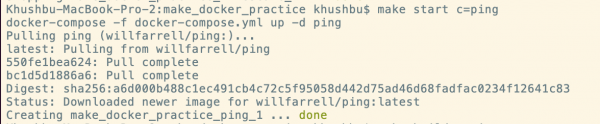
Starting the ping container
make login-timescale— logs into the container's bash sessiontimescale.
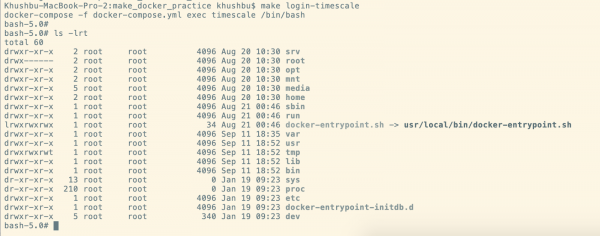
Starting bash in the timescale container
make db-shell— logs intopsqlin a containertimescaleto execute SQL queries against the database.

Starting psql in the timescaledb container
make stop— stops containers.

Stopping the timescale container
make down— stops and removes containers. To delete a specific container, you can use this command with the specified container. For example —make down c=timescaleormake down c=api.
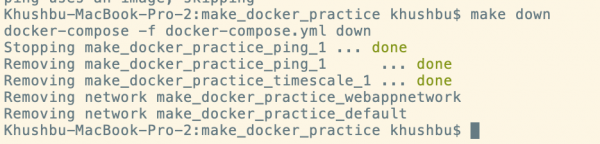
Stopping and removing all containers
Summary
Although the Docker Compose system provides us with a wide range of commands for managing containers, sometimes these commands become lengthy and can be hard to remember.
The usage method Makefile helped us establish quick and simple interactions with containers from the file docker-compose.yml. Specifically, it involves the following:
- The developer interacts only with the project containers described in
docker-compose.yml, other running containers do not interfere with the work. - In case some command is forgotten, you can run the command
make helpand get help on available commands. - There's no need to memorize long lists of arguments for actions like retrieving fresh log entries or logging in. For example, a command like
docker-compose -f docker-compose.yml exec timescale psql -Upostgresturns intomake db-shell. - File
Makefilecan be adjusted flexibly as the project grows. For instance, it’s not difficult to add a command for creating a database backup or for performing any other action. - If a large team of developers is using the same
Makefile, it organizes collaborative work and reduces the number of mistakes.
P.S. In our we have an image , which can be installed with a single click. You can check the operation of containers on . All new clients receive 3 days of free testing.
Dear readers! How do you automate working with Docker Compose?
Source: habr.com
