

Google Inc. release of the web browser . At the same time, the stable release of the open-source project , which serves as the foundation for Chrome. The Chrome browser features the use of Google logos, a crash notification system, the ability to load Flash plugins on demand, modules for playing protected video content (DRM), an automatic update installation system, and the transmission of RLZ parameters during searches. . The next release, Chrome 81, is scheduled for March 17.
:
- A small percentage of users have been offered a tab grouping feature, allowing multiple similar-purpose tabs to be combined into visually distinct groups. Each group can be assigned its own color and name. Users not in the first wave of activation can enable grouping support through the option “chrome://flags/#tab-groups”.
- Support for the feature , which allows creating links to individual words or phrases without explicitly marking them in the document using the “a name” tag or “id” property. The syntax for such links is planned to be established as a web standard that is still in the . The transition mask (essentially a scroll search) is separated from the usual anchor by the marker “:~:”. For example, opening the link “https://opennet.ru/52312/#:~:text=Chromе” will shift the page to the position of the first mention of the word “Chromе”, which will be highlighted.
- implemented On February 17, initially for a small percentage of users, and then gradually expanding the reach.
- protection against intrusive notifications related to permission confirmation. Since such activity, like spam requests for push notifications, interrupts user workflow and distracts attention away from actions in confirmation dialogues, Chrome 80 will now display an informational tooltip in the address bar with a warning about blocking permission requests instead of a separate dialogue. This tooltip will then minimize into an indicator with an image of a crossed-out bell. Clicking on the indicator allows users to either grant or deny the requested permission at their convenience. Automatically, this new mode will selectively activate for users who have typically blocked such requests and for sites that record a high percentage of denied requests. A special option has been added in settings to enable this new mode for all requests (chrome://flags/#quiet-notification-prompts).
- popup display (invoking the method window.open()) and sending synchronous XMLHttpRequest calls in event handlers for unloading or hiding the page (unload, beforeunload, pagehide, and visibilitychange);
- An initial against loading mixed multimedia content (when resources are loaded over http:// on an HTTPS page). On pages opened over HTTPS, links to "http://" will now automatically be replaced with "https://" in blocks related to playing audio and video files. If an audio or video resource is unavailable over https, its loading is blocked (users can manually indicate the block via the menu available through the lock symbol in the address bar).
Images will continue to load unchanged (auto-replacement will be applied in Chrome 81), but for replacing with https or blocking images, developers are provided with the CSP properties upgrade-insecure-requests and block-all-mixed-content. The blocking of mixed content for scripts and iframes was previously implemented.
- Gradual of FTP support has begun. By default, FTP support remains active for now, but it will be An experiment in which FTP support will be disabled for a certain percentage of users (to revert, the browser must be launched with the ‘—enable-ftp’ option). Recall that in previous releases, the display of content in the browser window from resources loaded via the ‘ftp://’ protocol was already disabled (for example, HTML documents and README files are no longer shown), FTP usage for loading sub-resources from documents was prohibited, and proxy support for FTP was discontinued. However, it has still been possible to upload files via direct links and display directory contents.
-
The ability to use vector SVG images as a website icon (favicon). - Settings have been added to selectively disable certain types of data transmitted during synchronization between browsers.
- A rule has been added for centrally administered corporate users , which allows prohibiting the installation of external extensions on the device.
- If the user refreshes the page in private browsing mode, Firefox will interpret this as a problem and suggest A one-time check of the entire chain of properties or calls in JavaScript. For example, when accessing ‘db.user.name.length’, it previously required checking the definition of all its components step by step, such as ‘if (db && db.user && db.user.name)’. Now, using the ‘?.’ operator, you can access the value ‘db?.user?.name?.length’ without prior checks, and such access will not result in an error. In case of issues (if any element is processed as null or undefined), the output will be ‘undefined’.
- In JavaScript, a new logical coalescing operator ‘‘ has been proposed, which returns the right operand if the left operand is NULL or undefined, and vice versa. For example, ‘const foo = bar ?? ‘default string’’ will return the string or the value of bar if bar is null, including when bar is 0 and ‘ ‘, unlike the ‘||’ operator.
- In Origin Trials mode (experimental features that require separate ) the Content Indexing API has been proposed. The Origin Trial implies the ability to work with the specified API from applications loaded from localhost or 127.0.0.1, or after registration and obtaining a special token, which is valid for a limited time for a specific site. The API , provides metadata about content that was previously cached by web applications operating in Progressive Web Apps (PWS) mode. The application can store various data on the browser side, including images, videos, and articles, and utilize them via the Cache Storage and IndexedDB APIs when the network connection is lost. The Content Indexing API allows the addition, retrieval, and deletion of such resources. This API is already used in browsers to enumerate the list of pages and multimedia data available for offline viewing.
- Stabilized and now distributed outside of Origin Trials, the API , enabling the user to select entries from the address book and transmit certain details about them to the site. Upon request, a list of properties to retrieve is defined. These properties are explicitly displayed to the user, who decides whether to send these properties or not. The API can be used, for example, in a web-based email client to select recipients for a sent email, in a web application with VoIP functionality to initiate a call to a specific number, or in a social network to find already registered friends. Within the framework of Origin Trials, some new properties for the Contact Picker have been proposed: in addition to the previously available full name, email, and phone number, the ability to transmit postal addresses and images has been added.
- In Web Workers a new way to load ECMAScript modules that avoids using the importScripts() function, which blocks the worker during the processing of the imported script and executes it in the global context. The new method implies the creation of special modules for Web Workers that support standard JavaScript import mechanisms and can be dynamically loaded without blocking the execution of the worker. For loading modules, a new resource type has been introduced in the Worker constructor — ‘module’:
const worker = new Worker(‘worker.js’, {
type: ‘module’
}); - a built-in capability for handling compressed streams in JavaScript that does not require the use of external libraries. For compression and decompression, the APIs have been added . Compression is supported using gzip and deflate algorithms.
const compressionReadableStream
= inputReadableStream.pipeThrough(new CompressionStream(‘gzip’)); - Added the CSS property “allowing breaks at any typographical character level, including breaks next to punctuation marks, predefined spaces (
) and in the middle of words. CSS property addedallowing unbreakable sequences of characters to be broken anywhere if a suitable breaking position could not be found in the line.
- For the media context processed in encrypted form, support has been implemented for the method , which provides information about the browser's capabilities related to decoding protected content (for example, the specified method can be used to select high-quality or energy-saving decoding scenarios considering available bandwidth and screen size).
- A method has been added , through which information about video playback performance can be obtained to adjust bitrate, resolution, and other video parameters.
- In the , which simplifies integration with existing payment systems, the ability to the processing of address and contact information to an external payment system handler (the payment system application may have more accurate information than the browser).
- Support for the HTTP header , which allows sending additional metadata about the type of content related to the request (for example, for a request through an img tag the type is specified as "image", for fonts - "font", for scripts - "script", for styles - "style", etc.). Based on the specified type, the server can take measures to protect against certain types of attacks (for example, it is unlikely that a handler link for transferring money will be specified through an img tag, so such requests do not need to be processed).
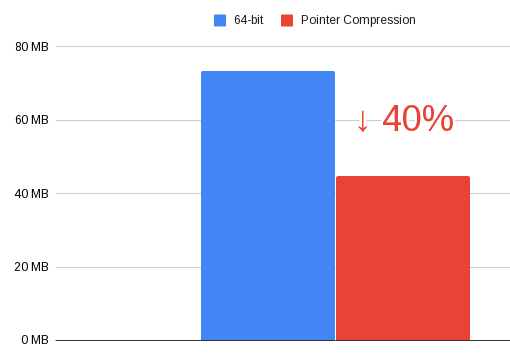
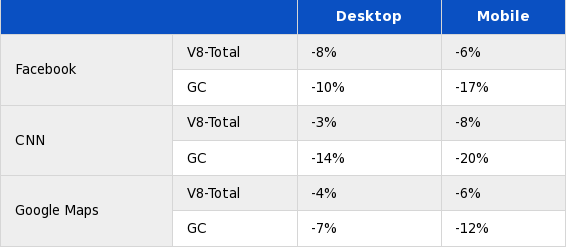
- In the JavaScript engine V8 of pointer storage in the heap. Instead of storing the full 64-bit value, only the unique lower bits of the pointer are stored. This optimization has reduced memory consumption in the heap by 40%, at the cost of a 3-8% reduction in performance.


- in the web developer tools:
- In the web console, the ability to override let and class expressions has been introduced.
- Improved debugging tools for WebAssembly. Support for for step-by-step debugging, setting breakpoints, and analyzing stack traces in the source code of the WebAssembly application.
- The panel for analyzing network activity has been improved. It now includes a feature to view the call chain of scripts related to the initiation of requests.
New columns Path and URL have been added, showing the absolute path and full URL for each network resource. The selected request is highlighted in the overview diagram.
- The Network Conditions tab now includes an option to modify the User-Agent parameter.
- A new interface has been proposed for configuring the audit panel.
- In the tab there is an option to collect coverage data for each function or for each block of code (more detailed statistics, but requires more resources).
- In the web console, the ability to override let and class expressions has been introduced.
- The AppCache manifest action (a technology for enabling web applications to work in offline mode) to the current site directory (if the manifest was loaded from www.example.com/foo/bar/, then the ability to override the URL will only work within /foo/bar/). Support for AppCache is planned to be completely removed in Chrome 82. The reason given is the desire to eliminate one of the vectors for attacks related to cross-site scripting. Instead of AppCache, it is recommended to use the .
- that provides access to components for creating virtual and augmented reality and standardizes interaction with various classes of devices, from stationary virtual reality headsets to solutions based on mobile devices. Protocol handlers registered via the registerProtocolHandler() and unregisterProtocolHandler() methods can now operate only in a secure context (when accessed via HTTPS).
- In addition to new features and bug fixes, the new version has resolved
56 vulnerabilities. AddressSanitizer , , , and No critical issues have been found that allow bypassing all browser security levels and executing code outside the sandbox environment. As part of the vulnerability reward program for the current release, Google has paid 37 rewards totaling $48,000 (one reward of $10,000, three rewards of $5,000, three rewards of $3,000, four rewards of $2,000, three rewards of $1,000, and six rewards of $500). The amount for 17 rewards has not yet been determined.
Source: opennet.ru
