

Danger is my middle name," said Austin Powers, the enigma of international intrigue. However, what is revered by super agents and intelligence services is quite the opposite in the world of computer services, where boredom is far preferable to danger.

With Istio along with OpenShift and Kubernetes, deploying microservices becomes a truly uneventful and predictable task—and that’s a good thing. We will discuss this and much more in the fourth and final post of the Istio series.
When boredom is a virtue
In our case, boredom only arises in the final phase, when all that's left is to sit back and observe the process. But for this, everything must be set up in advance, and there’s much of interest awaiting you.
When deploying a new version of your software, it's worth considering all options to minimize risks. Working in parallel mode is a powerful and proven testing method, and Istio enables you to utilize a 'secret service' (a hidden version of your microservice shielded from outsiders) without interfering with the production system. There’s even a special term for this—'Dark Launch'—which is activated by a function known as 'traffic mirroring.'
Notice that in the first sentence of the previous paragraph, the term 'deploy' is used rather than 'release.' You should truly be able to deploy—and, of course, use—your microservice as often as you wish. This service must be capable of receiving and processing traffic, providing results, as well as logging and monitoring. However, the service itself does not necessarily have to be released to production. Deployment and release are not always the same thing. You can deploy whenever you want, but you can only release when you are completely ready.
Organizing boredom is interesting
Take a look at the following Istio routing rule, which directs all HTTP requests to the microservice recommendation v1 (all examples are taken from ), while simultaneously mirroring them to the microservice recommendation v2:
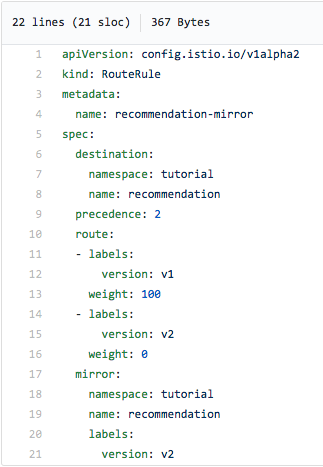
Notice the label mirror: at the bottom of the screenshot—that's what sets up traffic mirroring. Yes, it’s that simple!
As a result of this rule, your production system (v1) will continue to process incoming requests, but those requests will be asynchronously mirrored to v2, meaning full duplicates will be sent there. This way, you can test the v2 functionality in real conditions – with real data and traffic – without interfering with the production system's operation. Does this make the testing organization tedious? Yes, undoubtedly. But it is done in an interesting way.
Let's add some drama
Please note that in v2 code, you need to consider situations where incoming requests may lead to data modifications. The requests themselves are mirrored easily and transparently, but the choice of processing method in the test remains with you – and that is a bit thrilling.
Let's reiterate an important point
A dark launch with traffic mirroring can be done without affecting the code.
Food for thought
What if instead of mirroring requests all to v1, we send a portion of them to v2? For example, one percent of all requests or only requests from a specific user group. Then, looking at how v2 operates, you can gradually transition all requests to the new version. Or, conversely, revert everything to v1 if something goes wrong with v2. This seems to be called Canary Deployment – a term that , and if it had Russian origins, it would likely reference ), and we will examine this in more detail.
Canary Deployment in Istio: simplifying rollout
Cautiously and gradually
The essence of the Canary Deployment model is extremely simple: when launching a new version of your software (in our case – microservice), you first provide access to it for a small group of users. If everything goes well, you slowly increase this group until the new version starts to malfunction, or – if this doesn't happen – eventually transition all users to it. By thoughtfully and gradually introducing the new version into operation and controllably switching users to it, risks can be reduced and feedback maximized.
Of course, Istio simplifies Canary Deployment by offering several good options for intelligent request routing. And yes, all of this can be done without touching your source code.
Filtering by browser
One of the simplest routing criteria is redirection based on the browser. Suppose you want only requests from Safari browsers to go to v2. Here's how to do it:
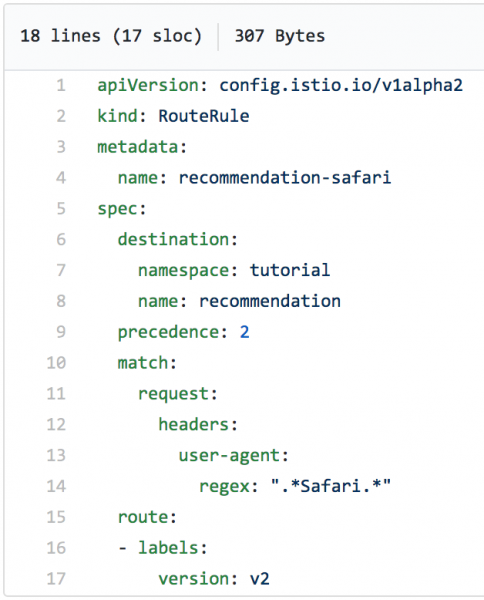
Let's apply this routing rule and then use the command curl to simulate real requests to the microservice in a loop. As seen in the screenshot, all the requests are going to v1:
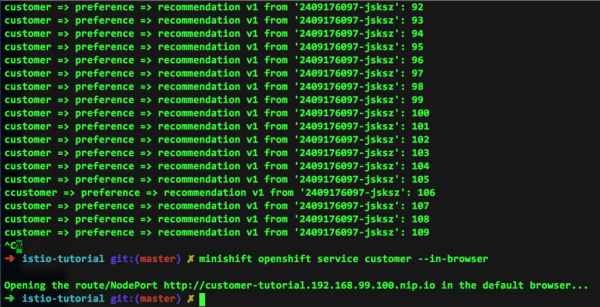
But where is the traffic to v2? Since in our example all requests were coming only from our command line, there is simply none. However, note the lower lines in the screenshot above: this is the response to the request we performed from a Safari browser, which produced the following:

Unlimited power
We have already mentioned that regular expressions provide very powerful capabilities for request routing. Take a look at the following example (we believe you'll understand what it does):
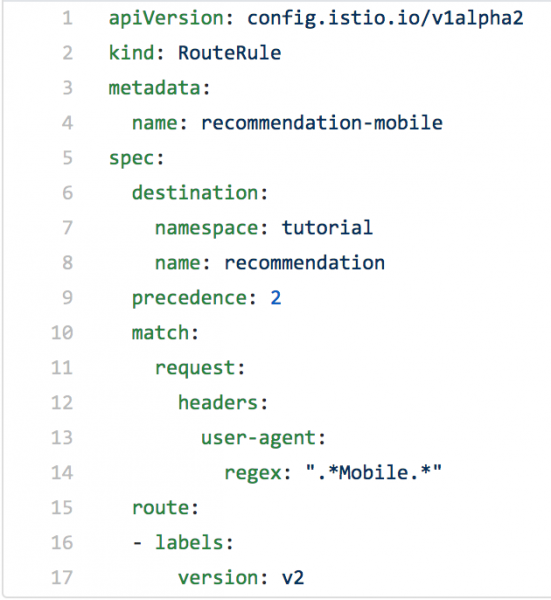
Now you probably already have an idea of what regular expressions are capable of.
Be smart
Smart routing, particularly handling packet headers using regular expressions, allows you to control traffic the way you want. This significantly simplifies the deployment of new code – it's straightforward, it doesn't require changing the code itself, and if necessary, everything can be quickly reverted to how it was.
Interested?
Are you eager to experiment with Istio, Kubernetes, and OpenShift on your computer? The team has prepared an excellent on this topic and has made all accompanying files publicly available. So go ahead, and don't hold back.
Istio Egress: exiting through a souvenir shop
By using Istio alongside Red Hat OpenShift and Kubernetes, you can significantly simplify your life with microservices. The Istio service mesh is tucked inside Kubernetes pods, while your code runs (mostly) in isolation. Performance, ease of modification, tracing, and more – all of this is easily utilized thanks to the application of sidecar containers. But what should you do if your microservice needs to communicate with other services located outside your OpenShift-Kubernetes system?
This is where Istio Egress comes into play. In brief, it allows access to resources (read: 'services') that are not part of your Kubernetes pods system. Without additional configuration, traffic in the Istio Egress environment is routed only within the pod clusters and between such clusters based on internal IP tables. This encapsulation works perfectly until you need access to services outside.
Egress allows you to bypass the aforementioned IP tables, either based on Egress rules or for an IP address range.
Let's say we have a Java program that makes a GET request to httpbin.org/headers.
(httpbin.org is simply a convenient resource for testing outgoing service requests.)
If you enter in the command line curl http://httpbin.org/headers, you'll see the following:
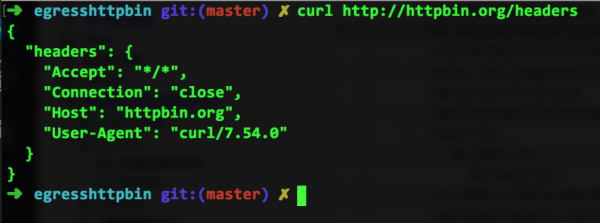
Or you can open the same address in a browser:

As you can see, the service located there simply returns the headers it received.
Import substitution head-on
Now let's take the Java code of this external service in relation to our system and run it on our end, where, as a reminder, Istio is set up. (You can do this yourself by referring to .) Having built the appropriate image and running it on the OpenShift platform, we will invoke this service with the command curl egresshttpbin-istioegress.$(minishift ip).nip.io, after which we will see the following on our screen:

Oops, what happened? It was just working. What does Not Found mean? We just created it for him. curl.
Expanding IP tables to the entire internet
We should blame (or thank) Istio for this. After all, Istio consists of sidecar containers that are responsible for discovering and routing (and many other things we discussed earlier). For this reason, IP tables only know about what is inside your cluster system. And httpbin.org is located outside and therefore inaccessible. This is where Istio Egress comes into play – without making any changes to your source code.
The Egress rule below instructs Istio to look for the required service (if necessary, throughout the world wide web), in this case, httpbin.org. As can be seen from this file (egress_httpbin.yml), the functionality here is quite straightforward:
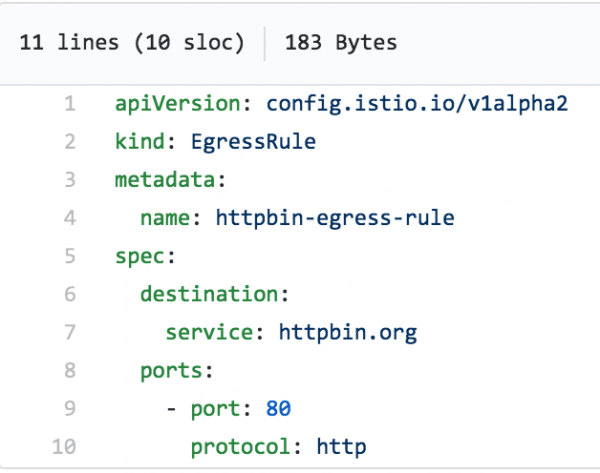
We just need to apply this rule:
istioctl create -f egress_httpbin.yml -n istioegress
You can view Egress rules with the command istioctl get egressrules:

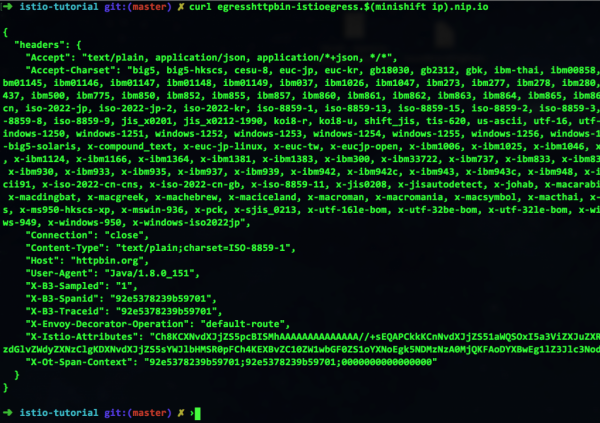
And finally, we run the command again curl – and see that everything works:
Think openly
As you can see, Istio facilitates interaction with the outside world. In other words, you can still create OpenShift services and manage them through Kubernetes, keeping everything in pods that scale up and down as needed. And you can comfortably access external services in relation to your environment. And yes, let’s reiterate that all this can be done without touching your code.
This was the last post in the series on Istio. Stay with us – there's a lot more interesting content ahead!
Source: habr.com
