

Exchange — the exchange or exchange point. Messages are sent to it. Exchange distributes messages into one or several queues. It routes messages to a queue based on created bindings (bindings) between it and the queue.
Exchange is not . For scalability reasons, exchange — this is a string (link to the module with code where the routing logic is stored) in the built-in database. . 1,000 exchanges will consume only 1MB of memory.
Table of Contents
- RabbitMQ. Part 3. Understanding Queues and Bindings
- RabbitMQ. Part 4. Understanding what messages and frames are
- RabbitMQ. Part 5. Performance of Message Publishing and Consumption
- RabbitMQ. Part 6. Overview of Federation and Shovel Modules
- RabbitMQ. Part 7. Detailed about Connection and Channel
- RabbitMQ. Part 8. RabbitMQ in .NET
- RabbitMQ. Part 9. Monitoring
Direct Exchange
Direct exchange — is used when you need to deliver a message to specific queues.. The message is published to the exchange with a specific routing key and goes to all queues that are bound to this exchange with the same routing key. The routing key is a string.. Matching is done by checking strings for equality..
Graphical representation of the message flow:
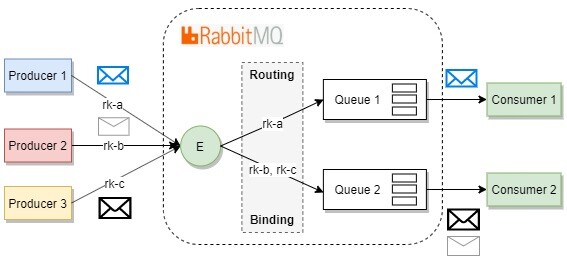
In rabbitmq there is a concept of default exchange. This is direct exchange without a name. If the default exchange is used, the message will be routed to the queue named the same as the routing key of the message..
Topic Exchange
Topic exchange – similarly, direct exchange allows selective routing by comparing the routing key. However, in this case, the key is defined by a pattern.. When creating a pattern, you use 0 one or more words (letters AZ and az and digits 0-9), separated by dots, as well as characters * and #.
*— can be replaced with exactly1word#— can be replaced with0one or more words.
Graphical representation of the message flow:
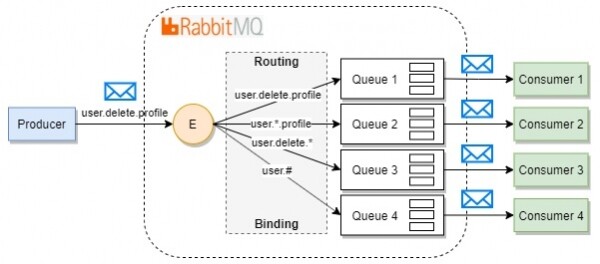
Starting from version RabbitMQ 2.4.0 the routing algorithm for topic exchange started working up to 145 twice as fast. They achieved this by implementing the , which implies representing patterns as a tree structure. For example, the patterns a.b.c, a.*.b.c, a.#.c and b.b.c will be represented by the following structure:
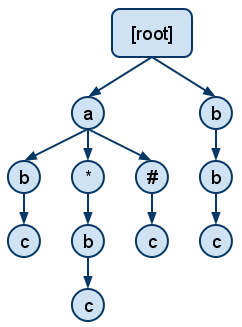
Matching the pattern starts from the root and proceeds from top to bottom.
Features:
- using this exchange can be a good choice for possible future development of the application,, as patterns can always be adjusted so that the message is published similarly to
direct exchangeorfanout exchange - patterns that use
*much faster, than patterns that use#. topic exchangeslower.direct exchange
Fanout Exchange
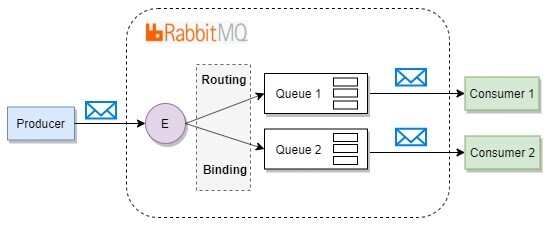
Fanout exchange – all messages are delivered to all queues even if a routing key is specified in the message.
Features:
RabbitMQdoes not work with routing keys and patterns, which positively affects performance. This is the fastest.exchange;- All users should be able to process all messages;
Graphical representation of the message flow:
Headers Exchange
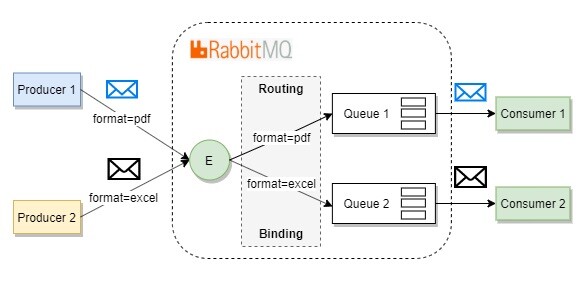
Headers exchange — directs messages to related queues based on the comparison of (key, value) pairs of the property headers bindings and corresponding message properties. headers is a Dictionary.
If a special key is added to the dictionary x-match with the value any, the message is routed on partial matches of (key, value) pairs. This behavior is similar to the operator or.
var bindingArguments = new Dictionary();
bindingArguments.add("x-match", "any");
By default, the key x-match contains the value all. This means that the message is routed on full matches of (key, value) pairs. This behavior is analogous to the operator and.
Graphical representation of the message flow:
Features:
- additional flexibility
- additional computation overhead. All (key, value) pairs of the attribute
headersmust be sorted by key name before calculating message routing values. Slower than other types of exchange.
Consistent-Hashing Exchange
This exchange is a and not built-in downward API support (simultaneously with this in RabbitMQ.
Consistent-hashing exchange (exchange with consistent hashing) – is used when there are multiple queues that are potential recipients of the message, and when load balancing between them is needed. Message correlation with the queue occurs based on weight (a conditional string value from 0 - n).
Equivalent weight of queues – indicates that each queue will receive approximately the same number of messages (each message will be placed in only one queue). There is no full guarantee of even message distribution.
Graphical representation of the message flow:
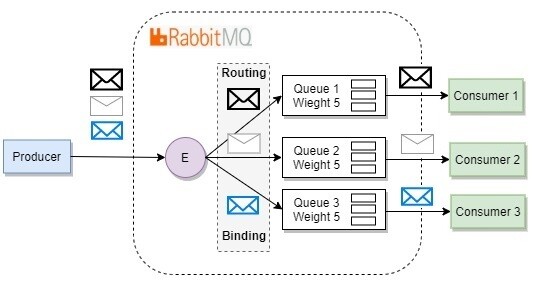
Hash is calculated based on the routing key or property headers of the message. If all published messages had different routing keys or headers, the distribution will occur based on weights. Otherwise, the routing key or headers.
Must assist when consumer throughput needs to grow higher than a solution with multiple consumers using one queue.
Combining exchanges (E2E)
The behavior of all exchanges can be combined through linking Exchange-to-Exchange (exchange combining is not included in the specification AMQP. This protocol extension comes from RabbitMQ).
Graphical representation of the message flow:
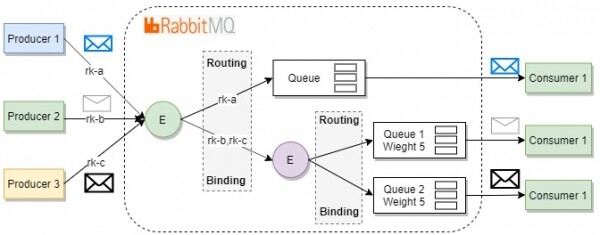
Thanks to E2E we can find the right scalable configuration that meets both current and growing demands.
Creating Exchange
The creation of an exchange occurs via synchronous RPC request to the server. The request is made using the method Exchange.Declare, called with the parameters:
- exchange name
- exchange type
- other parameters
Example of creation exchange with the help of :
//...
channel.ExchangeDeclare(
    exchange: "my_exchange",
    type: "direct",
    durable: "false",
    autoDelete: "false",
    arguments: null
);
//...exchange— the name of the exchange we want to create. The name must be uniquetype— the type of exchangedurable— if settrue, thenexchangewill be permanent. It will be stored on disk and can survive a server/broker restart. If the valuefalse, thenexchangeis temporary and will be deleted when the server/broker is restartedautoDelete— automatic deletion.Exchangewill be removed when all associated queues are deletedarguments— optional arguments. Most often, arguments are used to specifyalternative exchange(alternative exchange). If the message cannot go through the original route, it can be sent to an alternative exchange for routing another way.
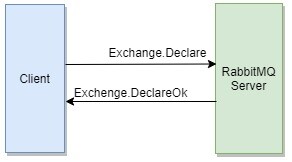
If creation exchange is possible, the server will send an synchronous RPC response Exchange.DeclareOk. If creation is not possible (the request was refused Exchange.Declare), then the channel will be closed by the server using an asynchronous command Channel.Close and the client will receive an exception , which will contain an error code and its description.
The exchange must be created before publishing messages. If you publish a message to a non-existing exchange — RabbitMQ it will be quietly deleted.
Creating Exchange via the graphical interface
Log into the admin panel RabbitMQ under the user guest (username: guest and password: guest). Note that the user guest can connect only from the local host. Now let's go to the Exchanges tab and click on Add a new exchange. Fill in the properties:
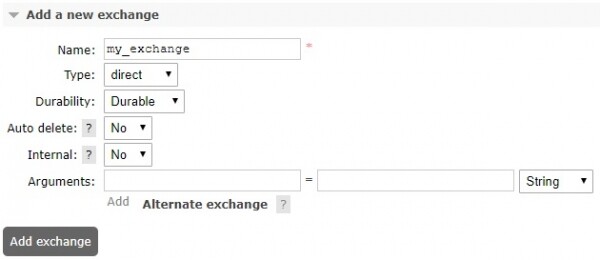
Most of the properties have been described above. Here we will note that if you set Internal, then the exchange can only be used for E2E. Producer will not be able to send messages to such an exchange.
Conclusion
When developing a system, it is convenient to describe the routing topology higher throughput (performance). Next, traffic can be classified. And only then should you proceed with the construction. If there exists
a finite set of routing keys, it is worth looking into several , which are 1:1 linked to the routing key. Remember that fanout exchangeis the fastest. fanout exchange If the number of routes
approaches infinity , then it's worth paying attention toor, if no template is needed, you can choose topic exchange direct exchange , as it is fasterCombinations of different topic exchange.
should help find the right exchange scalable configuration , which meets both current and growing system requirements.and the number of queues should be minimized compared to the number of routes.
Quantity exchange In the next article, we will start to delve deeper into Queues and Bindings.
In the next article, we will begin to delve deeper into Queues and Bindings.
Links
Source: habr.com
