

Greetings! Welcome to the ninth lesson of the course . On we examined the basic mechanisms for controlling user access to various resources. Now we face another task — we need to analyze user behavior online and set up data retrieval that can assist in investigating various security incidents. Therefore, in this lesson, we will cover the logging and reporting mechanism. For this, we will need FortiAnalyzer, which we deployed at the beginning of the course. The necessary theory and video lesson are available below.
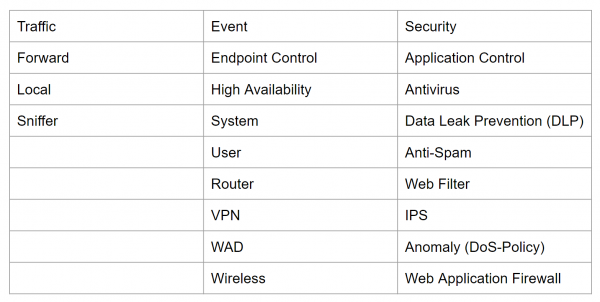
In FortiGate, logs are divided into three types: traffic logs, event logs, and security logs. Each of them is further divided into subtypes.
Traffic logs record information about traffic flow, such as requests and responses, if they exist. This type includes the Forward, Local, and Sniffer subtypes.
The Forward subtype contains information about traffic that FortiGate either accepted or rejected based on firewall policies.
The Local subtype contains information about traffic directly from the FortiGate IP address and from the IP addresses used for administration. For example — connections to the FortiGate web interface.
The Sniffer subtype contains traffic logs that were captured using traffic mirroring.
Event logs contain system or administrative events, such as — adding or modifying parameters, establishing and breaking VPN tunnels, dynamic routing events, and so on. All subtypes are shown in the image below.
And the third type consists of security logs. These logs record events related to virus attacks, access to forbidden resources, use of prohibited applications, and so on. A complete list is also presented in the image below.
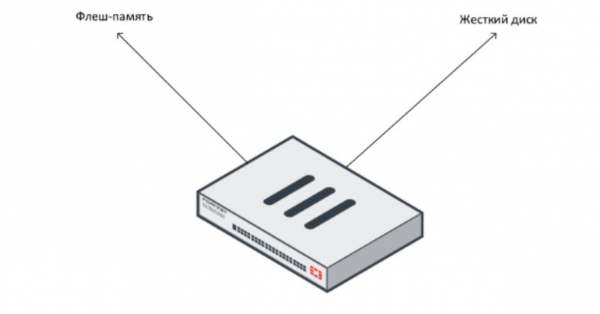
Logs can be stored in different locations — both on the FortiGate itself and externally. Storing logs on FortiGate is considered local logging. Depending on the device itself, logs can be stored either in the device's flash memory or on the hard disk. Typically, mid-range models have a hard disk. Models with a hard disk can be easily identified — they have a '1' at the end. For example — FortiGate 100E comes without a hard disk, while FortiGate 101E comes with one.
Younger and older models usually do not have a hard drive. In such cases, flash memory is used for log storage. However, it should be noted that constant logging to flash memory can reduce its efficiency and lifespan. Therefore, logging to flash memory is disabled by default. It is recommended to enable it only for logging events when troubleshooting specific issues.
With intensive logging, whether to a hard drive or flash memory, the device's performance will be reduced.
It is quite common to store logs on remote servers. FortiGate can store logs on Syslog servers, FortiAnalyzer, or FortiManager. Additionally, the FortiCloud cloud service can also be used for log storage.
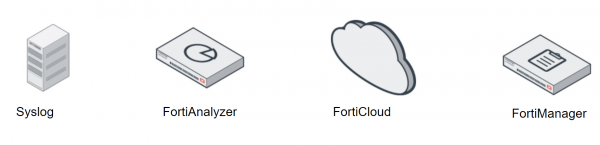
Syslog is a server for central log storage from network devices.
FortiCloud is a subscription-based security management and log storage service. It allows remote log storage and the creation of corresponding reports. If you have a relatively small network, using this cloud service might be a better solution than purchasing additional hardware. There is a free version of FortiCloud that allows for one week of log storage. After purchasing a subscription, logs can be stored for a year.
FortiAnalyzer and FortiManager are external log storage devices. Since they all run the same operating system—FortiOS—integrating FortiGate with these devices poses no difficulties.
However, it is important to note the differences between FortiAnalyzer and FortiManager. The main goal of FortiManager is centralized management of multiple FortiGate devices, which is why the log storage capacity on FortiManager is significantly smaller than on FortiAnalyzer (especially when comparing models in the same price segment).
The primary purpose of FortiAnalyzer is to collect and analyze logs. Therefore, we will focus on its operation in the following practical examination.
All the theory, as well as the practical part, is presented in this video lesson:
In the next lesson, we will cover the key aspects related to managing a FortiGate device. To not miss it, stay updated on the following channels:
Source: habr.com
