

Logging is a vital tool for developers, but when creating distributed systems, it becomes a cornerstone that must be laid right into the foundation of your application; otherwise, the complexity of developing microservices will quickly become apparent.
In .Net Core 3, a great has been added, so if your applications use direct HTTP calls for inter-service communication, you can take advantage of this out-of-the-box functionality. However, if your backend architecture involves communication through a message broker (like RabbitMQ or Kafka), you will still need to handle the transfer of correlation context through these messages yourself.
In this article, we will take a simple web API application and set up logging that will
maintain end-to-end correlation between the logs of independent services so that you can easily see all the activities triggered by a specific request from the client.
We need to have a single entry point with convenient analysis, so that the logging tool can be used even by Support, who often receives questions like, "I encountered an error in the application with this particular request ID."
First, we need to decide on a logging provider for our application. The main requirement for modern logging is structure, meaning we should work not with flat text messages but with objects. With such logs, we can easily build views of our messages from different angles and conduct analysis.
For our application, we will use the Serilog package, which has excellent support for structured logging and a rich extension system. I will skip the basic setup steps (you can find many articles on this topic) and assume that
Serilog is already configured and is the default logger in your dependency injection provider.
Its configuration includes enriching messages with context properties (Enrich.FromLogContext).
The next step is to choose which centralized logging system to send messages from Serilog. Probably the most common option today among open-source software is the ELK stack (Elasticsearch, Logstash, and Kibana), which we will use. For this, we'll take the offer from — after registering for the free plan, we have the full power of the Lucene search engine at our disposal.
We just need to add the package to our project
Install-Package Serilog.Sinks.Logzio
And add the corresponding enricher to our logger's configuration, providing it with the access token.
LoggerConfiguration loggerConfig = new LoggerConfiguration();
loggerConfig.WriteTo.Logzio(secrets.LogzioToken, 10, TimeSpan.FromSeconds(10), null, LogEventLevel.Debug);
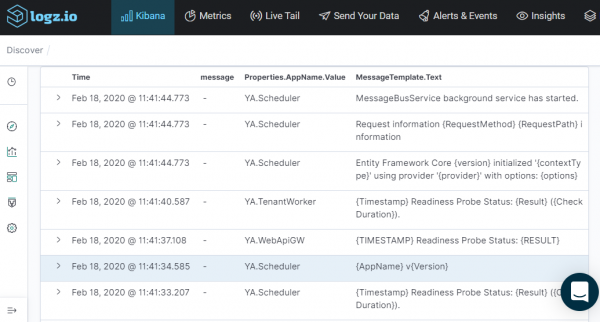
By running the application, we will be able to see our messages not only in the console but also in Kibana.
Interfaces
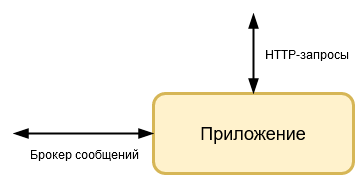
In a service-type application, we can identify two main interfaces for its interaction with the outside world, which we will designate as vertical and horizontal. The vertical interface is the web API through which requests from the client application come in. The horizontal interface is the message broker used for data exchange with other internal services.
Let’s consider the stages of implementing correlation at each of these interfaces.
Correlation in HTTP requests
To gather as much information as possible, we need to generate the correlation ID as close to the start of the activity as possible, i.e., at the gateway or directly on the client (mobile or web). Since we are dealing with a backend application today, we will simply designate the requirement for the mandatory header "X-Correlation-ID" in all requests to the web API.
Add the package , which functions to retrieve the value from the necessary header.
Install-Package CorrelationID
Let's add it to the request processing pipeline.
public class Startup
{
    public void Configure(IApplicationBuilder application)
    {
        application
	    .UseCorrelationId(new CorrelationIdOptions
        {
            Header = "X-Correlation-ID",
            IncludeInResponse = false,
            UpdateTraceIdentifier = false,
            UseGuidForCorrelationId = false
        });
    }
}
Now, with its help, let's create a simple action filter:
public sealed class ApiRequestFilter : ActionFilterAttribute
{
    public ApiRequestFilter(IApiRequestTracker apiRequestTracker, ICorrelationContextAccessor correlationContextAccessor)
    {
        _correlationContextAccessor = correlationContextAccessor ?? throw new ArgumentNullException(nameof(correlationContextAccessor));
    }

    private readonly ICorrelationContextAccessor _correlationContextAccessor;

    public override async Task OnActionExecutionAsync(ActionExecutingContext context, ActionExecutionDelegate next)
    {
        if (!Guid.TryParse(_correlationContextAccessor.CorrelationContext.CorrelationId, out Guid correlationId))
        {
            context.Result = new BadRequestResult();
            return;
        }

        await next.Invoke();
    }

    public override async Task OnResultExecutionAsync(ResultExecutingContext context, ResultExecutionDelegate next)
    {
        await next.Invoke();
    }
}
And we will add it to the controller
[Route("[controller]")]
[ApiController]
[ServiceFilter(typeof(ApiRequestFilter))]
public class CarsController : ControllerBase
{

}
As a result, the controller will return a 400 Bad Request for all requests without a corresponding identifier header.
After we started receiving the identifier from the client, we need to add it to the logging context; we'll create a wrapper layer for this:
public class CorrelationIdContextLogger
{
    public CorrelationIdContextLogger(RequestDelegate next)
    {
        _next = next ?? throw new ArgumentNullException(nameof(next));
    }

    readonly RequestDelegate _next;

    public async Task InvokeAsync(HttpContext httpContext, ILogger logger, ICorrelationContextAccessor correlationContextAccessor)
    {
        if (Guid.TryParse(correlationContextAccessor.CorrelationContext.CorrelationId, out Guid correlationId))
        {
            using (logger.BeginScopeWith(("CorrelationId", correlationId)))
            {
                await _next(httpContext);
            }
        }
        else
        {
            await _next(httpContext);
        }
    }
}
In our application, we use the standard ILogger from the Microsoft.Extensions.Logging.Abstractions package, so we will add the value using a simple extension for it.
public static IDisposable BeginScopeWith(this ILogger logger, params (string key, object value)[] keys)
{
    return logger.BeginScope(keys.ToDictionary(x => x.key, x => x.value));
}
We add the layer to the request processing pipeline and achieve the desired result.
public class Startup
{
    public void Configure(IApplicationBuilder application)
    {
        application.UseMiddleware();
    }
}
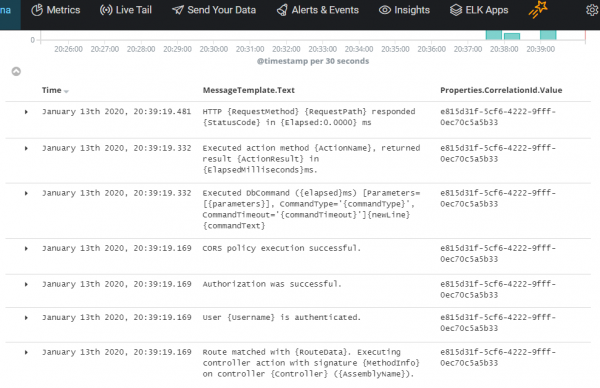
Now all activities generated by requests to our web API contain a correlation identifier, making it easy to correlate them.
Correlation in broker messages
The next step is to establish the transmission and reception of the correlation identifier through the message broker. In our example, we will use RabbitMQ and the MassTransit framework as our client. Again, we will skip the initial setup with MassTransit and move directly to configuring logging.
First, we can enable the logs of MassTransit itself, for this we will add the package
Install-Package MassTransit.SerilogIntegration
Now, after adding the logger to the MassTransit settings, we will be able to see logs from the framework.
services
    .AddSingleton(provider =>
        {
            return Bus.Factory.CreateUsingRabbitMq(cfg =>
            {
                cfg.UseSerilog();
            });
        });
Let our application respond to a POST request by sending the SomethingDoneMessage event with the value "done". The contract for such a message can be described as follows:
namespace MbMessages
{
    public interface ISomethingDoneMessageV1
    {
        string Value { get; }
    }
}
MassTransit messages essentially serve as an envelope that contains broker messages. The envelope looks approximately like this:
{
  "messageId": "59020000-5dba-0015-10b8-08d77ec28593",
  "requestId": "59020000-5dba-0015-5674-08d77ec28592",
  "conversationId": "59020000-5dba-0015-bca8-08d77ec28594",
  "destinationAddress": "rabbitmq://bear.rmq.cloudamqp.com/aelzlsta/ya.servicetemplate.receiveendpoint",
  "headers": {},
  "messageType": [
    "urn:message:MbMessages:ISomethingDoneMessageV1"
  ],
  "message": {
    "value": "done"
  }
}
The message reveals system fields required for the framework's operation, but we also have the opportunity to add our own additional properties to this envelope. Furthermore, MassTransit has built-in facilities to work with certain optional fields, of which we are most interested in the correlation identifier, CorrelationId.
Let's add the CorrelatedBy interface to the message contract:
namespace MbMessages
{
    public interface ISomethingDoneMessageV1 : CorrelatedBy
    {
        string Value { get; }
    }
}
We will implement it and assign the value to the CorrelationId property when creating the message:
internal class SomethingDoneMessageV1 : ISomethingDoneMessageV1
{
    internal SomethingDoneMessageV1(Guid correlationId, string value)
    {
        CorrelationId = correlationId;
        Value = value;
    }

    public Guid CorrelationId { get; private set; }
    public string Value { get; private set; }
}
If we look at the updated message, we can see that the correlation ID has become not only part of our message but also part of the envelope — this ID will now also be used in all MassTransit logs, making it much easier for us to troubleshoot issues at the message broker level.
{
  "messageId": "59020000-5dba-0015-10b8-08d77ec28593",
  "requestId": "59020000-5dba-0015-5674-08d77ec28592",
  "conversationId": "59020000-5dba-0015-bca8-08d77ec28594",
  "correlationId": "c7ff562a-b639-415b-9add-c9e524a727cc",
  "destinationAddress": "rabbitmq://bear.rmq.cloudamqp.com/aelzlsta/ya.servicetemplate.receiveendpoint",
  "headers": {},
  "messageType": [
    "urn:message:MbMessages:ISomethingDoneMessageV1"
  ],
  "message": {
    "correlationId": "c7ff562a-b639-415b-9add-c9e524a727cc",
    "value": "Hello"
  }
}
We need to set up logging for these message properties, so we will add the package to the project . The package adds a filter to the MassTransit message processing pipeline that pushes the message context onto a thread-safe stack. Serilog reads the context from the stack and adds these additional properties to our log objects.
Install-Package Serilog.Enrichers.MassTransitMessage
In MassTransit, we insert the filter
services
    .AddSingleton(provider =>
        {
            return Bus.Factory.CreateUsingRabbitMq(cfg =>
            {
                cfg.UseSerilog();
                cfg.UseSerilogMessagePropertiesEnricher();
            });
        });
And in the Serilog configuration, we add the enricher
Log.Logger = new LoggerConfiguration()
    .Enrich.FromMassTransitMessage()
    .CreateLogger();
Since the application that receives messages from the RabbitMQ queue has access to all properties of the MassTransit envelope, we can use the obtained correlation ID within the consumer application and pass it further along the call chain.
As a result, our logs now contain the CorrelationId not only within a single service but also when interacting with other applications.
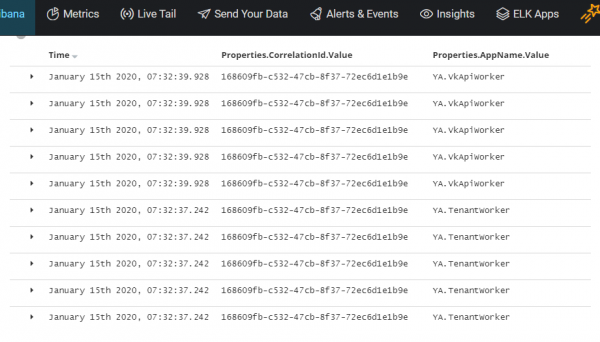
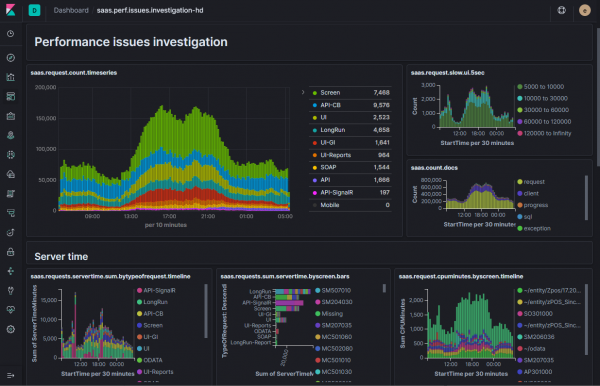
Thus, the logging system obtained in .Net applications allows us to correlate logs from completely different microservices — even those working through a message broker. And with Elasticsearch, we can quickly and conveniently analyze logs, creating the necessary dashboards in Kibana (an example is shown in the image accompanying the post).
Of course, in this form, logging will not cover complex interactions between your services and various external systems, but establishing such order at the very beginning of the project’s development is one of those things for which you will thank yourself more than once.
You can investigate the source code of the resulting system in the project:
Source: habr.com
