

The translation of the article is specially prepared for the students of the course .

In the past few weeks, we have added to a binary streaming format, enhancing the existing random access/IPC file format. We have implementations in Java and C++, along with Python bindings. In this article, I will explain how the format works and demonstrate how to achieve very high data throughput for pandas DataFrames.
Streaming Columnar Data
A common question I receive from Arrow users is about the high cost of transferring large sets of tabular data from a row-oriented or record format to a columnar format. For multi-gigabyte datasets, transposing in memory or on disk can be an overwhelming task.
For data streaming, regardless of whether the source data is row-based or columnar, one option is to send small packets of rows, each containing a columnar layout internally.
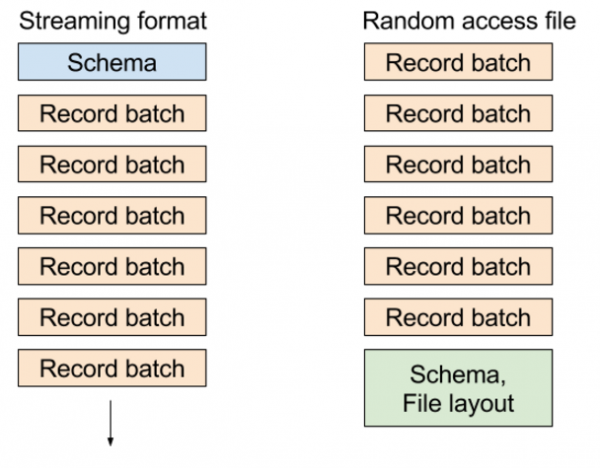
In Apache Arrow, a collection of columnar arrays in memory representing a chunk of a table is called a record batch. To represent a single data structure of a logical table, multiple record batches can be assembled.
In the existing random access file format, we write metadata containing the table schema and block locations at the end of the file, allowing you to extremely cheaply select any record batch or any column from the dataset. In the streaming format, we send a series of messages: the schema, followed by one or more record batches.
The various formats look approximately like this:
Data Streaming in PyArrow: An Application
To demonstrate how this works, I will create an example dataset representing a single streaming chunk:
import time
import numpy as np
import pandas as pd
import pyarrow as pa

def generate_data(total_size, ncols):
    nrows = int(total_size / ncols / np.dtype('float64').itemsize)
    return pd.DataFrame({
        'c' + str(i): np.random.randn(nrows)
        for i in range(ncols)
    })
Now, let's assume we want to write 1 GB of data consisting of chunks of 1 MB each, totaling 1024 chunks. First, let's create the initial DataFrame of size 1 MB with 16 columns:
KILOBYTE = 1 << 10
MEGABYTE = KILOBYTE * KILOBYTE
DATA_SIZE = 1024 * MEGABYTE
NCOLS = 16

df = generate_data(MEGABYTE, NCOLS)
Then I will convert them to pyarrow.RecordBatch:
batch = pa.RecordBatch.from_pandas(df) Now I will create an output stream that will write to memory and create StreamWriter:
sink = pa.InMemoryOutputStream()
stream_writer = pa.StreamWriter(sink, batch.schema)
Then we will write 1024 chunks, which will ultimately make up a 1GB dataset:
for i in range(DATA_SIZE // MEGABYTE):
    stream_writer.write_batch(batch)
Since we wrote to RAM, we can get the entire stream in a single buffer:
In [13]: source = sink.get_result()

In [14]: source
Out[14]:

In [15]: source.size
Out[15]: 1074750744
Since this data is in memory, reading Arrow record batches is a zero-copy operation. I open StreamReader, read the data into pyarrow.Table, and then convert them to DataFrame pandas:
In [16]: reader = pa.StreamReader(source)

In [17]: table = reader.read_all()

In [18]: table
Out[18]:

In [19]: df = table.to_pandas()

In [20]: df.memory_usage().sum()
Out[20]: 1073741904
All this is certainly good, but you may have questions. How fast does this happen? How does chunk size affect the performance of obtaining a pandas DataFrame?
Data Stream Performance
As the chunk size decreases, the cost of reconstructing the continuous columnar frame of the DataFrame in pandas increases due to inefficient cache access patterns. There are also some overheads from working with C++ data structures and arrays and their memory buffers.
For 1MB, as stated above, on my laptop (Quad-core Xeon E3-1505M) it results in:
In [20]: %timeit pa.StreamReader(source).read_all().to_pandas()
10 loops, best of 3: 129 ms per loop
Thus, the effective throughput is 7.75 GB/s for recovering a 1GB DataFrame from 1024 chunks of 1MB each. What happens if we use chunks of larger or smaller size? Here are the results:
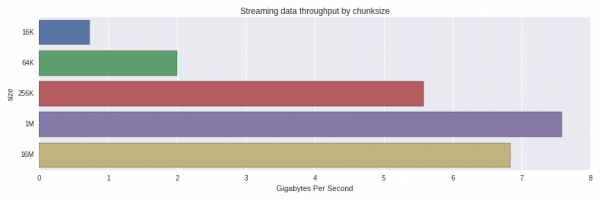
Performance significantly drops from 256K to 64K chunks. I was surprised that 1MB chunks were processed faster than 16MB. A more thorough investigation is worth conducting to understand whether this is a normal distribution or if something else is influencing it.
In the current implementation of the format, data is not compressed at all, so the size in memory and 'in transit' is roughly the same. Compression may become an additional option in the future.
Summary
Streaming columnar data can be an effective way to transfer large datasets to columnar analytical tools like pandas using small chunks. Data services that use row-oriented storage can transmit and transpose small chunks of data that are more cache-friendly for your CPU's L2 and L3.
Full Code
import time
import numpy as np
import pandas as pd
import pyarrow as pa

def generate_data(total_size, ncols):
    nrows = total_size // ncols // np.dtype('float64').itemsize
    return pd.DataFrame({
        'c' + str(i): np.random.randn(nrows)
        for i in range(ncols)
    })

KILOBYTE = 1 << 10
MEGABYTE = KILOBYTE * KILOBYTE
DATA_SIZE = 1024 * MEGABYTE
NCOLS = 16

def get_timing(f, niter):
    start = time.clock_gettime(time.CLOCK_REALTIME)
    for i in range(niter):
        f()
    return (time.clock_gettime(time.CLOCK_REALTIME) - start) // NITER

def read_as_dataframe(klass, source):
    reader = klass(source)
    table = reader.read_all()
    return table.to_pandas()
NITER = 5
results = []

CHUNKSIZES = [16 * KILOBYTE, 64 * KILOBYTE, 256 * KILOBYTE, MEGABYTE, 16 * MEGABYTE]

for chunksize in CHUNKSIZES:
    nchunks = DATA_SIZE // chunksize
    batch = pa.RecordBatch.from_pandas(generate_data(chunksize, NCOLS))

    sink = pa.InMemoryOutputStream()
    stream_writer = pa.StreamWriter(sink, batch.schema)

    for i in range(nchunks):
        stream_writer.write_batch(batch)

    source = sink.get_result()

    elapsed = get_timing(lambda: read_as_dataframe(pa.StreamReader, source), NITER)

    result = (chunksize, elapsed)
    print(result)
    results.append(result)
Source: habr.com
