

Note: translation.: DNS issues in Kubernetes, specifically regarding the configuration of the parameter ndots, — surprisingly popular, and this is not the first One of the main advantages of deploying applications in Kubernetes is seamless application discovery. Intra-cluster interaction is greatly simplified thanks to the service concept (
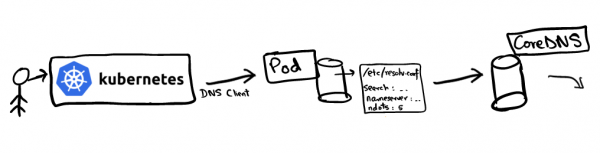
), which represents a virtual IP that supports a set of pod IP addresses. For example, if the servicevanilla wants to connect to the service chocolate , it can directly access the virtual IP for. The question arises: who will resolve the DNS request for , it can directly access the virtual IP forand how? , it can directly access the virtual IP for DNS name resolution is configured in the Kubernetes cluster using
CoreDNS all pods. If you look at the content of /etc/resolv.conf any pod, it will look something like this: /etc/resolv.conf search hello.svc.cluster.local svc.cluster.local cluster.local nameserver 10.152.183.10 options ndots:5
This configuration is used by DNS clients to redirect requests to the DNS server. The file resolv.conf contains the following information: nameserver
- : the server to which DNS queries will be sent. In our case, this is the address of the CoreDNS service;search
- : defines the search path for a specific domain. Interestingly,google.com
mrkaran.devorare not FQDN (fully qualified domain namesmrkaran.dev.is a fully qualified domain name (FQDN), whereasis not;are not FQDN (: The most interesting parameter (this article is about it). - ndotssets the threshold number of dots in the query name, at which point it is considered a "fully" qualified domain name. We will discuss this in more detail later when analyzing the DNS lookup sequence.
ndotsLet’s see what happens when we query
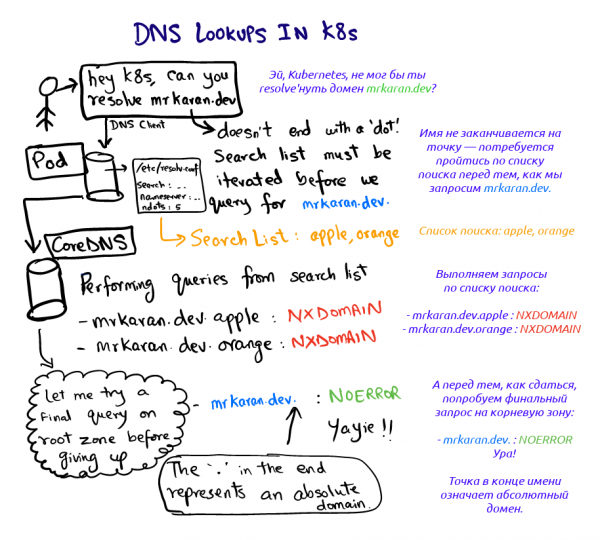
in the pod: are not FQDN ( $ nslookup mrkaran.dev Server: 10.152.183.10 Address: 10.152.183.10#53Non-authoritative answer: Name: mrkaran.dev Address: 157.230.35.153 Name: mrkaran.dev Address: 2400:6180:0:d1::519:6001
$ nslookup mrkaran.dev
Server: 10.152.183.10
Address: 10.152.183.10#53

Non-authoritative answer:
Name: mrkaran.dev
Address: 157.230.35.153
Name: mrkaran.dev
Address: 2400:6180:0:d1::519:6001
For this experiment, I set the logging level of CoreDNS to all (which makes it quite verbose). Let's take a look at the pod's logs coredns:
[INFO] 10.1.28.1:35998 - 11131 "A IN mrkaran.dev.hello.svc.cluster.local. udp 53 false 512" NXDOMAIN qr,aa,rd 146 0.000263728s
[INFO] 10.1.28.1:34040 - 36853 "A IN mrkaran.dev.svc.cluster.local. udp 47 false 512" NXDOMAIN qr,aa,rd 140 0.000214201s
[INFO] 10.1.28.1:33468 - 29482 "A IN mrkaran.dev.cluster.local. udp 43 false 512" NXDOMAIN qr,aa,rd 136 0.000156107s
[INFO] 10.1.28.1:58471 - 45814 "A IN mrkaran.dev. udp 29 false 512" NOERROR qr,rd,ra 56 0.110263459s
[INFO] 10.1.28.1:54800 - 2463 "AAAA IN mrkaran.dev. udp 29 false 512" NOERROR qr,rd,ra 68 0.145091744s
Phew. Two things here draw attention:
- The request goes through all stages of searching until the response contains the code
NOERROR(DNS clients understand it and store it as a result).NXDOMAINmeans that no record was found for the given domain name. Sinceare not FQDN (is not an FQDN name (according tondots=5), the resolver looks at the search path and determines the order of queries; - Records
AandAAAAare sent in parallel. The thing is that single queries in/etc/resolv.confare configured by default to perform parallel searches for both IPv4 and IPv6 protocols. This behavior can be canceled by adding the optionsingle-requestdownward API support (simultaneously with this incontains the following information:.
Note: glibc can be configured to send these requests sequentially, while musl cannot, so Alpine users should keep this in mind.
Experimenting with ndots
Let's experiment a bit more with ndots and see how this parameter behaves. The idea is simple: ndots determines whether the DNS client considers the domain absolute or relative. For example, how does a simple google DNS client determine if this domain is absolute? If you set ndots to 1, the client will say: "Oh, there are no dots; I'll just run through the whole search list." However, if you request google , the suffix list will be completely ignored since the requested name meets the threshold mrkaran.dev(there is at least one dot). ndots Let's make sure of this:
$ cat /etc/resolv.conf options ndots:1 $ nslookup mrkaran Server: 10.152.183.10 Address: 10.152.183.10#53** server can't find mrkaran: NXDOMAIN
CoreDNS Logs:CoreDNS Logs:
[INFO] 10.1.28.1:52495 - 2606 "A IN mrkaran.hello.svc.cluster.local. udp 49 false 512" NXDOMAIN qr,aa,rd 142 0.000524939s
[INFO] 10.1.28.1:59287 - 57522 "A IN mrkaran.svc.cluster.local. udp 43 false 512" NXDOMAIN qr,aa,rd 136 0.000368277s
[INFO] 10.1.28.1:53086 - 4863 "A IN mrkaran.cluster.local. udp 39 false 512" NXDOMAIN qr,aa,rd 132 0.000355344s
[INFO] 10.1.28.1:56863 - 41678 "A IN mrkaran. udp 25 false 512" NXDOMAIN qr,rd,ra 100 0.034629206s
Since there is no dot in mrkaran the search was conducted through the entire suffix list.
Note: in practice, the maximum value ndots is limited to 15; by default, in Kubernetes, it is set to 5.
Application in production
If an application makes many external network calls, DNS can become a bottleneck during active traffic, as numerous unnecessary queries are executed during name resolution (before the system reaches the required one). Applications usually do not prepend the root zone to domain names, but this is indeed a viable hack. So instead of querying api.twitter.com, you can 'hardcode' api.twitter.com. (with the dot) in the application, which will prompt DNS clients to perform an authoritative lookup directly in the absolute domain.
Furthermore, starting from Kubernetes version 1.14, the extensions dnsConfig and dnsPolicy have reached stable status. Thus, when deploying a pod, you can reduce the value ndots, say, to 3 (or even 1!). As a result, every message within the node should include the full domain. This is one of the classic trade-offs when having to choose between performance and portability. I believe this is only a concern if ultra-low latency is critical for your application, as DNS results are also cached internally.
Links
I first learned about this feature at the , held on January 25. This issue was discussed there, among others.
Here are a few links for further study:
- , why ndots=5 in Kubernetes;
- on how changing ndots affects application performance;
- between the musl and glibc resolvers.
Note: I preferred not to use dig in this article. dig automatically adds a dot (root zone identifier), making the domain 'complete' (FQDN), do not running it first through the search list. I wrote about this in . Nonetheless, it is quite surprising that, generally, a separate flag must be set for standard behavior.
Happy DNSing! See you soon!
P.S. from the translator
Also read in our blog:
- «»;
- «»;
- Illustrated guide to networking in Kubernetes: , .
Source: habr.com
