

This article will discuss the operating principle , along with a practical section on connecting them to Docker.
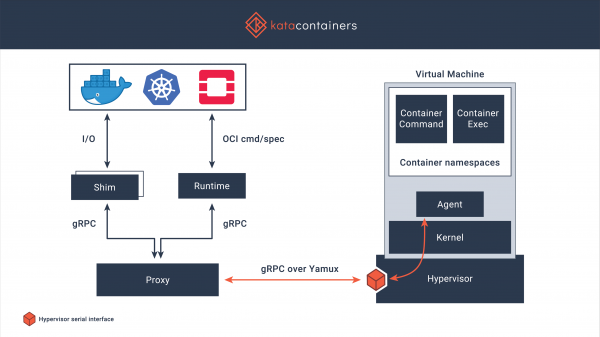
General issues with Docker and potential solutions have already been , today I will briefly describe the implementation of Kata Containers. Kata Containers is a secure container runtime based on lightweight virtual machines. Working with them is similar to working with other containers, but they provide a more reliable isolation through hardware virtualization technology. The project started in 2017 when the community finished merging the best ideas from Intel Clear Containers and Hyper.sh RunV, after which work continued on supporting various architectures, including AMD64, ARM, IBM p- and z-series. Additionally, it supports operation within hypervisors like QEMU and Firecracker, and there is integration with containerd. The code is available at is licensed under the MIT License.
Key Features
- Working with a separate kernel, thus ensuring isolation of network, memory, and I/O operations, with the option to enforce hardware isolation based on virtualization extensions.
- Support for industry standards, including OCI (container format), Kubernetes CRI.
- Stable performance of standard Linux containers, enhancing isolation without throughput penalties that affect standard virtual machines.
- Eliminating the need to run containers inside full virtual machines, standardized interfaces simplify integration and deployment.
Installation
There is installation options, I will review the installation from the repositories, based on the Centos 7 operating system.
Important: Kata Containers only supports operation on hardware; virtualization passthrough does not always work; also, support for sse4.1 is required from the processor.
Installing Kata Containers is quite straightforward:
Install utilities for working with the repositories:
# yum -y install yum-utilsDisable Selinux (more correctly — configure it, but for simplicity, I will disable it):
# setenforce 0
# sed -i 's/^SELINUX=enforcing$/SELINUX=permissive/' /etc/selinux/config
Connect the repository and proceed with the installation.
# source /etc/os-release
# ARCH=$(arch)
# BRANCH="${BRANCH:-stable-1.10}"
# yum-config-manager --add-repo "http://download.opensuse.org/repositories/home:/katacontainers:/releases:/${ARCH}:/${BRANCH}/CentOS_${VERSION_ID}/home:katacontainers:releases:${ARCH}:${BRANCH}.repo"
# yum -y install kata-runtime kata-proxy kata-shim
Settings
I will configure it to work with Docker; its installation is standard, and I will not detail it further:
# rpm -qa | grep docker
docker-ce-cli-19.03.6-3.el7.x86_64
docker-ce-19.03.6-3.el7.x86_64
# docker -v
Docker version 19.03.6, build 369ce74a3c
Make adjustments in daemon.json:
# cat <<EOF > /etc/docker/daemon.json
{
  "default-runtime": "kata-runtime",
  "runtimes": {
    "kata-runtime": {
      "path": "/usr/bin/kata-runtime"
    }
  }
}
EOF
Restart Docker:
# service docker restartCheck functionality.
If you start the container before rebooting Docker, you can see that uname will display the kernel version running on the host system:
# docker run busybox uname -a
Linux 19efd7188d06 3.10.0-1062.12.1.el7.x86_64 #1 SMP Tue Feb 4 23:02:59 UTC 2020 x86_64 GNU/Linux
After rebooting, the kernel version looks like this:
# docker run busybox uname -a
Linux 9dd1f30fe9d4 4.19.86-5.container #1 SMP Sat Feb 22 01:53:14 UTC 2020 x86_64 GNU/Linux
More commands!
# time docker run busybox mount
kataShared on / type 9p (rw,dirsync,nodev,relatime,mmap,access=client,trans=virtio)
proc on /proc type proc (rw,nosuid,nodev,noexec,relatime)
tmpfs on /dev type tmpfs (rw,nosuid,size=65536k,mode=755)
devpts on /dev/pts type devpts (rw,nosuid,noexec,relatime,gid=5,mode=620,ptmxmode=666)
sysfs on /sys type sysfs (ro,nosuid,nodev,noexec,relatime)
tmpfs on /sys/fs/cgroup type tmpfs (ro,nosuid,nodev,noexec,relatime,mode=755)
cgroup on /sys/fs/cgroup/systemd type cgroup (ro,nosuid,nodev,noexec,relatime,xattr,name=systemd)
cgroup on /sys/fs/cgroup/cpu,cpuacct type cgroup (ro,nosuid,nodev,noexec,relatime,cpu,cpuacct)
cgroup on /sys/fs/cgroup/blkio type cgroup (ro,nosuid,nodev,noexec,relatime,blkio)
cgroup on /sys/fs/cgroup/memory type cgroup (ro,nosuid,nodev,noexec,relatime,memory)
cgroup on /sys/fs/cgroup/devices type cgroup (ro,nosuid,nodev,noexec,relatime,devices)
cgroup on /sys/fs/cgroup/perf_event type cgroup (ro,nosuid,nodev,noexec,relatime,perf_event)
cgroup on /sys/fs/cgroup/net_cls,net_prio type cgroup (ro,nosuid,nodev,noexec,relatime,net_cls,net_prio)
cgroup on /sys/fs/cgroup/freezer type cgroup (ro,nosuid,nodev,noexec,relatime,freezer)
cgroup on /sys/fs/cgroup/pids type cgroup (ro,nosuid,nodev,noexec,relatime,pids)
cgroup on /sys/fs/cgroup/cpuset type cgroup (ro,nosuid,nodev,noexec,relatime,cpuset)
mqueue on /dev/mqueue type mqueue (rw,nosuid,nodev,noexec,relatime)
shm on /dev/shm type tmpfs (rw,nosuid,nodev,noexec,relatime,size=65536k)
kataShared on /etc/resolv.conf type 9p (rw,dirsync,nodev,relatime,mmap,access=client,trans=virtio)
kataShared on /etc/hostname type 9p (rw,dirsync,nodev,relatime,mmap,access=client,trans=virtio)
kataShared on /etc/hosts type 9p (rw,dirsync,nodev,relatime,mmap,access=client,trans=virtio)
proc on /proc/bus type proc (ro,relatime)
proc on /proc/fs type proc (ro,relatime)
proc on /proc/irq type proc (ro,relatime)
proc on /proc/sys type proc (ro,relatime)
tmpfs on /proc/acpi type tmpfs (ro,relatime)
tmpfs on /proc/timer_list type tmpfs (rw,nosuid,size=65536k,mode=755)
tmpfs on /sys/firmware type tmpfs (ro,relatime)

real    0m2.381s
user    0m0.066s
sys 0m0.039s
# time docker run busybox free -m
total used free shared buff/cache available
Mem: 1993 30 1962 0 1 1946
Swap: 0 0 0
real 0m3.297s
user 0m0.086s
sys 0m0.050sQuick load testing
To assess the losses from virtualization, I run sysbench, using the following examples as benchmarks: .
Running sysbench using Docker+containerd
CPU Test
sysbench 1.0:  multi-threaded system evaluation benchmark

Running the test with the following options:
Number of threads: 1
Initializing random number generator from the current time

Prime numbers limit: 20000

Initializing worker threads...

Threads started!

General statistics:
    total time:                          36.7335s
    total number of events:              10000
    total time taken by event execution: 36.7173s
    response time:
         min:                                  3.43ms
         avg:                                  3.67ms
         max:                                  8.34ms
         approx.  95 percentile:               3.79ms

Threads fairness:
    events (avg/stddev):           10000.0000/0.00
    execution time (avg/stddev):   36.7173/0.00
Memory Test
sysbench 1.0:  multi-threaded system evaluation benchmark

Running the test with the following options:
Number of threads: 1
Initializing random number generator from the current time

Initializing worker threads...

Threads started!

Operations performed: 104857600 (2172673.64 ops/sec)

102400.00 MiB transferred (2121.75 MiB/sec)

General statistics:
    total time:                          48.2620s
    total number of events:              104857600
    total time taken by event execution: 17.4161s
    response time:
         min:                                  0.00ms
         avg:                                  0.00ms
         max:                                  0.17ms
         approx.  95 percentile:               0.00ms

Threads fairness:
    events (avg/stddev):           104857600.0000/0.00
    execution time (avg/stddev):   17.4161/0.00
Running sysbench using Docker+Kata Containers
CPU Test
sysbench 1.0:  multi-threaded system evaluation benchmark

Running the test with the following options:
Number of threads: 1
Initializing random number generator from the current time

Prime numbers limit: 20000

Initializing worker threads...

Threads started!

General statistics:
    total time:                          36.5747s
    total number of events:              10000
    total time taken by event execution: 36.5594s
    response time:
         min:                                  3.43ms
         avg:                                  3.66ms
         max:                                  4.93ms
         approx.  95 percentile:               3.77ms

Threads fairness:
    events (avg/stddev):           10000.0000/0.00
    execution time (avg/stddev):   36.5594/0.00
Memory Test
sysbench 1.0: multi-threaded system evaluation benchmark

Running the test with the following options:
Number of threads: 1
Initializing random number generator from current time

Initializing worker threads...

Threads started!

Operations performed: 104857600 (2450366.94 ops/sec)

102400.00 MiB transferred (2392.94 MiB/sec)

General statistics:
    total time:                          42.7926s
    total number of events:              104857600
    total time taken by event execution: 16.1512s
    response time:
         min:                                  0.00ms
         avg:                                  0.00ms
         max:                                  0.43ms
         approx.  95 percentile:               0.00ms

Threads fairness:
    events (avg/stddev):           104857600.0000/0.00
    execution time (avg/stddev):   16.1512/0.00
The situation is generally clear, but it's better to run the tests multiple times, eliminating outliers and averaging the results, so I won't be running more tests for now.
Conclusions
Despite the fact that launching such containers takes about five to ten times longer (the typical startup time for similar commands using containerd is less than a third of a second) — they still work fairly quickly when looking at the absolute startup time (examples above show commands executed in an average of three seconds). The results of the quick CPU and RAM tests show virtually identical outcomes, which is encouraging, especially considering that isolation is provided by a well-tested mechanism like KVM.
Announcement
This is a review article, but it allows for exploration of an alternative runtime. Many areas of application are not covered, for example, the site describes the possibility of running Kubernetes on top of Kata Containers. Additionally, a series of tests can also be conducted to identify security issues, impose limits, and other interesting matters.
I ask everyone who has read or scrolled down here to participate in the survey, which will determine future publications on this topic.
Only registered users can participate in the survey. , please.
Should we continue publishing articles about Kata Containers?
80,0%Yes, write more!28
20,0%No, it's not necessary…7
35 users voted. 7 users abstained.
Source: habr.com
