

The standard condition for implementing CI/CD in Kubernetes: the application must be able to stop accepting new client requests before completely shutting down and, most importantly, successfully finish handling the existing requests.

Adhering to this condition allows achieving zero downtime during deployment. However, even when using very popular stacks (like NGINX and PHP-FPM), one can encounter difficulties that lead to spikes in errors with each deployment…
Theory. How a pod lives
We have already published details about the lifecycle of a pod . In the context of the topic under consideration, we are interested in the following: at the moment when the pod transitions to the state Terminating, it stops receiving new requests (the pod from the list of endpoints for the service). Thus, to avoid downtime during deployment, it is sufficient for us to solve the problem of correctly stopping the application.
Also, it should be remembered that the grace period is by default : after this the pod will be terminated and the application must manage to handle all requests before this period. Note: although any request that takes more than 5-10 seconds is already problematic, and graceful shutdown won’t help it…
To better understand what happens when the pod is shutting down, it is sufficient to study the following diagram:
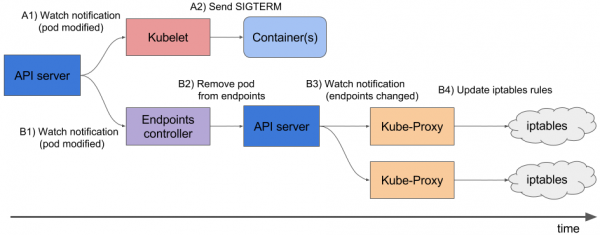
A1, B1 — Receiving state change notifications of the pod
A2 — Sending SIGTERM
B2 — Removing the pod from endpoints
B3 — Receiving changes (the list of endpoints has changed)
B4 — Updating iptables rules
Note: the removal of the pod endpoint and sending SIGTERM does not happen sequentially but in parallel. And due to the fact that Ingress does not receive the updated list of endpoints immediately, new requests from clients will be sent to the pod, causing 500 errors during the termination of the pod. (more detailed material on this issue we ). This problem should be addressed in the following ways:
- Send Connection: close in the response headers (if this concerns an HTTP application).
- If it's not possible to make changes to the code, the following section describes a solution that will allow handling requests until the end of the graceful period.
Theory. How NGINX and PHP-FPM terminate their processes
NGINX
Let's start with NGINX, as it's relatively straightforward. Delving into the theory, we learn that NGINX has one master process and several 'workers'—these are child processes that handle client requests. A convenient feature is provided: with the command nginx -s you can terminate processes either in a fast shutdown mode or in a graceful shutdown mode. Clearly, we are interested in the latter option.
Next, it's simple: you need to add into the a command that will send a signal for graceful shutdown. This can be done in the Deployment, within the container block:
       lifecycle:
          preStop:
            exec:
              command:
              - /usr/sbin/nginx
              - -s
              - quit
Now, at the moment of pod termination, we will see the following in the NGINX container logs:
2018/01/25 13:58:31 [notice] 1#1: signal 3 (SIGQUIT) received, shutting down
2018/01/25 13:58:31 [notice] 11#11: gracefully shutting down
And this will mean what we need: NGINX is waiting for requests to complete, after which it kills the process. However, below we will still discuss a common issue that can cause the process to terminate incorrectly even with the command nginx -s quit being issued.
At this stage, we have finished with NGINX: at least from the logs, we can understand that everything is working as it should.
What about PHP-FPM? How does it handle graceful shutdown? Let's figure it out.
PHP-FPM
In the case of PHP-FPM, there is less information available. If we refer to the for PHP-FPM, it will state that the following POSIX signals are accepted:
-
SIGINT,SIGTERM— fast shutdown; -
SIGQUIT— graceful shutdown (which is what we need).
The other signals are not required for this task, so we will skip their discussion. To ensure the process terminates correctly, you will need to write the following preStop hook:
        lifecycle:
          preStop:
            exec:
              command:
              - /bin/kill
              - -SIGQUIT
              - "1"
At first glance, this is all that is needed for graceful shutdown in both containers. However, the task is more complicated than it seems. The following are two cases where graceful shutdown did not work and caused temporary unavailability of the project during deployment.
Practice. Possible issues with graceful shutdown
NGINX
First and foremost, it is useful to remember: in addition to executing the command nginx -s quit There is one more stage worth paying attention to. We encountered a problem where NGINX, instead of sending the SIGQUIT signal, still sent SIGTERM, causing requests to not terminate correctly. Similar cases can be found, for example, . Unfortunately, we could not determine the exact cause of this behavior: there was a suspicion about the versions of NGINX, but that was not confirmed. The symptoms were that the logs of the NGINX container showed messages «open socket #10 left in connection 5», after which the pod would stop.
We can observe such a problem, for example, from the responses on the necessary Ingress:

Status code metrics at the time of deployment
In this case, we receive a 503 error code from the Ingress itself: it cannot reach the NGINX container as it is already unavailable. If we look at the NGINX container logs, we see the following:
[alert] 13939#0: *154 open socket #3 left in connection 16
[alert] 13939#0: *168 open socket #6 left in connection 13
After changing the stop signal, the container begins to stop correctly: this is confirmed by the absence of the 503 error.
If you encounter a similar problem, it makes sense to investigate which stop signal is used in the container and what the preStop hook looks like. It is quite possible that the cause lies there.
PHP-FPM… and more
The issue with PHP-FPM is described trivially: it does not wait for child processes to complete and terminates them, which causes 502 errors during deployment and other operations. Since 2005, there have been several bug reports on bugs.php.net (for example, and ), that describe this problem. However, in the logs, you are unlikely to see anything: PHP-FPM will announce the termination of its process without any errors or external notifications.
It is worth noting that the problem may depend to a lesser or greater extent on the application itself and may not manifest, for example, in monitoring. If you do encounter it, a simple workaround comes to mind: add a preStop hook with sleep(30). This will allow all previously existing requests to complete (and we won't accept new ones as the pod is already in a state of Terminating), and after 30 seconds, the pod will terminate with the signal SIGTERM.
This means that lifecycle for the container will look as follows:
    lifecycle:
      preStop:
        exec:
          command:
          - /bin/sleep
          - "30"
However, due to the specification of a 30-second sleep we significantly it will increase the deployment time, as each pod will be terminated at least 30 seconds, which is bad. What can be done about it?
Let's turn to the part responsible for the actual execution of the application. In our case, this is PHP-FPM, which by default does not monitor the execution of its child processes: the master process is terminated immediately. This behavior can be changed using the directive process_control_timeout, which specifies time limits for child processes to wait for signals from the master. Setting a value of 20 seconds will cover most requests executed in the container, and after they finish, the master process will be stopped.
With this knowledge, let's return to our last issue. As mentioned, Kubernetes is not a monolithic platform: it takes some time for different components to interact. This is especially relevant when considering the work of Ingresses and other related components, as such delays during deployment can easily lead to spikes of 500 errors. For example, an error may occur at the stage of sending a request to the upstream, but the actual 'time lag' of interaction between components is quite short—less than a second.
Therefore, in total with the aforementioned directive process_control_timeout the following construct can be used for lifecycle:
lifecycle:
  preStop:
    exec:
      command: ["/bin/bash","-c","/bin/sleep 1; kill -QUIT 1"]
In this case, we compensate for the delay with the command sleep and do not significantly increase the deployment time: is there a noticeable difference between 30 seconds and one? In essence, the 'main work' is taken on by process_control_timeout, and lifecycle it is only used as a 'safeguard' in case of lag.
Generally speaking, the described behavior and corresponding workaround apply not only to PHP-FPM. A similar situation may arise when using other programming languages/frameworks. If it is not possible to fix graceful shutdown in other ways—such as rewriting the code so that the application properly handles termination signals—this method can be applied. Although it may not be the prettiest, it works.
Practice. Load testing to verify the pod's operation.
Load testing is one method to check how a container operates, as this process simulates real-world conditions when users access the site. To test the recommendations mentioned above, you can use : it fully meets all our needs. Below are tips and recommendations for conducting testing with a visual example — enhanced by Grafana graphs and Yandex.Tank — drawn from our experience.
The most important thing here is to gradually check changes. After adding a new fix, run the tests and see if the results have changed compared to the last run. Otherwise, it will be challenging to identify ineffective solutions, and in the long run, it could even cause harm (for example, increase deployment time).
Another nuance is to watch the container logs during termination. Is there any information about graceful shutdown recorded there? Are there errors in the logs when accessing other resources (for instance, to the neighboring PHP-FPM container)? Application errors (like in the above case with NGINX)? I hope the introductory information from this article helps you better understand what happens to the container during its termination.
So, the first test run occurred without lifecycle and without additional directives for the application server (process_control_timeout in PHP-FPM). The goal of this test was to identify the approximate number of errors (and whether they exist at all). Additionally, it's worth noting that the average deployment time for each pod was about 5-10 seconds until full readiness. The results are as follows:
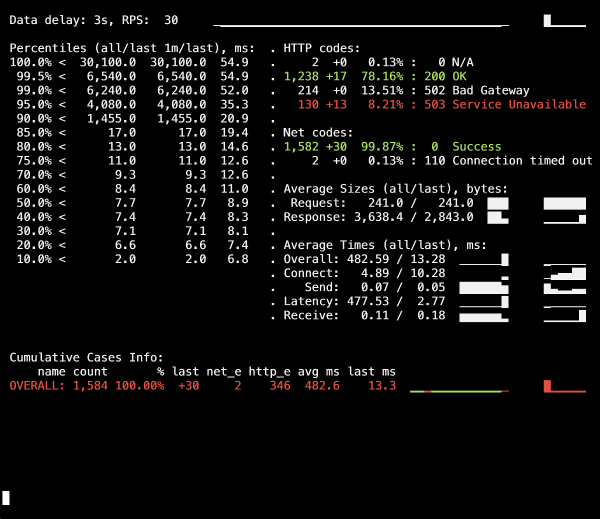
On the Yandex.Tank dashboard, a spike in 502 errors can be seen, which occurred during deployment and lasted on average for 5 seconds. Presumably, existing requests to the old pod were interrupted during its termination. After that, 503 errors appeared, resulting from the stopped NGINX container, which also broke connections due to the backend (causing Ingress to be unable to connect to it).
Let's see how process_control_timeout in PHP-FPM will help us wait for the child processes to finish, that is, to fix such errors. A redeployment already using this directive:
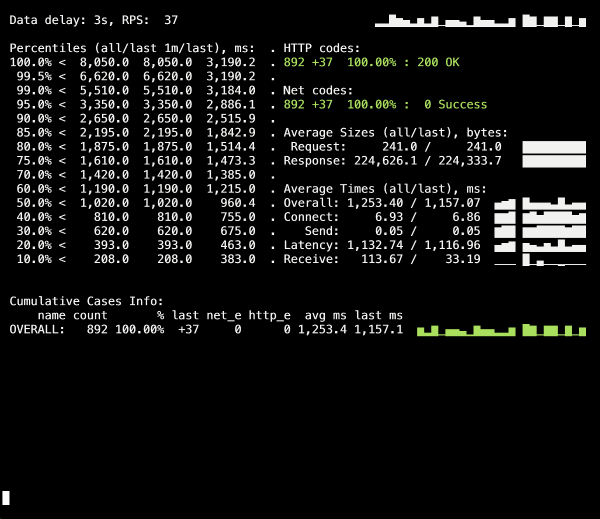
No more 500 errors during deployment! The deployment is successful, and graceful shutdown is working.
However, it's worth recalling the issue with Ingress containers, where a small percentage of errors may occur due to temporary lag. To avoid these, we should add a structure with sleep and repeat the deployment. Nonetheless, in our specific case, no changes were seen (no errors again).
Conclusion
To correctly complete the process, we expect the application to behave as follows:
- Wait for a few seconds, after which it should stop accepting new connections.
- Wait for all requests to finish and close all keepalive connections that are not executing requests.
- Terminate its process.
However, not all applications can operate this way. One solution to the problem in the Kubernetes context is:
- adding a pre-stop hook that will wait for a few seconds;
- reviewing the configuration file of our backend for the appropriate parameters.
An example with NGINX illustrates that even an application that is initially supposed to handle termination signals correctly may not do so, making it critical to check for 500 errors during application deployment. This also allows for a broader view of the issue and not just focus on a specific pod or container, but rather on the entire infrastructure as a whole.
For testing, you can use Yandex.Tank in conjunction with any monitoring system (in our case, we used data from Grafana with a backend based on Prometheus). Problems with graceful shutdown are evident under heavy loads generated by the benchmark, and monitoring helps to analyze the situation more thoroughly during or after the test.
In response to feedback on the article: it should be noted that the issues and their solutions described here pertain specifically to NGINX Ingress. Other cases may have different solutions, which we may explore in future materials of the series.
P.S.
Another from the K8s tips & tricks series:
- «»;
- «»;
- «»;
- «».
Source: habr.com
