

Sometimes it seems that ‘and mostly people buy them to install Linux on them. Off the top of my head, articles on Habr: , , , , …
Therefore decided that the market lacks something besides Chromebook semi-finished products , which is specifically designed to use Linux/*BSD as the operating system.
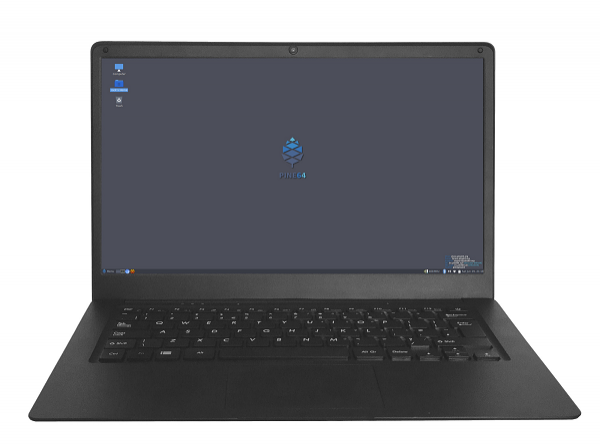
There is already focusing on the ability to enable/disable hardware modules for the camera, microphone, and WiFi/Bluetooth. However, I would like to examine this laptop in more detail on one hand, and on the other hand, talk about the changes that have occurred.
It is worth noting that the modern version of the laptop has slightly different key combinations for hardware disabling the corresponding modules (it cuts power to the peripherals with no option to turn them back on from the OS):
Combination
Affects
Indication (2 blinks = on, 3 blinks = off)
PINE64 + F10
Microphone
Caps Lock LED
PINE64 + F11
WiFi/BT
Num Lock LED (requires reboot or )
PINE64 + F12
Camera
Caps Lock and Num Lock LEDs together
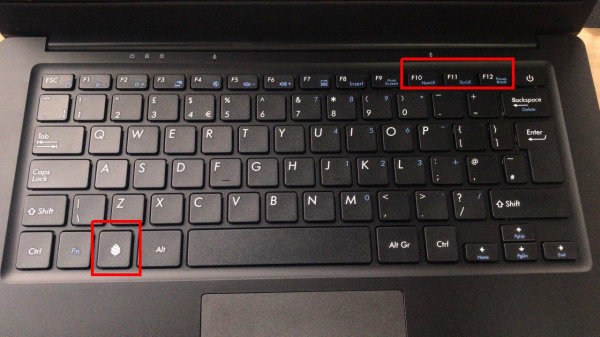
And now these combinations need to be held for 3 seconds instead of 10.
Let me remind you of the main technical specifications of the laptop, which is based on the Rockchip RK3399 SoC:

CPU
64-Bit Dual-Core ARM 1.8GHz Cortex A72 and Quad-Core ARM 1.4GHz Cortex A53
GPU
Quad-Core MALI T-860
RAM
4 GB LPDDR4 Dual Channel System DRAM Memory
Flash
64 GB eMMC 5.0 (expandable to 128)
Wireless connectivity interfaces
WiFi 802.11AC and Bluetooth 5.0
USB ports
One USB 3.0 and one USB 2.0 Type-A, as well as a USB 3.0 Type-C for charging the battery or connecting an external monitor
MicroSD card slot
1
Headphone jack
1 (Headphone Jack)
Microphone
Built-in
Keyboard
Full-sized keyboard with two layout options: ISO — UK Keyboard or ANSI — US Keyboard
Battery
Lithium-polymer battery (10,000 mAH)
Screen
14.1″ IPS LCD (1920 x 1080)
Body material
Magnesium alloy
Dimensions
329mm x 220mm x 12mm
Weight
1.26 kg
Thus, in fact, the laptop is built around a single-board computer to which the keyboard and touchpad are connected via USB 2.0 and the FullHD display via eDP MiPi protocol.
As noted in the specifications table, the laptop is available with two keyboard options (ISO and ANSI):

Two keyboard options became available after user feedback during the announcement phase of the new device. Initially, only the ISO layout was planned, but the company listened to the opinions of potential users and added the option to order a laptop with an ANSI layout.
By default, the RK3399 SoC has a hardware-defined boot sequence that prioritizes internal memory (eMMC) over the SD card. However, the developers wanted to provide users with a convenient way to try operating systems other than the one flashed in eMMC. Therefore, the bootloader code was modified to start the OS from the SD card if one is present.
By default, laptops come with the Debian operating system, which uses (the successor to GNOME 2) as a desktop environment. In addition, currently, the official has prepared images of the following OSs:
 Bionic LXDE
- Bionic Mate
- Chromium OS
- Android 7.1
 Bionic LXDE
 Bionic Mate
 Chromium OS
 Android 7.1
In the English review an interesting usage option is suggested. You can keep an SD card with Chromium OS handy in case your friend/wife/child wants to use the Pinebook Pro to browse the internet.
There are already bootable builds of Q4OS and Manjaro Preview, but it's still too early to talk about a ready-made solution for the end user. Active work is underway on Fedora 31, Kali Linux, Arch, and other OSs. Meanwhile, there is also ongoing development in the main Debian build (with MATE) (): performance is increasing, new software support is being added, and power consumption is improving.
Although *BSD systems were mentioned in all press releases, PINE is currently not actively supporting this OS family. However, judging by previous laptop models, there are active participants in the *BSD community around the company's products who add the necessary support as they receive their devices. .
An interesting example of interaction with its community can also be seen from another side: PINE64 responded by providing users with .dwg files containing exact specifications for the case and states its readiness to promote similar projects in the future, even including them in the official store.
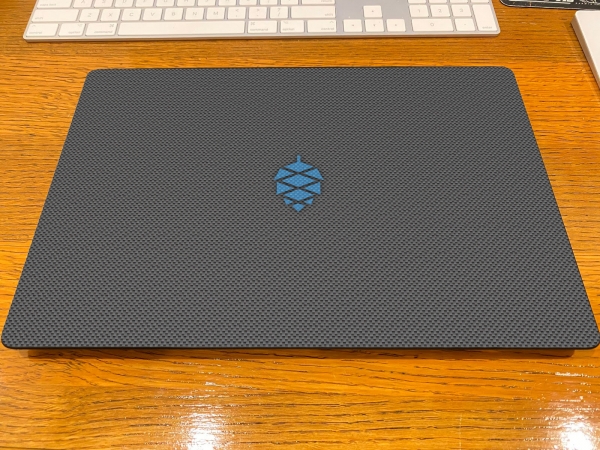
In general, it seems that PINE64 encourages research on its device. For example, the laptop has a :
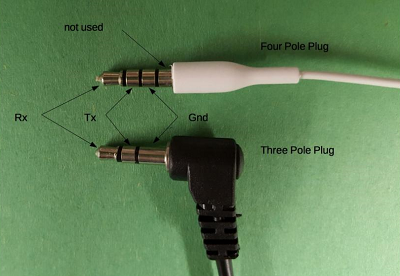
It's also pleasing that the developers take errors seriously throughout the product's lifecycle. For instance:
- Before the release of the first batch, it was discovered that the computer does not start when the battery is disconnected. To solve this issue, two cables (bypass cables) were added inside the case, which are disabled by default. To operate the device with the battery disconnected, these cables must be connected to provide power to the motherboard.
- After the first batch of laptops was released, users began to complain about trackpad and keyboard issues: input delays and missed keystrokes. The developers obtained the source codes for the input device firmware, fixed the issues, and distribute the new firmware from their website along with an update utility. Modern devices now come with the fixed firmware from the factory.
Let's move on to more unpleasant matters: the price. This laptop is often referred to as a $199.99 laptop. However, shipping via DHL needs to be added to this price, which, for example, makes it $233 for the USA:

In comparison, ordering the device to Finland will be even more expensive:
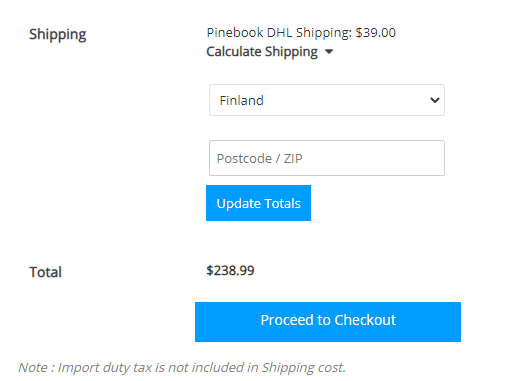
But for residents of Russia, the situation is even more disheartening: there is simply no shipping available.

As I understand it, part of the electronics assortment can be ordered from their store, but not the Pinebook Pro. I clarified this with the support of the official PINE64 store, and the reply confirmed the lack of possibility to order the device to Russia:
We are unable to import the Pinebook Pro to Russia due to Express carriers not having service for B2C electronics devices. Only for documents.
Someday, if our partner registers with the Russian Federal Security Service, it will be possible to import.
This means that the cost of shipping the device from the USA or Europe must be added to the price.
It's also worth noting that there is a small (but highlighted in red) remark on the order page, the essence of which is:
A small number of dead pixels (1-3) is normal for LCD screens and should not be considered a defect. We do not make a profit from selling these units, so please do not buy the Pinebook Pro if a dead pixel will lead you to file a dispute through PayPal.
English
- Small numbers (1-3) of stuck or dead pixels are a characteristic of LCD screens. These are normal and should not be considered a defect.
- When fulfilling the purchase, please bear in mind that we are offering the Pinebook Pro at this price as a community service to the PINE64, Linux, and BSD communities. We make no profit from selling these units. If you think that a minor dissatisfaction, such as a dead pixel, will prompt you to file a PayPal dispute then please do not purchase the Pinebook Pro. Thank you.
At There are also mentions that the Pinebook and Pinebook Pro are sold at cost price. Therefore, it is hard to blame the company for such pricing.
At the time of writing this publication, pre-orders for the current batch are open, which will be manufactured and delivered to consumers by the Chinese New Year (February 2020): devices with ISO layout are planned to be released at the end of December, followed by laptops with ANSI keyboard layout (early January). However, large shipment volumes from China (Christmas, Chinese New Year) may slightly shift the timelines. It is also worth considering that devices from the next series (which will be after the Chinese New Year) will be delivered to owners by the end of March - early April 2020.
I came across this laptop when I needed an affordable thin client (RDP to Windows machines and SSH). I was considering using Chromebooks, but I became interested in such an unconventional product. According to the description, this beast will be sufficient for me (), so I intend to get it for myself. After some time of usage, I plan to write another article, in this regard I invite anyone interested in a review to leave comments, personal messages, or email (eretik.box gmail
gmail com) with suggestions on what to test and what to pay attention to.
Source: habr.com
