

The internet has changed significantly. One of the fundamental protocols of the internet, UDP, is used by applications not only for delivering datagrams and broadcasting but also for establishing peer-to-peer connections between network nodes. Due to its simple structure, this protocol has found numerous unplanned applications, although the protocol's drawbacks, such as lack of guaranteed delivery, have not disappeared. This article describes the implementation of a guaranteed delivery protocol over UDP.
Contents:
Introduction
The initial architecture of the Internet assumed a uniform address space in which each node had a global and unique IP address, allowing direct communication with other nodes. Nowadays, the Internet, in fact, has a different architecture—a single area of global IP addresses and numerous areas with private addresses hidden behind NAT devices.In such architecture, only devices located in the global address space can easily interact with anyone on the network, as they have a unique, globally routable IP address. A node in a private network can connect to other nodes in the same network, as well as connect to other well-known nodes in the global address space. This interaction is largely achieved through the network address translation mechanism. NAT devices, such as Wi-Fi routers, create special entries in translation tables for outgoing connections and modify IP addresses and port numbers in packets. This allows establishing an outgoing connection from a private network to nodes in the global address space. However, at the same time, NAT devices typically block all incoming traffic unless specific rules for incoming connections are set.
This architecture of the Internet is quite suitable for client-server interaction, where clients can reside in private networks, while servers have a global address. However, it creates difficulties for direct connections between two nodes across different private networks. Directly connecting two nodes is crucial for peer-to-peer applications, such as voice transmission (Skype), remote access to computers (TeamViewer), or online gaming. One of the most effective methods for establishing a peer-to-peer connection between devices located in different private networks is called 'hole punching.' This technique is most commonly used with applications based on the UDP protocol.
However, if your application requires guaranteed data delivery, for example, when transferring files between computers, using UDP may present numerous challenges because UDP is not a guaranteed delivery protocol and does not ensure packets are delivered in order, unlike the TCP protocol.
In this case, to ensure guaranteed packet delivery, it's necessary to implement an application-layer protocol that provides the required functionality and operates over UDP.
In such scenarios, to guarantee the reliable delivery of packets, it is essential to establish an application-layer protocol that ensures the desired functionality and operates on top of UDP.
First, I'd like to point out that there is a technique called TCP hole punching for establishing TCP connections between nodes in different private networks. However, due to the lack of support by many NAT devices, it is typically not considered the primary method for connecting such nodes.
In this article, I will only discuss the implementation of the guaranteed delivery protocol. The implementation of the UDP hole punching technique will be described in subsequent articles.
Protocol Requirements
- Reliable packet delivery is achieved through a positive feedback mechanism (known as positive acknowledgment).
- There is a need for effective transmission of large data, i.e., the protocol must avoid unnecessary packet retransmissions.
- There should be a possibility to cancel the delivery acknowledgment mechanism (with the ability to function as a 'pure' UDP protocol).
- The capability for a command mode implementation, confirming each message.
- The basic unit of data transfer in the protocol should be a message.
These requirements largely coincide with the requirements for the Reliable Data Protocol described in and , and I based the development of this protocol on these standards.
To understand these requirements, let’s examine the time diagrams of data transmission between two nodes in the network using TCP and UDP protocols. Let's assume in both cases we have a lost packet.
Transmission of non-interactive data over TCP: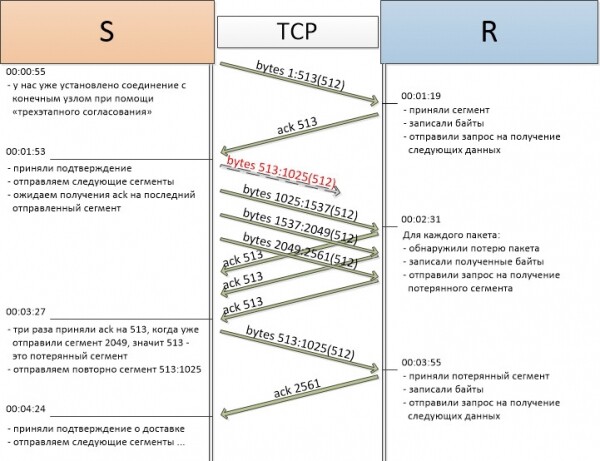
As can be seen from the diagram, in the case of packet loss, TCP will detect the lost packet and notify the sender, requesting the number of the lost segment.
Data transmission over the UDP protocol: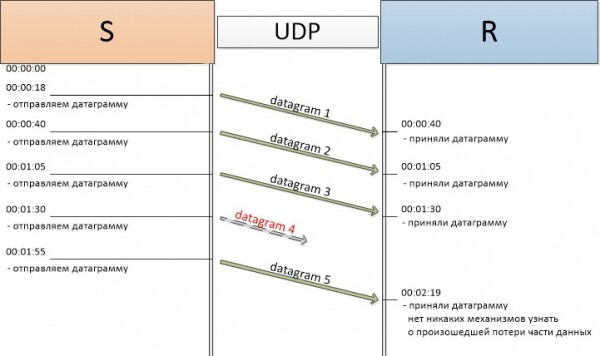
UDP does not take any steps to detect losses. Error control in the UDP protocol is entirely the responsibility of the application.
Error detection in the TCP protocol is achieved by establishing a connection with the endpoint, maintaining the state of that connection, indicating the number of bytes sent in each packet header, and notifications of receipt using the acknowledgment number.
Additionally, to improve performance (i.e., sending more than one segment without receiving acknowledgment), the TCP protocol uses a so-called transmission window — the number of bytes of data that the sender of the segment expects to receive.
More detailed information about the TCP protocol can be found in , with UDP in , where they are actually defined.
From the above, it is clear that to create a reliable message delivery protocol over UDP (hereafter called Reliable UDP), it is necessary to implement mechanisms similar to those of TCP for data transmission. Specifically:
- maintain connection state
- use segment numbering
- use special acknowledgment packets
- implement a simplified window mechanism to increase the throughput of the protocol
Additionally, it is required to:
- signal the beginning of a message to allocate resources for the connection
- signal the end of the message to transmit the received message to the upper application and free protocol resources
- allow the protocol for specific connections to disable the acknowledgment mechanism to function like 'pure' UDP
Reliable UDP Header
Recall that a UDP datagram is encapsulated in an IP datagram. The Reliable UDP packet is accordingly 'wrapped' in a UDP datagram.
Encapsulation of the Reliable UDP header: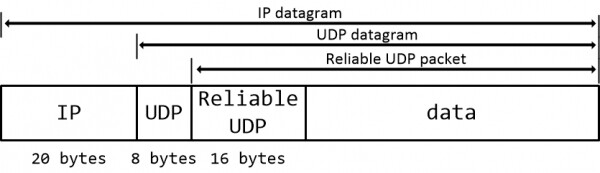
The structure of the Reliable UDP header is quite simple:
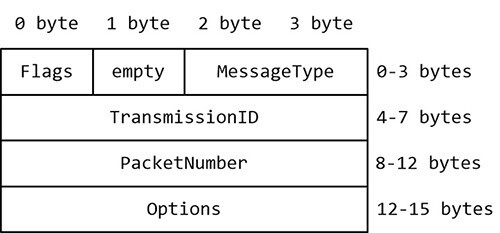
- Flags – control flags of the packet
- MessageType – message type, used by upper applications to subscribe to specific messages
- TransmissionId – transmission number, uniquely identifies the connection along with the address and port of the recipient
- PacketNumber – packet number
- Options – additional protocol options. In the case of the first packet, used to indicate the message size
The flags are as follows:
- FirstPacket — the first packet of the message
- NoAsk — the message does not require acknowledgment
- LastPacket — the last packet of the message
- RequestForPacket — acknowledgment packet or request for a lost packet
General Principles of Protocol Operation
Since Reliable UDP is oriented towards guaranteed message delivery between two nodes, it must be able to establish a connection with the other side. To establish a connection, the sending side sends a packet with the FirstPacket flag, and the response will indicate the establishment of the connection. All response packets, or acknowledgment packets, always set the PacketNumber field to one greater than the highest PacketNumber of successfully received packets. In the Options field for the first sent packet, the size of the message is recorded.
A similar mechanism is used to finalize the connection. In the last packet of messages, the LastPacket flag is set. In the response packet, the number of the last packet + 1 is indicated, which means successful delivery of the message for the receiving side.
Connection Establishment and Termination Diagram: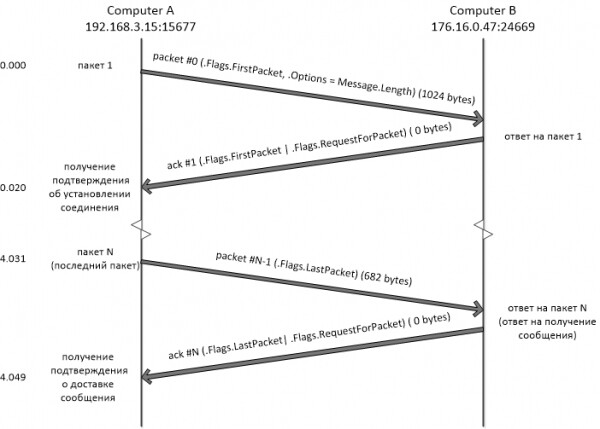
When the connection is established, data transmission begins. Data is transmitted in blocks of packets. Each block, except for the last one, contains a fixed number of packets. This is equal to the size of the receive/transmit window. The last block of data may contain fewer packets. After sending each block, the sender waits for an acknowledgment of delivery or a request to resend lost packets, keeping the receive/transmit window open for responses. Upon receiving the acknowledgment of the block's delivery, the receive/transmit window shifts, and the next block of data is sent.
The receiving side accepts packets. Each packet is checked against the transmission window. Packets that do not fall within the window and duplicates are discarded. Since the window size is strictly fixed and the same for both the receiver and the sender, if a block of packets is delivered without loss, the window shifts to accept the packets of the next block of data, and an acknowledgment of delivery is sent. If the window does not fill within the period set by the working timer, a check is initiated to identify which packets were not delivered, and requests for retransmission are sent.
Retransmission Diagram: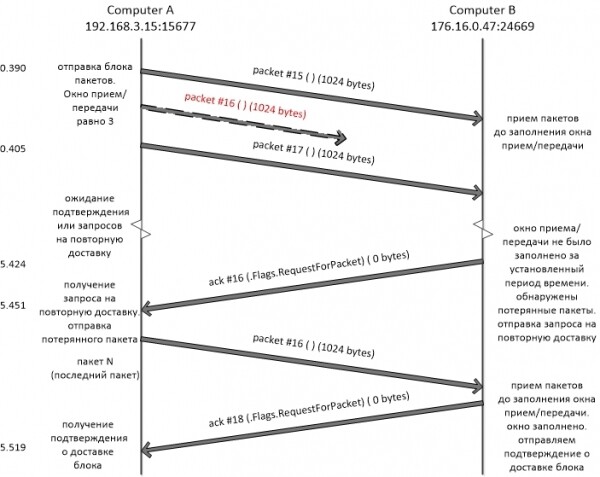
Timeouts and Protocol Timers
There are several reasons why a connection cannot be established. For example, if the receiving side is offline. In this case, when attempting to establish a connection, it will be closed due to a timeout. In the Reliable UDP implementation, two timers are used for timeout settings. The first, the working timer, is used to wait for a response from the remote host. If it times out on the sender's side, the last sent packet is retransmitted. If the timer times out on the receiver's side, a check for lost packets is performed, and requests for retransmission are sent.
The second timer is necessary to close the connection in case of a loss of communication between nodes. For the sender side, it starts immediately after the working timer triggers and waits for a response from the remote node. If there is no response within the prescribed period, the connection is terminated and resources are freed. For the receiver side, the connection closure timer starts after the working timer triggers twice. This is essential for ensuring against the loss of the acknowledgment packet. When the timer triggers, the connection is also terminated and resources are freed.
State Diagram of Reliable UDP Transmission
The principles of the protocol are implemented in a finite automaton, where each state is responsible for a specific logic of packet processing.
State diagram of Reliable UDP:
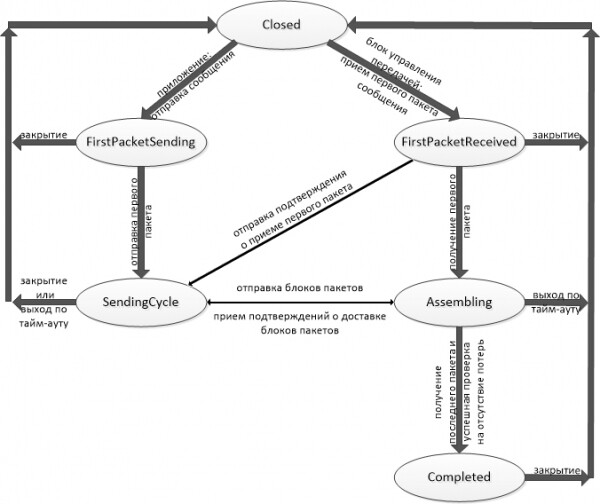
Closed – is not actually a state; it is a starting and ending point for the automaton. The state Closed is considered the control block of transmission, which, by implementing an asynchronous UDP server, redirects packets to the appropriate connections and starts state processing.
FirstPacketSending – the initial state in which the outgoing connection is located when sending a message.
In this state, the first packet is sent for regular messages. For messages without acknowledgment of receipt, this is the only state - the entire message is sent in it.
SendingCycle – the main state for transmitting message packets.
Transition to it from the state FirstPacketSending occurs after sending the first packet of the message. All acknowledgments and requests for retransmissions come to this state. Exiting it is possible in two cases - in case of successful delivery of the message or due to a timeout.
FirstPacketReceived – the initial state for the message receiver.
In it, the correctness of the start of transmission is checked, necessary structures are created, and an acknowledgment of the receipt of the first packet is sent.
For a message consisting of a single packet and sent without using delivery acknowledgment, this is the only state. After processing such a message, the connection is closed.
Assembling – the main state for receiving message packets.
It records packets to temporary storage, checks for packet loss, sends acknowledgments for the delivery of packet blocks and messages as a whole, and requests the resending of lost packets. If the entire message is successfully received – the connection transitions to the state Completed, otherwise, it exits on a timeout.
Completed – closing the connection in the case of successful receipt of the entire message.
This state is necessary for assembling the message and in cases where the acknowledgment of message delivery was lost on its way to the sender. The exit from this state occurs on timeout, but the connection is considered successfully closed.
Digging Deeper into the Code: Transmission Control Block
One of the key elements of Reliable UDP is the transmission control block. Its task is to store the current connections and auxiliary elements, distribute incoming packets to the corresponding connections, provide an interface for sending packets to the connection, and implement the protocol API. The transmission control block receives packets from the UDP layer and redirects them for processing to the finite state machine. An asynchronous UDP server is implemented for receiving packets.
Some members of the ReliableUdpConnectionControlBlock class:
internal class ReliableUdpConnectionControlBlock : IDisposable
{
  // byte array for the specified key. Used for assembling incoming messages
  public ConcurrentDictionary<Tuple, byte[]> IncomingStreams { get; private set; }
  // byte array for the specified key. Used for sending outgoing messages.
  public ConcurrentDictionary<Tuple, byte[]> OutcomingStreams { get; private set; }
  // connection record for the specified key.
  private readonly ConcurrentDictionary<Tuple, ReliableUdpConnectionRecord> m_listOfHandlers;
  // list of subscribers for the messages.
  private readonly List m_subscribers;
  // local socket
  private Socket m_socketIn;
  // port for incoming messages
  private int m_port;
  // local IP address
  private IPAddress m_ipAddress;
  // local endpoint
  public IPEndPoint LocalEndpoint { get; private set; }
  // collection of pre-initialized
  // states of the finite state machine
  public StatesCollection States { get; private set; }
  // random number generator. Used to create TransmissionId
  private readonly RNGCryptoServiceProvider m_randomCrypto;
  //...
}
Implementation of an asynchronous UDP server:
private void Receive()
{
  EndPoint connectedClient = new IPEndPoint(IPAddress.Any, 0);
  // create a new buffer for each socket.BeginReceiveFrom
  byte[] buffer = new byte[DefaultMaxPacketSize + ReliableUdpHeader.Length];
  // pass the buffer as a parameter for the asynchronous method
  this.m_socketIn.BeginReceiveFrom(buffer, 0, buffer.Length, SocketFlags.None, ref connectedClient, EndReceive, buffer);
}

private void EndReceive(IAsyncResult ar)
{
  EndPoint connectedClient = new IPEndPoint(IPAddress.Any, 0);
  int bytesRead = this.m_socketIn.EndReceiveFrom(ar, ref connectedClient);
  // packet received, ready to accept the next
  Receive();
  // since the simplest way to handle the buffer is to get a reference to it
  // from IAsyncResult.AsyncState
  byte[] bytes = ((byte[]) ar.AsyncState).Slice(0, bytesRead);
  // receive the packet header
  ReliableUdpHeader header;
  if (!ReliableUdpStateTools.ReadReliableUdpHeader(bytes, out header))
  {
    // incorrect packet received - discard it
    return;
  }
  // construct a key for determining the connection record for the packet
  Tuple key = new Tuple(connectedClient, header.TransmissionId);
  // get the existing connection record or create a new one
  ReliableUdpConnectionRecord record = m_listOfHandlers.GetOrAdd(key, new ReliableUdpConnectionRecord(key, this, header.ReliableUdpMessageType));
  // start processing the packet in the finite state machine
  record.State.ReceivePacket(record, header, bytes);
}
A structure containing connection information is created for each message transmission. This structure is called connection record.
Some members of the ReliableUdpConnectionRecord class:
internal class ReliableUdpConnectionRecord : IDisposable
{
  // Array of bytes with the message
  public byte[] IncomingStream { get; set; }
  // Reference to the state of the finite automaton
  public ReliableUdpState State { get; set; }
  // Pair that uniquely identifies the connection record
  // in the transmission control block
  public Tuple Key { get; private set;}
  // Lower bound of the receive window
  public int WindowLowerBound;
  // Size of the transmission window
  public readonly int WindowSize;
  // Packet number to be sent
  public int SndNext;
  // Number of packets to be sent
  public int NumberOfPackets;
  // Transmission number (which is the second part of the Tuple)
  // each message has its own
  public readonly Int32 TransmissionId;
  // Remote IP endpoint – the actual recipient of the message
  public readonly IPEndPoint RemoteClient;
  // Packet size, to avoid fragmentation at the IP level
  // should not exceed MTU – (IP.Header + UDP.Header + ReliableUDP.Header)
  public readonly int BufferSize;
  // Transmission control block
  public readonly ReliableUdpConnectionControlBlock Tcb;
  // Encapsulates the results of the asynchronous operation for BeginSendMessage/EndSendMessage
  public readonly AsyncResultSendMessage AsyncResult;
  // Do not send acknowledgment packets
  public bool IsNoAnswerNeeded;
  // Last correctly received packet (always set to the highest number)
  public int RcvCurrent;
  // Array with the numbers of lost packets
  public int[] LostPackets { get; private set; }
  // Has the last packet been received? Used as a bool.
  public int IsLastPacketReceived = 0;
  //...
}
Digging Deeper into the Code: States
States implement the finite automaton of the Reliable UDP protocol, where the main packet processing occurs. The abstract class ReliableUdpState provides an interface for the state:

All protocol logic is implemented by the classes mentioned above, along with a helper class that provides static methods, such as building a ReliableUdp header from a connection record.
Next, the implementations of the interface methods that define the main algorithms of the protocol will be examined in detail.
DisposeByTimeout Method
The DisposeByTimeout method is responsible for releasing connection resources upon timeout and signaling successful/unsuccessful message delivery.
ReliableUdpState.DisposeByTimeout:
protected virtual void DisposeByTimeout(object record)
{
  ReliableUdpConnectionRecord connectionRecord = (ReliableUdpConnectionRecord) record;
  if (record.AsyncResult != null)
  {
    connectionRecord.AsyncResult.SetAsCompleted(false);
  }
  connectionRecord.Dispose();
}
It is overridden only in the state Completed.
Completed.DisposeByTimeout:
protected override void DisposeByTimeout(object record)
{
  ReliableUdpConnectionRecord connectionRecord = (ReliableUdpConnectionRecord) record;
  // Notify successful message receipt
  SetAsCompleted(connectionRecord);
}
ProcessPackets Method
The ProcessPackets method is responsible for further processing of a packet or packets. It is called directly or via a packet wait timer.
In state Assembling the method is overridden and responsible for checking lost packets and transitioning to state Completed, upon receiving the last packet and passing the successful check
Assembling.ProcessPackets:
public override void ProcessPackets(ReliableUdpConnectionRecord connectionRecord)
{
  if (connectionRecord.IsDone != 0)
    return;
  if (!ReliableUdpStateTools.CheckForNoPacketLoss(connectionRecord, connectionRecord.IsLastPacketReceived != 0))
  {
    // There are lost packets, sending requests for them
    foreach (int seqNum in connectionRecord.LostPackets)
    {
      if (seqNum != 0)
      {
        ReliableUdpStateTools.SendAskForLostPacket(connectionRecord, seqNum);
      }
    }
    // Setting the timer for a second try at transmission
    if (!connectionRecord.TimerSecondTry)
    {
      connectionRecord.WaitForPacketsTimer.Change(connectionRecord.ShortTimerPeriod, -1);
      connectionRecord.TimerSecondTry = true;
      return;
    }
    // If after two triggers of WaitForPacketTimer
    // it was not possible to receive the packets - start the connection closure timer
    StartCloseWaitTimer(connectionRecord);
  }
  else if (connectionRecord.IsLastPacketReceived != 0)
  // Successful check
  {
    // Send acknowledgment for receiving the data block
    ReliableUdpStateTools.SendAcknowledgePacket(connectionRecord);
    connectionRecord.State = connectionRecord.Tcb.States.Completed;
    connectionRecord.State.ProcessPackets(connectionRecord);
    // Instead of instant resource implementation
    // start a timer, in case
    // the last ack does not reach the sender and they request it again.
    // Upon timer expiration - implement resources
    // in Completed state, the timer method is overridden
    StartCloseWaitTimer(connectionRecord);
  }
  // This case occurs when the ack for the block of packets was lost
  else
  {
    if (!connectionRecord.TimerSecondTry)
    {
      ReliableUdpStateTools.SendAcknowledgePacket(connectionRecord);
      connectionRecord.WaitForPacketsTimer.Change(connectionRecord.ShortTimerPeriod, -1);
      connectionRecord.TimerSecondTry = true;
      return;
    }
    // Start the connection closure timer
    StartCloseWaitTimer(connectionRecord);
  }
}
In state SendingCycle This method is called only by the timer and is responsible for re-sending the last message as well as enabling the connection closure timer.
SendingCycle.ProcessPackets:
public override void ProcessPackets(ReliableUdpConnectionRecord connectionRecord)
{
  if (connectionRecord.IsDone != 0)
    return;
  // resend the last packet
  // (in case of connection recovery, the receiving node will resend requests that did not reach it)
  ReliableUdpStateTools.SendPacket(connectionRecord, ReliableUdpStateTools.RetransmissionCreateUdpPayload(connectionRecord, connectionRecord.SndNext - 1));
  // start CloseWait timer – to wait for connection recovery or completion
  StartCloseWaitTimer(connectionRecord);
}
In state Completed The method stops the working timer and sends a message to subscribers.
Completed.ProcessPackets:
public override void ProcessPackets(ReliableUdpConnectionRecord connectionRecord)
{
  if (connectionRecord.WaitForPacketsTimer != null)
    connectionRecord.WaitForPacketsTimer.Dispose();
  // gather the message and send it to subscribers
  ReliableUdpStateTools.CreateMessageFromMemoryStream(connectionRecord);
}
ReceivePacket Method
In state FirstPacketReceived The main task of the method is to determine whether the first packet of the message has indeed arrived at the interface and to assemble a message consisting of a single packet.
FirstPacketReceived.ReceivePacket:
public override void ReceivePacket(ReliableUdpConnectionRecord connectionRecord, ReliableUdpHeader header, byte[] payload)
{
  if (!header.Flags.HasFlag(ReliableUdpHeaderFlags.FirstPacket))
    // discard the packet
    return;
  // combination of two flags - FirstPacket and LastPacket indicates a single message
  if (header.Flags.HasFlag(ReliableUdpHeaderFlags.FirstPacket) &
      header.Flags.HasFlag(ReliableUdpHeaderFlags.LastPacket))
  {
    ReliableUdpStateTools.CreateMessageFromSinglePacket(connectionRecord, header, payload.Slice(ReliableUdpHeader.Length, payload.Length));
    if (!header.Flags.HasFlag(ReliableUdpHeaderFlags.NoAsk))
    {
      // send acknowledgment packet
      ReliableUdpStateTools.SendAcknowledgePacket(connectionRecord);
    }
    SetAsCompleted(connectionRecord);
    return;
  }
  // by design all packet numbers start at 0;
  if (header.PacketNumber != 0)
    return;
  ReliableUdpStateTools.InitIncomingBytesStorage(connectionRecord, header);
  ReliableUdpStateTools.WritePacketData(connectionRecord, header, payload);
  // count the number of packets expected to arrive
  connectionRecord.NumberOfPackets = (int)Math.Ceiling((double)((double)connectionRecord.IncomingStream.Length / (double)connectionRecord.BufferSize));
  // record the last received packet number (0)
  connectionRecord.RcvCurrent = header.PacketNumber;
  // move the reception window up by 1
  connectionRecord.WindowLowerBound++;
  // change state
  connectionRecord.State = connectionRecord.Tcb.States.Assembling;
  // if acknowledgment mechanism is not required
  // start a timer that will free all structures
  if (header.Flags.HasFlag(ReliableUdpHeaderFlags.NoAsk))
  {
    connectionRecord.CloseWaitTimer = new Timer(DisposeByTimeout, connectionRecord, connectionRecord.ShortTimerPeriod, -1);
  }
  else
  {
    ReliableUdpStateTools.SendAcknowledgePacket(connectionRecord);
    connectionRecord.WaitForPacketsTimer = new Timer(CheckByTimer, connectionRecord, connectionRecord.ShortTimerPeriod, -1);
  }
}
In state SendingCycle This method is overridden to receive delivery confirmations and retransmission requests.
SendingCycle.ReceivePacket:
public override void ReceivePacket(ReliableUdpConnectionRecord connectionRecord, ReliableUdpHeader header, byte[] payload)
{
  if (connectionRecord.IsDone != 0)
    return;
  if (!header.Flags.HasFlag(ReliableUdpHeaderFlags.RequestForPacket))
    return;
  // calculate the final window boundary
  // the window boundary + 1 is taken for delivery confirmations
  int windowHighestBound = Math.Min((connectionRecord.WindowLowerBound + connectionRecord.WindowSize), (connectionRecord.NumberOfPackets));
  // check if it falls within the window
  if (header.PacketNumber  windowHighestBound)
    return;
  connectionRecord.WaitForPacketsTimer.Change(connectionRecord.ShortTimerPeriod, -1);
  if (connectionRecord.CloseWaitTimer != null)
    connectionRecord.CloseWaitTimer.Change(-1, -1);
  // check for the last packet:
  if (header.PacketNumber == connectionRecord.NumberOfPackets)
  {
    // transfer is complete
    Interlocked.Increment(ref connectionRecord.IsDone);
    SetAsCompleted(connectionRecord);
    return;
  }
  // this is a response to the first packet with confirmation
  if ((header.Flags.HasFlag(ReliableUdpHeaderFlags.FirstPacket) && header.PacketNumber == 1))
  {
    // without shifting the window
    SendPacket(connectionRecord);
  }
  // received confirmation of data block receipt
  else if (header.PacketNumber == windowHighestBound)
  {
    // shift the receive/send window
    connectionRecord.WindowLowerBound += connectionRecord.WindowSize;
    // reset the transmission control array
    connectionRecord.WindowControlArray.Nullify();
    // send a block of packets
    SendPacket(connectionRecord);
  }
  // this is a request for retransmission – send the required packet
  else
    ReliableUdpStateTools.SendPacket(connectionRecord, ReliableUdpStateTools.RetransmissionCreateUdpPayload(connectionRecord, header.PacketNumber));
}
In state Assembling The ReceivePacket method performs the main work of assembling a message from the incoming packets.
Assembling.ReceivePacket:
public override void ReceivePacket(ReliableUdpConnectionRecord connectionRecord, ReliableUdpHeader header, byte[] payload)
{
  if (connectionRecord.IsDone != 0)
    return;
  // processing packets with the acknowledgment delivery mechanism disabled
  if (header.Flags.HasFlag(ReliableUdpHeaderFlags.NoAsk))
  {
    // resetting the timer
    connectionRecord.CloseWaitTimer.Change(connectionRecord.LongTimerPeriod, -1);
    // recording data
    ReliableUdpStateTools.WritePacketData(connectionRecord, header, payload);
    // if we received a packet with the last flag - we finalize
    if (header.Flags.HasFlag(ReliableUdpHeaderFlags.LastPacket))
    {
      connectionRecord.State = connectionRecord.Tcb.States.Completed;
      connectionRecord.State.ProcessPackets(connectionRecord);
    }
    return;
  }
  // calculating the upper bound of the window
  int windowHighestBound = Math.Min((connectionRecord.WindowLowerBound + connectionRecord.WindowSize - 1), (connectionRecord.NumberOfPackets - 1));
  // discarding packets that do not fall within the window
  if (header.PacketNumber  (windowHighestBound))
    return;
  // discarding duplicates
  if (connectionRecord.WindowControlArray.Contains(header.PacketNumber))
    return;
  // recording data
  ReliableUdpStateTools.WritePacketData(connectionRecord, header, payload);
  // increasing the packet counter
  connectionRecord.PacketCounter++;
  // recording the current packet number in the window control array
  connectionRecord.WindowControlArray[header.PacketNumber - connectionRecord.WindowLowerBound] = header.PacketNumber;
  // setting the highest received packet
  if (header.PacketNumber > connectionRecord.RcvCurrent)
    connectionRecord.RcvCurrent = header.PacketNumber;
  // restarting timers
  connectionRecord.TimerSecondTry = false;
  connectionRecord.WaitForPacketsTimer.Change(connectionRecord.ShortTimerPeriod, -1);
  if (connectionRecord.CloseWaitTimer != null)
    connectionRecord.CloseWaitTimer.Change(-1, -1);
  // if the last packet has arrived
  if (header.Flags.HasFlag(ReliableUdpHeaderFlags.LastPacket))
  {
    Interlocked.Increment(ref connectionRecord.IsLastPacketReceived);
  }
  // if we have received all packets in the window, then we reset the counter
  // and send the acknowledgment packet
  else if (connectionRecord.PacketCounter == connectionRecord.WindowSize)
  {
    // resetting the counter.
    connectionRecord.PacketCounter = 0;
    // shifted the transmission window
    connectionRecord.WindowLowerBound += connectionRecord.WindowSize;
    // nullifying the transmission control array
    connectionRecord.WindowControlArray.Nullify();
    ReliableUdpStateTools.SendAcknowledgePacket(connectionRecord);
  }
  // if the last packet is already received
  if (Thread.VolatileRead(ref connectionRecord.IsLastPacketReceived) != 0)
  {
    // checking the packets
    ProcessPackets(connectionRecord);
  }
}
In state Completed The sole purpose of the method is to send a resend acknowledgment of the successful delivery of the message.
Completed.ReceivePacket:
public override void ReceivePacket(ReliableUdpConnectionRecord connectionRecord, ReliableUdpHeader header, byte[] payload)
{
  // Resending the last packet because
  // the last ack did not reach the sender
  if (header.Flags.HasFlag(ReliableUdpHeaderFlags.LastPacket))
  {
    ReliableUdpStateTools.SendAcknowledgePacket(connectionRecord);
  }
}
SendPacket Method
In state FirstPacketSending This method sends the first data packet, or, if the message does not require acknowledgment of delivery – the entire message.
FirstPacketSending.SendPacket:
public override void SendPacket(ReliableUdpConnectionRecord connectionRecord)
{
  connectionRecord.PacketCounter = 0;
  connectionRecord.SndNext = 0;
  connectionRecord.WindowLowerBound = 0;
  // if acknowledgment is not required - send all packets
  // and release resources
  if (connectionRecord.IsNoAnswerNeeded)
  {
    // Here sending occurs As Is
    do
    {
      ReliableUdpStateTools.SendPacket(connectionRecord, ReliableUdpStateTools.CreateUdpPayload(connectionRecord, ReliableUdpStateTools.CreateReliableUdpHeader(connectionRecord)));
      connectionRecord.SndNext++;
    } while (connectionRecord.SndNext < connectionRecord.NumberOfPackets);
    SetAsCompleted(connectionRecord);
    return;
  }
  // create packet header and send it
  ReliableUdpHeader header = ReliableUdpStateTools.CreateReliableUdpHeader(connectionRecord);
  ReliableUdpStateTools.SendPacket(connectionRecord, ReliableUdpStateTools.CreateUdpPayload(connectionRecord, header));
  // increment counter
  connectionRecord.SndNext++;
  // shift the window
  connectionRecord.WindowLowerBound++;
  connectionRecord.State = connectionRecord.Tcb.States.SendingCycle;
  // Start the timer
  connectionRecord.WaitForPacketsTimer = new Timer(CheckByTimer, connectionRecord, connectionRecord.ShortTimerPeriod, -1);
}
In state SendingCycle This method sends a block of packets.
SendingCycle.SendPacket:
public override void SendPacket(ReliableUdpConnectionRecord connectionRecord)
{
  // sending a block of packets
  for (connectionRecord.PacketCounter = 0;
        connectionRecord.PacketCounter < connectionRecord.WindowSize &&
        connectionRecord.SndNext < connectionRecord.NumberOfPackets;
        connectionRecord.PacketCounter++)
  {
    ReliableUdpHeader header = ReliableUdpStateTools.CreateReliableUdpHeader(connectionRecord);
    ReliableUdpStateTools.SendPacket(connectionRecord, ReliableUdpStateTools.CreateUdpPayload(connectionRecord, header));
    connectionRecord.SndNext++;
  }
  // in case of a large transmission window, restart the timer after sending
  connectionRecord.WaitForPacketsTimer.Change(connectionRecord.ShortTimerPeriod, -1);
  if (connectionRecord.CloseWaitTimer != null)
  {
    connectionRecord.CloseWaitTimer.Change(-1, -1);
  }
}
Digging Deeper into the Code: Connection Creation and Establishment
Now that we are familiar with the main states and methods used to handle states, let's take a closer look at a few examples of protocol operation.
Data transmission diagram under normal conditions: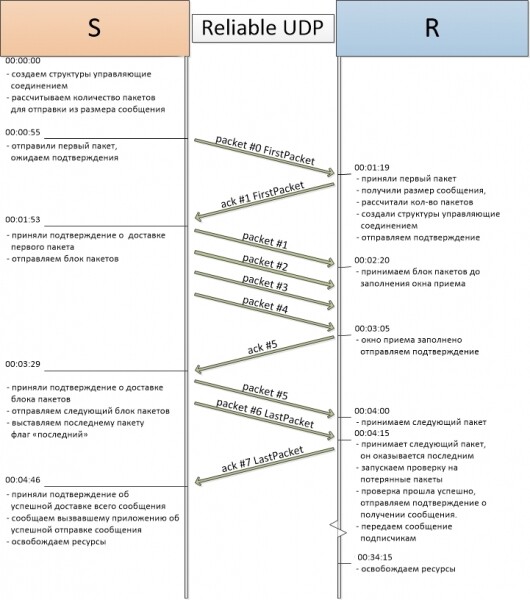
Let's examine the creation in detail connection record to establish a connection and send the first packet. The initiator of the transfer is always the application that calls the API method for sending the message. Then, the StartTransmission method of the transmission control block is invoked, starting the data transfer for the new message.
Creating an outgoing connection:
private void StartTransmission(ReliableUdpMessage reliableUdpMessage, EndPoint endPoint, AsyncResultSendMessage asyncResult)
{
  if (m_isListenerStarted == 0)
  {
    if (this.LocalEndpoint == null)
    {
      throw new ArgumentNullException("", "You must use constructor with parameters or start listener before sending message");
    }
    // starting the processing of incoming packets
    StartListener(LocalEndpoint);
  }
  // creating a key for the dictionary, based on EndPoint and ReliableUdpHeader.TransmissionId
  byte[] transmissionId = new byte[4];
  // generating a random number for transmissionId
  m_randomCrypto.GetBytes(transmissionId);
  Tuple key = new Tuple(endPoint, BitConverter.ToInt32(transmissionId, 0));
  // creating a new record for the connection and checking if there is already such a number in our dictionaries
  if (!m_listOfHandlers.TryAdd(key, new ReliableUdpConnectionRecord(key, this, reliableUdpMessage, asyncResult)))
  {
    // if it exists – regenerate the random number
    m_randomCrypto.GetBytes(transmissionId);
    key = new Tuple(endPoint, BitConverter.ToInt32(transmissionId, 0));
    if (!m_listOfHandlers.TryAdd(key, new ReliableUdpConnectionRecord(key, this, reliableUdpMessage, asyncResult)))
      // if it still could not be added – throw an exception
      throw new ArgumentException("Pair TransmissionId & EndPoint already exists in the dictionary");
  }
  // started processing state
  m_listOfHandlers[key].State.SendPacket(m_listOfHandlers[key]);
}
Sending the first packet (state FirstPacketSending):
public override void SendPacket(ReliableUdpConnectionRecord connectionRecord)
{
  connectionRecord.PacketCounter = 0;
  connectionRecord.SndNext = 0;
  connectionRecord.WindowLowerBound = 0;
  // ...
  // creating the packet header and sending it
  ReliableUdpHeader header = ReliableUdpStateTools.CreateReliableUdpHeader(connectionRecord);
  ReliableUdpStateTools.SendPacket(connectionRecord, ReliableUdpStateTools.CreateUdpPayload(connectionRecord, header));
  // incrementing the counter
  connectionRecord.SndNext++;
  // shifting the window
  connectionRecord.WindowLowerBound++;
  // transition to SendingCycle state
  connectionRecord.State = connectionRecord.Tcb.States.SendingCycle;
  // starting the timer
  connectionRecord.WaitForPacketsTimer = new Timer(CheckByTimer, connectionRecord, connectionRecord.ShortTimerPeriod, -1);
}
After sending the first packet, the sender transitions to the state SendingCycle – waiting for acknowledgment of the packet delivery.
The receiving side uses the EndReceive method to accept the sent packet, creating a new connection record and passes this packet, with the previously parsed header, to the ReceivePacket method for processing in the state. FirstPacketReceived
Creating a connection on the receiving side:
private void EndReceive(IAsyncResult ar)
{
  // ...
  // packet received
  // parsing the packet header
  ReliableUdpHeader header;
  if (!ReliableUdpStateTools.ReadReliableUdpHeader(bytes, out header))
  {
    // invalid packet received - discarding it
    return;
  }
  // constructing a key to identify the connection record for the packet
  Tuple key = new Tuple(connectedClient, header.TransmissionId);
  // getting the existing connection record or creating a new one
  ReliableUdpConnectionRecord record = m_listOfHandlers.GetOrAdd(key, new ReliableUdpConnectionRecord(key, this, header.ReliableUdpMessageType));
  // processing the packet in the finite state machine
  record.State.ReceivePacket(record, header, bytes);
}
Receiving the first packet and sending an acknowledgment (state FirstPacketReceived):
public override void ReceivePacket(ReliableUdpConnectionRecord connectionRecord, ReliableUdpHeader header, byte[] payload)
{
  if (!header.Flags.HasFlag(ReliableUdpHeaderFlags.FirstPacket))
    // discarding packet
    return;
  // ...
  // by design, all packet numbers start from 0;
  if (header.PacketNumber != 0)
    return;
  // initializing array to store message parts
  ReliableUdpStateTools.InitIncomingBytesStorage(connectionRecord, header);
  // recording packet data into the array
  ReliableUdpStateTools.WritePacketData(connectionRecord, header, payload);
  // calculating the number of packets that should arrive
  connectionRecord.NumberOfPackets = (int)Math.Ceiling((double)((double)connectionRecord.IncomingStream.Length / (double)connectionRecord.BufferSize));
  // recording the number of the last received packet (0)
  connectionRecord.RcvCurrent = header.PacketNumber;
  // shifting the reception window by 1
  connectionRecord.WindowLowerBound++;
  // changing the state
  connectionRecord.State = connectionRecord.Tcb.States.Assembling;
  if (/*if acknowledgment mechanism is not required*/)
  // ...
  else
  {
    // sending acknowledgment
    ReliableUdpStateTools.SendAcknowledgePacket(connectionRecord);
    connectionRecord.WaitForPacketsTimer = new Timer(CheckByTimer, connectionRecord, connectionRecord.ShortTimerPeriod, -1);
  }
}
Digging Deeper into the Code: Closing Connection Due to Timeout
Handling timeouts is an essential part of Reliable UDP. Let's consider an example where a failure occurred at an intermediate node, making data delivery in both directions impossible.
Connection closing diagram due to timeout: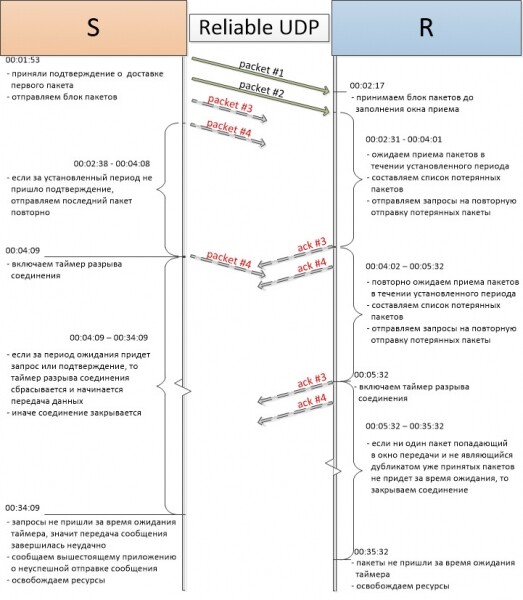
As seen in the diagram, the operational timer on the sender starts immediately after sending a block of packets. This occurs in the SendPacket method of the state SendingCycle.
Starting the operational timer (state SendingCycle):
public override void SendPacket(ReliableUdpConnectionRecord connectionRecord)
{
  // sending a block of packets
  // ...
  // restarting the timer after sending
  connectionRecord.WaitForPacketsTimer.Change(connectionRecord.ShortTimerPeriod, -1);
  if (connectionRecord.CloseWaitTimer != null)
    connectionRecord.CloseWaitTimer.Change(-1, -1);
}
Timer periods are set when establishing a connection. By default, ShortTimerPeriod is 5 seconds. In this example, it is set to 1.5 seconds.
In the incoming connection, the timer starts after the last received data packet is received, which happens in the ReceivePacket method of the state. Assembling
Activating the working timer (Assembling state):
public override void ReceivePacket(ReliableUdpConnectionRecord connectionRecord, ReliableUdpHeader header, byte[] payload)
{
  // ...
  // restart timers
  connectionRecord.TimerSecondTry = false;
  connectionRecord.WaitForPacketsTimer.Change(connectionRecord.ShortTimerPeriod, -1);
  if (connectionRecord.CloseWaitTimer != null)
    connectionRecord.CloseWaitTimer.Change(-1, -1);
  // ...
}
In the incoming connection, no more packets arrived during the expected wait time of the working timer. The timer triggered and called the ProcessPackets method, where lost packets were detected and requests for retransmission were sent for the first time.
Sending retransmission requests (Assembling state):
public override void ProcessPackets(ReliableUdpConnectionRecord connectionRecord)
{
  // ...
  if (/*check for lost packets */)
  {
    // send retransmission requests
    // set the timer for the second time, for retrying transmission
    if (!connectionRecord.TimerSecondTry)
    {
      connectionRecord.WaitForPacketsTimer.Change(connectionRecord.ShortTimerPeriod, -1);
      connectionRecord.TimerSecondTry = true;
      return;
    }
    // if after two attempts of WaitForPacketTimer
    // packets could not be obtained - start the connection close timer
    StartCloseWaitTimer(connectionRecord);
  }
  else if (/*received last packet and successful check */)
  {
    // ...
    StartCloseWaitTimer(connectionRecord);
  }
  // if ack for the packet block was lost
  else
  {
    if (!connectionRecord.TimerSecondTry)
    {
      // resending ack
      connectionRecord.WaitForPacketsTimer.Change(connectionRecord.ShortTimerPeriod, -1);
      connectionRecord.TimerSecondTry = true;
      return;
    }
    // starting the connection close timer
    StartCloseWaitTimer(connectionRecord);
  }
}
The TimerSecondTry variable has been set to true. This variable is responsible for the repeated restart of the working timer.
The sender's side also triggers the working timer and resends the last sent packet.
Starting the connection close timer (SendingCycle state):
public override void ProcessPackets(ReliableUdpConnectionRecord connectionRecord)
{
  // ...
  // resend the last packet
  // ...
  // activate the CloseWait timer – to wait for the connection to resume or to finalize it
  StartCloseWaitTimer(connectionRecord);
}
After this, a disconnect timer is started in the outgoing connection.
ReliableUdpState.StartCloseWaitTimer:
protected void StartCloseWaitTimer(ReliableUdpConnectionRecord connectionRecord)
{
  if (connectionRecord.CloseWaitTimer != null)
    connectionRecord.CloseWaitTimer.Change(connectionRecord.LongTimerPeriod, -1);
  else
    connectionRecord.CloseWaitTimer = new Timer(DisposeByTimeout, connectionRecord, connectionRecord.LongTimerPeriod, -1);
}
The default timeout period for the disconnect timer is 30 seconds.
After a short time, the working timer on the recipient's side is triggered again, requests are sent once more, after which the disconnect timer for the incoming connection is started.
When the disconnect timers expire, all resources of both connection records are released. The sender reports delivery failure to the upper application (see API Reliable UDP).
Releasing resources of the connection record:
public void Dispose()
{
  try
  {
    System.Threading.Monitor.Enter(this.LockerReceive);
  }
  finally
  {
    Interlocked.Increment(ref this.IsDone);
    if (WaitForPacketsTimer != null)
    {
      WaitForPacketsTimer.Dispose();
    }
    if (CloseWaitTimer != null)
    {
      CloseWaitTimer.Dispose();
    }
    byte[] stream;
    Tcb.IncomingStreams.TryRemove(Key, out stream);
    stream = null;
    Tcb.OutcomingStreams.TryRemove(Key, out stream);
    stream = null;
    System.Threading.Monitor.Exit(this.LockerReceive);
  }
}
Digging Deeper into the Code: Data Transmission Recovery
Data transmission recovery diagram in case of packet loss: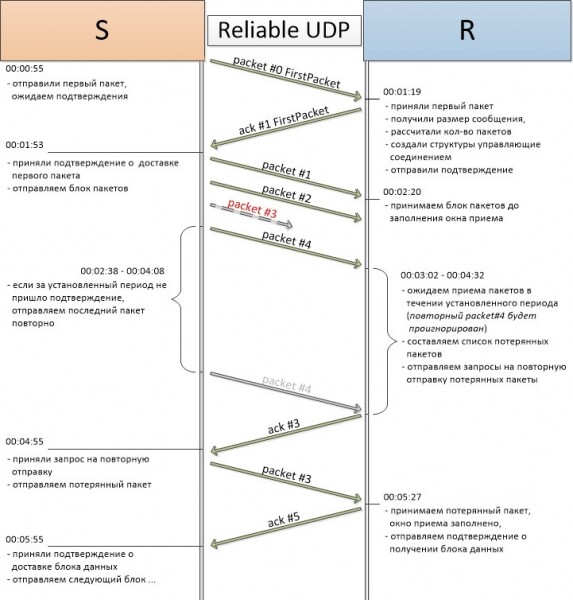
As discussed in the closing of the connection by timeout, after the working timer expires, the recipient will check for lost packets. If packet losses are detected, a list of packet numbers that did not reach the recipient will be compiled. These numbers are added to the LostPackets array of the specific connection and requests for retransmission are sent.
Sending requests for packet retransmission (Assembling state):
public override void ProcessPackets(ReliableUdpConnectionRecord connectionRecord)
{
  //...
  if (!ReliableUdpStateTools.CheckForNoPacketLoss(connectionRecord, connectionRecord.IsLastPacketReceived != 0))
  {
    // there are lost packets, sending requests for them
    foreach (int seqNum in connectionRecord.LostPackets)
    {
      if (seqNum != 0)
      {
        ReliableUdpStateTools.SendAskForLostPacket(connectionRecord, seqNum);
      }
    }
    // ...
  }
}
The sender will receive the retransmission request and send the missing packets. It is noteworthy that at this moment, the sender has already started the disconnect timer and, upon receiving the request, it is reset.
Resending lost packets (SendingCycle state):
public override void ReceivePacket(ReliableUdpConnectionRecord connectionRecord, ReliableUdpHeader header, byte[] payload)
{
  // ...
  connectionRecord.WaitForPacketsTimer.Change(connectionRecord.ShortTimerPeriod, -1);
  // Reset the connection close timer
  if (connectionRecord.CloseWaitTimer != null)
    connectionRecord.CloseWaitTimer.Change(-1, -1);
  // ...
  // This is a retransmission request – sending the required packet
  else
    ReliableUdpStateTools.SendPacket(connectionRecord, ReliableUdpStateTools.RetransmissionCreateUdpPayload(connectionRecord, header.PacketNumber));
}
The retransmitted packet (packet#3 in the diagram) is received by the incoming connection. A check is performed for the reception window, and normal data transmission is resumed.
Check for inclusion in the reception window (Assembling state):
public override void ReceivePacket(ReliableUdpConnectionRecord connectionRecord, ReliableUdpHeader header, byte[] payload)
{
  // ...
  // Increment the packet counter
  connectionRecord.PacketCounter++;
  // Record the current packet number in the window control array
  connectionRecord.WindowControlArray[header.PacketNumber - connectionRecord.WindowLowerBound] = header.PacketNumber;
  // Set the highest received packet
  if (header.PacketNumber > connectionRecord.RcvCurrent)
    connectionRecord.RcvCurrent = header.PacketNumber;
  // Restart the timers
  connectionRecord.TimerSecondTry = false;
  connectionRecord.WaitForPacketsTimer.Change(connectionRecord.ShortTimerPeriod, -1);
  if (connectionRecord.CloseWaitTimer != null)
    connectionRecord.CloseWaitTimer.Change(-1, -1);
  // ...
  // If all packets in the window have been received, reset the counter
  // and send an acknowledgment packet
  else if (connectionRecord.PacketCounter == connectionRecord.WindowSize)
  {
    // Reset the counter.
    connectionRecord.PacketCounter = 0;
    // Shift the transmission window
    connectionRecord.WindowLowerBound += connectionRecord.WindowSize;
    // Nullify the transmission control array
    connectionRecord.WindowControlArray.Nullify();
    ReliableUdpStateTools.SendAcknowledgePacket(connectionRecord);
  }
  // ...
}
Reliable UDP API
To interact with the data transmission protocol, there is an open class Reliable Udp, which acts as a wrapper over the transmission control block. Here are the most important members of the class:
public sealed class ReliableUdp : IDisposable
{
  // gets the local endpoint
  public IPEndPoint LocalEndpoint
  // creates an instance of ReliableUdp and starts
  // listening for incoming packets on the specified IP address
  // and port. A value of 0 for the port means using
  // a dynamically allocated port
  public ReliableUdp(IPAddress localAddress, int port = 0)
  // subscribes to receive incoming messages
  public ReliableUdpSubscribeObject SubscribeOnMessages(ReliableUdpMessageCallback callback, ReliableUdpMessageTypes messageType = ReliableUdpMessageTypes.Any, IPEndPoint ipEndPoint = null)
  // unsubscribes from receiving messages
  public void Unsubscribe(ReliableUdpSubscribeObject subscribeObject)
  // asynchronously sends a message
  // Note: compatibility with XP and Server 2003 is preserved, as .NET Framework 4.0 is used
  public Task SendMessageAsync(ReliableUdpMessage reliableUdpMessage, IPEndPoint remoteEndPoint, CancellationToken cToken)
  // starts the asynchronous message sending
  public IAsyncResult BeginSendMessage(ReliableUdpMessage reliableUdpMessage, IPEndPoint remoteEndPoint, AsyncCallback asyncCallback, Object state)
  // gets the result of asynchronous sending
  public bool EndSendMessage(IAsyncResult asyncResult)
  // cleans up resources
  public void Dispose()
}
Receiving a message is done via subscription. The delegate signature for the callback method:
public delegate void ReliableUdpMessageCallback(ReliableUdpMessage reliableUdpMessage, IPEndPoint remoteClient);Message:
public class ReliableUdpMessage
{
  // message type, simple enumeration
  public ReliableUdpMessageTypes Type { get; private set; }
  // message data
  public byte[] Body { get; private set; }
  // if set to true – the delivery confirmation mechanism will be disabled
  // for sending a specific message
  public bool NoAsk { get; private set; }
}
To subscribe to a specific type of messages and/or from a specific sender, two optional parameters are used: ReliableUdpMessageTypes messageType and IPEndPoint ipEndPoint.
Message types:
public enum ReliableUdpMessageTypes : short
{
  // Any
  Any = 0,
  // Request to STUN server
  StunRequest = 1,
  // Response from STUN server
  StunResponse = 2,
  // File transfer
  FileTransfer = 3,
  // ...
}
Message sending is done asynchronously, for which an asynchronous programming model is implemented in the protocol:
public IAsyncResult BeginSendMessage(ReliableUdpMessage reliableUdpMessage, IPEndPoint remoteEndPoint, AsyncCallback asyncCallback, Object state)
The result of the message sending will be true – if the message has successfully reached the recipient and false – if the connection was closed due to a timeout:
public bool EndSendMessage(IAsyncResult asyncResult)
Conclusion
Much has not been described within this article. Flow coordination mechanisms, exception and error handling, and the implementation of asynchronous message sending methods. However, the core of the protocol, the description of packet processing logic, connection establishment, and timeout handling must be clarified for you.
The demonstrated version of the reliable delivery protocol is quite stable and flexible, meeting certain previously defined requirements. However, I want to add that the described implementation can be improved. For instance, to increase throughput and dynamically change timer periods, mechanisms such as sliding window and RTT can be added to the protocol. Also, implementing a mechanism to determine MTU between connection nodes would be useful (but only when sending large messages).
Thank you for your attention, and I look forward to your comments and feedback.
P.S. For those interested in details or just wanting to test the protocol, here is the link to the project on GitHub:
Useful Links and Articles
- TCP Protocol Specification: and
- UDP Protocol Specification: and
- Discussion on the RUDP Protocol:
- Reliable Data Protocol: and
- A simple implementation of delivery confirmation over UDP:
- An article describing mechanisms to traverse NATs:
- Implementation of the Asynchronous Programming Model: and
- Transferring the asynchronous programming model to a task-based asynchronous pattern (APM to TAP):
Update: Thank you and for the idea of adding a task to the interface. The library's compatibility with older OS versions is not disrupted, as the 4th framework supports both XP and 2003 server.
Source: habr.com
