


I uploaded to Github .
This is a simple GPU hash table capable of processing hundreds of millions of inserts per second. On my laptop with an NVIDIA GTX 1060, the code inserts 64 million randomly generated key-value pairs in about 210 ms and deletes 32 million pairs in about 64 ms.
This means the speed on the laptop is approximately 300 million inserts/sec and 500 million deletes/sec.
The table is written in CUDA, though the same method can be applied to HLSL or GLSL. The implementation has several limitations that ensure high performance on the GPU:
- Only 32-bit keys and values are processed.
- The hash table has a fixed size.
- And this size must be a power of two.
A simple boundary marker must be reserved for keys and values (in the provided code, it is 0xffffffff).
Lock-free hash table
The hash table uses open addressing with , which means it is simply an array of key-value pairs stored in memory and has excellent cache performance. This cannot be said for chaining, which implies searching for a pointer in a linked list. The hash table is a simple array that stores the elements KeyValue:
struct KeyValue
{
    uint32_t key;
    uint32_t value;
};
The size of the table is a power of two, not a prime number, because applying pow2/AND mask requires just one fast instruction, while the modulus operator works much slower. This is important in the case of linear probing since, with linear searching through the table, the slot index needs to be wrapped into every slot. As a result, the cost of the modulus operation is added in every slot.
The table only stores the key and value for each entry, not the hash of the key. Since the table only holds 32-bit keys, the hash is computed very quickly. The provided code uses the Murmur3 hash, which performs only a few shifts, XORs, and multiplications.
A hash table uses a blocking-resistant technique that is independent of the order of placement in memory. Even if some write operations disrupt the sequence of other such operations, the hash table will still maintain a consistent state. We will discuss this below. This technique works exceptionally well with graphics cards where thousands of threads are executed concurrently.
The keys and values in a hash table are initialized as empty.
The code can be modified to handle both 32-bit and 64-bit keys and values. Atomic operations for reading, writing, and comparing with exchange (compare-and-swap) are required for keys. For values, atomic read and write operations are necessary. Fortunately, in CUDA, read-write operations for both 32-bit and 64-bit values are atomic as long as they are naturally aligned (see ), and modern graphics cards support 64-bit atomic compare-and-swap operations. Of course, when moving to 64 bits, there is a slight performance decrease.
State of the hash table
Each key-value pair in a hash table can have one of four states:
- Key and value are empty. In this state, the hash table is initialized.
- The key has been written, but the value has not yet been set. If another thread reads the data at this point, it will return an empty value. This is acceptable; the same would happen if another thread had completed slightly earlier, and we are talking about a concurrent data structure.
- Both the key and value have been written.
- The value is available to other threads, but the key is not yet. This can occur because the programming model in CUDA implies a weakly ordered memory model. This is acceptable; regardless of the event, the key remains empty even if the value is not.
An important nuance is that once a key is written to a slot, it does not move — even if the key is deleted, which we will discuss below.
The hash table code works even with weakly ordered memory models where the order of reads and writes to memory is not known. As we delve into insertion, search, and deletion in the hash table, remember that each key-value pair is in one of the four states described above.
Insertion into the hash table
The CUDA function that inserts key-value pairs into a hash table looks like this:
void gpu_hashtable_insert(KeyValue* hashtable, uint32_t key, uint32_t value)
{
    uint32_t slot = hash(key);

    while (true)
    {
        uint32_t prev = atomicCAS(&hashtable[slot].key, kEmpty, key);
        if (prev == kEmpty || prev == key)
        {
            hashtable[slot].value = value;
            break;
        }
        slot = (slot + 1) & (kHashTableCapacity-1);
    }
}
To insert a key, the code iterates over the hash table array starting from the hash of the inserted key. In each slot of the array, an atomic compare-and-swap operation is performed, which compares the key in that slot with empty. If a mismatch is found, the key in the slot is updated to the inserted key, and then the original key of the slot is returned. If this original key was empty or matched the inserted key, then the code has found a suitable slot for insertion and stores the inserted value in it.
If in one kernel call gpu_hashtable_insert() there are multiple elements with the same key, then any of their values can be written into the key slot. This is considered normal: one of the key-value write operations during the call will succeed, but since all this happens in parallel across multiple execution threads, we cannot predict which memory write operation will be the last.
Searching in the hash table
Code for searching keys:
uint32_t gpu_hashtable_lookup(KeyValue* hashtable, uint32_t key)
{
        uint32_t slot = hash(key);

        while (true)
        {
            if (hashtable[slot].key == key)
            {
                return hashtable[slot].value;
            }
            if (hashtable[slot].key == kEmpty)
            {
                return kEmpty;
            }
            slot = (slot + 1) & (kHashTableCapacity - 1);
        }
}
To find the value of a key stored in the table, we iterate over the array starting from the hash of the target key. In each slot, we check if the key is the one we are looking for, and if so, we return its value. We also check if the key is empty, and if so, we terminate the search.
If we fail to find the key, the code returns an empty value.
All these search operations can be performed concurrently during insertions and deletions. Each pair in the table will have one of the four states described above for the thread.
Deletion in the hash table
Code for deleting keys:
void gpu_hashtable_delete(KeyValue* hashtable, uint32_t key, uint32_t value)
{
    uint32_t slot = hash(key);

    while (true)
    {
        if (hashtable[slot].key == key)
        {
            hashtable[slot].value = kEmpty;
            return;
        }
        if (hashtable[slot].key == kEmpty)
        {
            return;
        }
        slot = (slot + 1) & (kHashTableCapacity - 1);
    }
}
Key deletion is performed unusually: we leave the key in the table and mark its value (not the key itself) as empty. This code is very similar to lookup(), except that when a match is found by key, it sets its value to empty.
As mentioned above, once a key is written to a slot, it does not move. Even when an element is deleted from the table, the key remains in place, just its value becomes empty. This means we do not need to use an atomic operation to write the slot's value because it does not matter whether the current value is empty or not—it will become empty anyway.
Resizing the Hash Table
The hash table can be resized by creating a larger table and inserting non-empty elements from the old table into it. I did not implement this functionality because I wanted to keep the code sample simple. Moreover, in CUDA programs, memory allocation is often done in the host code rather than in the CUDA kernel.
In this article describes how to modify such a lock-free data structure.
Concurrency
In the code snippets above, the functions gpu_hashtable_insert(), _lookup() and _delete() process one key-value pair at a time. Below, gpu_hashtable_insert(), _lookup() and _delete() process an array of pairs in parallel, each pair in a separate GPU thread:
// CPU code to invoke the CUDA kernel on the GPU
uint32_t threadblocksize = 1024;
uint32_t gridsize = (numkvs + threadblocksize - 1) / threadblocksize;
gpu_hashtable_insert_kernel<<<gridsize, threadblocksize>>>(hashtable, kvs, numkvs);

// GPU code to process numkvs key/values in parallel
void gpu_hashtable_insert_kernel(KeyValue* hashtable, const KeyValue* kvs, unsigned int numkvs)
{
    unsigned int threadid = blockIdx.x*blockDim.x + threadIdx.x;
    if (threadid < numkvs)
    {
        gpu_hashtable_insert(hashtable, kvs[threadid].key, kvs[threadid].value);
    }
}
A lock-free hash table supports concurrent insertions, searches, and deletions. Since key-value pairs are always in one of four states and keys do not move, the table guarantees correctness even when different types of operations are used simultaneously.
However, if we are processing a batch of insertions and deletions in parallel, and if the input array of pairs contains duplicate keys, we cannot predict which pairs will 'win'—which will be written to the hash table last. Let’s say we called the insertion code with an input array of pairs A/0 B/1 A/2 C/3 A/4. When the code finishes, the pairs B/1 and C/3 will definitely be present in the table, but any of the pairs A/0, A/2 or A/4This can be a problem or maybe not — it all depends on the application. You may already know that there are no duplicate keys in the input array, or it might not matter to you what value was recorded last.
If this is a problem for you, then you need to separate the duplicate pairs across different system CUDA calls. In CUDA, any operation with a kernel call always completes before the next kernel call (at least within one thread. In different threads, kernels execute in parallel). If in the example above one kernel is called with A/0 B/1 A/2 C/3, and another with A/4, then the key A will receive the value 4.
Now let’s talk about whether the functions lookup() and delete() should use a plain or volatile pointer to the array of pairs in the hash table. states that:
The compiler can optimize read and write operations to global or shared memory at its discretion... These optimizations can be disabled with the keyword
volatile: … any reference to this variable is compiled into an actual memory read or write instruction.
Correctness considerations do not require it. volatileIf the execution thread uses a cached value from an earlier read operation, this means it will use slightly outdated information. Yet it is still information from a valid state of the hash table at a particular moment of the kernel call. If you need to use the most up-to-date information, you can use a pointer volatile, but performance will drop slightly: according to my tests, when deleting 32 million elements, the speed decreased from 500 million deletions/sec to 450 million deletions/sec.
Performance
In the test of inserting 64 million elements and deleting 32 million of them, the competition between std::unordered_map and the hash table for GPU is virtually absent:
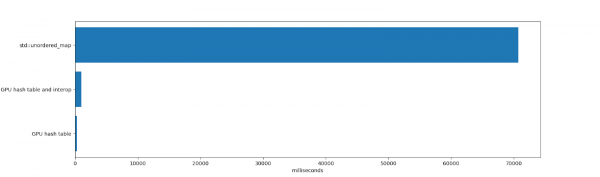
std::unordered_map it took 70,691 ms to insert and delete elements with subsequent freeing of unordered_map (freeing millions of elements takes considerable time because numerous memory allocations occur within) unordered_map . Honestly, with std:unordered_map completely different limitations. It is a single execution CPU thread, supporting key-value pairs of any size, performing well under high usage rates and showing stable performance after numerous deletions.
The duration of the hash table operation for GPU and inter-process communication was 984 ms. This includes the time spent allocating the table in memory and its deletion (a single allocation of 1 GB of memory, which takes a certain amount of time in CUDA), inserting and deleting elements, as well as iterating through them. All copies to and from the graphics card memory were also considered.
The operation of the hash table itself took 271 ms. This includes the time the graphics card spent inserting and deleting elements, excluding the time for copying to memory and iterating through the resulting table. If the GPU table lives long or if the hash table is entirely contained in the graphics card memory (for example, to create a hash table to be used by other GPU code rather than the CPU), then the test results are relevant.
The hash table for the graphics card demonstrates high performance due to its large bandwidth and active parallelization.
Disadvantages
The architecture of the hash table has several issues to keep in mind:
- Linear probing is hindered by clustering, causing keys in the table to be placed far from ideal.
- Keys are not removed using the function
deleteand over time clutter the table.
As a result, the performance of the hash table may gradually decrease, especially if it exists for a long time and numerous insertions and deletions are performed. One way to mitigate these drawbacks is to rehash into a new table with a sufficiently low utilization ratio and filter out deleted keys during rehashing.
To illustrate the problems described, I will use the above code to create a table with 128 million elements, cyclically inserting 4 million elements until I fill 124 million slots (utilization ratio of about 0.96). Here is the result table, each row is a CUDA kernel call with the insertion of 4 million new elements into one hash table:
Utilization ratio
Insertion duration of 4,194,304 elements
0,00
11.608448 ms (361.314798 million keys/second)
0,03
11.751424 ms (356.918799 million keys/second)
0,06
11.942592 ms (351.205515 million keys/second)
0,09
12.081120 ms (347.178429 million keys/second)
0,12
12.242560 ms (342.600233 million keys/second)
0,16
12.396448 ms (338.347235 million keys/second)
0,19
12.533024 ms (334.660176 million keys/second)
0,22
12.703328 ms (330.173626 million keys/second)
0,25
12.884512 ms (325.530693 million keys/second)
0,28
13.033472 ms (321.810182 million keys/second)
0,31
13.239296 ms (316.807174 million keys/second)
0,34
13.392448 ms (313.184256 million keys/second)
0,37
13.624000 ms (307.861434 million keys/second)
0,41
13.875520 ms (302.280855 million keys/second)
0,44
14.126528 ms (296.909756 million keys/second)
0,47
14.399328 ms (291.284699 million keys/second)
0,50
14.690304 ms (285.515123 million keys/second)
0,53
15.039136 ms (278.892623 million keys/second)
0,56
15.478656 ms (270.973402 million keys/second)
0,59
15.985664 ms (262.379092 million keys/second)
0,62
16.668673 ms (251.627968 million keys/second)
0,66
17.587200 ms (238.486174 million keys/second)
0,69
18.690048 ms (224.413765 million keys/second)
0,72
20.278816 ms (206.831789 million keys/second)
0,75
22.545408 ms (186.038058 million keys/second)
0,78
26.053312 ms (160.989275 million keys/second)
0,81
31.895008 ms (131.503463 million keys/second)
0,84
42.103294 ms (99.619378 million keys/second)
0,87
61.849056 ms (67.815164 million keys/second)
0,90
105.695999 ms (39.682713 million keys/second)
0,94
240.204636 ms (17.461378 million keys/second)
As the utilization ratio increases, performance decreases. This is undesirable in most cases. If an application inserts elements into a table and then discards them (for example, when counting words in a book), it is not a problem. However, if an application uses a long-lived hash table (for example, in a graphic editor for storing non-empty parts of images when a user frequently inserts and deletes information), such behavior can be troublesome.
I measured the probing depth of the hash table after 64 million insertions (utilization ratio 0.5). The average depth was 0.4774, so most keys were either in the best possible slots or one slot away from the best position. The maximum probing depth was 60.
Then I measured the probing depth in a table with 124 million insertions (utilization ratio 0.97). The average depth was already 10.1757, and the maximum was 6474 (!!). The performance of linear probing drops significantly with high utilization ratios.
It is best to maintain a low usage ratio for this hash table. However, this increases performance at the expense of memory consumption. Fortunately, in the case of 32-bit keys and values, this can be justified. If we maintain a usage ratio of 0.25 for a table with 128 million elements, we will only be able to store 32 million elements, while the remaining 96 million slots will be wasted—8 bytes for each pair, resulting in 768 MB of wasted memory.
Note that this concerns the loss of GPU memory, which is a more precious resource than system memory. While most modern desktop GPUs with CUDA support have at least 4 GB of memory (as of the time of writing, NVIDIA's 2080 Ti has 11 GB), losing such amounts is not the wisest decision.
Later, I will write in more detail about creating hash tables for GPUs that do not have issues with probing depth, as well as ways to reuse deleted slots.
Measuring Probing Depth
To determine the probing depth of a key, we can extract the key's hash (its ideal index in the table) from its actual table index:
// get_key_index() -> index of key in hash table
uint32_t probelength = (get_key_index(key) - hash(key)) & (hashtablecapacity-1);
Due to the magic of two binary numbers in two's complement and the fact that the capacity of a hash table is a power of two, this approach will work even when the key index wraps around the start of the table. Let's take a key that hashes to 1 but is inserted in slot 3. Then for a table with a capacity of 4, we get (3 - 1) & 3, which is equivalent to 2.
Conclusion
If you have questions or comments, write to me at or start a new topic in.
This code was inspired by the wonderful articles:
In the future, I will continue writing about the implementations of hash tables for GPUs and will analyze their performance. I plan to cover chaining, Robin Hood hashing, and cuckoo hashing using atomic operations in data structures that are suitable for GPUs.
Source: habr.com
