


Connection tracking ("conntrack") is a core function of the Linux kernel's networking stack. It enables the kernel to monitor all logical network connections or streams, thereby identifying all packets that make up each stream for sequential processing.
Conntrack is a critical kernel feature used in several fundamental cases:
- NAT relies on information from conntrack, allowing it to handle all packets from a single stream uniformly. For example, when a pod accesses a Kubernetes service, the kube-proxy load balancer uses NAT to direct traffic to a specific pod within the cluster. Conntrack records that for a particular connection, all packets to the service IP should be sent to the same pod, and that the packets returned from the backend pod should be directed back through NAT to the pod that initiated the request.
- Stateful firewalls, such as Calico, depend on information from conntrack to whitelist "reply" traffic. This allows you to write a network policy that says, "allow my pod to connect to any remote IP address" without needing to write a policy to explicitly allow reply traffic. (Without this, you would have to add a much less secure rule allowing packets into my pod from any IP.)
Additionally, conntrack typically enhances system performance (reducing CPU time consumption and packet latency) since only the first packet in a stream
needs to undergo full network stack processing to determine what to do with it. See the post “” for an example of how this works.
However, conntrack has its limitations...
So, where did it all go wrong?
The conntrack table has a configurable maximum size, and if it becomes full, connections typically start getting rejected or dropped. For handling the traffic of most applications, the table usually has enough free space, and this never becomes a problem. However, there are a few scenarios where it’s worth considering the use of the conntrack table:
- The most obvious case is when your server handles an extremely large number of simultaneously active connections. For example, if your conntrack table is set to 128k entries, but you have > 128k concurrent connections, you will certainly encounter problems!
- A slightly less obvious case: if your server processes a very high number of connections per second. Even if the connections are short-lived, they continue to be tracked by Linux for a certain period (by default, 120 seconds). For example, if your conntrack table is set to 128k entries and you're trying to handle 1100 connections per second, it will exceed the conntrack table size, even if the connections are very ephemeral (128k / 120s = 1092 connections / s).
There are some niche types of applications that fall into these categories. Additionally, if you have many malicious users, filling your server's conntrack table with many half-open connections can be used as part of a denial-of-service (DoS) attack. In both cases, conntrack can become a limiting bottleneck in your system. In some instances, adjusting conntrack table parameters may be enough to meet your needs—by increasing the size or reducing conntrack timeouts (but if you do this incorrectly, you will face significant difficulties). For other cases, it will be necessary to bypass conntrack for aggressive traffic.
A real-world example
For a concrete example: one large SaaS provider we worked with had a number of memcached servers on hosts (not virtual machines), each handling over 50K short-lived connections per second.
They experimented with conntrack configuration, increasing table sizes and reducing tracking time, but the configuration was unreliable, significantly increasing RAM consumption, which was a problem (on the order of gigabytes!), and the connections were so brief that conntrack did not create its usual performance gains (reduced CPU consumption or packet delays).
As an alternative, they turned to Calico. Calico's network policies allow avoiding conntrack for specific types of traffic (using the doNotTrack option in the policies). This provided them with the necessary level of performance, plus an additional layer of security offered by Calico.
What will it take to bypass conntrack?
- Do-not-track network policies generally need to be symmetric. In the case of a SaaS provider: their applications operated within a protected zone, and therefore, using the network policy, they could whitelist traffic from other specific applications allowed to access memcached.
- The do-not-track policy does not consider the direction of the connection. Therefore, in the event of a memcached server being hacked, it could theoretically try to connect to any of the memcached clients if it uses the correct source port. However, if you have appropriately defined the network policy for your memcached clients, those connection attempts will still be rejected on the client side.
- The do-not-track policy applies to every packet, unlike regular policies that are only applied to the first packet from a stream. This could increase CPU resource consumption for one packet, as the policy needs to be applied to each packet. But for short-lived connections, this consumption is balanced out by the reduced resource usage on conntrack processing. For example, in the case of the SaaS provider, the number of packets for each connection was very small, so the additional CPU resource usage for applying policies to each packet was justified.
Let's begin the tests
We conducted tests on one pod with a memcached server and multiple pods of memcached clients running on remote nodes so that we could initiate a very large number of connections per second. The server with the memcached server pod had 8 cores and 512k entries in the conntrack table (the standard configured table size for the host).
We measured the performance difference between: no network policy; with a standard Calico policy; and with the Calico do-not-track policy.
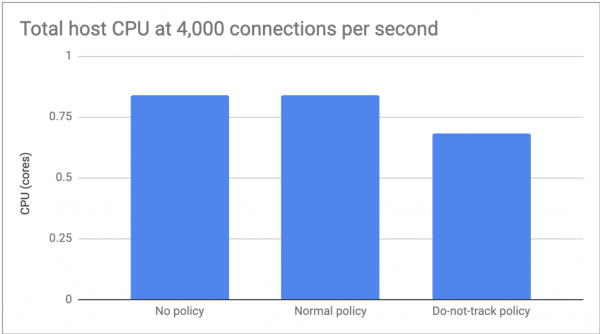
For the first test, we set the number of connections to 4,000 per second, allowing us to focus on the difference in CPU consumption. There were no significant differences between the absence of policy and the regular policy, but do-not-track increased CPU consumption by about 20%.
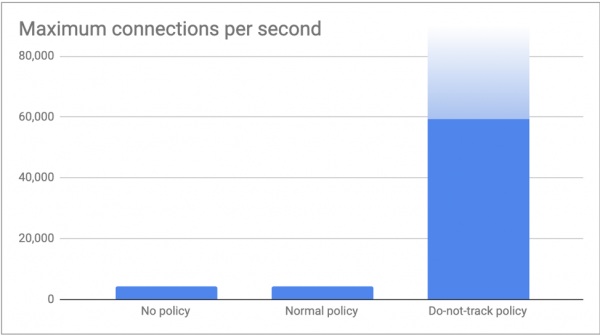
In the second test, we launched as many connections as our clients could generate and measured the maximum number of connections per second that our memcached server could handle. As expected, both the 'no policies' and 'regular policy' scenarios reached the conntrack limit of over 4,000 connections per second (512k / 120s = 4,369 connections/s). With the do-not-track policy, our clients sent 60,000 connections per second without any issues. We are confident we could increase this number by connecting more clients, but we feel these figures are already sufficient to illustrate the point of this article!
Conclusion
Conntrack is an important kernel feature. It does its job excellently and is often utilized by key system components. However, in certain scenarios, the overhead from conntrack can outweigh the usual advantages it provides. In this scenario, Calico network policies can be used to selectively disable conntrack while enhancing network security. For all other traffic, conntrack remains your ally!
Also, read other articles in our blog:
Source: habr.com
