

The analytical database ClickHouse processes numerous different strings, consuming resources. To enhance system performance, new optimizations are continuously being added. ClickHouse developer Nikolai Kochetov discusses the string data type, including a new type, LowCardinality, and explains how to accelerate operations with strings.

— First, let's explore how to store strings.

We have string data types. String is a good default option and should typically be used. It has a small overhead — 9 bytes per string. If we want the string size to be fixed and known in advance, it's better to use FixedString. This allows us to specify the exact number of bytes needed, making it convenient for data types like IP addresses or hash functions.
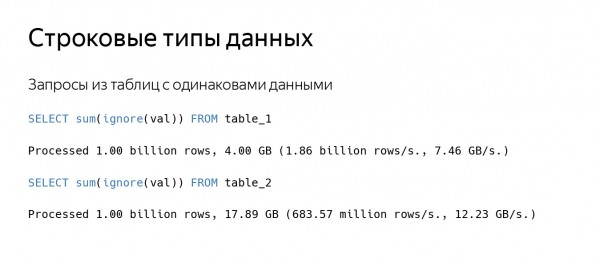
Of course, sometimes something slows down. For instance, when making a query to a table, ClickHouse reads a substantial amount of data, say at a speed of 100 GB/s, while processing a limited number of strings. We have two tables that store almost identical data. ClickHouse reads data from the second table at a higher speed, but the number of strings read per second is three times lower.
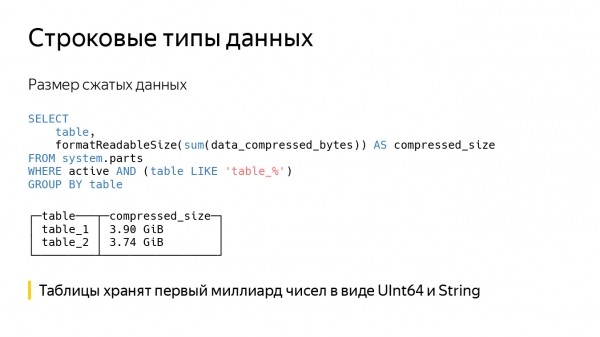
If we look at the size of the compressed data, it will be nearly equal. In fact, the same data — the first billion numbers — is recorded in both tables; in the first column, it's stored as UInt64, and in the second as String. As a result, the second query takes longer to read data from the disk and decompress it.
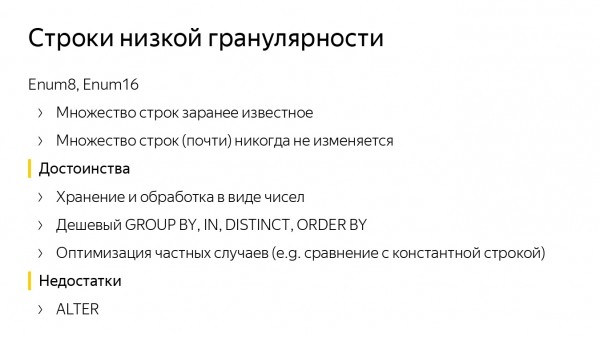
Here's another example. Suppose there is a predefined set of strings, limited to a constant of 1000 or 10,000, and it rarely changes. For this case, the Enum data type is suitable; ClickHouse has two types — Enum8 and Enum16. By storing data in Enum, we can process queries quickly.
ClickHouse features optimizations for GROUP BY, IN, DISTINCT, and specific functions, such as comparisons with constant strings. Of course, numbers in the string are not converted; instead, the constant string is transformed into an Enum value. After that, all comparisons are quick.
However, there are downsides. Even if we know the exact set of strings, it sometimes needs to be updated. When a new string arrives, we have to perform an ALTER.
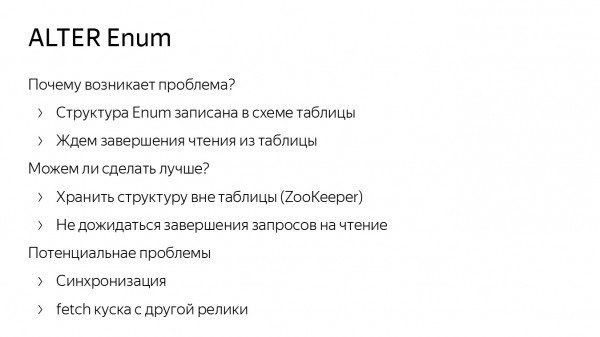
The ALTER command for Enum in ClickHouse is implemented optimally. We do not rewrite data on disk, but ALTER operations can lag due to the fact that Enum structures are stored in the table schema itself. Therefore, we have to wait for read queries from the table, for example.
This raises the question: can it be done better? Probably, yes. We could store the Enum structure not in the table schema, but in ZooKeeper. However, this could lead to synchronization issues. For instance, one replica may receive the data while another does not; if it has the old Enum, something might break. (In ClickHouse, we are nearly finished with non-blocking ALTER requests. Once we complete them fully, there will be no need to wait for read queries.)

To avoid dealing with ALTER Enum, one can use ClickHouse external dictionaries. Recall that this is a key-value data structure within ClickHouse, which allows obtaining data from external sources, such as MySQL tables.
In a ClickHouse dictionary, we store numerous different strings, while in the table, we keep their identifiers as numbers. If we need to retrieve a string, we call the dictGet function and work with it. After this, we don’t need to run ALTER. To add something to the Enum, we insert it into the same MySQL table.
But this introduces other problems. First, the syntax is cumbersome. If we want to get a string, we have to call dictGet. Second, there are some missing optimizations. Comparing with a constant string for dictionaries is not as quick.
There may also be issues with updates. Suppose we requested a string in the cache dictionary, but it was not cached. Then we have to wait for data to load from the external source.

A general disadvantage of both methods is that we store all keys in one place and synchronize them. So why not store dictionaries locally? No synchronization means no problems. We can store the dictionary locally in a chunk on disk. This means we did an Insert and recorded the dictionary. If we are working with in-memory data, we can store the dictionary either in a data block, or in a column chunk, or in some cache to speed up computations.
Dictionary encoding of strings
Thus, we arrived at the creation of a new data type in ClickHouse—LowCardinality. This is a data storage format: how the data is written to disk and read, its representation in memory, and its processing schema.
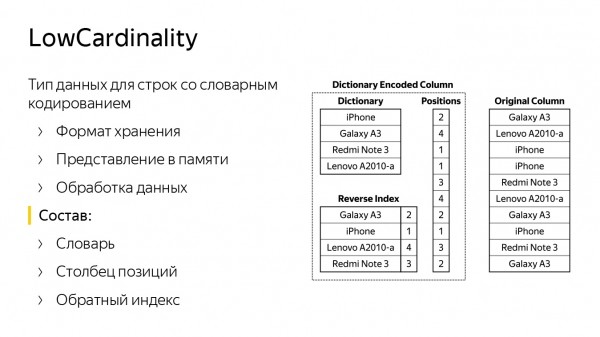
The slide contains two columns. The right column stores rows in a standard format as String. It appears to show some mobile phone models. On the left, there's an identical column, but in LowCardinality format. This consists of a dictionary containing a variety of strings (the strings from the right column) and a list of positions (row numbers).
With these two structures, you can reconstruct the original column. There is also a reverse index — a hash table that helps find the position in the dictionary based on a string. It is needed to speed up certain queries. For example, if we want to compare, search for a string in our column, or merge them together.
LowCardinality is a parametric data type. It can be either a number, something that is represented as a number, a string, or even a Nullable version of them.
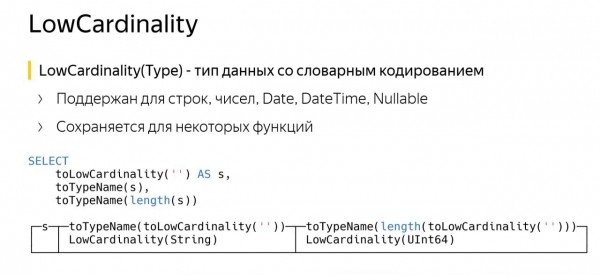
The feature of LowCardinality is that it can be preserved for certain functions. The slide shows an example query. In the first line, I created a column of type LowCardinality from String and named it S. Then I queried its name — ClickHouse replied that it is LowCardinality from String. That is correct.
The third line is almost the same, but we called the length function. In ClickHouse, the length function returns a data type of UInt64. However, it became LowCardinality of UInt64. What is the point?
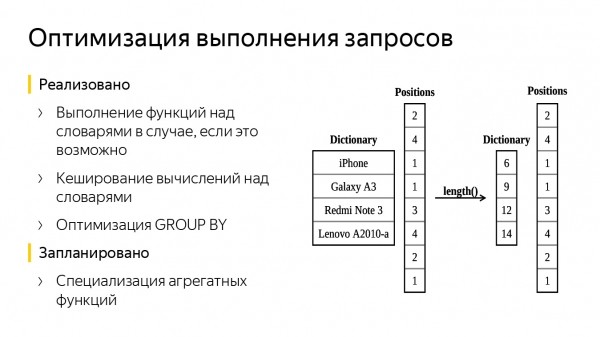
The dictionary contained the names of mobile phones, and we applied the length function. Now we have a similar dictionary consisting solely of numbers — the lengths of the strings. The column of positions remained unchanged. As a result, we processed less data, saving on query time.
There can be other optimizations, such as adding a simple cache. When calculating a function's value, one can remember it and create the same without recalculating.
There can also be optimizations for GROUP BY, since our column with the dictionary is already partially aggregated — it is possible to compute the hash function values more quickly and approximately identify the bucket where the next string should be placed. Additionally, some aggregate functions, such as uniq, can be specialized, as it can only accept the dictionary while leaving the positions untouched — this will make everything work faster. We have already added the first two optimizations in ClickHouse.
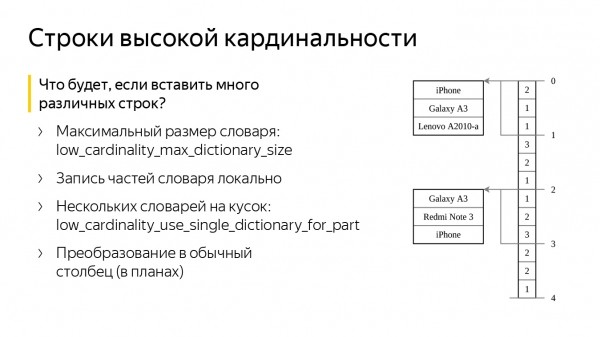
What if we create a column with our data type and insert a lot of bad different strings into it? Won't our memory overflow? No, ClickHouse has two special settings for this. The first is low_cardinality_max_dictionary_size. This is the maximum size of the dictionary that can be written to disk. Insertion works as follows: when we insert data, we receive a stream of rows, from which we form a large common dictionary. If the dictionary exceeds the setting value, we write the current dictionary to disk, and the remaining rows are stored 'aside,' next to the indexes. As a result, we never recompute a large dictionary and won’t face memory issues.
The second setting is called low_cardinality_use_single_dictionary_for_part. Imagine that in the previous scenario, when we inserted data, our dictionary overflowed, and we wrote it to disk. The question arises: why not form another identical dictionary now?
When it overflows, we will write it to disk again and start forming a third one. This setting disables such a possibility by default.
In fact, having multiple dictionaries can be useful if we want to insert a certain set of rows, but accidentally inserted some 'garbage.' Let's say, first we inserted bad rows, and then we inserted good ones. The dictionary will then split into many small dictionaries. Some of them will contain 'garbage,' but the last ones will contain good rows. And if we read only the last granule, everything will still work quickly.
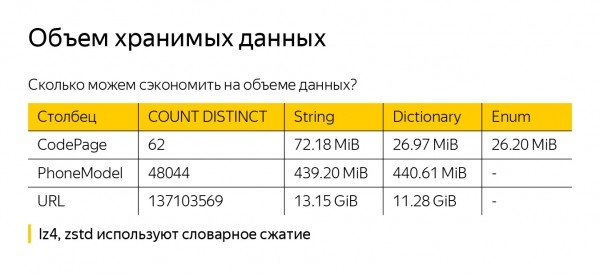
Before discussing the advantages of LowCardinality, I should mention that we are unlikely to achieve a reduction in data on disk (though it can happen), because ClickHouse compresses data. The default option is LZ4. It is also possible to use compression with ZSTD. But both algorithms already implement dictionary compression, so our external dictionary in ClickHouse won’t be very helpful.
To be more convincing, I took some data from the metrics — String, LowCardinality(String), and Enum — and saved them into different data types. This resulted in three columns containing one billion rows. In the first column, CodePage, there are only 62 values. It is evident that LowCardinality(String) compresses them better. String is slightly worse, but this is likely due to the fact that the strings are short; we store their lengths, which takes up a lot of space and compresses poorly.
When considering PhoneModel, there are 48 thousand — already more, and the differences between String and LowCardinality(String) are almost negligible. We also saved only 2 GB for URLs — I don't think this is something to rely on.
Performance assessment

Now let's assess the performance. To evaluate it, I used a dataset containing descriptions of taxi rides in New York. It can be found on GitHub. It includes just over a billion rides. The dataset reflects the location, start and end times of the ride, payment method, number of passengers, and even the type of taxi — green, yellow, or Uber.
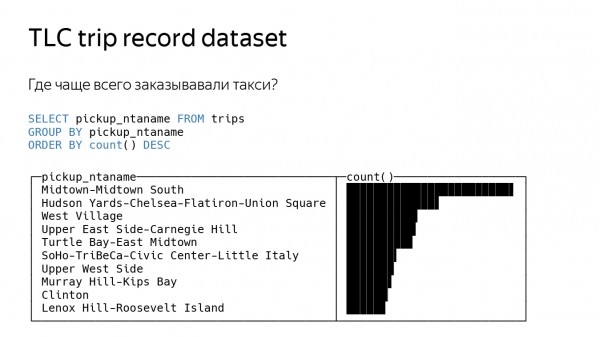
My first query was quite simple — I asked where taxis are ordered most often. For this, you need to take the location from which the taxi was ordered, do a GROUP BY on it, and count the function count. ClickHouse returns some results.
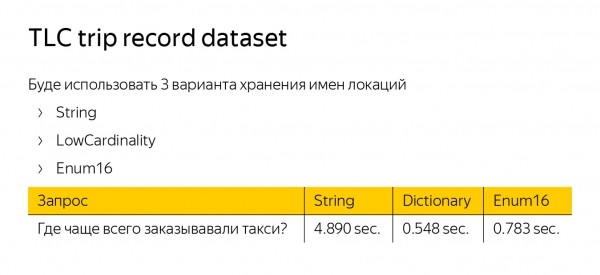
To measure the speed of query processing, I created three tables with identical data but used three different data types for our starting location — String, LowCardinality, and Enum. LowCardinality and Enum turned out to be five times faster than String. Enum is faster because it works with numbers. LowCardinality is faster due to optimized GROUP BY implementation.
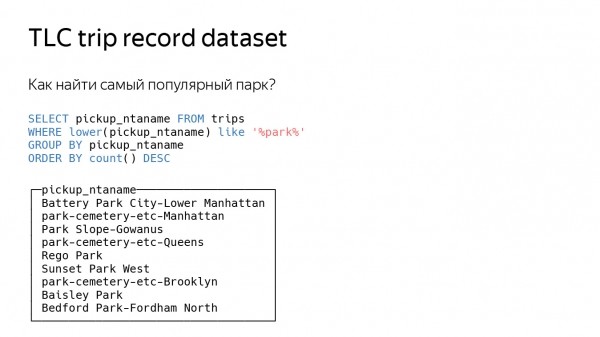
Let's complicate the query even further — let's ask where the most popular park in New York is located. Again, we will measure it based on where taxis are ordered most often, but we will filter only those locations that contain the word 'park'. We will also add the like function.
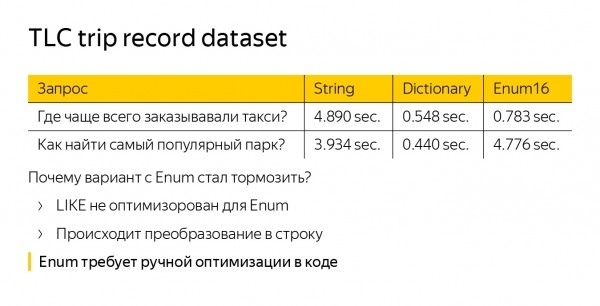
Looking at the time — we see that Enum suddenly started to lag. In fact, it is now working even slower than the standard String data type. This happens because the like function is not optimized for Enum. We have to convert our Enum strings into regular strings — we are doing more work. LowCardinality(String) is also not optimized by default, but the like function operates on the dictionary, so the query speeds up compared to String.
When working with Enums, there is a broader issue. If we want to optimize it, we have to do so in every part of the code. Suppose we wrote a new function — we must definitely come up with an optimization for the Enum. In contrast, LowCardinality is optimized by default.
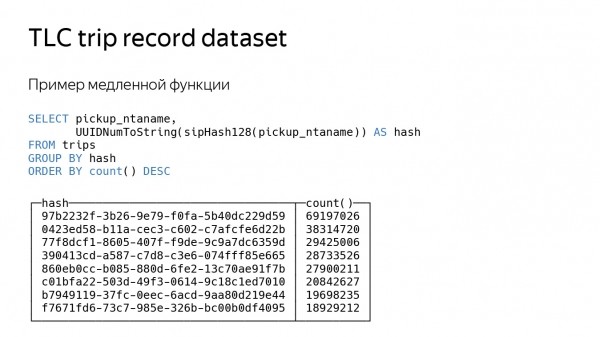
Let's look at the last query, which is more artificial. We will simply calculate the hash function of our location. The hash function is quite a slow query, it takes a long time to compute, so everything will slow down by about three times.
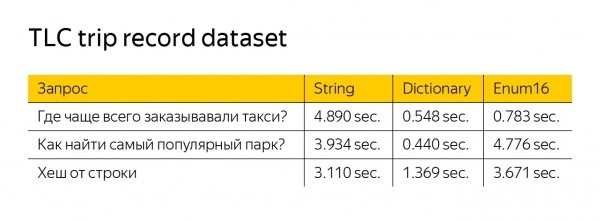
LowCardinality still operates faster, even though there is no filtering here. This is because our functions work only on the dictionary. The hash calculation function has one argument — it can process less data and can also return LowCardinality.

Our overall goal is to achieve performance that is at least on par with String in all cases while maintaining acceleration. And perhaps one day we will replace String with LowCardinality, you will update ClickHouse, and everything will work a bit faster.
Source: habr.com
