

When dealing with complex processing of large datasets (various : imports, conversions, and synchronization with an external source), the need often arises to temporarily 'remember' and quickly process something substantial.
The typical task of this kind usually sounds something like this: "Here, the latest incoming payments, we need to quickly upload them to the site and link them to invoices"
But when the volume of this 'something' begins to measure in hundreds of megabytes, and the service must continue to work with the database 24/7, numerous side effects arise that will complicate your life.
To cope with them in PostgreSQL (and not just there), certain optimization features can be used that will allow for faster processing with less resource consumption.
1. Where to load?
First, let's determine where we can load the data we want to 'process'.
1.1. Temporary tables (TEMPORARY TABLE)
In principle, for PostgreSQL, temporary tables are just like any other tables. Therefore, superstitions like "everything is stored only in memory, and it can run out"are incorrect. However, there are several significant differences.
A separate 'namespace' for each connection to the database
If two connections try to simultaneously execute CREATE TABLE x, then someone will definitely get a uniqueness violation error of database objects.
However, if both try to execute CREATE TEMPORARY TABLE x, then both will do it successfully, and each will receive its own instance of the table. There will be nothing in common between them.
'Self-destruction' upon disconnection
When a connection is closed, all temporary tables are automatically deleted, so there's no point in manually executing DROP TABLE x unless…
If you are working through pgbouncer in transaction mode, then the database still considers that the connection is still active, and that temporary table still exists in it.
Therefore, trying to create it again from another connection to pgbouncer will lead to an error. But this can be bypassed by using CREATE TEMPORARY TABLE IF NOT EXISTS x.
In fact, it's better not to do that, as you might unexpectedly discover leftover data from the previous owner. Instead, it's much better to read the manual and see that when creating a table, you have the option to specify ON COMMIT DROP — meaning that upon completing the transaction, the table will be automatically deleted.
Non-replication
Due to being tied to a specific connection, temporary tables are not replicated. However, this eliminates the need for double data writing in heap + WAL, so INSERT/UPDATE/DELETE operations on it are significantly faster.
But since a temporary table is still 'almost ordinary,' it cannot be created on a replica either. At least, not for now, although the corresponding patch has been around for a long time.
1.2. Unlogged Tables (UNLOGGED TABLE)
But what if, for instance, you have some bulky ETL process that cannot be realized within a single transaction, and you do have pgbouncer in transaction mode?..
Or if the data flow is so large that the bandwidth of a single connection to the DB (i.e., one process on the CPU) is insufficient?..
Or if part of the operations are going asynchronously in different connections?..
Here, there’s only one option — temporarily creating a non-temporary table. A pun, right? Meaning:
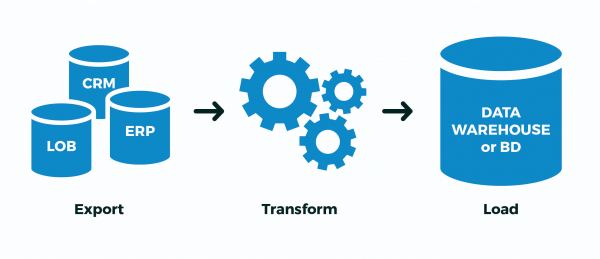
- I created 'my' tables with maximally random names to avoid any collisions
- Extract: I loaded the data into them from an external source
- Transform: I transformed and filled the key linking fields
- Load: I poured the prepared data into target tables
- and deleted 'my' tables.
And now — the fly in the ointment. Essentially, all writing in PostgreSQL occurs twice — , and then into the bodies of tables/indices. All of this is done to support ACID and maintain data visibility between COMMITcommitted and ROLLBACKcommitted transactions.
But we don't need that! Either our entire process has completely succeeded or it hasn't.It doesn’t matter how many intermediate transactions there are — we’re not interested in 'continuing the process from the middle,' especially when it’s unclear where it was.
To address this, PostgreSQL developers introduced the concept of :
With this specification, the table is created as unlogged. Data written into unlogged tables does not go through the write-ahead log (see Chapter 29), resulting in such tables work much faster than usual. However, they are not protected against failure; in case of failure or sudden server shutdown, the unlogged table is automatically truncated. Furthermore, the content of the unlogged table is not replicated to standby servers. Any indexes created for the unlogged table automatically become unlogged.
In short, it will be significantly faster, but if the DB server crashes — it will be unpleasant. But how often does this happen, and does your ETL process handle it correctly "midway" after the DB is "revived"?
If not, and the case above resembles yours — use UNLOGGED, but never enable this attribute on real tables, the data from which you value.
1.3. ON COMMIT { DELETE ROWS | DROP }
This construct allows you to specify automatic behavior upon transaction completion when creating a table.
About ON COMMIT DROP I already wrote above, it generates DROP TABLE, but the situation with ON COMMIT DELETE ROWS is more interesting — it generates TRUNCATE TABLE.
Since the entire infrastructure for storing the metadata of the temporary table is exactly the same as that of a regular one, the constant creation-deletion of temporary tables leads to significant "bloating" of system tables pg_class, pg_attribute, pg_attrdef, pg_depend,…
Now imagine you have a worker on a direct connection with the DB, who opens a new transaction every second, creates, fills, processes, and deletes a temporary table… Garbage will accumulate excessively in the system tables, resulting in extra slowdowns with each operation.
In general, don’t do that! In this case, it is much more efficient to take the creation of the temporary table out of the transaction cycle — then at the beginning of each new transaction, the table will already exist (saving the call ), but CREATEit will be empty , thanks toTRUNCATE (we also saved that call) upon completion of the previous transaction. 1.4. LIKE… INCLUDING …
I mentioned at the beginning that one of the typical use cases for temporary tables is various imports — and the developer tirelessly copy-pastes the list of fields from the target table into the declaration of their temporary one…
But laziness is the engine of progress! Therefore,
it is much simpler to create a new table "by example": CREATE TEMPORARY TABLE import_table( LIKE target_table ); creating a new table 'by example'
can be much simpler: CREATE TEMPORARY TABLE import_table(
  LIKE target_table
);
Since a lot of data can be generated in this table later, searching through it won't be fast at all. But there’s a traditional solution to this — indexes! And yes, temporary tables can also have indexes..
Since, often, the needed indexes coincide with those of the target table, you can simply write LIKE target_table INCLUDING INDEXES.
If you also need DEFAULT-values (for example, to fill in primary key values), you can use LIKE target_table INCLUDING DEFAULTS. Or just — LIKE target_table INCLUDING ALL — it will copy defaults, indexes, constraints,…
But here you need to understand that if you created the import table with indexes right away, then the data will be loaded slower, than if you load everything first and then apply the indexes — take a look at how .
In general, !
2. How to write?
I'll say simply — use -stream instead of "batch" INSERT, . You can even do it directly from a pre-formed file.
3. How to process?
So, let's say our input looks something like this:
- you have a table in the database with client data containing 1M records
- every day the client sends you a new full "image"
- from experience, you know that from time to time there are no more than 10K record changes
A classic example of such a situation is — there are many addresses in total, but there are only a few changes (renaming of localities, merging of streets, the appearance of new buildings) in each weekly export even on a national scale.
3.1. Full synchronization algorithm
For simplicity, let's assume that you don’t even need to restructure the data — just format the table appropriately, that is:
- remove everything that no longer exists
- update everything that was already there and needs updating
- insert everything that was not there yet
Why should operations be done in this specific order? Because this is how the table size will minimally increase ().
DELETE FROM dst
No, of course, you can manage with just two operations:
- remove (
DELETE) everything at all - insert everything from the new image
But in doing so, due to MVCC, the table size will increase by exactly double! Getting +1M record images in the table due to updating 10K — that’s quite the redundancy…
TRUNCATE dst
A more experienced developer knows that the entire table can be cleaned up quite cheaply:
- clean up (
(we also saved that call) upon completion of the previous transaction.) the entire table - insert everything from the new image
An effective method, , but there is a challenge… Inserting 1M records will take a long time, so we cannot afford to leave the table empty all this time (as would happen without wrapping in a single transaction).
This means that:
- we are starting a long transaction
(we also saved that call) upon completion of the previous transaction.imposes AccessExclusive-locking- we spend a lot of time on insertion while everyone else cannot even
SELECT
Something is going wrong...
ALTER TABLE… RENAME… / DROP TABLE …
As an option — load everything into a separate new table, and then simply rename it in place of the old one. A couple of annoying details:
- it also AccessExclusive, though significantly less time-consuming
- all query plans/statistics for this table are reset,
- all foreign keys (FK) to the table break
There was a WIP patch from Simon Riggs that proposed to make the ALTER-operation to replace the table's body at the file level, without touching the statistics and FK, but it did not gather a quorum.
DELETE, UPDATE, INSERT
So, we settle on the non-blocking option of three operations. Almost three... How can we do this most efficiently?
-- we do everything within a transaction so that no one sees "intermediate" states
BEGIN;

-- create a temporary table with imported data
CREATE TEMPORARY TABLE tmp(
  LIKE dst INCLUDING INDEXES -- like-for-like, including indexes
) ON COMMIT DROP; -- outside of the transaction, we don't need it

-- quickly insert the new data through COPY
COPY tmp FROM STDIN;
-- ...
-- .

-- delete the missing ones
DELETE FROM
  dst D
USING
  dst X
LEFT JOIN
  tmp Y
    USING(pk1, pk2) -- primary key fields
WHERE
  (D.pk1, D.pk2) = (X.pk1, X.pk2) AND
  Y IS NOT DISTINCT FROM NULL; -- "anti-join"

-- update the remaining ones
UPDATE
  dst D
SET
  (f1, f2, f3) = (T.f1, T.f2, T.f3)
FROM
  tmp T
WHERE
  (D.pk1, D.pk2) = (T.pk1, T.pk2) AND
  (D.f1, D.f2, D.f3) IS DISTINCT FROM (T.f1, T.f2, T.f3); -- no need to update matching ones

-- insert the missing ones
INSERT INTO
  dst
SELECT
  T.*
FROM
  tmp T
LEFT JOIN
  dst D
    USING(pk1, pk2)
WHERE
  D IS NOT DISTINCT FROM NULL;

COMMIT;
3.2. Post-processing import
In the same CLADR, all changed records need to undergo additional post-processing — normalization, keyword extraction, bringing into the right structures. But how to know — what exactly was changed, without complicating the synchronization code, ideally, without touching it at all?
If write access during synchronization is only granted to your process, you can use a trigger to collect all changes for us:
-- Target tables
CREATE TABLE kladr(...);
CREATE TABLE kladr_house(...);

-- Change history tables
CREATE TABLE kladr$log(
  ro kladr, -- here lie the complete copies of old/new records
  rn kladr
);

CREATE TABLE kladr_house$log(
  ro kladr_house,
  rn kladr_house
);

-- General function for logging changes
CREATE OR REPLACE FUNCTION diff$log() RETURNS trigger AS $$
DECLARE
  dst varchar = TG_TABLE_NAME || '$log';
  stmt text = '';
BEGIN
  -- check if logging is necessary when updating a record
  IF TG_OP = 'UPDATE' THEN
    IF NEW IS NOT DISTINCT FROM OLD THEN
      RETURN NEW;
    END IF;
  END IF;
  -- create a log record
  stmt = 'INSERT INTO ' || dst::text || '(ro,rn)VALUES(';
  CASE TG_OP
    WHEN 'INSERT' THEN
      EXECUTE stmt || 'NULL,$1)' USING NEW;
    WHEN 'UPDATE' THEN
      EXECUTE stmt || '$1,$2)' USING OLD, NEW;
    WHEN 'DELETE' THEN
      EXECUTE stmt || '$1,NULL)' USING OLD;
  END CASE;
  RETURN NEW;
END;
$$ LANGUAGE plpgsql;
Now we can apply (or enable through before starting synchronization) the triggers ALTER TABLE ... ENABLE TRIGGER ...):
CREATE TRIGGER log
  AFTER INSERT OR UPDATE OR DELETE
  ON kladr
    FOR EACH ROW
      EXECUTE PROCEDURE diff$log();

CREATE TRIGGER log
  AFTER INSERT OR UPDATE OR DELETE
  ON kladr_house
    FOR EACH ROW
      EXECUTE PROCEDURE diff$log();
Then we can easily extract all necessary changes from the log tables and run them through additional handlers.
3.3. Importing related sets
Above, we discussed cases where the data structures of the source and receiver match. But what if the export from the external system has a format different from the storage structure in our database?
Let's take the storage of clients and their invoices as an example, a classic "many-to-one" scenario:
CREATE TABLE client(
  client_id
    serial
      PRIMARY KEY
, inn
    varchar
      UNIQUE
, name
    varchar
);

CREATE TABLE invoice(
  invoice_id
    serial
      PRIMARY KEY
, client_id
    integer
      REFERENCES client(client_id)
, number
    varchar
, dt
    date
, sum
    numeric(32,2)
);
However, the export from the external source comes to us in an "all-in-one" format:
CREATE TEMPORARY TABLE invoice_import(
  client_inn
    varchar
, client_name
    varchar
, invoice_number
    varchar
, invoice_dt
    date
, invoice_sum
    numeric(32,2)
);
It's clear that client data may be duplicated in this case, and the primary record is the "invoice":
0123456789;Vasya;A-01;2020-03-16;1000.00
9876543210;Petya;A-02;2020-03-16;666.00
0123456789;Vasya;B-03;2020-03-16;9999.00
For the model, we will simply insert our test data, but keep in mind — COPY more efficiently!
INSERT INTO invoice_import
VALUES
  ('0123456789', 'Vasya', 'A-01', '2020-03-16', 1000.00)
, ('9876543210', 'Petya', 'A-02', '2020-03-16', 666.00)
, ('0123456789', 'Vasya', 'B-03', '2020-03-16', 9999.00);
First, we'll highlight the "dimensions" that our "facts" refer to. In our case, invoices refer to clients:
CREATE TEMPORARY TABLE client_import AS
SELECT DISTINCT ON(client_inn)
-- you can simply use SELECT DISTINCT if the data is inherently consistent
  client_inn inn
, client_name "name"
FROM
  invoice_import;
To correctly link invoices with client IDs, we first need to know or generate these identifiers. Let's add fields for them:
ALTER TABLE invoice_import ADD COLUMN client_id integer;
ALTER TABLE client_import ADD COLUMN client_id integer;
We will use the method described above for synchronizing tables with a slight adjustment — we won’t update or delete anything in the target table, as client import is 'append-only':
-- assigning IDs of existing records to the import table
UPDATE
  client_import T
SET
  client_id = D.client_id
FROM
  client D
WHERE
  T.inn = D.inn; -- unique key

-- inserting missing records and assigning their IDs
WITH ins AS (
  INSERT INTO client(
    inn
  , name
  )
  SELECT
    inn
  , name
  FROM
    client_import
  WHERE
    client_id IS NULL -- if ID was not assigned
  RETURNING *
)
UPDATE
  client_import T
SET
  client_id = D.client_id
FROM
  ins D
WHERE
  T.inn = D.inn; -- unique key

-- assigning client IDs to invoice records
UPDATE
  invoice_import T
SET
  client_id = D.client_id
FROM
  client_import D
WHERE
  T.client_inn = D.inn; -- natural key
That's all — in invoice_import we now have the linkage field filled client_id, which we will use to insert the invoice.
Source: habr.com
