


We continue our series of articles on Check Point Maestro. We have already published three introductory articles:
Now it’s time to move on to load testing. In this article, we will aim to demonstrate how load balancing occurs between nodes, as well as discuss the process of adding new gateways to an existing scalable platform. We will use the well-known traffic generator — TRex for the tests.
Scenario #1. Load balancing between two nodes
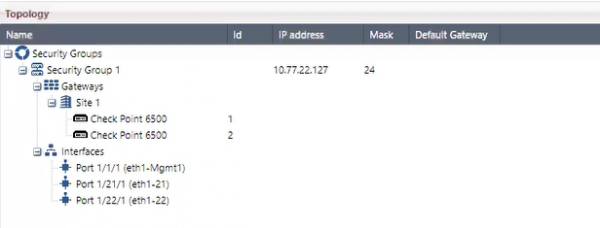
We will begin our experience with an already created Security Group that includes two gateways 6500:
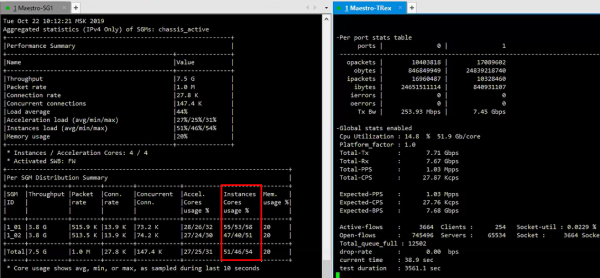
For the performance test, we will launch the aforementioned TRex. As seen in the screenshot below, the CPU load is distributed across two devices with an average load of 50%.:
Scenario #2. Adding a gateway to the Security Group
Adding a new gateway to the Security Group is quite simple, it’s practically Drag & Drop:
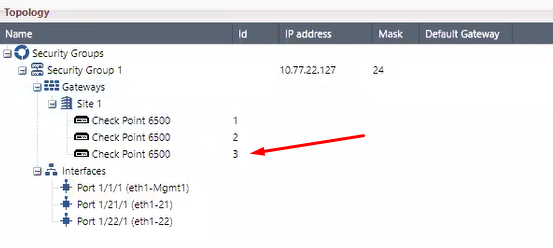
TRex is still operating with the same parameters. After adding the gateway, all necessary configurations will be performed automatically. Even the policy itself is established. The entire procedure takes 5-8 minutes. After the addition, we see the changed metrics of the gateways:
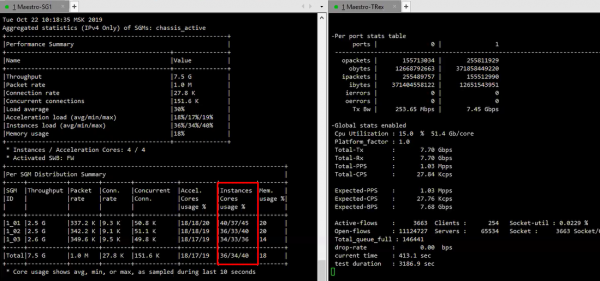
As can be seen, there are now 3 gateways and the average load on the CPU is already 35%..
Scenario #3. Emergency shutdown of one node
For the purity of the experiment, let’s turn off one node using the command clusterXL_admin down..
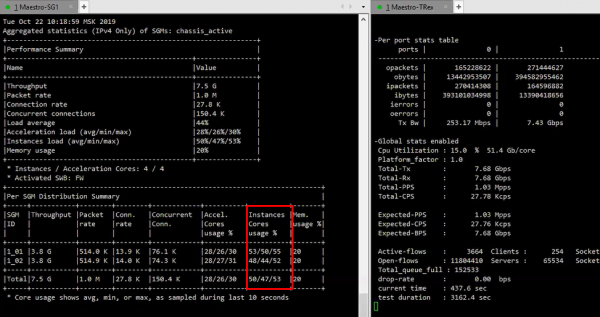
This will immediately reflect on the CPU load of the two gateways still operating in the cluster:
In conclusion
I'm sure many would like to test this technology. Especially for them, we are going to conduct The training will take place in Moscow, on November 19, at the Golden Gate Business Center. The seminar will be led by a Check Point engineer specializing in scalable platforms — Ilya Anokhin.Unfortunately, the number of seats is very limited (due to the need for real equipment), so .
This is definitely not the last seminar we plan to hold, so stay tuned for updates (, , , )!
Source: habr.com
