


The Calico network plugin provides a wide range of network policies with a unified syntax to protect hosts on bare metal, virtual machines, and pods. These policies can be applied within a namespace or can be global network policies applicable to (to protect applications running directly on the host — the host can be a physical server or a virtual machine) or to (to protect applications running in containers or virtual machines hosted on the machine). Calico policies allow the implementation of security measures for various packet path points using options such as preDNAT, unraracked, and applyOnForward. Understanding how these options work can help enhance the overall security and performance of the system. This article explains the essence of these Calico policy parameters (preDNAT, unraracked, and applyOnForward) applied to host endpoints, focusing on what happens in the packet processing paths (iptabels chains).
This article assumes you have an understanding of the basic principles of Kubernetes and Calico network policies. If not, we recommend trying and using Calico before reading this article. We also expect that you have a basic understanding of Linux.
Calico allows you to apply a set of access rules based on labels (to groups of hosts and workloads/pods). This is very useful if you are using heterogeneous systems together — virtual machines, physical systems, or Kubernetes infrastructure. Additionally, you can secure your cluster (nodes) with a set of declarative policies and apply network policies to incoming traffic (for example, through NodePorts or External IPs).
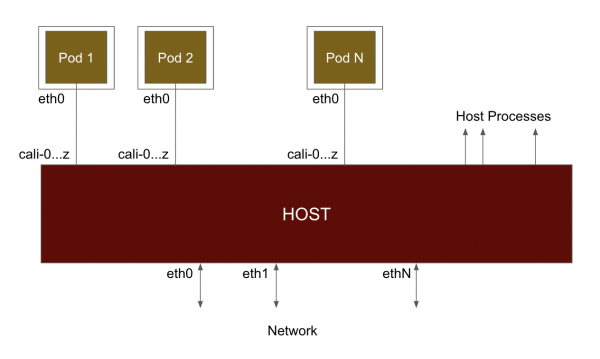
At a fundamental level, when Calico connects a pod to the network (see the diagram below), it connects it to the host using a virtual Ethernet interface (veth). Traffic sent by the pod arrives at the host from this virtual interface and is processed as if it had come from a physical network interface. By default, Calico names these interfaces caliXXX. Because traffic comes through the virtual interface, it passes through iptables as if the pod were a single hop away. Therefore, when traffic arrives or departs from the pod, it is forwarded from the host's perspective.
On the Kubernetes node where Calico is running, you can map the virtual interface (veth) to the workload as follows. In the example below, you can see that veth#10 (calic1cbf1ca0f8) is connected to cnx-manager-* in the calico-monitoring namespace.
[centos@ip-172-31-31-46 K8S]$ sudo ip a
...
10: calic1cbf1ca0f8@if4:  mtu 1440 qdisc noqueue state UP group default
    link/ether ee:ee:ee:ee:ee:ee brd ff:ff:ff:ff:ff:ff link-netnsid 5
    inet6 fe80::ecee:eeff:feee:eeee/64 scope link
       valid_lft forever preferred_lft forever
...

[centos@ip-172-31-31-46 K8S]$ calicoctl get wep --all-namespaces
...
calico-monitoring cnx-manager-8f778bd66-lz45m                            ip-172-31-31-46.ec2.internal 192.168.103.134/32
calic1cbf1ca0f8
... 
Given that Calico creates a veth interface for each workload, how does it apply policies? To this end, Calico creates hooks in various packet processing chains using iptables.
The diagram below shows the chains involved in packet processing in iptables (or the netfilter subsystem). When a packet arrives through the network interface, it first goes through the PREROUTING chain. Then, a routing decision is made, and based on this, the packet goes through either the INPUT (intended for host processes) or the FORWARD (intended for pods or another node in the network). From a local process, the packet goes through the OUTPUT chain and then POSTROUTING before being sent out.
Note that the pod is also an external object (connected to veth) from the perspective of iptables processing. To summarize:
- Forwarded traffic (nat, routed to or from a pod) goes through the chains PREROUTING — FORWARD — POSTROUTING.
- Traffic to a local host process goes through the chain PREROUTING — INPUT.
- Traffic from a local host process goes through the chain OUTPUT — POSTROUTING.
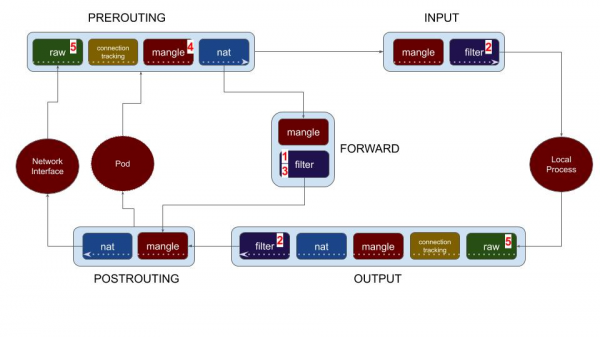
Calico provides options for policies, allowing you to apply policies across all chains. With this in mind, let's look at the various policy configuration options available in Calico. The numbers in the list of options below correspond to the numbers in the diagram above.
- Workload endpoint (pod) policy
- Host endpoint policy
- ApplyOnForward option
- PreDNAT policy
- Untracked policy
Let's start by examining how policies are applied to workload endpoints (Kubernetes pods or OpenStack VMs), and then look at policy options for host endpoints.
Workload Endpoints
Workload Endpoint Policy (1)
This option is for securing your Kubernetes pods. Calico supports working with Kubernetes NetworkPolicy, but it also offers additional policies—Calico NetworkPolicy and GlobalNetworkPolicy. Calico creates a chain for each pod (workload) and hooks into the INPUT and OUTPUT chains for the workload to the filter table of the FORWARD chain.
Host Endpoints
Host Endpoint Policy (2)
In addition to CNI (container network interface), Calico policies provide the ability to protect the host itself. In Calico, you can create a host endpoint by specifying a combination of the host interface and, if necessary, port numbers. Policies for this entity are applied using the filter table in the INPUT and OUTPUT chains. As shown in the diagram, (2) they apply to local processes on the node/host. This means that if you create a policy that applies to a host endpoint, it will not affect traffic to/from your pods. However, it provides a unified interface/syntax for blocking traffic for your host and pods using Calico policies. This significantly simplifies the management of policies for heterogeneous networks. Configuring host endpoint policies to strengthen cluster protection is another important use case.
ApplyOnForward Policy (3)
The ApplyOnForward option is available in Calico's global network policy to enable the application of policies to all traffic passing through the host endpoint, including traffic that will be forwarded by the host. This traffic includes that sent to a local pod or elsewhere in the network. Calico requires this parameter to be enabled for policies that use PreDNAT and untracked, see the next sections. Additionally, ApplyOnForward can be used to track host traffic in cases of using a virtual router or software NAT.
Note that if you need to apply the same network policy for both host processes and pods, you do not necessarily need to use the ApplyOnForward option. It is sufficient to create labels for the required host endpoints and workload endpoints (pods). Calico is clever enough to apply the policy based on labels, regardless of the type of endpoint (hostendpoint or workload).
PreDNAT Policy (4)
In Kubernetes, service entity ports can be exposed externally using NodePorts option or, optionally (when using Calico), declared through Cluster IPs or External IPs options. Kube-proxy balances incoming traffic associated with the service to the corresponding pods of that service using DNAT. Given this, how can you apply policies for traffic coming through NodePorts? For these policies to be applied before the traffic is processed by DNAT (which represents the mapping of host:port to the corresponding service), Calico provides a parameter for globalNetworkPolicy called ‘preDNAT: true’.
When pre-DNAT is enabled, these policies are implemented in (4) on the diagram — in the mangle table’s PREROUTING chain — just before DNAT. The usual policy order is not maintained here, as the application of these policies occurs much earlier in the traffic processing path. However, preDNAT policies do respect the order of application among themselves.
When creating policies with pre-DNAT, it is important to be careful about the traffic you want to process and allow most to be denied. Traffic marked as ‘allow’ in the pre-DNAT policy will no longer be checked by the hostendpoint policy, while traffic that fails the pre-DNAT policy will continue through the other chains.
Calico has made it mandatory to enable the applyOnForward option when using preDNAT, as by definition the traffic destination has not yet been selected. The traffic may be directed to a host process, or it may be redirected to a pod or another node.
Untracked Policy (5)
Networks and applications can exhibit significant differences in behavior. In some extreme cases, applications may create numerous ephemeral connections. This can lead to memory shortages in conntrack (the core component of the Linux networking stack). Traditionally, running such applications in Linux requires you to manually configure or disable conntrack, or to write iptables rules to circumvent conntrack. Untracked policy in Calico is a simpler and more efficient option if you want to handle connections as quickly as possible. For example, if you use a massive or as an additional layer of protection against .
Read this (or ) for more information, including performance tests using untracked policy.
When you set the 'doNotTrack: true' option in Calico globalNetworkPolicy, it becomes an **untracked** policy and is applied at the earliest stage of the Linux packet processing pipeline. Looking at the diagram above, untracked policies are applied in the PREROUTING and OUTPUT chains in the raw table before connection tracking (conntrack) is initiated. When a packet is allowed by the untracked policy, it is marked to disable connection tracking for that packet. This means:
- The untracked policy applies to every packet. There is no concept of a connection (or stream). The absence of connections leads to several important implications:
- If you want to allow both request and response traffic, you need a rule for both incoming and outgoing (since Calico typically uses conntrack to mark response traffic as allowed).
- The untracked policy does not work for Kubernetes workloads (pods) because, in this case, there is no way to track the outbound connection from the pod.
- NAT does not work correctly with untracked packets (since the kernel stores the NAT mapping in conntrack).
- When passing through the 'allow all' rule in the untracked policy, all packets will be marked as untracked. This is almost always not what you want, so it is important to be very selective about the packets allowed by untracked policies (and to let most traffic pass through regular tracked policies).
- Untracked policies are applied at the very beginning of the packet processing pipeline. It's crucial to understand this when creating Calico policies. You may have a policy for a pod with order:1 and an untracked policy with order:1000. This won't matter. The untracked policy will be applied before the policy for the pod. Untracked policies respect the execution order only among themselves.
Since one of the objectives of the doNotTrack policy is to enforce the policy at the earliest stage of the Linux packet processing pipeline, Calico requires you to specify the applyOnForward option when using doNotTrack. Referring to the packet processing diagram, note that the untracked policy (5) is applied before any routing decisions. Traffic may be directed to the host process, or it may be redirected to a pod or another node.
Summary
We have examined various policy options (Host endpoint, ApplyOnForward, preDNAT, and Untracked) in Calico and how they are applied along the packet processing path. Understanding the essence of how they work aids in developing effective and secure policies. With Calico, you can use global network policy, which applies to labels (groups of nodes and pods) and implement policies with different parameters. This allows security and network design professionals to conveniently protect 'everything' (types of endpoints) using a unified policy language with Calico policies.
Acknowledgment: I would like to thank and for their review and valuable insights.
Source: habr.com
