

Berkeley Packet Filters (BPF) is a Linux kernel technology that's been making headlines in English-speaking technical publications for several years. Conferences are filled with talks about the use and development of BPF. David Miller, the maintainer of the Linux networking subsystem, presents his talk at Linux Plumbers 2018. (XDP is one way to use BPF). Brendan Gregg gives talks titled . Toke Høiland-Jørgensen , saying that the kernel is now a microkernel. Thomas Graf advocates the idea that .
There is still no systematic description of BPF on Хабр, so I aim to explain the history of the technology in a series of articles, describing its architecture and development tools, outlining areas of application and best practices for using BPF. In this introductory first article of the series, I will discuss the history and architecture of classic BPF and reveal the secrets of its principles of operation. tcpdump, seccomp, strace, and much more.
The development of BPF is overseen by the Linux networking community, and the main existing applications of BPF are network-related. Therefore, with permission from , I titled the series "BPF for Beginners," in honor of the acclaimed series .
A Brief History of BPF (c)
The modern BPF technology is an improved and enhanced version of the old technology with the same name, now referred to as classic BPF to avoid confusion. Based on classic BPF, the well-known utility tcpdump, the mechanism seccomp, as well as the less known module xt_bpf for iptables and classifier cls_bpf. In modern Linux, classic BPF programs are automatically translated into the new form; however, from the user's perspective, the API remains the same, and new applications of classic BPF, as we will see in this article, still exist. For this reason, and because following the history of the classic BPF development in Linux will clarify how and why it evolved into its modern form, I decided to start with an article about classic BPF.
In the late 1980s, engineers from the renowned Lawrence Berkeley Laboratory became interested in how to effectively filter network packets on contemporary hardware of that era. The basic idea of filtering, originally implemented in the CSPF technology (CMU/Stanford Packet Filter), was to filter out unnecessary packets as early as possible, i.e., in kernel space, since this prevents superfluous data from being copied into user space. To ensure safe runtime for executing user code in kernel space, a virtual machine — a sandbox — was used.
However, the virtual machines for existing filters were designed to run on stack-architecture machines and did not operate as effectively on new RISC machines. As a result, the engineers at Berkeley Labs developed a new technology called BPF (Berkeley Packet Filters), whose virtual machine architecture was designed based on the Motorola 6502 processor — a workhorse of such well-known products as or . The new virtual machine significantly increased the performance of filters by tens of times compared to existing solutions.
Architecture of the BPF machine
We will explore the architecture in a practical manner by examining examples. However, let's first state that the machine had two user-accessible 32-bit registers: an accumulator A and an index register X, 64 bytes of memory (16 words) available for read and write, and a small instruction system to work with these objects. Programs also had access to jump instructions for implementing conditional expressions; however, to ensure timely termination of the program, jumps could only be made forward, thus disallowing the creation of loops.
The overall scheme for running the machine is as follows. The user creates a program for the BPF architecture and, through some mechanism of the kernel (for example, a system call), loads and attaches the program to some event generator in the kernel (for example, an event is the arrival of the next packet at the network interface). When an event occurs, the kernel executes the program (e.g., in an interpreter), where the machine's memory corresponds to event generator in the kernel (for example, an event is the arrival of another packet at the network card). When an event occurs, the kernel launches a program (for instance, in the interpreter), while the machine's memory is aligned. event generator in the kernel (for example, an event is the arrival of the next packet at the network interface). When an event occurs, the kernel executes the program (e.g., in an interpreter), where the machine's memory corresponds to the memory region of the kernel (for example, the data of the incoming packet).
What has been said above will be sufficient for us to start examining examples: we will get acquainted with the command system and format as needed. However, if you want to immediately learn about the command system of the virtual machine and discover all its capabilities, you can read the original article. and/or the first half of the file from the kernel documentation. Additionally, you can study the presentation , in which McCanne, one of the authors of BPF, discusses the history of its creation. libpcap.
We will now move on to examining all significant examples of the classic BPF application in Linux: tcpdump (libpcap), seccomp, xt_bpf, cls_bpf.
tcpdump
The development of BPF was carried out in parallel with the development of the front-end for packet filtering — the well-known utility. tcpdump. And since this is the oldest and most well-known example of using classic BPF, available on many operating systems, we will begin our exploration of the technology with it.
(All examples in this article were run on Linux 5.6.0-rc6. The output of some commands has been edited for better readability.)
Example: observing IPv6 packets
Let’s assume we want to look at all IPv6 packets on the interface. eth0. To do this, we can run the program tcpdump with the simplest filter ip6:
$ sudo tcpdump -i eth0 ip6At this point, tcpdump it will compile the filter ip6 into BPF architecture bytecode and send it to the kernel (see details in the section ). The loaded filter will be run for each packet passing through the interface. eth0. If the filter returns a non-zero value n, then the n bytes of the packet will be copied to user space and we will see it in the output. tcpdump.
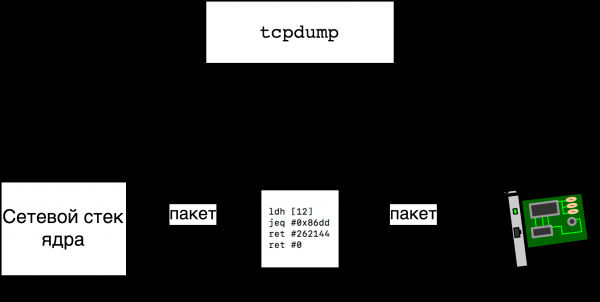
It turns out we can easily find out what bytecode was sent to the kernel tcpdump using the tcpdump, if we run it with the option -d:
$ sudo tcpdump -i eth0 -d ip6
(000) ldh      [12]
(001) jeq      #0x86dd          jt 2    jf 3
(002) ret      #262144
(003) ret      #0
On the zero line, we execute the command ldh [12], which translates to "load into the register A half-word (16 bits), located at address 12" and the only question is — what memory are we addressing? The answer is that at address x the (x+1)th byte of the analyzed network packet begins. We read packets from the Ethernet interface eth0, and this , which means the packet looks like this (for simplicity, we'll assume there are no VLAN tags in the packet):
       6              6          2
|Destination MAC|Source MAC|Ether Type|...|
So after executing the command ldh [12] in the register A there will be a field Ether Type — the type of the packet being transmitted in this Ethernet frame. In line 1, we compare the content of the register A (packet type) with 0x86dd, and this the type we are interested in, IPv6. In line 1, in addition to the comparison command, there are two more columns — jt 2 and jf 3 — labels to move to in case of a successful comparison (A == 0x86dd) and unsuccessful. Thus, in the case of success (IPv6), we move to line 2, and in the case of failure — to line 3. In line 3, the program exits with code 0 (do not copy the packet), while in line 2, it exits with code 262144 (copy me a maximum of 256 kilobytes of the packet).
A slightly more complex example: looking at TCP packets by destination port
Let's look at what the filter looks like that copies all TCP packets with destination port 666. We will consider the IPv4 case, as the IPv6 case is simpler. After studying this example, you can independently study the filter for IPv6 as an exercise (ip6 and tcp dst port 666) and the filter for the general case (tcp dst port 666). So, the filter we are interested in looks like this:
$ sudo tcpdump -i eth0 -d ip and tcp dst port 666
(000) ldh      [12]
(001) jeq      #0x800           jt 2    jf 10
(002) ldb      [23]
(003) jeq      #0x6             jt 4    jf 10
(004) ldh      [20]
(005) jset     #0x1fff          jt 10   jf 6
(006) ldxb     4*([14]&0xf)
(007) ldh      [x + 16]
(008) jeq      #0x29a           jt 9    jf 10
(009) ret      #262144
(010) ret      #0
What lines 0 and 1 do we already know. In line 2, we have already checked that this is an IPv4 packet (Ether Type = 0x800) and we load into the register A the 24th byte of the packet. Our packet looks like
       14            8      1     1
|ethernet header|ip fields|ttl|protocol|...
which means we load into the register A the Protocol field of the IP header, as it makes sense, since we only want to copy TCP packets. We compare Protocol with 0x6 () at line 3.
In lines 4 and 5, we load half-words located at address 20, and using the command jset we check if one of the three — in the issued mask jset the three highest bits are cleared. Two of the three bits tell us whether the packet is part of a fragmented IP packet, and if so, whether it is the last fragment. The third bit is reserved and must be zero. We do not want to check either incomplete or corrupted packets, which is why we check all three bits.
Line 6 is the most interesting in this listing. The expression ldxb 4*([14]&0xf) means that we are loading into the register X the four least significant bits of the fifteenth byte of the packet, multiplied by 4. The four least significant bits of the fifteenth byte represent the field of the IPv4 header, which holds the length of the header in words, so we need to multiply by 4 later. Interestingly, the expression 4*([14]&0xf) is a notation for a special addressing scheme that can only be used in this form and only for the register X, meaning we cannot say either ldb 4*([14]&0xf) or ldxb 5*([14]&0xf) (we can only specify a different offset, for example, ldxb 4*([16]&0xf)). It is clear that this addressing scheme was added to BPF precisely to obtain the X (index register) length of the IPv4 header.
Thus, on line 7, we are trying to load a half-word from the address (X+16). Remembering that 14 bytes are taken by the Ethernet header, and X it contains the length of the IPv4 header, we understand that in A the TCP destination port is loaded:
       14           X           2             2
|ethernet header|ip header|source port|destination port|
Finally, on line 8, we compare the destination port with the sought value and on lines 9 or 10 return the result — whether to copy the packet or not.
Tcpdump: loading
In the previous examples we deliberately did not go into detail about how we load the BPF bytecode into the kernel for packet filtering. Generally speaking, tcpdump it has been ported to many systems and for working with filters uses the library . In short, to set a filter on an interface using libpcap, you need to do the following:
- create a descriptor of type
pcap_tfrom the interface name: , - activate the interface: ,
- compile the filter: ,
- attach the filter: .
To see how the function pcap_setfilter is implemented in Linux, we use strace (some lines were removed):
$ sudo strace -f -e trace=%network tcpdump -p -i eth0 ip
socket(AF_PACKET, SOCK_RAW, 768)        = 3
bind(3, {sa_family=AF_PACKET, sll_protocol=htons(ETH_P_ALL), sll_ifindex=if_nametoindex("eth0"), sll_hatype=ARPHRD_NETROM, sll_pkttype=PACKET_HOST, sll_halen=0}, 20) = 0
setsockopt(3, SOL_SOCKET, SO_ATTACH_FILTER, {len=4, filter=0xb00bb00bb00b}, 16) = 0
...
On the first two lines of the output, we create to read all Ethernet frames and bind it to the interface eth0. From we know that the filter ip will consist of four BPF instructions, and on the third line we see how using the option of the system call setsockopt We load and attach a filter of length 4. This is our filter.
It is worth noting that in classic BPF, loading and attaching a filter always occurs as an atomic operation, while in the new version of BPF, loading the program and binding it to the event generator are time-separated.
The Hidden Truth
A slightly more complete version of the output looks like this:
$ sudo strace -f -e trace=%network tcpdump -p -i eth0 ip
socket(AF_PACKET, SOCK_RAW, 768)        = 3
bind(3, {sa_family=AF_PACKET, sll_protocol=htons(ETH_P_ALL), sll_ifindex=if_nametoindex("eth0"), sll_hatype=ARPHRD_NETROM, sll_pkttype=PACKET_HOST, sll_halen=0}, 20) = 0
setsockopt(3, SOL_SOCKET, SO_ATTACH_FILTER, {len=1, filter=0xbeefbeefbeef}, 16) = 0
recvfrom(3, 0x7ffcad394257, 1, MSG_TRUNC, NULL, NULL) = -1 EAGAIN (Resource temporarily unavailable)
setsockopt(3, SOL_SOCKET, SO_ATTACH_FILTER, {len=4, filter=0xb00bb00bb00b}, 16) = 0
...
As mentioned above, we load and attach our filter to the socket on line 5, but what happens on lines 3 and 4? It turns out that this libpcap takes care of us — so that packets that do not meet the filter's criteria are not included in the output, the library a dummy filter ret #0 (drop all packets), sets the socket to non-blocking mode and attempts to read all the packets that may have been left over from previous filters.
In summary, to filter packets on Linux using classic BPF, you need a filter in the form of a structure of type struct sock_fprog and an open socket, after which the filter can be attached to the socket using a system call. setsockopt.
Interestingly, you can attach a filter to any socket, not just raw. Here’s of a program that strips everything except the first two bytes from all incoming UDP datagrams. (I added comments in the code to avoid cluttering the article.)
For more details on using setsockopt to attach filters, see , and about writing your own filters of the type struct sock_fprog without assistance tcpdump we will discuss in the section .
Classic BPF and the 21st Century
BPF was included in Linux in 1997 and has long remained a workhorse libpcap without significant changes (Linux-specific changes, of course, , but they did not change the global picture). The first serious signs that BPF would evolve appeared in 2011 when Eric Dumazet proposed , adding Just In Time Compiler support to the kernel — a translator for converting BPF bytecode to native x86_64 code.
JIT compiler was the first in a series of changes: in 2012, the ability to write filters for , using BPF, in January 2013. module xt_bpf, allowing you to write rules for iptables using BPF, and in October 2013, there was also a module cls_bpf, enabling the writing of traffic classifiers using BPF.
We will soon look at all these examples in more detail, but first, it will be helpful to learn how to write and compile arbitrary programs for BPF, as the capabilities provided by the library libpcap are limited (a simple example: a filter generated libpcap can only return two values — 0 or 0x40000) or, in the case of seccomp, are not applicable at all.
Programming BPF with Our Own Hands
Let's get acquainted with the binary format of BPF instructions; it is very simple:
   16    8    8     32
| code | jt | jf |  k  |
Each instruction occupies 64 bits, where the first 16 bits are the command code, followed by two eight-bit offsets, jt and jf, and 32 bits for the argument K, the purpose of which varies from command to command. For example, the command ret, which terminates the program, has the code 6, and the return value is taken from the constant K. In C, a single BPF instruction is represented as a structure
struct sock_filter {
        __u16   code;
        __u8    jt;
        __u8    jf;
        __u32   k;
}
and an entire program is represented as a structure
struct sock_fprog {
        unsigned short len;
        struct sock_filter *filter;
}
Thus, we can already write programs (we assume we know the instruction codes from ). This is what the filter would look like ip6 from :
struct sock_filter code[] = {
        { 0x28, 0, 0, 0x0000000c },
        { 0x15, 0, 1, 0x000086dd },
        { 0x06, 0, 0, 0x00040000 },
        { 0x06, 0, 0, 0x00000000 },
};
struct sock_fprog prog = {
        .len = ARRAY_SIZE(code),
        .filter = code,
};
The program prog can be legally used in the call
setsockopt(sk, SOL_SOCKET, SO_ATTACH_FILTER, &prog, sizeof(prog))Writing programs in the form of machine codes is not very convenient, but it is sometimes necessary (for example, for debugging, creating unit tests, writing articles on Habr, etc.). For convenience, in the file <linux/filter.h> macros helpers are defined — the same example as above could be rewritten as
struct sock_filter code[] = {
        BPF_STMT(BPF_LD|BPF_H|BPF_ABS, 12),
        BPF_JUMP(BPF_JMP|BPF_JEQ|BPF_K, ETH_P_IPV6, 0, 1),
        BPF_STMT(BPF_RET|BPF_K, 0x00040000),
        BPF_STMT(BPF_RET|BPF_K, 0),
}
However, even such an option is not very convenient. This is what the Linux kernel programmers thought, and therefore, in the directory of the kernel, you can find an assembler and a debugger for working with classic BPF.
The assembly language is very similar to the debug output tcpdump, but in addition, we can specify symbolic labels. For example, here is a program that drops all packets except TCP/IPv4:
$ cat /tmp/tcp-over-ipv4.bpf
ldh [12]
jne #0x800, drop
ldb [23]
jneq #6, drop
ret #-1
drop: ret #0
By default, the assembler generates code in the format , ,..., for our TCP example it will result in
$ tools/bpf/bpf_asm /tmp/tcp-over-ipv4.bpf
6,40 0 0 12,21 0 3 2048,48 0 0 23,21 0 1 6,6 0 0 4294967295,6 0 0 0,
To make it easier for C programmers, another output format can be used:
$ tools/bpf/bpf_asm -c /tmp/tcp-over-ipv4.bpf
{ 0x28,  0,  0, 0x0000000c },
{ 0x15,  0,  3, 0x00000800 },
{ 0x30,  0,  0, 0x00000017 },
{ 0x15,  0,  1, 0x00000006 },
{ 0x06,  0,  0, 0xffffffff },
{ 0x06,  0,  0, 0000000000 },
This text can be copied into a structure type definition struct sock_filter, as we did at the beginning of this section.
Linux and netsniff-ng extensions
Besides the standard BPF instructions, Linux and tools/bpf/bpf_asm also support . Mainly, the instructions serve to access fields of the structure struct sk_buff, which describes a network packet in the kernel. However, there are also other types of helper instructions, for example ldw cpu will load into the register A the result of executing the kernel function raw_smp_processor_id().In the new version of BPF, these non-standard extensions have been expanded to provide programs with a set of kernel helpers for accessing memory, structures, and generating events.) Here's an interesting example of a filter where we copy only the headers of packets to user space using the extension poff, payload offset:
ld poff
ret a
BPF extensions cannot be used in tcpdump, but it's a good reason to get acquainted with the netsniff-ng utility suite , which, in addition to filtering using BPF, also contains an efficient traffic generator and a more advanced assembler than , which, among other things, includes an advanced program, called tools/bpf/bpf_asmbpfc. The package contains quite detailed documentation; see also the links at the end of the article.So, we already know how to write BPF programs of arbitrary complexity and are ready to look at new examples, the first of which is the seccomp technology that allows managing a multitude and set of arguments for system calls accessible to this process and its descendants using BPF filters.
seccomp
The first version of seccomp was added to the kernel in 2005 and was not very popular, as it only provided a single capability—to restrict the number of system calls available to a process, namely:
read write, exit, sigreturn and , and a violating process was killed using, and the process that violated the rules was terminated using SIGKILL. However, in 2012, seccomp was enhanced with the ability to use BPF filters, allowing for the definition of multiple permitted system calls and even performing checks on their arguments. (Interestingly, one of the first users of this functionality was Chrome, and currently, the Chrome team is developing the KRSI mechanism, based on the new version of BPF, which allows the customization of Linux Security Modules.) Links to additional documentation can be found at the end of the article.
Note that there have already been articles on Habr about the use of seccomp, so some might want to read them before (or instead of) going through the next sections. In the article examples of seccomp usage are provided, both from the 2007 version and from the version using BPF (filters are generated using libseccomp), and the relationship between seccomp and Docker is discussed, along with many useful links. In the article it particularly discusses how to add black or white lists of system calls for daemons managed by systemd.
Next, we will look at how to write and load filters for seccomp in plain C and using the library libseccomp and what the pros and cons of each option are; lastly, we will look at how seccomp is used by the program strace.
Writing and Loading Filters for seccomp
We already know how to write BPF programs, so we will first examine the programming interface of seccomp. A filter can be set at the process level, and all child processes will inherit the restrictions. This is done using the system call :
seccomp(SECCOMP_SET_MODE_FILTER, flags, &filter)where &filter — this is a pointer to the familiar structure struct sock_fprog, i.e., a BPF program.
How do seccomp programs differ from socket programs? By the context being passed. In the case of sockets, we were passed a memory area containing the packet, whereas in seccomp, a structure of the following kind is passed
struct seccomp_data {
    int   nr;
    __u32 arch;
    __u64 instruction_pointer;
    __u64 args[6];
};
Here nr — the number of the invoked system call, arch — the current architecture (more on this later), args — up to six arguments of the system call, while instruction_pointer — this is a pointer to a user-space instruction that made this system call. Thus, for example, to load the system call number into the register A we have to say
ldw [0]For seccomp programs, there are other features, for example, access to the context is only possible with 32-bit alignment, and half-words or bytes cannot be loaded — attempting to load the filter ldh [0] system call seccomp will return EINVAL. The check of the loaded filters is performed by the function of the kernel. (Funny enough, in the original commit adding seccomp functionality, permission to use the instruction was forgotten in this function mod and now it is unavailable for seccomp BPF programs, as its addition ABI.)
In principle, we already know everything needed to write and read seccomp programs. Usually, the program logic is structured as a whitelist or blacklist of system calls, for example, the program
ld [0]
jeq #304, bad
jeq #176, bad
jeq #239, bad
jeq #279, bad
good: ret #0x7fff0000 /* SECCOMP_RET_ALLOW */
bad: ret #0
checks a blacklist of four system calls with numbers 304, 176, 239, 279. What are these system calls? We cannot say for sure, as we do not know which architecture the program was written for. Therefore, the authors of seccomp to start all programs with an architecture check (the current architecture is indicated in the context as a field of the arch struct struct seccomp_data). With the architecture check, the beginning of the example would look like:
ld [4]
jne #0xc000003e, bad_arch ; SCMP_ARCH_X86_64
and then our system call numbers would have defined values.
We write and load filters for seccomp using libseccomp
Writing filters in machine codes or for the BPF assembler allows for complete control over the outcome, but at the same time, it is sometimes preferable to have portable and/or readable code. The library , providing a standard interface for writing black or white filters, will help us with this.
Let's write a program that runs a binary file selected by the user, first setting a blacklist of system calls from (the program is simplified for better readability; a full version can be found ):
#include <seccomp.h>
#include <unistd.h>
#include <err.h>

static int sys_numbers[] = {
        __NR_mount,
        __NR_umount2,
       // ... еще 40 системных вызовов ...
        __NR_vmsplice,
        __NR_perf_event_open,
};

int main(int argc, char **argv)
{
        scmp_filter_ctx ctx = seccomp_init(SCMP_ACT_ALLOW);

        for (size_t i = 0; i < sizeof(sys_numbers)/sizeof(sys_numbers[0]); i++)
                seccomp_rule_add(ctx, SCMP_ACT_TRAP, sys_numbers[i], 0);

        seccomp_load(ctx);

        execvp(argv[1], &argv[1]);
        err(1, "execlp: %s", argv[1]);
}
First, we define an array sys_numbers from 40+ system call numbers to block. Then, we initialize the context ctx and tell the library that we want to allow (SCMP_ACT_ALLOW) all system calls by default (it's easier to build blacklists). Then, one by one, we add all the system calls from the blacklist. In response to a system call from the list, we request SCMP_ACT_TRAP, in this case seccomp will send the process a signal SIGSYS with a description of which specific system call violated the rules. Finally, we load the program into the kernel using seccomp_load, which will compile the program and attach it to the process using the system call seccomp(2).
To successfully compile, the program must be linked with the library libseccomp, for example:
cc -std=c17 -Wall -Wextra -c -o seccomp_lib.o seccomp_lib.c
cc -o seccomp_lib seccomp_lib.o -lseccomp
Example of successful execution:
$ ./seccomp_lib echo ok
ok
Example of a blocked system call:
$ sudo ./seccomp_lib mount -t bpf bpf /tmp
Bad system call
We use strace, to find out more details:
$ sudo strace -e seccomp ./seccomp_lib mount -t bpf bpf /tmp
seccomp(SECCOMP_SET_MODE_FILTER, 0, {len=50, filter=0x55d8e78428e0}) = 0
--- SIGSYS {si_signo=SIGSYS, si_code=SYS_SECCOMP, si_call_addr=0xboobdeadbeef, si_syscall=__NR_mount, si_arch=AUDIT_ARCH_X86_64} ---
+++ killed by SIGSYS (core dumped) +++
Bad system call
from which we can learn that the program was terminated due to the use of a forbidden system call mount(2).
In total, we wrote a filter using the library libseccomp, fitting non-trivial code into four lines. In the above example, with a large number of system calls, execution time may decrease significantly as the check is just a list of comparisons. Recently, a patch has been , introducing support for the filter attribute SCMP_FLTATR_CTL_OPTIMIZE. If this attribute is set to 2, the filter will be transformed into a binary search program.
If you want to see how binary search filters are structured, take a look at , generating such programs in BPF assembly based on a set of system call numbers, for example:
$ echo 1 3 6 8 13 | ./generate_bin_search_bpf.py
ld [0]
jeq #6, bad
jgt #6, check8
jeq #1, bad
jeq #3, bad
ret #0x7fff0000
check8:
jeq #8, bad
jeq #13, bad
ret #0x7fff0000
bad: ret #0
Nothing significantly faster can be written since BPF programs cannot make jumps (we cannot do, for example, jmp A or jmp [label+X]) and therefore all jumps are static.
seccomp and strace
Everyone knows the utility strace an indispensable tool for examining process behavior on Linux. However, many are also aware of when using this utility. The thing is that strace is implemented using ptrace(2), and in this mechanism, we cannot specify which particular set of system calls we need to stop the process on, i.e., for example, the commands
$ time strace du /usr/share/ > /dev/null 2>&1

real    0m3.081s
user    0m0.531s
sys     0m2.073s
and
$ time strace -e open du /usr/share/ > /dev/null 2>&1

real    0m2.404s
user    0m0.193s
sys     0m1.800s
execute in roughly the same amount of time, although in the second case we want to trace only one system call.
The new option --seccomp-bpf, added in strace version 5.3, significantly speeds up the process and the startup time under tracing for a single system call is now comparable to the time of a regular startup:
$ time strace --seccomp-bpf -e open du /usr/share/ > /dev/null 2>&1

real    0m0.148s
user    0m0.017s
sys     0m0.131s

$ time du /usr/share/ > /dev/null 2>&1

real    0m0.140s
user    0m0.024s
sys     0m0.116s
(Of course, there is a slight deception here in that we are tracing not the main system call of this command. If we were tracing, for example, newfsstat, then strace it would slow down as much as without --seccomp-bpf.)
How does this option work? Without it, strace attaches to the process and starts it using PTRACE_SYSCALL. When the controlled process makes (any) system call, control is passed to strace, which looks at the arguments of the system call and starts it using PTRACE_SYSCALL. After some time, the process completes the system call and upon exiting it, control is passed back to strace, which checks the return values and starts the process using PTRACE_SYSCALL, and so on.
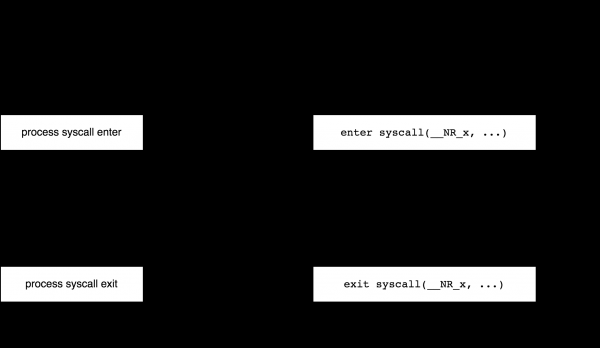
With seccomp, however, this process can be optimized exactly as we would like. That is, if we want to focus only on the system call X, we can write a BPF filter that for X returns the value SECCOMP_RET_TRACE, and for calls we are not interested in — SECCOMP_RET_ALLOW:
ld [0]
jneq #X, ignore
trace: ret #0x7ff00000
ignore: ret #0x7fff0000
In this case, strace initially starts the process as PTRACE_CONT, for each system call our filter is applied; if the system call is not X, then the process continues running, but if it is X, then seccomp will pass control to strace, which will look at the arguments and start the process as PTRACE_SYSCALL (since seccomp cannot spawn a program on exit from a system call). When the system call returns, strace it will restart the process using PTRACE_CONT and will wait for new messages from seccomp.
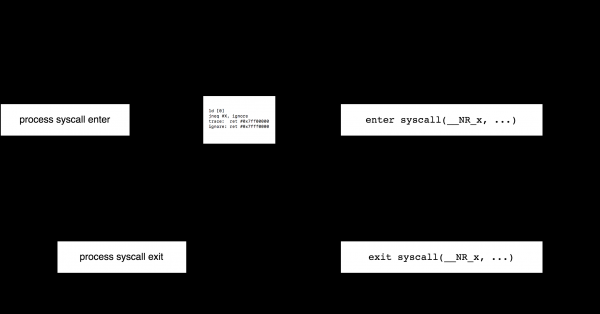
When using the option --seccomp-bpf there are two limitations. First, you cannot attach to an already existing process (option -p of the program strace), as this is not supported by seccomp. Second, there is no way do not to observe child processes, as seccomp filters are inherited by all child processes with no option to disable this.
A bit more detail about how exactly strace works with seccomp can be learned from . For us, the most interesting fact is that classic BPF in the form of seccomp is still in use.
xt_bpf
Now, let's return to the world of networks.
Background: long ago, in 2007, a new module was added to the kernel module xt_u32 for netfilter. It was written similarly to an even older traffic classifier cls_u32 and allowed writing arbitrary binary rules for iptables using the following simple operations: load 32 bits from the packet and perform a set of arithmetic operations on them. For example,
sudo iptables -A INPUT -m u32 --u32 "6&0xFF=1" -j LOG --log-prefix "seen-by-xt_u32"Loads 32 bits of the IP header starting from an offset of 6 and applies the mask 0xFF (to take the least significant byte). This is the protocol field of the IP header and we compare it with 1 (ICMP). In one rule, many checks can be combined, and you can also perform the operator @ — jump X bytes to the right. For example, the rule
iptables -m u32 --u32 "6&0xFF=0x6 && 0>>22&0x3C@4=0x29"checks if the TCP Sequence Number 0x29is not equal to. I won't go into more detail since it's already clear that writing such rules by hand is not very convenient. The article , has several links with examples of using and generating rules for xt_u32. See also links at the end of this article.
Starting from 2013, instead of a module, it's possible to use a BPF-based module xt_u32 . Everyone who has read this far should already understand the principle of its operation: run BPF bytecode as iptables rules. A new rule can be created, for example, like this: xt_bpfiptables -A INPUT -m bpf --bytecode -j LOG
iptables -A INPUT -m bpf --bytecode -j LOGhere — this is the code in the output assembly format bpf_asm by default, for example, $ cat /tmp/test.bpf ldb [9] jneq #17, ignore ret #1 ignore: ret #0$ bpf_asm /tmp/test.bpf 4,48 0 0 9,21 0 1 17,6 0 0 1,6 0 0 0,# iptables -A INPUT -m bpf --bytecode "$(bpf_asm /tmp/test.bpf)" -j LOG
$ cat /tmp/test.bpf
ldb [9]
jneq #17, ignore
ret #1
ignore: ret #0

$ bpf_asm /tmp/test.bpf
4,48 0 0 9,21 0 1 17,6 0 0 1,6 0 0 0,

# iptables -A INPUT -m bpf --bytecode "$(bpf_asm /tmp/test.bpf)" -j LOG
In this example, we filter all UDP packets. The context for the BPF program in the module xt_bpf, of course, points to the packet data, in the case of iptables — to the start of the IPv4 header. The return value from the BPF program , where false , meaning that the packet did not match.
It is clear that the module xt_bpf supports more complex filters than in the example above. Let's look at real examples from Cloudfare. Until recently, they used the module xt_bpf to protect against DDoS attacks. In the article they explain how (and why) they generate BPF filters and provide links to a set of utilities for creating such filters. For example, with the utility bpfgen you can create a BPF program that matches DNS requests to the name habr.com:
$ ./bpfgen --assembly dns -- habr.com
ldx 4*([0]&0xf)
ld #20
add x
tax

lb_0:
    ld [x + 0]
    jneq #0x04686162, lb_1
    ld [x + 4]
    jneq #0x7203636f, lb_1
    ldh [x + 8]
    jneq #0x6d00, lb_1
    ret #65535

lb_1:
    ret #0
In the program, we first load into the register X the address of the start of the string x04habrx03comx00 inside the UDP datagram and then check the request: 0x04686162 "x04hab" etc.
Shortly after, Cloudfare published the p0f compiler code -> BPF. In the article they discuss what p0f is and how to convert p0f signatures to BPF:
$ ./bpfgen p0f -- 4:64:0:0:*,0::ack+:0
39,0 0 0 0,48 0 0 8,37 35 0 64,37 0 34 29,48 0 0 0,
84 0 0 15,21 0 31 5,48 0 0 9,21 0 29 6,40 0 0 6,
...
At present, Cloudfare no longer uses xt_bpf, as they moved to XDP — one of the options for using the new version of BPF, see .
cls_bpf
The last example of using classic BPF in the kernel is a classifier cls_bpf for the traffic control subsystem in Linux, added to Linux at the end of 2013 and conceptually replacing the ancient cls_u32.
However, we will not describe how cls_bpf, as from the standpoint of knowledge about classic BPF, it does not provide us with anything — we have already familiarized ourselves with all the functionalities. Moreover, in subsequent articles discussing Extended BPF, we will encounter this classifier more than once.
Another reason not to discuss the use of classic BPF with cls_bpf is that compared to Extended BPF, this case has a radically narrowed scope of applicability: classic programs cannot modify packet contents and cannot maintain state between calls.
So it's time to say goodbye to classic BPF and look to the future.
Farewell to classic BPF
We looked at how the BPF technology, developed in the early nineties, has successfully survived for a quarter of a century and continually found new applications. However, similar to the transition from stack machines to RISC, which triggered the development of classic BPF, the 2000s saw a shift from 32-bit to 64-bit machines, causing classic BPF to become outdated. Additionally, the capabilities of classic BPF are severely limited: aside from the outdated architecture, there is no ability to maintain state between BPF program calls, no direct interaction with the user, and no interaction with the kernel, other than reading a limited number of fields from the structure. sk_buff and running simple helper functions; packet content cannot be modified or redirected.
In fact, currently, only the API interface of classic BPF remains in Linux, and within the kernel, all classic programs, whether socket filters or seccomp filters, are automatically translated into the new format, Extended BPF. (We will explain how this process works in the next article.)
The transition to the new architecture began in 2013 when Alexey Starovoitov proposed a scheme for updating BPF. In 2014, the relevant patches in the kernel. As far as I understand, the initial plan was only to optimize the architecture and JIT compiler for more efficient operation on 64-bit machines, but instead, these optimizations initiated a new chapter in Linux development.
Subsequent articles in this series will discuss the architecture and applications of the new technology known initially as internal BPF, then extended BPF, and now simply BPF.
Links
- Steven McCanne and Van Jacobson, "The BSD Packet Filter: A New Architecture for User-level Packet Capture",
https://www.tcpdump.org/papers/bpf-usenix93.pdf - Steven McCanne, "libpcap: An Architecture and Optimization Methodology for Packet Capture",
https://sharkfestus.wireshark.org/sharkfest.11/presentations/McCanne-Sharkfest'11_Keynote_Address.pdf tcpdump,libpcap:- .
- BPF — the forgotten bytecode:
https://blog.cloudflare.com/bpf-the-forgotten-bytecode/ - Introducing the BPF Tool:
https://blog.cloudflare.com/introducing-the-bpf-tools/ bpf_cls:http://man7.org/linux/man-pages/man8/tc-bpf.8.html- A seccomp overview:
https://lwn.net/Articles/656307/ https://github.com/torvalds/linux/blob/master/Documentation/userspace-api/seccomp_filter.rst- Paul Chaignon, "strace —seccomp-bpf: a look under the hood",
https://fosdem.org/2020/schedule/event/debugging_strace_bpf/ , which, among other things, includes an advanced program:http://netsniff-ng.org/
Source: habr.com
