

One of the typical scenarios in all the applications we are familiar with is searching for data based on specific criteria and displaying it in a readable format. There may also be additional options for sorting, grouping, and pagination. The task, in theory, is trivial, but many developers make a number of mistakes in solving it, which then affects performance. Let's explore various solutions to this problem and formulate recommendations for choosing the most efficient implementation.

Paging Option #1
The simplest option that comes to mind is to paginate search results in its most classic form.
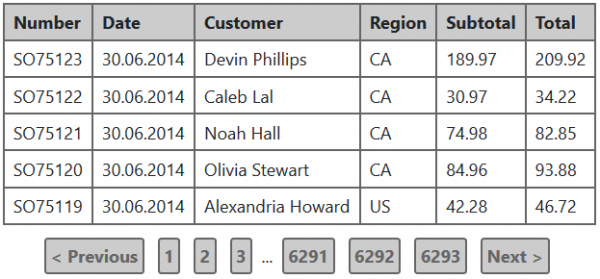
Suppose a relational database is used in the application. In this case, to output the information in such a form, two SQL queries will need to be executed:
- Retrieve the rows for the current page.
- Count the total number of rows that match the search criteria — this is needed for displaying pages.
Let's consider the first query using a test MS SQL database. for the 2016 server. For this purpose, we will use the Sales.SalesOrderHeader table:
SELECT * FROM Sales.SalesOrderHeader
ORDER BY OrderDate DESC
OFFSET 0 ROWS
FETCH NEXT 50 ROWS ONLY
The above query will output the first 50 orders from the list, sorted by the descending date of addition, in other words — the 50 most recent orders.
It executes quickly on the test database, but let's look at the execution plan and I/O statistics:

Table 'SalesOrderHeader'. Scan count 1, logical reads 698, physical reads 0, read-ahead reads 0, lob logical reads 0, lob physical reads 0, lob read-ahead reads 0.You can get the I/O statistics for each query by executing the command SET STATISTICS IO ON in the query execution environment.
As seen from the execution plan, the most resource-intensive operation is sorting all the rows of the source table by the date of addition. The issue is that the more rows appear in the table, the 'heavier' the sorting will be. In practice, such situations should be avoided, so we will add an index on the date of addition and see if resource consumption has changed:

Table 'SalesOrderHeader'. Scan count 1, logical reads 165, physical reads 0, read-ahead reads 5, lob logical reads 0, lob physical reads 0, lob read-ahead reads 0.
Clearly, things have improved significantly. But have all the issues been resolved? Let's modify the order search query to find orders where the total value of goods exceeds 100 dollars:
SELECT * FROM Sales.SalesOrderHeader
WHERE SubTotal > 100
ORDER BY OrderDate DESC
OFFSET 0 ROWS
FETCH NEXT 50 ROWS ONLY

Table 'SalesOrderHeader'. Scan count 1, logical reads 1081, physical reads 0, read-ahead reads 0, lob logical reads 0, lob physical reads 0, lob read-ahead reads 0.We have an amusing situation: the query plan is not much worse than the previous one, but the actual number of logical reads is almost twice as high as with a full table scan. There is a solution — if we create a composite index from the existing index and add the total product price as a second field, we'll get back to 165 logical reads:
CREATE INDEX IX_SalesOrderHeader_OrderDate_SubTotal on Sales.SalesOrderHeader(OrderDate, SubTotal);
This series of examples can go on for a long time, but the two main points I want to express here are:
- Adding any new criteria or sorting order to a search query can significantly affect its execution speed.
- But if we only need to read a part of the data, not all results that meet the search criteria — there are many ways to optimize such a query.
Now, let's move on to the second query mentioned at the very beginning — the one that counts the number of records that meet the search criteria. We'll take the same example — searching for orders that cost more than 100 dollars:
SELECT COUNT(1) FROM Sales.SalesOrderHeader
WHERE SubTotal > 100
With the composite index mentioned above, we get:
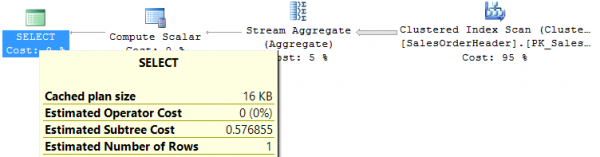
Table 'SalesOrderHeader'. Scan count 1, logical reads 698, physical reads 0, read-ahead reads 0, lob logical reads 0, lob physical reads 0, lob read-ahead reads 0.It’s not surprising that the query goes through the entire index, as the SubTotal field is not in the first position, so the query cannot benefit from it. The problem is solved by adding another index on the SubTotal field, resulting in only 48 logical reads.
We can provide several more examples of count queries, but the essence remains the same: fetching a portion of data and counting the total number — these are two fundamentally different queries, and each requires its own measures for optimization. In general, it will not be possible to find a combination of indexes that works equally well for both queries.
Accordingly, one of the important requirements to clarify when developing such a search solution is whether it is really important for the business to see the total number of found objects. Often, it is not. And navigating through specific page numbers, in my opinion, is a solution with a very narrow application area, as most paging scenarios look like 'go to the next page.'
Paging Option #2
Let's assume users do not need to know the total number of found objects. We will try to simplify the search page:
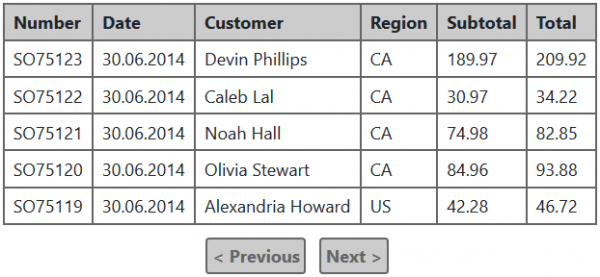
In fact, the only change is that it is no longer possible to go to specific page numbers, and now this table does not need to know how many there might be in total. But the question arises — how does the table know if there is data for the next page (to correctly display the 'Next' link)?
The answer is very simple: you can read from the database one record more than needed for display, and the presence of this 'extra' record will indicate whether there is the next batch. Thus, to obtain one page of data, you only need to perform a single query, which significantly improves performance and simplifies the support of such functionality. In my practice, there was a case when abandoning the count of total records accelerated result output by 4-5 times.
For this approach, there are several user interface options: 'back' and 'forward' buttons, like in the example above, a 'load more' button that simply adds a new batch to the displayed results, and 'infinite scrolling', which works on the principle of 'load more' but signals to retrieve the next batch when the user scrolls through all the displayed results to the end. Whatever the visual solution, the principle of data selection remains the same.
Subtlety of Paging Implementation
In all the request examples provided above, the 'offset + count' approach is used, where the request specifies the order of the result rows and how many rows need to be returned. First, let's consider how to best organize the parameter transmission in this case. In practice, I have encountered several methods:
- The sequential number of the requested page (pageIndex) and the page size (pageSize).
- The sequential number of the first record to return (startIndex) and the maximum number of records in the result (count).
- The sequential number of the first record to return (startIndex) and the sequential number of the last record to return (endIndex).
At first glance, it may seem so elementary that there is no difference. However, this is not the case — the most convenient and universal option is the second one (startIndex, count). There are several reasons for this:
- For the approach with reading +1 record, as mentioned above, the first option with pageIndex and pageSize is extremely inconvenient. For example, we want to display 50 records on a page. According to the algorithm described above, we need to read one record more than necessary. If this '+1' is not accounted for on the server, it results in needing to request records from 1 to 51 for the first page, from 51 to 101 for the second page, and so on. If we specify a page size of 51 and increase pageIndex, the second page will return records from 52 to 102, and so forth. Thus, in the first option, the only way to properly implement the button for moving to the next page is to account for the 'extra' line on the server, which is a very implicit detail.
- The third option makes no sense at all, as executing queries in most databases will still require the amount, not the index of the last record to be passed. Although subtracting startIndex from endIndex is a basic arithmetic operation, it is superfluous here.
Now it is time to describe the drawbacks of implementing paging through 'offset + count':
- Fetching each subsequent page will be more costly and slower than the previous one because the database will still need to traverse all records 'from the beginning' according to the search and sort criteria, and then stop at the necessary fragment.
- Not all DBMS can support this approach.
There are alternatives, but they are not ideal either. The first of these approaches is called 'keyset paging' or 'seek method' and is as follows: after fetching a batch, one can remember the field values in the last record on the page and then use them to fetch the next batch. For instance, we executed such a request:
SELECT * FROM Sales.SalesOrderHeader
ORDER BY OrderDate DESC
OFFSET 0 ROWS
FETCH NEXT 50 ROWS ONLY
In the last record, we received the order date value '2014-06-29'. To retrieve the next page, we can try executing the following:
SELECT * FROM Sales.SalesOrderHeader
WHERE OrderDate < '2014-06-29'
ORDER BY OrderDate DESC
OFFSET 0 ROWS
FETCH NEXT 50 ROWS ONLY
The issue is that OrderDate is not a unique field, and the condition mentioned above is likely to skip many necessary rows. To add clarity to this query, we need to add a unique field to the condition (let's assume that 75074 is the last primary key value from the first batch):
SELECT * FROM Sales.SalesOrderHeader
WHERE (OrderDate = '2014-06-29' AND SalesOrderID < 75074)
   OR (OrderDate < '2014-06-29')
ORDER BY OrderDate DESC, SalesOrderID DESC
OFFSET 0 ROWS
FETCH NEXT 50 ROWS ONLY
This option will work correctly, but in general, it will be difficult to optimize since the condition contains an OR operator. If as OrderDate increases, the primary key value also increases, the condition can be simplified by keeping only the filter on SalesOrderID. However, if there is no strict correlation between the primary key values and the field by which the result is sorted — in most DBMS, avoiding this OR will not be possible. One known exception is PostgreSQL, which fully supports tuple comparison, allowing the above condition to be written as 'WHERE (OrderDate, SalesOrderID) < ('2014-06-29', 75074)'. With a composite key consisting of these two fields, a similar query should be fairly lightweight.
A second alternative approach can be found, for example, in or — where the query, in addition to data, returns a special identifier, which can be used to retrieve the next batch of data. If this identifier has an unlimited lifespan (as in Cosmos DB), it is an excellent way to implement paging with sequential navigation between pages (option #2 mentioned above). Its potential downsides include: it is not supported by all DBMS; the retrieved identifier for the next batch may have a limited lifespan, which generally does not suit user interaction (as, for example, in the ElasticSearch scroll API).
Complex filtering
Let's complicate the task further. Suppose there is a requirement to implement what is known as faceted search, something that is well-known from online stores. The examples above based on the orders table are not very illustrative in this case, so let's switch to the Product table from the AdventureWorks database:
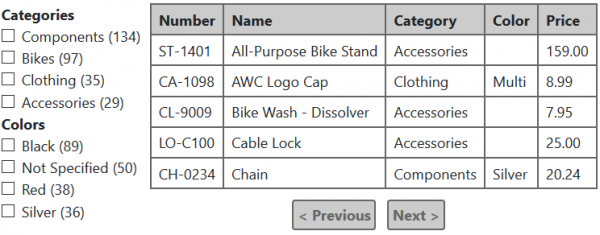
What is the idea behind faceted search? It is that for each filter element, the number of records corresponding to that criterion is shown. taking into account the filters chosen in all other categories..
For example, if we select in this case the category Bikes and the color Black, the table will display only black bicycles, but at the same time:
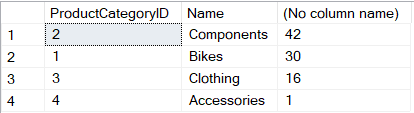
- For each criterion in the 'Categories' group, the number of products from this category in black color will be shown.
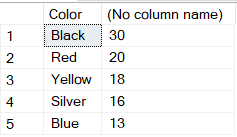
- For each criterion in the 'Colors' group, the number of bicycles of this color will be displayed.
Here is an example of the results output for such conditions:
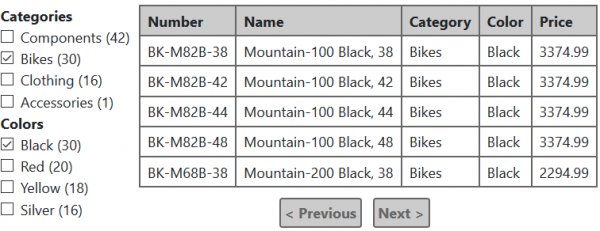
Additionally, if the 'Clothing' category is marked, the table will also show black clothing that is in stock. The number of black products in the 'Color' section will also be recalculated according to the new conditions, but nothing will change in the 'Categories' section... I hope these examples are sufficient to understand the familiar algorithm of how faceted search works.
Now let's imagine how this can be implemented on a relational database. Each group of criteria, such as Category and Color, will require a separate query:
SELECT pc.ProductCategoryID, pc.Name, COUNT(1) FROM Production.Product p
  INNER JOIN Production.ProductSubcategory ps ON p.ProductSubcategoryID = ps.ProductSubcategoryID
  INNER JOIN Production.ProductCategory pc ON ps.ProductCategoryID = pc.ProductCategoryID
WHERE p.Color = 'Black'
GROUP BY pc.ProductCategoryID, pc.Name
ORDER BY COUNT(1) DESC
SELECT Color, COUNT(1) FROM Production.Product p
  INNER JOIN Production.ProductSubcategory ps ON p.ProductSubcategoryID = ps.ProductSubcategoryID
WHERE ps.ProductCategoryID = 1 --Bikes
GROUP BY Color
ORDER BY COUNT(1) DESC
So, what is wrong with this solution? Quite simply — it doesn't scale well. Each filter section requires a separate query to count the quantities, and these queries are not the lightest. In online stores, there can be several dozen filter sections in some categories, which can become a serious performance issue.
Usually, after these statements, I am offered some solutions, namely:
- Combine all quantity counts into a single query. Technically, this is possible using the UNION keyword, but it won't significantly improve performance – the database will still have to execute each fragment "from scratch."
- Cache quantities. This is suggested to me practically every time I describe the problem. The nuance is that this is generally impossible. Suppose we have 10 "facets," each with 5 values. This is a very "modest" situation compared to what can be seen in online stores. Choosing one facet item affects the quantities in the other 9; in other words, for every combination of criteria, the quantities can be different. In total, in our example, there are 50 criteria that users can select, which means there could be 250 possible combinations. There won't be enough memory or time to fill such a data array. One might argue that not all combinations are real and that users rarely choose more than 5-10 criteria. Yes, lazy loading and caching quantities only for what has ever been selected can be done, but the more options there are, the less effective such caching will be, and the more noticeable the response time problems will become (especially if the data set is regularly changing).
Fortunately, this type of task has long had sufficiently effective solutions that work predictably with large volumes of data. For any of these options, it makes sense to separate facet recalculation and retrieving the results page into two parallel requests to the server and to organize the user interface in such a way that loading facet data "does not interfere" with displaying search results.
- Triggering a full recalculation of facets should be done as infrequently as possible. For instance, not recalculating everything with every change in search criteria, but rather finding the total number of results that match the current conditions and offering the user to display them — "1425 records found, show?" The user can either continue changing the search conditions or click the "show" button. It's only in the latter case that all requests for retrieving results and recalculating counts for all facets will be executed. Notably, this requires dealing with a request for obtaining the total number of results and optimizing it. This method can be found in many small online stores. Clearly, it's not a panacea for this problem, but it can serve as a decent compromise in simple cases.
- Use search engines for retrieving results and counting facets, such as Solr, ElasticSearch, Sphinx, and others. All of them are designed for building facets and do so quite effectively through inverted indexing. How search engines are structured, why they are more efficient in such cases compared to general-purpose databases, what best practices and pitfalls exist — this is a topic for a separate article. Here, I want to emphasize that a search engine cannot replace the main data storage; it is used as an addition: any changes in the main database that matter for search are synchronized into the search index; the search mechanism typically interacts only with the search engine and does not query the main database. One of the most important aspects here is how to organize this synchronization reliably. Everything depends on the requirements for "response time." If the time between a change in the main database and its "manifestation" in search is not critical, a service can be set up that checks for recently modified records and indexes them every few minutes. If a minimally possible response time is required, something like for sending updates to the search service.
Conclusions
- Implementing server-side paging is a significant complication and should only be applied for rapidly growing or simply large datasets. There is no absolute recipe for assessing what constitutes 'large' or 'rapidly growing', but I would adhere to this approach:
- If obtaining the complete collection of data, considering server time and network transmission, fits within performance requirements, there is no sense in implementing server-side paging.
- It's possible that for the near future, there may be no performance issues, as there is little data, but the dataset is continuously growing. If a certain dataset may soon fail to meet the previous point, it's better to establish paging from the start.
- If there is no strict business requirement for displaying the total number of results or page numbers, and your system lacks a search engine, it's best not to implement these aspects and consider option #2.
- If there is a clear requirement for faceted search, you have two options to avoid sacrificing performance:
- Do not recalculate all counts with every change in search criteria.
- Use search engines such as Solr, ElasticSearch, Sphinx, and others. However, it's essential to understand that they cannot replace the main database and should be used as a complement to the primary storage for solving search tasks.
- In the case of faceted search, it also makes sense to separate obtaining the search results page and counting quantities into two parallel queries. The counting of quantities may take longer than retrieving results, while results are more crucial for the user.
- If you are using an SQL database for search, any code changes related to this part should be well-tested concerning performance on the corresponding data volume (exceeding the volume in the 'live' database). It is also advisable to monitor query execution times on all database instances, especially on 'live'. Even if everything was good during the development stage with query plans, the situation may change significantly with the growing data volume.
Source: habr.com
