

"What is the difference between Kubernetes and OpenShift?" – this question arises with surprising regularity. In fact, it's like asking what the difference is between a car and an engine. To continue the analogy, a car is a finished product that you can use right away, literally: you get in and drive. On the other hand, for an engine to take you somewhere, it needs to be enhanced with many other components to ultimately produce the same car.

Therefore, Kubernetes is the engine around which the car (platform) brand OpenShift is built, which drives you toward your goals.
In this article, we want to remind you and elaborate on the following key points:
- Kubernetes is the heart of the OpenShift platform, and it is a 100% certified Kubernetes, featuring fully open source code with no proprietary elements whatsoever. In short:
- The API for the OpenShift cluster is a complete Kubernetes.
- If a container operates in any other Kubernetes system, it will work on OpenShift without any modifications. No changes to applications are necessary.
- OpenShift not only complements Kubernetes with useful features and capabilities. Like a car, OpenShift is ready to use immediately, can be put into production right away and, as we will show below, significantly simplifies the developer's life. That's why OpenShift is unique in two aspects. It's both a successful and widely recognized enterprise-class PaaS platform from the developer's perspective. At the same time, it is an extremely reliable Container-as-a-Service solution in terms of industrial deployment.
OpenShift is Kubernetes with 100% certification from the CNCF foundation.
At the core of OpenShift lies . Therefore, after the appropriate training, users are impressed by the power of kubectl. Those who transitioned to OpenShift from a Kubernetes Cluster often say how much they appreciate that after redirecting kubeconfig to the OpenShift cluster, all existing scripts work flawlessly.
You’ve probably heard about the OpenShift command-line utility called OC. It is fully compatible with kubectl commands, plus it offers several handy helpers which are useful for performing a variety of tasks. But first, let’s elaborate on the compatibility between OC and kubectl:
kubectl commands
OC commands
kubectl get pods
oc get pods
kubectl get namespaces
oc get namespaces
kubectl create -f deployment.yaml
oc create -f deployment.yaml
This is what the results of using kubectl on the OpenShift API look like:
• kubectl get pods – as expected, returns the pods.
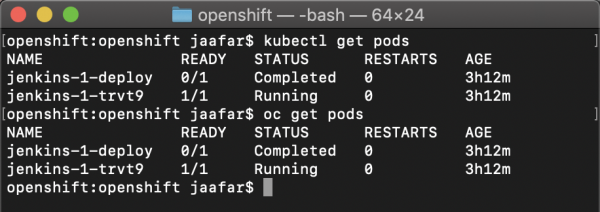
• kubectl get namespaces – as expected, returns the namespaces.

The command kubectl create -f mydeployment.yaml creates Kubernetes resources just as it would on any other Kubernetes platform, as shown in the video below:
In other words, all Kubernetes APIs are fully accessible in OpenShift while maintaining 100% compatibility. That’s why .
OpenShift enhances Kubernetes with useful features.
Kubernetes APIs are 100% available in OpenShift, but unfortunately, the standard Kubernetes utility kubectl lacks functionality and convenience. Therefore, Red Hat has supplemented Kubernetes with useful features and command-line tools such as OC (short for OpenShift client) and ODO (OpenShift DO, this utility is aimed at developers).
1. The OC utility is a more powerful and user-friendly alternative to kubectl.
For instance, unlike kubectl, it allows for the creation of new namespaces and easily switching contexts, as well as offering a range of useful commands for developers, such as building container images and deploying applications directly from source code or binary files (Source-to-image, s2i).
Let's look at examples of how built-in helpers and the extended functionality of the OC utility help simplify day-to-day work.
Example one – managing namespaces. In every Kubernetes cluster, there are always several namespaces. They are typically used for creating development and production environments, but they can also be used, for example, to provide each developer with a personal 'sandbox'. In practice, this means that a developer often has to switch between namespaces since kubectl operates in the current namespace context. As a result, people actively use helper scripts for this purpose with kubectl. However, when using OC, it’s sufficient to say 'oc project namespace_name' to switch to the desired namespace.
Don't remember the name of the namespace you need? No problem, just type “oc get projects” to display the full list. Are you skeptically wondering how this will work if you have access only to a limited subset of namespaces in the cluster? Well, because kubectl only does this correctly if RBAC allows you to see all namespaces in the cluster, and in large clusters, such permissions are not granted to everyone. So, here's the answer: for OC, this is not an issue at all, and it will easily provide a complete list in such situations. It's these little details that contribute to OpenShift's corporate orientation and the good scalability of this platform in terms of users and applications.
2. ODO – an improved version of kubectl for developers
As another example of Red Hat OpenShift improvements over Kubernetes, we can mention the ODO command-line utility. It is designed for developers and allows for quick deployment of local code to a remote OpenShift cluster. Additionally, it helps optimize internal processes to instantly sync all code changes with containers on the remote OpenShift cluster without needing to rebuild, push to the registry, and redeploy images.
Let's take a look at how OC and ODO simplify working with containers and Kubernetes.
Let's compare a couple of workflows, when they are based on kubectl, and when OC or ODO are applied.
• Deploying code to OpenShift for those who don't speak YAML:
Kubernetes / kubectl
$> git clone
1- Create a Dockerfile that builds the image from the code
————–
FROM node
WORKDIR /usr/src/app
COPY package*.json ./
COPY index.js ./
COPY ./app ./app
RUN npm install
EXPOSE 3000
CMD [ “npm”, “start” ]
————–
2- Build the image
$> podman build …
3- Log in to the registry
podman login …
4- Push the image to the registry
podman push
5- Create yaml files for application deployment (deployment.yaml, service.yaml, ingress.yaml) – this is the absolute minimum
6- Deploy the manifest files:
kubectl apply -f .
OpenShift / oc
$> oc new-app – name_of_our_application
OpenShift / odo
$> git clone
$> odo create component nodejs myapp
$> odo push
• Switching context: changing the working namespace or working cluster.
Kubernetes / kubectl
1- Create a context in kubeconfig for the project “myproject”
2- kubectl set-context …
OpenShift / oc
oc project “myproject”
Quality Control: "An interesting feature has appeared here, still in alpha version. Shall we introduce it into production?"
Imagine being seated in a race car and being told: "We have installed new type brakes and, honestly, they aren't completely reliable yet... But don't worry, we'll actively refine them during the championship." How does that prospect sound to you? Not so great for us at Red Hat. 🙂
That's why we try to avoid alpha versions until they have sufficiently matured, and we have conducted thorough battle testing and feel that they can be safely used. Usually, everything goes through the Dev Preview stage first, then through and only then is released as a public release (GA), which is stable enough to be used in production.
Why is that? Because, just like with the development of any other software, not all initial ideas in Kubernetes make it to the final release. Or they do make it and even retain the intended functionality, but their implementation is drastically different from what was in the alpha version. Since thousands of Red Hat customers use OpenShift to support critical tasks, we place a strong emphasis on the stability of our platform and long-term support.
Red Hat intentionally releases frequent updates for OpenShift and updates the included version of Kubernetes. For example, at the time of writing this article, the GA release of OpenShift 4.3 includes Kubernetes 1.16, which is just one version behind the upstream Kubernetes version 1.17. This way, we strive to provide customers with enterprise-class Kubernetes and ensure additional quality control in the release of new OpenShift versions.
Software patches: "In the version of Kubernetes that we have in production, a vulnerability was found. And it can only be closed by upgrading three versions up. Or are there other options?"
Within the open Kubernetes project, software patches usually come out as part of the next release, sometimes covering one or two previous interim releases, which provides coverage for up to 6 months back.
Red Hat rightfully prides itself on releasing critical patches earlier than others and providing support for a much longer period. Take, for example, the privilege escalation vulnerability in Kubernetes (): it was discovered in Kubernetes 1.11, and fixes for earlier releases were only provided up to version 1.10.11, leaving a gap in all prior Kubernetes releases, from 1.x to 1.9.
In turn, (which runs Kubernetes 1.2), covering nine OpenShift releases and clearly demonstrating a commitment to customers (more on this ).
How OpenShift and Red Hat Drive Kubernetes Forward
Red Hat ranks second in terms of software contributions to the open-source Kubernetes project, only behind Google, with 3 out of the 5 most prolific developers being Red Hat employees. Another little-known fact: many critical features in Kubernetes were introduced at the initiative of Red Hat, including such capabilities as:
- RBAC. Kubernetes did not have RBAC features (ClusterRole, ClusterRoleBinding) until Red Hat engineers decided to implement them within the platform itself, rather than as an additional feature of OpenShift. Is Red Hat afraid to improve Kubernetes? Certainly not, as Red Hat strictly adheres to the principles of open source and does not play Open Core games. Improvements and innovations made at the level of development communities, rather than based on proprietary principles, become more viable and gain wider adoption, which aligns perfectly with our primary goal – to make open-source software more beneficial for our clients.
- Pod Security Policies. This concept of secure application execution within pods was originally implemented in OpenShift under the name SCC (Security Context Constraints). And as in the previous example, Red Hat chose to integrate these developments into the open-source Kubernetes project for everyone to benefit from.
This series of examples can be continued, but we just wanted to show that Red Hat genuinely strives to advance Kubernetes and make it better for everyone.
It’s clear, OpenShift is Kubernetes. But what are the differences? 🙂
We hope that by the time you reach this point, you understand that Kubernetes is a core component of OpenShift. It is essential, but far from the only one. In other words, simply installing Kubernetes won’t provide you with an enterprise-class platform. You will need to add authentication, networking, security, monitoring, log management, and much more. Additionally, you’ll have to make the difficult choice among a wide array of available tools (to appreciate the diversity of the ecosystem, just take a look at ) and somehow ensure consistency and coherence so that they work together as a whole. Furthermore, you will regularly need to perform updates and regression testing whenever a new version of any of the components you use is released. That is, in addition to creating and maintaining the platform itself, you will also have to manage all this software. There will likely be little time left for solving business tasks and achieving competitive advantages.
In the case of OpenShift, Red Hat takes on all these complexities and simply provides you with a fully functional platform that not only includes Kubernetes itself but also the entire set of necessary open-source tools that transform Kubernetes into a true enterprise-class solution, which can be immediately and confidently launched into production. And of course, if you have your own technology stacks, you can integrate OpenShift into the existing solutions.
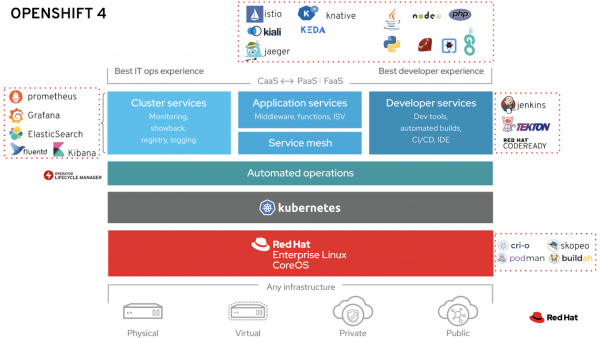
Look at the image above: everything outside the Kubernetes rectangle represents the areas where Red Hat adds functionality that is not present in Kubernetes by design. Now we will examine the main of these areas.
1. A reliable OS as a foundation: RHEL CoreOS or RHEL
For over 20 years, Red Hat has been a leading provider of Linux distributions for mission-critical business applications. Our extensive and continually updated expertise in this domain enables us to offer a truly reliable and trusted foundation for industrial container operations. RHEL CoreOS uses the same kernel as RHEL but is primarily optimized for tasks such as running containers and operating in Kubernetes clusters: its reduced size and immutability simplify cluster installation, auto-scaling, patch deployment, etc. All these features make it an ideal basis for providing the same user experience when working with OpenShift across various computing environments, from bare metal to private and public cloud.
2. Automation of IT Operations
Automating installation processes and day-two operations (i.e., everyday maintenance) is a strong suit of OpenShift, greatly simplifying the administration, updating, and maintenance of the container platform at peak performance. This is achieved through core-level support for Kubernetes operators in OpenShift 4.
OpenShift 4 is also an entire ecosystem of solutions built on Kubernetes operators, developed by both Red Hat and third-party partners (see Red Hat, or the operator store , created by Red Hat for third-party developers).
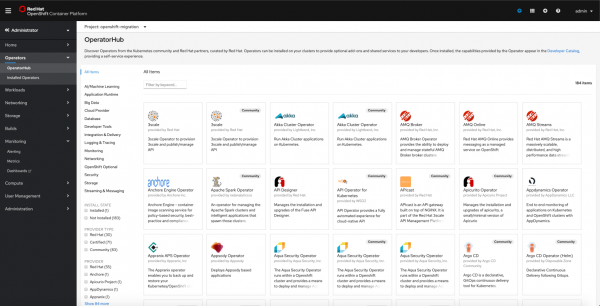
The integrated catalog of OpenShift 4 includes over 180 Kubernetes operators
3. Developer Tools
Since 2011, OpenShift has been available as a PaaS (Platform-as-a-Service), significantly simplifying life for developers, allowing them to focus on coding while offering built-in support for programming languages such as Java, Node.js, PHP, Ruby, Python, Go, as well as services for continuous integration and delivery CI/CD, databases, and more. OpenShift 4 offers , featuring over 100 services based on Kubernetes operators developed by Red Hat and our partners.
Unlike Kubernetes, OpenShift 4 includes a dedicated graphical interface (), helping developers effortlessly deploy applications from various sources (git, external registries, Dockerfile, etc.) into their namespaces, and clearly visualizing the connections between application components.
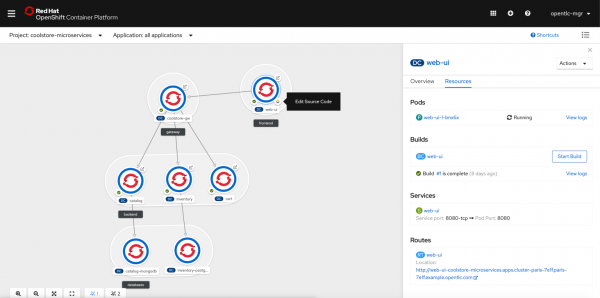
Additionally, OpenShift offers a set of Codeready development tools, which includes, in particular, , a fully containerized web-based IDE that works directly on top of OpenShift, implementing the "IDE as a Service" approach. On the other hand, for those who prefer to work strictly in local mode, there is Codeready Containers – a fully functional version of OpenShift 4 that can be deployed on a laptop.
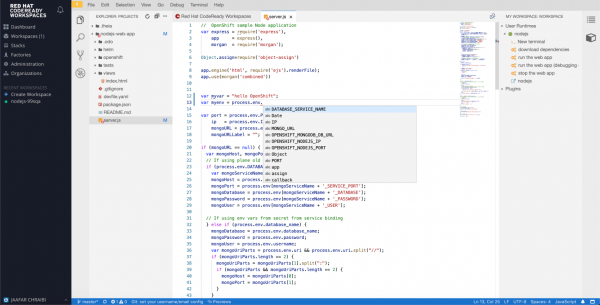
Integrated "IDE as a Service" for effective development on the Kubernetes/OpenShift platform.
Right out of the box, OpenShift offers a full CI/CD system, either based on containerized Jenkins and the plugin for working with pipelines, or a Kubernetes-oriented CI/CD system. (currently in Tech Preview). Both of these solutions fully integrate with the OpenShift console, allowing you to trigger pipelines, view deployments, logs, etc.
4. Tools for Applications
OpenShift allows deploying both traditional stateful applications and cloud-oriented solutions based on new architectures, such as microservices or serverless. The OpenShift Service Mesh solution includes essential tools for managing microservices, like Istio, Kiali, and Jaeger, right out of the box. Meanwhile, the OpenShift Serverless solution encompasses not only Knative but also tools like Keda, developed in collaboration with Microsoft, to provide Azure capabilities on the OpenShift platform.
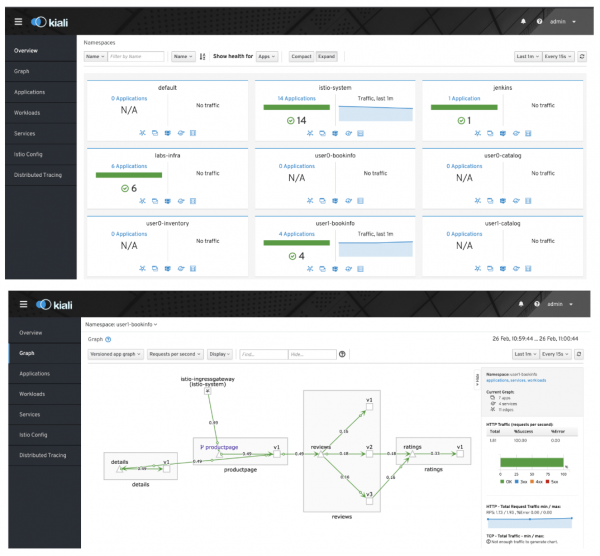
The integrated OpenShift ServiceMesh solution (Istio, Kiali, Jaeger) is useful for microservices development.
To bridge the gap between legacy applications and containers, OpenShift now allows for the migration of virtual machines to the OpenShift platform using Container Native Virtualization (currently in Tech Preview), making hybrid applications a reality and easing their transfer between various clouds, both private and public.
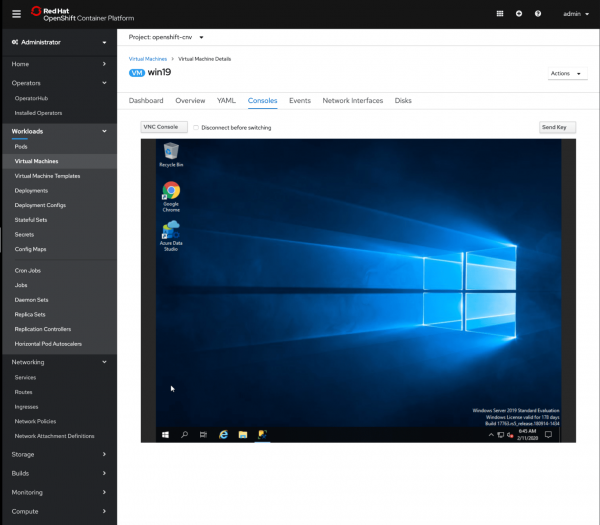
Windows 2019 Virtual machine running on OpenShift through Container Native Virtualization (currently in Tech Preview).
5. Tools for Clusters
Any enterprise-class platform must have monitoring services and centralized logging, security mechanisms, authentication and authorization, and network management tools. OpenShift provides all of this out-of-the-box, entirely with open-source code, including solutions like ElasticSearch, Prometheus, and Grafana. All these solutions come with dashboards, metrics, and alerts that are pre-configured and set up based on Red Hat's extensive experience in cluster monitoring, enabling you to effectively control and track the performance of your production environment from the very first moments.
OpenShift also inherently includes crucial features for enterprise customers, such as authentication with a built-in oauth provider, integration with credential providers including LDAP, ActiveDirectory, OpenID Connect, and much more.
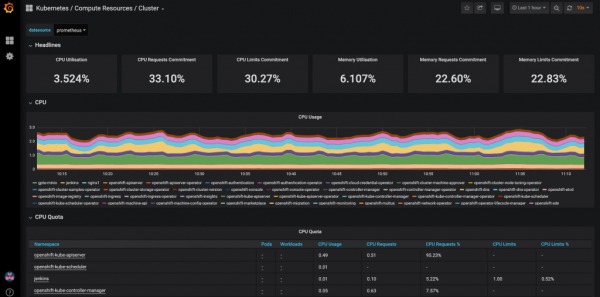
Pre-configured Grafana dashboard for monitoring your OpenShift cluster
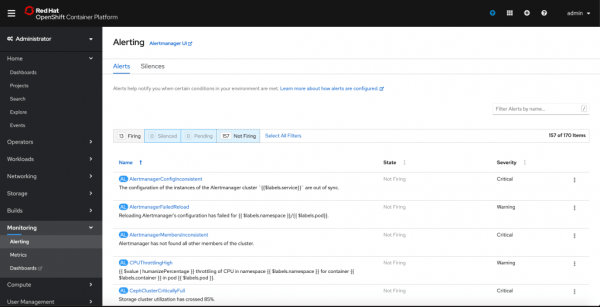
Over 150 pre-configured Prometheus metrics and alerts for monitoring your OpenShift cluster
To be continued
The rich functionality of the solution and Red Hat's extensive experience in Kubernetes are the reasons OpenShift has established a dominant position in the market, as shown in the figure below (for more details ).
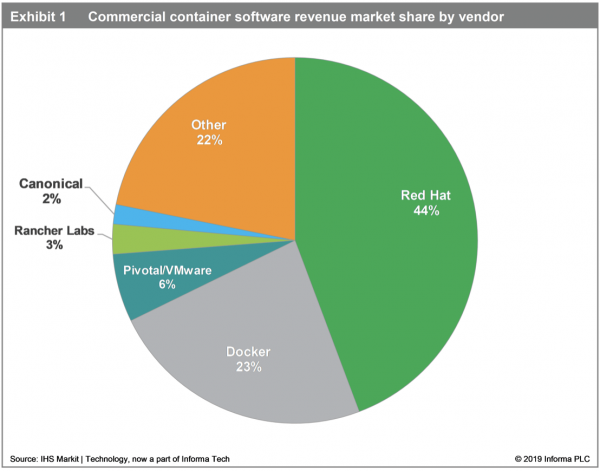
Currently, Red Hat leads the market with a share of 44%.
The company is reaping the benefits of its sales strategy with active customer engagement, where it initially consults and trains corporate developers, before moving on to monetization as the enterprise begins to implement containers in production.
(Source: )
We hope you enjoyed this article. In future posts in this series, we will delve deeper into the advantages of OpenShift over Kubernetes in each of the categories discussed here.
Source: habr.com
