

This is the beginning of a comprehensive course on how mail servers operate. I don’t intend to quickly teach anyone how to work with mail servers. There will be plenty of additional information regarding the issues we will encounter along the way, as I aim to make this course primarily for those just taking their first steps.
PrefaceIt so happened that I work part-time as a Linux administration instructor. For homework, I provide students with a dozen links to various resources since some materials are insufficient or overly complex. Moreover, content is often duplicated across different resources, or sometimes it diverges. Also, much of the content is in English, and there are students who struggle with understanding it. There are excellent courses by Semayev and Lebedev, and possibly others, but in my opinion, some topics are not adequately covered, and some are not sufficiently connected with others.
So, one day I decided to summarize the material and present it to my students in a convenient format. But since I'm at it, why not share it with everyone? Initially, I tried creating text and supplementing it with links, but there are millions of such resources, and what's the point? In some cases, there was a lack of clarity and explanations, and sometimes students are reluctant to read all the text (and not just them), which results in gaps in their knowledge.
But it's not only about the students. Throughout my career, I have worked in IT integrators, which provided me with vast experience with various systems. Ultimately, I became a versatile engineer. I often encounter IT professionals in different companies, and I regularly notice knowledge gaps among them. In the IT field, many are self-taught, including me. I have my own gaps in knowledge, and I would like to help others, as well as myself, bridge those gaps.
In my opinion, short videos with information are more engaging and easier to digest, so I decided to try this format. I am fully aware that my delivery may not be smooth, making it challenging to listen to me, but I am striving to improve. This is a new hobby for me that I wish to develop. My previous microphone was of lower quality, and now I mainly focus on solving sound and speech issues. I aspire to create quality content and deeply need constructive criticism and advice.
P.S. Some have felt that video format is not quite suitable and that text would be better. I don't completely agree, but let's allow for choice — both video and text.
Video
Next >
To be able to work with email, you need an email client. This can be a web client, such as Gmail, OWA, Roundcube, or a desktop application like Outlook, Thunderbird, etc. Let's assume you've already registered with an email service and now need to set up your email client. You open the application and it asks for information: an account name, your email address, and password.
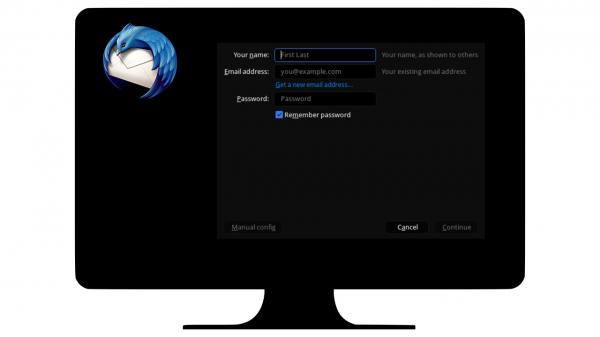
After you enter this information, your email client will try to find information about your email server. This is done to simplify the connection setup to the server, as most users don't know the addresses and connection protocols. To do this, email clients use various methods to search for information about the server and connection settings. These methods can vary depending on the email client.
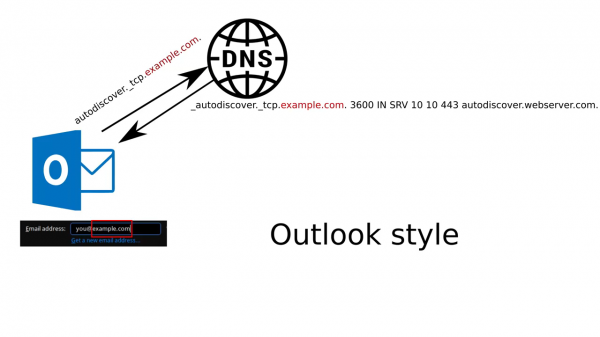
For example, Outlook uses the 'autodiscover' method, where the client queries the DNS server for a specific autodiscover record associated with the email domain you specified in your email client's settings. If the administrator has configured this record on the DNS server, it points to a web server.
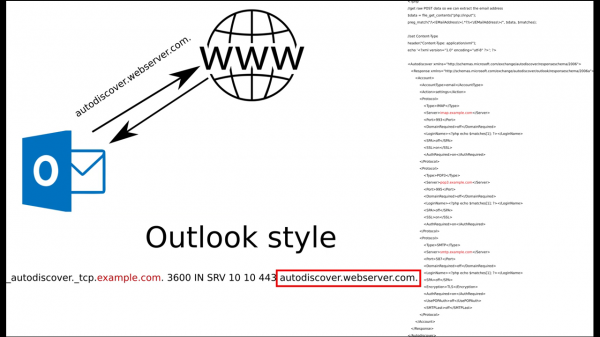
Once the email client has learned the web server address, it makes a request to it and finds a pre-prepared file with the email server connection settings in XML format.
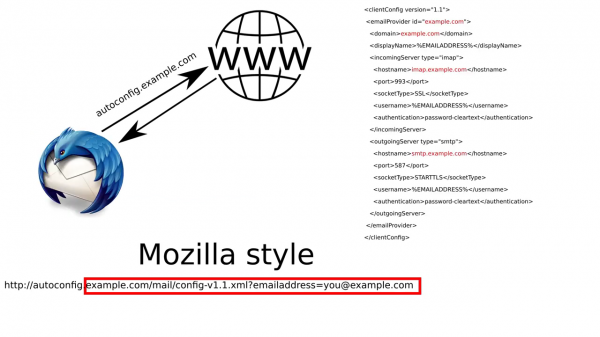
In the case of Thunderbird, the email client skips searching for the autodiscover DNS record and directly tries to connect to the autoconfig web server and the specified domain name. It also attempts to find a file with connection settings in XML format on the web server.
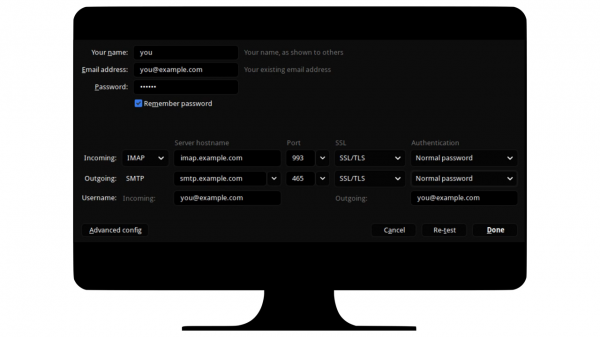
If the email client does not find the necessary settings file, it will attempt to guess the settings from commonly used ones. For example, if the domain is called example.com, the email client will check for servers with the names imap.example.com and smtp.example.com. If it finds them, it will add this to the settings. If the email client cannot determine the email server address at all, it will prompt the user to enter the connection details themselves.
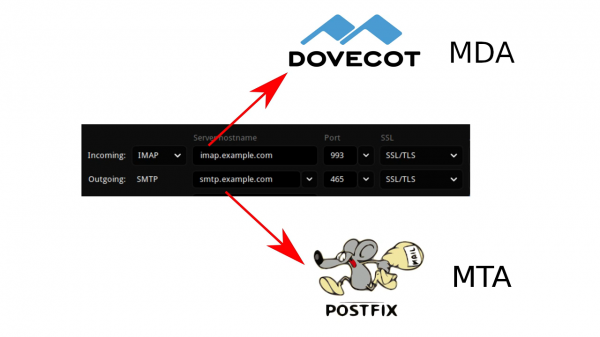
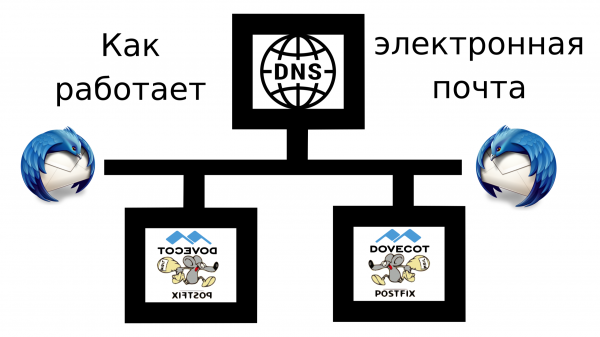
Then you will see 2 fields for servers — mail server address for incoming mail and address for outgoing mail. Generally, in small organizations, these addresses are the same, even if specified via different DNS names, whereas in large companies they may be different servers. But it doesn't matter whether it’s the same server or not — the services behind them are different. One of the most popular combinations of mail services is Postfix & Dovecot. Here, Postfix acts as the outgoing mail server (MTA — mail transfer agent), while Dovecot serves as the incoming mail server (MDA — mail delivery agent). As the name suggests, Postfix is used for sending mail, and Dovecot is for receiving mail by the mail client. The mail servers communicate with each other using the SMTP protocol — that is, Dovecot (MDA) is needed for users.
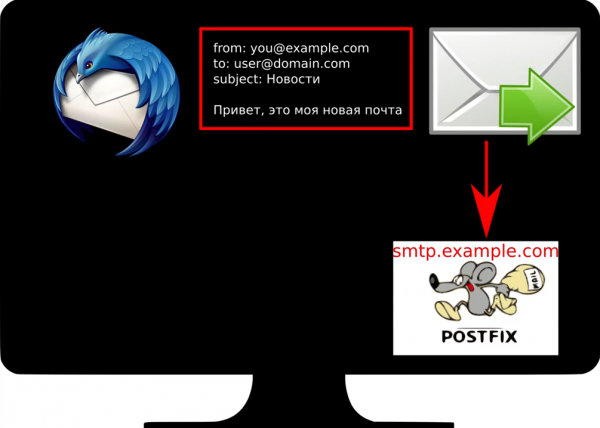
Suppose we have configured the connection to our mail server. Let’s try sending a message. In the message, we specify our address and the recipient's address. Now, to deliver the message, your mail client will send the message to your outgoing mail server.
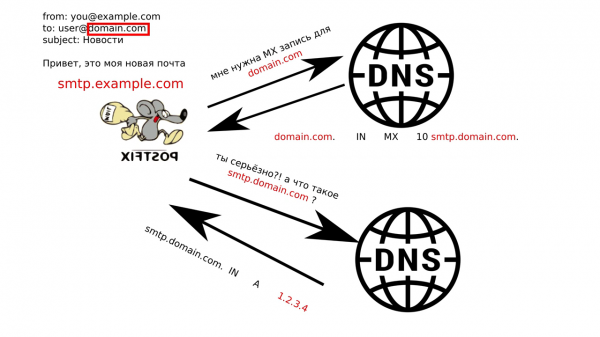
When your server receives the message, it will try to identify where to deliver this message. Your server cannot know all mail server addresses by heart, so it queries DNS to find a special MX record — pointing to the mail server for this domain. These records may differ for various subdomains.
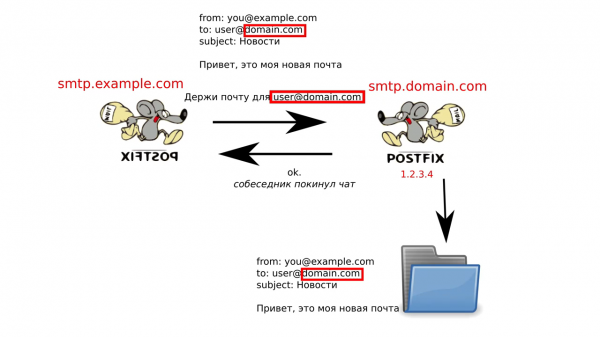
After it learns the recipient's server address, it sends your message via SMTP to this address, where the recipient's mail server (MTA) will accept the message and place it in a special directory, which is also monitored by the service responsible for delivering messages to clients (MDA).
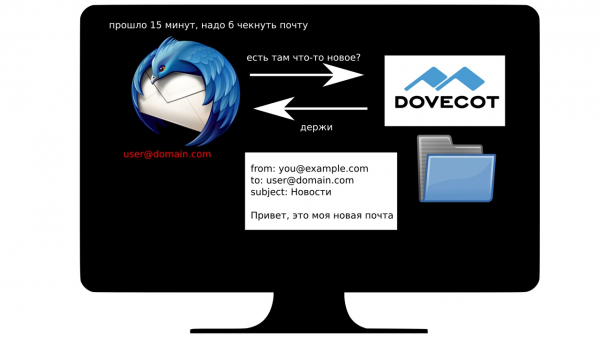
The next time the recipient's mail client checks with the incoming mail server for new messages, the MDA will send your message to it.
However, since mail servers operate on the internet and anyone can connect to them and send messages, and mail servers are widely used by various companies to exchange important data, they are quite an attractive target for attackers, especially spammers. Therefore, modern mail servers have many additional measures to verify the sender, spam checks, etc. I will try to cover many of these topics in the following parts.
Source: habr.com
