

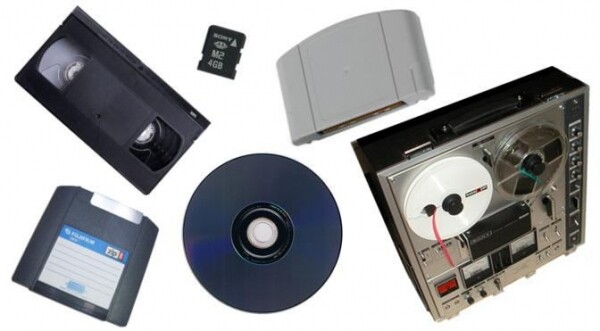
Any cloud provider offers data storage services. These can include cold and hot storage, Ice-cold, etc. Storing information in the cloud is quite convenient. But how did we store data 10, 20, or 50 years ago? Cloud4Y translated an interesting article that talks precisely about this.
A byte of data can be stored in various ways, as new, more advanced, and faster data storage devices are continually emerging. A byte is a unit of storage and processing of digital information that consists of eight bits. A single bit can be recorded as either 0 or 1.
In the case of punch cards, a bit is stored as the presence/absence of a hole in the card in a specific location. Looking further back to Babbage's 'Analytical Engine', registers that stored numbers were represented by gear wheels. In magnetic storage devices such as tapes and disks, a bit is represented by the polarity of a certain area of magnetic tape. In modern dynamic random-access memory (DRAM), a bit is often represented as a two-level electrical charge stored in a device that accumulates electrical energy in an electric field. A charged or discharged capacitor stores a bit of data.
In June 1956, coined the term to denote a group of bits used for encoding a single character of Let's talk a bit about character encoding. We'll start with the American Standard Code for Information Interchange, or ASCII. ASCII is based on the English alphabet, so every letter, number, and symbol (a-z, A-Z, 0-9, +, -, /, ", !, etc.) was represented as a 7-bit integer ranging from 32 to 127. This was not very 'friendly' toward other languages. To support other languages, Unicode expanded ASCII. In Unicode, each character is represented as a code point, or character; for example, the lowercase j is U+006A, where U denotes Unicode, followed by the hexadecimal number.
UTF-8 is a standard for representing characters as eight bits, allowing each code point in the range of 0-127 to be stored in a single byte. If we recall ASCII, this is quite normal for English characters, but characters from other languages are often expressed in two or more bytes. UTF-16 is the standard for representing characters as 16 bits, while UTF-32 is the standard for representing characters as 32 bits. In ASCII, each character is a byte, while in Unicode, which is often not entirely accurate, a character can take up 1, 2, 3, or more bytes. Various bit groupings will be used in this article. The number of bits in a byte varies depending on the media construction.
In this article, we will take a time-travel journey through various storage media to delve into the history of data storage. We will not delve deeply into every individual storage medium ever invented. Before you is an entertaining informative article, in no way claiming to be of encyclopedic significance.
Let's get started. Suppose we have a byte of data to store: the letter j, either in the encoded byte form 6a, or in binary form 01001010. Throughout our time-travel journey, this byte of data will be used in various storage technologies that will be described.
1951
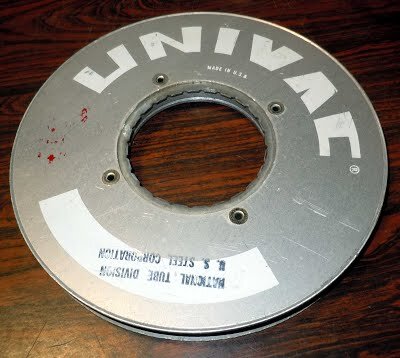
Our story begins in 1951 with the UNIVAC UNISERVO tape drive for the UNIVAC I computer. This was the first tape drive created for a commercial computer. The tape was made from a thin strip of nickel-plated bronze, 12.65 mm wide (known as Vicalloy), and nearly 366 meters long. Our bytes of data could be stored at a rate of 7,200 characters per second on tape moving at a speed of 2.54 meters per second. At this stage in history, you could measure the speed of storage algorithms by the distance traveled by the tape.
1952
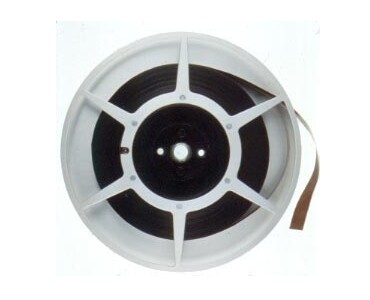
Let's fast forward to May 21, 1952, when IBM announced the release of its first magnetic tape unit, the IBM 726. Now our byte of data can be moved from the UNISERVO metal tape to the IBM magnetic tape. This new home turned out to be quite cozy for our very small byte of data, as the tape could store up to 2 million digits. This magnetic 7-track tape moved at a speed of 1.9 meters per second with a transfer rate of 12,500 or 7500 (then referred to as copy groups) per second. For reference, an average article on Habr has about 10,000 characters.
The IBM 726 tape had seven tracks, six of which were used for data storage, and one for parity control. One reel could hold up to 400 meters of tape, 1.25 cm wide. The theoretical data transfer rate reached 12,500 characters per second; the recording density was 40 bits per centimeter. This system used a "vacuum channel" method, where the tape loop circulated between two points. This allowed the tape to start and stop in fractions of a second. This was achieved by placing long vacuum columns between the tape reels and the read/write heads to absorb sudden increases in tape tension, without which the tape would likely break. A detachable plastic ring at the back of the tape reel provided write protection. About 1.1 .
Remember VHS tapes? What did you have to do to watch a movie again? Fast forward the tape! And how many times did you turn the cassette on a pencil to conserve battery power and avoid tearing or jammed tape? The same can be said for the tapes used in computers. Programs couldn't just skip over sections of tape or accidentally access data; they could only read and write data in strict sequence.
1956
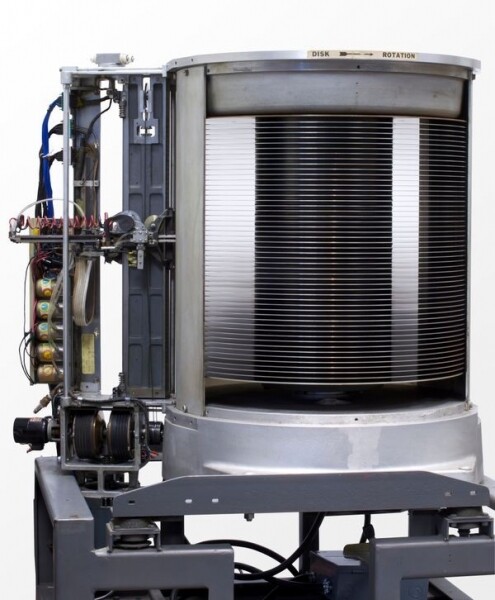
If we fast forward a few years to 1956, the era of magnetic disk storage began with IBM completing the development of the RAMAC 305 computer system, which Zellerbach Paper would install. This computer was the first to use a hard disk with a moving head. The RAMAC disk drive consisted of fifty magnetized metal plates with a diameter of 60.96 cm, capable of storing about five million characters of data, 7 bits per character, and rotating at a speed of 1200 revolutions per minute. The storage capacity was approximately 3.75 megabytes.
RAMAC allowed real-time access to large volumes of data, unlike magnetic tape or punch cards. IBM promoted RAMAC as a device capable of storing the equivalent of 64,000. Previously, RAMAC introduced the concept of continuous transaction processing as transactions were executed, so data could be extracted immediately while still fresh. Now access to our data in RAMAC could occur at a speed of 100,000. Earlier, when using tapes, we had to write and read sequential data, and we could not randomly skip to different sections of the tape. Real-time random access to data was truly revolutionary at that time.
1963
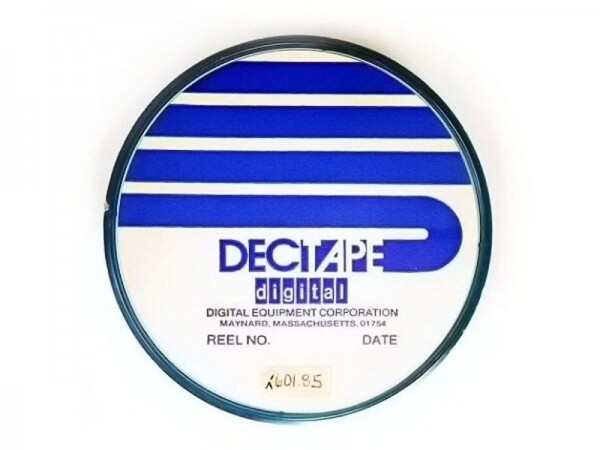
Let's travel back to 1963, when DECtape was introduced. The name came from the Digital Equipment Corporation, known as DEC. DECtape was inexpensive and reliable, thus used in many generations of DEC computers. It was a 19 mm tape laminated and sandwiched between two layers of Mylar on a four-inch (10.16 cm) reel.
Unlike its heavy, large predecessors, the DECtape could be manually transported. This made it a great option for personal computers. Unlike 7-track counterparts, DECtape had 6 data tracks, 2 label tracks, and 2 for clock pulses. Data was recorded at a speed of 350 bits per inch (138 bits per cm). Our data byte, which consists of 8 bits but can be extended to 12, could be transmitted on DECtape at a rate of 8,325 12-bit words per second at a tape speed of 93 (±12) inches per. This is 8% more digits per second than the metal tape UNISERVO in 1952.
1967
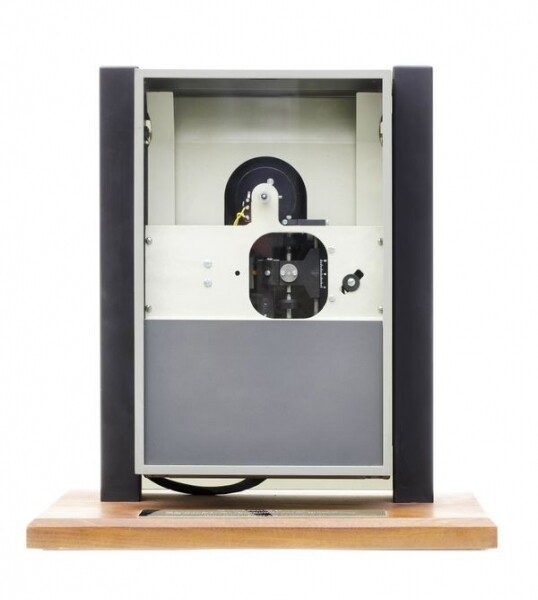
Four years later, in 1967, a small IBM team began working on the IBM drive code-named At that time, the team's task was to develop a reliable and inexpensive way to load microcode. IBM System/370. The project was later re-assigned and repurposed to load microcode into the controller for the IBM 3330 Direct Access Storage Facility, codenamed Merlin.
Now our byte could be stored on readonly 8-inch Mylar floppy disks with a magnetic coating, known today as floppy disks. At the time of its release, the product was named IBM 23FD Floppy Disk Drive System. The disks could hold 80 kilobytes of data. Unlike hard drives, users could easily transfer the floppy disk in a protective case from one drive to another. Later, in 1973, IBM released a read/write floppy disk that then became an industry standard. .
1969
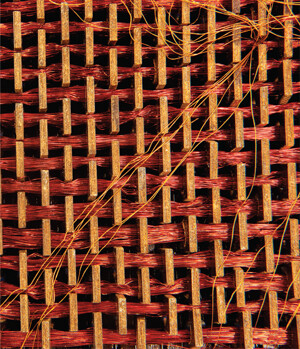
In 1969, aboard the Apollo 11 spacecraft, which transported American astronauts to the Moon and back, the AGC (Apollo Guidance Computer) with 'rope memory' was launched. This rope memory was handcrafted and could hold 72 kilobytes of data. The production of rope memory was labor-intensive, slow, and required skills similar to weaving; embedding a program into the rope memory could take . But it was the right tool for those times when it was crucial to fit as much as possible into a tightly constrained space. When the wire passed through one of the circular strands, it represented 1. The wire encircling the strand represented 0. Our byte of data required several minutes of weaving into the rope.
1977
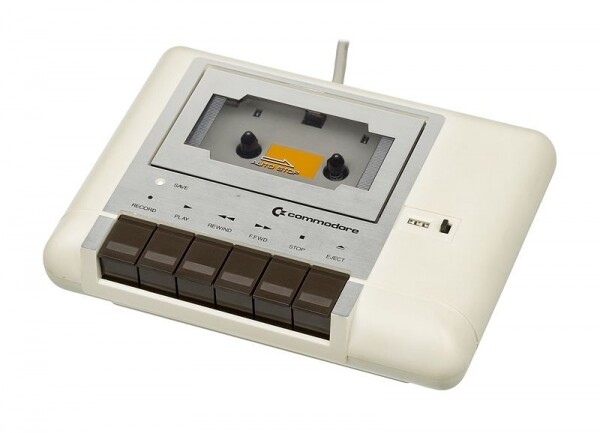
In 1977, the Commodore PET was released — the first (successful) personal computer. The PET used the Commodore 1530 Datasette, which means data plus cassette. The PET converted data into analog sound signals, which were then stored on . This provided an economical and reliable solution for data storage, albeit very slow. Our small byte of data could be transmitted at about 60-70 bytes per . Cassettes could hold about 100 kilobytes on a 30-minute side, with two sides per tape. For example, about two 55 KB images could fit on one side of a cassette. Datasettes were also used in the Commodore VIC-20 and Commodore 64.
1978
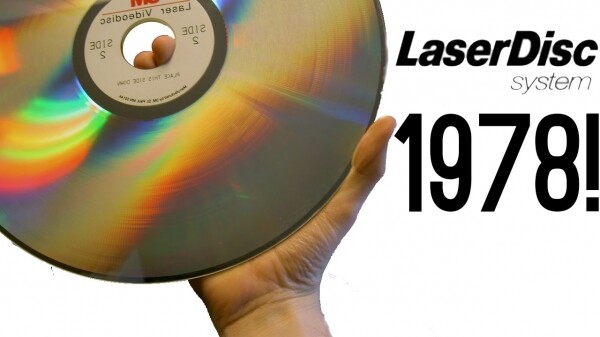
A year later, in 1978, MCA and Philips introduced LaserDisc under the name 'Discovision'. The movie 'Jaws' became the first film sold on LaserDisc in the USA. The audio and video quality were significantly better than competitors, but the LaserDisc was too expensive for most consumers. Unlike VHS tapes, LaserDiscs could not be recorded, which is why people recorded TV shows on those. LaserDiscs operated with analog video, analog FM stereo sound, and pulse-code modulation, or PCM, digital audio. , or PCM, digital audio. The discs had a diameter of 12 inches (30.47 cm) and consisted of two single-sided aluminum discs coated with plastic. Today, LaserDiscs are remembered as the foundation of CD and DVD.
1979
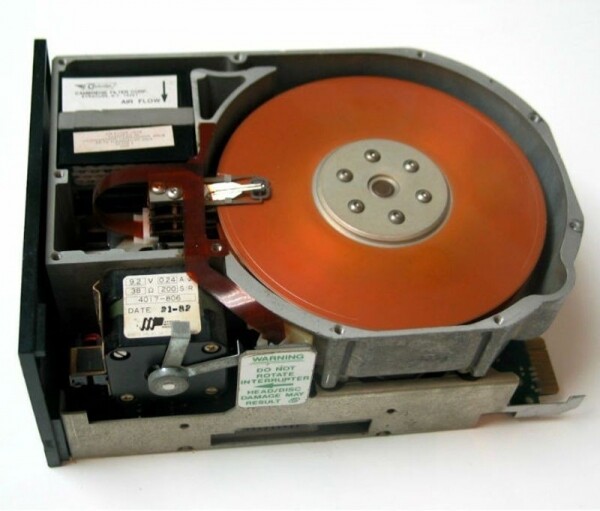
A year later, in 1979, Alan Shugart and Finis Connor founded Seagate Technology with the idea of scaling the hard drive down to the size of a 5 ¼-inch floppy disk, which was standard at the time. Their first product in 1980 was the Seagate ST506 hard drive—the first hard drive for compact computers. The disk held five megabytes of data, which was five times larger than a standard floppy disk at that time. The founders were able to achieve their goal of reducing the disk size to that of a 5¼-inch floppy disk. The new data storage device featured a rigid metal platter coated on both sides with a thin layer of magnetic material for data storage. Our bytes of data could be transferred to the disk at a speed of 625 kilobytes per. second. This is about .
1981
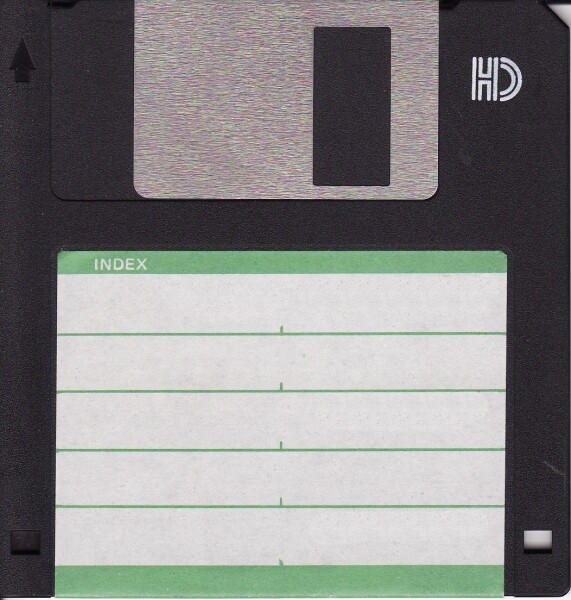
Let's jump a couple of years ahead to 1981 when Sony introduced the first 3.5-inch floppy disks. Hewlett-Packard became the first follower of this technology in 1982 with its HP-150. This popularized 3.5-inch floppy disks and led to their widespread adoption in the The disks were single-sided with a formatted capacity of 161.2 kilobytes and an unformatted capacity of 218.8 kilobytes. In 1982, a double-sided version was released, and the Microfloppy Industry Committee (MIC), consisting of 23 media companies, established the 3.5-inch floppy disk specification based on Sony's original design, securing the format in history as we Now our bytes of data could be stored on the early version of one of the most popular storage media: the 3.5-inch floppy disk. Later a pair of 3.5-inch floppy disks with became the most important part of my childhood.
1984
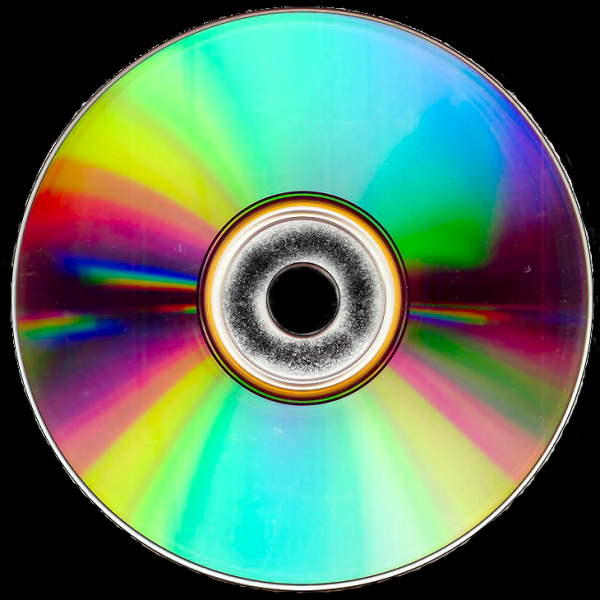
Shortly thereafter, in 1984, the release of the compact disc with read-only data (Compact Disc Read-Only Memory, CD-ROM) was announced. These were 550 megabyte CD-ROMs from Sony and Philips. The format grew out of digital audio compact discs, or CD-DA, which were used for distributing music. CD-DA was developed by Sony and Philips in 1982, with a capacity of 74 minutes. According to legend, when Sony and Philips were negotiating the CD-DA standard, one of the four people insisted that it could the entire 'Ninth Symphony.' The first product released on a compact disc was the 'Grolier Electronic Encyclopedia,' which came out in 1985. The encyclopedia contained nine million words, occupying only 12% of the available disk space, which was 553 We would have had more than enough space for the encyclopedia and a byte of data. Shortly thereafter, in 1985, computer companies worked together to create a standard for disks so that any computer could read information from them.
1984
Also in 1984, Fujio Masuoka developed a new type of memory with a floating gate, called flash memory, which was capable of being erased and rewritten multiple times.
Let's pause for a moment to discuss flash memory that uses a floating gate transistor. Transistors are electrical gates that can be turned on and off individually. Since each transistor can be in two different states (on and off), it can store two different numbers: 0 and 1. The floating gate refers to the second gate added to the middle transistor. This second gate is isolated by a thin oxide layer. These transistors use a small voltage applied to the gate of the transistor to indicate whether it is on or off, which in turn translates to 0 or 1.
With floating gates, when an appropriate voltage is applied through the oxide layer, electrons pass through it and get trapped on the gates. Thus, even when the power is turned off, the electrons remain there. When there are no electrons on the floating gates, they represent a 1, and when electrons are trapped, they represent a 0. The reverse of this process and applying suitable voltage through the oxide layer in the opposite direction causes electrons to pass through the floating gates, restoring the transistor back to its original state. Therefore, the cells are made programmable and . Our byte can be programmed in the transistor as 01001010, with electrons trapped in the floating gates representing zeros.
Masuoka's design was somewhat more accessible but less flexible than the electrically erasable PROM (EEPROM), as it required several groups of cells to be erased together, but this was also due to its speed.
At that time, Masuoka was working at Toshiba. Eventually, he left to work at Tohoku University, as he was dissatisfied with the fact that the company did not reward him for his work. Masuoka sued Toshiba for compensation. In 2006, he was awarded 87 million yuan, equivalent to $758,000. This still seems insignificant considering how influential flash memory has become in the industry.
Since we're talking about flash memory, it's also worth noting the difference between NOR and NAND flash memory. As we already know from Masuoka, flash stores information in memory cells made up of floating gate transistors. The names of the technologies are directly related to how the memory cells are organized.
In NOR flash memory, individual memory cells are connected in parallel, providing random access. This architecture reduces the read time required for random access to microprocessor instructions. NOR flash memory is ideal for lower density applications that are primarily read-only. That's why most CPUs boot their firmware typically from NOR flash memory. Masuoka and his colleagues introduced the invention of NOR flash in 1984 and NAND flash in .
NAND Flash developers abandoned random access in order to achieve a smaller memory cell size. This results in a smaller chip size and lower cost per bit. The architecture of NAND flash memory consists of memory transistors connected in series, made up of eight parts. This enables high storage density, smaller memory cell size, and faster data writing and erasing, as it can program data blocks simultaneously. This is achieved because data needs to be rewritten when not being written sequentially and the data already exists in .
1991
Let's move to 1991, when the prototype solid-state drive (SSD) was created by SanDisk, which was then known as . The design integrated a flash memory array, non-volatile memory chips, and an intelligent controller for automatic detection and correction of defective cells. The disk had a capacity of 20 megabytes with a 2.5-inch form factor, and its cost was estimated at around $1000. This drive was used by IBM in the .
1994
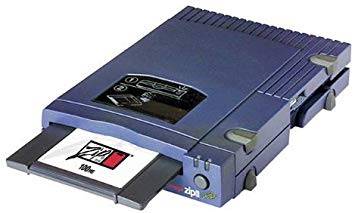
One of my personal favorite storage devices since childhood was Zip Disks. In 1994, Iomega released the Zip Disk, a 100-megabyte cartridge in a 3.5-inch form factor, slightly thicker than a standard 3.5-inch floppy disk. Later versions of the disks could hold up to 2 gigabytes. The convenience of these disks was that they were the size of a floppy but could store a larger amount of data. Our data bytes could be recorded onto a Zip disk at a speed of 1.4 megabytes per second. For comparison, at that time, 1.44 megabytes on a 3.5-inch floppy disk were recorded at about 16 kilobytes per second. On the Zip disk, the heads read/write data contactlessly, as if flying over the surface, which is similar to how a hard drive works but differs from the mechanism of other floppy disks. Soon, Zip disks became obsolete due to reliability issues and availability.
1994
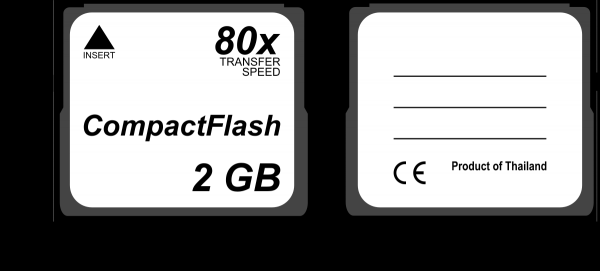
That same year, SanDisk introduced CompactFlash, which was widely used in digital camcorders. Like with CDs, the speed of CompactFlash is based on 'x' ratings such as 8x, 20x, 133x, and so on. The maximum data transfer rate is calculated based on the original audio CD transfer speed, which is 150 kilobytes per second. The transfer rate is expressed as R = Kx150 kB/s, where R is the transfer rate and K is the nominal speed. Thus, for 133x CompactFlash, our data byte would be written at 133x150 kB/s, or about 19,950 kB/s, or 19.95 MB/s. The CompactFlash Association was established in 1995 to create an industry standard for flash memory cards.
1997
A few years later, in 1997, the rewritable compact disc (CD-RW) was released. This optical disc was used for data storage, as well as for copying and transferring files to various devices. CD-RWs can be rewritten approximately 1,000 times, which at the time was not a limiting factor since users rarely rewrote data.
CD-RWs are based on a technology that alters the reflectivity of the surface. In the case of CD-RWs, phase shifts in a special coating made of silver, tellurium, and indium enable the ability to reflect or not reflect the reading laser, which denotes 0 or 1. When the connection is in crystalline state, it is translucent, indicating 1. When the connection melts into an amorphous state, it becomes opaque and non-reflective, which 0. Thus, we could write our data byte as 01001010.
DVDs eventually captured a significant share of the market from CD-RWs.
1999
Let's move to 1999, when IBM introduced the smallest hard drives in the world at that time: IBM Microdrives with capacities of 170 and 340 MB. These were small hard drives, measuring 2.54 cm, designed to be installed in CompactFlash Type II slots. A device was planned to be created that would function like CompactFlash but with greater memory capacity. However, soon they were replaced by USB flash drives, and later by larger CompactFlash cards as they became available. Like other hard drives, Microdrives were mechanical and contained small rotating disks.
2000
A year later, in 2000, USB flash drives were introduced. These drives were composed of flash memory encapsulated in a small form factor with a USB interface. Depending on the version of the USB interface used, speeds could vary. USB 1.1 is limited to 1.5 megabits per second, while USB 2.0 can handle 35 megabits per second. , and USB 3.0 — 625 megabits per second. The first USB 3.1 Type-C drives were announced in March 2015, featuring read/write speeds of 530 megabits per second. Unlike floppy disks and optical discs, USB devices are harder to scratch, yet they offer the same data storage capabilities as well as file transfer and backup options. Floppy disk and compact disc drives were quickly displaced by USB ports.
2005
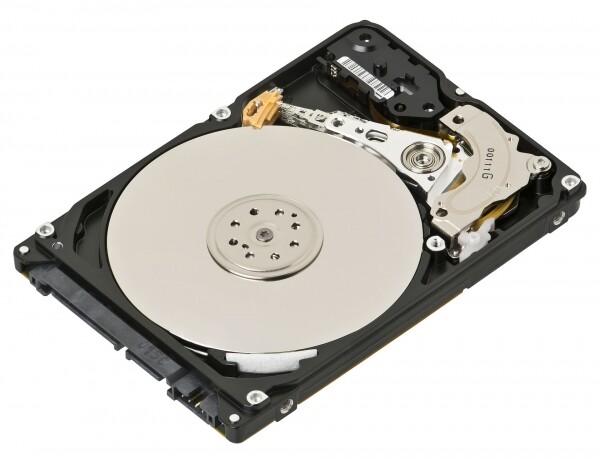
In 2005, hard drive manufacturers (HDD) began shipping products using perpendicular magnetic recording, or PMR. Interestingly, this coincided with the iPod Nano announcing the use of flash memory instead of 1-inch hard drives in the iPod Mini.
A typical hard drive contains one or more platters coated with a magnetic-sensitive film made up of tiny magnetic grains. Data is written when the magnetic read/write head flies just above the spinning platter. This is very similar to a traditional gramophone player, with the only difference being that in a gramophone, the needle is in physical contact with the disc. As the platters spin, the air in contact with them creates a slight breeze. Just as air on an airplane wing generates lift, the air generates lift on the head of the aerodynamic surface . The head rapidly changes the magnetization of one magnetic area of the grains so that its magnetic pole points up or down, representing 1 or 0.
The predecessor of PMR was longitudinal magnetic recording, or LMR. PMR recording density can exceed LMR recording density by more than three times. The main difference between PMR and LMR is that the grain structure and magnetic orientation of the data stored on PMR media is vertical, rather than longitudinal. PMR has better thermal stability and improved signal-to-noise ratio (SNR) due to better grain separation and uniformity. It also features improved writability thanks to stronger head fields and better magnetic alignment of the media. Like LMR, the fundamental limitations of PMR are based on the thermal stability of the magnetically recorded data bits and the need for sufficient SNR to read the recorded information.
2007
In 2007, the release of the first 1 TB hard drive from Hitachi Global Storage Technologies was announced. The Hitachi Deskstar 7K1000 used five 3.5-inch 200-gigabyte platters and spun at a speed of rpm. This is a significant advance compared to the world's first hard drive, the IBM RAMAC 350, which had a capacity of about 3.75 megabytes. Oh, how far we have come in 51 years! But wait, there’s more.
2009
In 2009, technical work began on creating non-volatile memory express, or . Non-volatile memory (NVM) is a type of memory that can store data permanently, unlike volatile memory, which requires constant power to retain data. NVMe meets the demand for a scalable host controller interface for peripheral components based on semiconductor drives that support PCIe technology, hence the name NVMe. Over 90 companies joined the working group to develop the project. All of this was based on the results of efforts to define the non-volatile memory host controller interface specification (NVMHCIS). The best NVMe drives available today can handle about 3500 megabytes per second in read speeds and 3300 megabytes per second in write speeds. Writing a byte of data j, which we started with, can be done very quickly compared to a couple of minutes of manually weaving rope memory for the Apollo Guidance Computer.
The Present and Future
Storage Class Memory
Now that we have taken a time-travel trip (ha!), let's take a look at the current state of Storage Class Memory. SCM, like NVM, is persistent, but SCM also offers performance that exceeds or matches that of main memory, as well as . The goal of SCM is to address some of today's caching problems, such as the low density of static random-access memory (SRAM). With dynamic random-access memory (DRAM), we can achieve better density, but this comes at the cost of slower access. DRAM also suffers from the need for continuous power to refresh the memory. Let's break this down a bit. Power is necessary because the electric charge in the capacitors slowly leaks away, meaning that without intervention, the data on the chip will soon be lost. To prevent this leakage, DRAM requires an external memory refresh circuitry that periodically rewrites the data in the capacitors, restoring them to their original charge.
Phase-change memory (PCM)
Previously, we looked at how phase changes for CD-RW. PCM is similar. The material used for phase change is typically Ge-Sb-Te, also known as GST, which can exist in two different states: amorphous and crystalline. The amorphous state has a higher resistance, representing 0, compared to the crystalline state, representing 1. By assigning data values to intermediate resistances, PCM can be used to store multiple states as .
Spin-transfer torque random access memory (STT-RAM)
STT-RAM consists of two ferromagnetic, permanent magnetic layers separated by a dielectric, which is an insulator that can transmit electrical force without conducting. It stores data bits based on the difference in magnetic orientations. One magnetic layer, called the reference layer, has a fixed magnetic direction, while the other magnetic layer, called the free layer, has a magnetic direction controlled by the current passing through it. For 1, the magnetization direction of the two layers aligns. For 0, both layers have opposite magnetic directions.
Resistive Random Access Memory (ReRAM)
A ReRAM cell consists of two metallic electrodes separated by a metal oxide layer. It resembles the design of Masuoka flash memory, where electrons penetrate the oxide layer and get trapped in floating gates or vice versa. However, in ReRAM, the cell's state is determined by the concentration of free oxygen in the metal oxide layer.
Despite these technologies being promising, they do have drawbacks. PCM and STT-RAM have high write latencies. PCM latencies are ten times higher than those of DRAM, while STT-RAM latencies are ten times higher than those of SRAM. PCM and ReRAM have a write endurance limitation before significant errors occur, meaning the memory element gets stuck at .
In August 2015, Intel announced the release of Optane, its product built on 3DXPoint technology. Optane claims performance that is 1000 times greater than that of NAND flash drives, at a price four to five times higher than flash memory. Optane serves as evidence that SCM is not merely an experimental technology. It will be interesting to observe the development of these technologies.
Hard Disk Drives (HDD)
Helium Hard Disk Drive (HHDD)
A helium disk is a high-capacity hard disk drive (HDD) filled with helium and hermetically sealed during manufacturing. Like other hard disks, it is similar to a turntable with a magnetic-coated platter. Typical hard disks simply contain air within the cavity, but this air creates some resistance when spinning the platters.
Helium balloons float because helium is lighter than air. In fact, helium is 1/7 the density of air, which helps decrease drag when rotating the platters, resulting in a reduction of the energy required to spin the disks. However, this feature is secondary; the primary distinguishing characteristic of helium is that it allows for packing seven platters in the same form factor that typically housed only five. If we recall the analogy with an aircraft wing, it's a perfect comparison. Since helium reduces drag, turbulence is eliminated.
We also know that helium balloons start to deflate after a few days because the helium leaks out. The same can be said for storage drives. It took years for manufacturers to create a container that prevents helium from escaping the form factor over the entire lifespan of the drive. Backblaze conducted experiments and found that hard drives filled with helium had an annual failure rate of 1.03%, compared to 1.06% for standard drives. Of course, this difference is so small that it’s hard to draw any serious conclusions. .
A helium-filled form factor can contain a hard drive encapsulated using PMR, which we discussed earlier, or microwave-assisted magnetic recording (MAMR) or heat-assisted magnetic recording (HAMR). Any magnetic data storage technology can be combined with helium instead of air. In 2014, HGST combined two cutting-edge technologies in its 10 TB helium-filled hard drive, which employed Host Managed Shingled Magnetic Recording, or SMR. Let’s take a brief look at SMR, and then we will examine MAMR and HAMR.
Shingled Magnetic Recording technology
Previously, we looked at perpendicular magnetic recording (PMR), which was the predecessor to SMR. Unlike PMR, SMR writes new tracks that overlap parts of previously written magnetic tracks. This, in turn, makes the previous track narrower, allowing for a higher track density. The technology gets its name from the fact that the overlapping tracks resemble shingles on a roof.
SMR leads to a much more complex writing process, as writing to one track overwrites the adjacent track. This does not manifest when the disk substrate is empty, and the data is sequential. But as soon as you write to a series of tracks that already contain data, the existing neighboring data gets erased. If an adjacent track contains data, it must be rewritten. This is quite similar to NAND flash, which we discussed earlier.
SMR devices allow this complexity to be hidden through firmware management, resulting in an interface similar to any other hard drive. On the other hand, host-managed SMR devices will not allow the use of these disks without special adaptation of applications and operating systems. The host must perform writes to the devices strictly sequentially, ensuring that the performance of the devices is 100% predictable. Seagate began shipping SMR drives in 2013, claiming that their density exceeds PMR by 25%. PMR density.
Microwave-assisted magnetic recording (MAMR)
Microwave-assisted magnetic recording (MAMR) is a magnetic memory technology using energy similar to HAMR (which we'll discuss next). A key part of MAMR is the Spin Torque Oscillator (STO), or 'spin-based generator.' The STO itself is located in close proximity to the write head. When current is applied to the STO, it generates a circular electromagnetic field at a frequency of 20-40 GHz due to the polarization of electron spins.
When such a field is applied in the ferromagnet used for MAMR, resonance occurs, leading to the precession of the magnetic moments of the domains in this field. Essentially, the magnetic moment deviates from its axis, and to change its direction (flip), the write head requires significantly less energy.
Using MAMR technology allows for ferromagnetic materials with higher coercivity, meaning the size of magnetic domains can be reduced without the risk of causing the superparamagnetic effect. The STO generator helps reduce the size of the write head, enabling information to be recorded on smaller magnetic domains, thereby increasing recording density.
Western Digital, also known as WD, introduced this technology in 2017. Shortly after, in 2018, Toshiba supported this technology. While WD and Toshiba are focused on MAMR technology, Seagate is betting on HAMR.
Heat-assisted magnetic recording (HAMR)
Heat-assisted magnetic recording (HAMR) is an energy-efficient magnetic data storage technology that significantly increases the amount of data that can be stored on a magnetic device, such as a hard disk, by using heat generated by a laser to aid in writing data onto the surface of the hard disk substrate. The heating allows data bits to be positioned much closer together on the disk substrate, thereby increasing data density and capacity.
This technology is quite challenging to implement. A 200 mW laser quickly a tiny area to 400 °C before writing, while not interfering with or damaging the rest of the data on the disk. The heating, data writing, and cooling processes must be completed in less than a nanosecond. To address these challenges, the development of nanoscale surface plasmons, also known as laser-induced surface heating, was required instead of direct laser heating, along with new types of glass disks and thermoregulating coatings capable of withstanding rapid localized heating without damaging the write head or any nearby data, as well as various other technical issues that needed to be resolved.
Despite numerous skeptical remarks, Seagate first demonstrated this technology in 2013. The first disks began shipping in 2018.
End of the tape, rewind to the beginning!
We started in 1951 and conclude the article by looking toward the future of data storage technology. Data storage has changed significantly over time: from paper tape to metal and magnetic, rope memory, spinning disks, optical disks, flash memory, and more. Over the course of this progress, data storage devices have become faster, more compact, and more efficient.
Comparing NVMe to the metal tape UNISERVO from 1951, NVMe can read 486,111% more digits per second. Compared to my childhood favorite, Zip disks, NVMe can read 213,623% more digits per second.
The only constant is the use of 0 and 1. The ways we do this vary greatly. I hope that the next time you burn a CD-RW with songs for a friend or save home video to an Optical Disc Archive, you think about how a non-reflective surface translates to 0 and a reflective one to 1. Or, if you're making a mixtape on a cassette, remember that it closely ties back to the Datasette used in the Commodore PET. Finally, don’t forget to be kind and rewind.
Thank you and for the tasty bits (I can’t help myself) throughout the article!
What else is useful to read in the blog
→
→
→
→
→
Subscribe to our -channel, so you don’t miss the next article! We write no more than twice a week and only when necessary. We also remind you that Cloud4Y can provide secure and reliable remote access to business applications and information necessary for business continuity. Remote work is an extra barrier to the spread of the coronavirus. Details are available from our managers at .
Source: habr.com
