

— our open-source GitOps CLI utility for building and delivering applications in Kubernetes. As promised, marked the beginning of adding new features to werf and revising conventional approaches. We are now pleased to introduce release v1.1, which is a significant step forward and a foundation for the future. builder werf. The version is currently available in .
The core of the release features a new stages storage architecture and optimization of both builders (for Stapel and Dockerfile). The new storage architecture opens up possibilities for implementing distributed builds across multiple hosts and parallel builds on a single host.
The optimizations entail eliminating unnecessary computations during the stages signature calculations and modifying the checksum calculation mechanisms to more efficient ones. This optimization reduces the average build time for projects using werf. Even empty builds, where all stages exist in the cache stages-storage, are now genuinely fast. In most cases, restarting a build will take less than 1 second! This also applies to the verification procedures for stages during the execution of commands. werf deploy and werf run.
Additionally, this release introduces a content-based image tagging strategy — content-based tagging, which is now enabled by default and is the only recommended method.
Let’s take a closer look at the key innovations in werf v1.1, while also sharing plans for the future.
What has changed in werf v1.1?
New stage naming format and cache stage selection algorithm
A new rule for stage name generation. Every stage build now generates a unique stage name, consisting of 2 parts: a signature (as it was in v1.0) plus a unique timestamp identifier.
For example, the full stage image name may look like this:
werf-stages-storage/myproject:d2c5ad3d2c9fcd9e57b50edd9cb26c32d156165eb355318cebc3412b-1582656767835
… or in general form:
werf-stages-storage/PROJECT:SIGNATURE-TIMESTAMP_MILLISEC
Here:
-
SIGNATURE— is the stage signature representing the content identifier of the stage, depending on the Git commit history that led to this content; -
TIMESTAMP_MILLISEC— this is a guaranteed unique identifier for the image, generated at the time of building a new image.
The cache stage selection algorithm is based on checking the ancestry of Git commits:
- Werf calculates the signature of a certain stage.
- In stages-storage There may be several stages for a given signature. Werf selects all stages that match the signature.
- If the current stage is associated with Git (git-archive, a custom stage with Git patches:
install,beforeSetup,setup; or git-latest-patch), then werf selects only those stages that are related to a commit that is a parent of the current commit (for which the build is initiated). - From the remaining matching stages, one is chosen — the oldest by creation date.
A stage for different Git branches can have the same signature. However, werf will prevent the use of cache associated with different branches, even if the signatures match.
.
A new algorithm for creating and saving stages in the stages storage
If during the stage selection from the cache werf does not find a suitable stage, a process to build a new stage is initiated.
Note that multiple processes (on one or several hosts) may start building the same stage at roughly the same time. Werf uses an optimistic locking algorithm stages-storage at the moment of saving the freshly built image in stages-storage. Thus, when the new stage build is ready, werf locks stages-storage and saves the freshly built image there only if there is no suitable image already existing (by signature and other parameters — see the new algorithm for stage selection from cache).
The freshly built image will have a unique identifier by TIMESTAMP_MILLISEC (see the new stage naming format). If a suitable image is found in stages-storage , werf will discard the freshly built image and use the cached image.
In other words: the first process that finishes building the image (the fastest) will have the right to save it in stages-storage (and then this single image will be used for all builds). The slower build process will never block the faster process from saving the current stage build results and moving on to build the next.
.
Improved Dockerfile builder performance
Currently, the stage pipeline for the image built from Dockerfile consists of a single stage — dockerfile. When calculating the signature, the checksum of files is considered. context, which will be used during assembly. Prior to this improvement, werf recursively processed all files and calculated the checksum by summing the context and mode of each file. Starting from version v1.1, werf can use the calculated checksums stored in the Git repository.
The algorithm is based on . The algorithm considers entries in .dockerignore and recursively traverses the file tree only when necessary. Thus, we have detached from reading the file system, and the algorithm's dependency on the size of context is not significant.
The algorithm also checks untracked files and includes them in the checksum if necessary.
Performance has improved when importing files
In werf versions v1.1, a rsync server is used when . Previously, importing was conducted in two steps using directory mounting from the host system.
Import performance on macOS is no longer limited by Docker volumes, and imports are performed in the same time as on Linux and Windows.
Content-based tagging
Werf v1.1 supports so-called content-based image tagging — content-based tagging. The tags of the resulting Docker images depend on the content of these images.
When you run the command werf publish --tags-by-stages-signature or Now, if specified, it is changed to will tag published images with what is referred to as stage signature of the image. Each image is tagged with its own stage signature, which is calculated according to the same rules as the regular signature of each stage individually, but serves as a generic identifier of the image.
The stage signature of the image depends on:
- the content of this image;
- the history of commits in Git that led to this content.
In a Git repository, there are always empty commits that do not alter the content of the image files. For example, commits that only have comments, merge commits, or commits that change files in Git that will not be imported into the image.
With content-based tagging, issues of unnecessary pod restarts of an application in Kubernetes due to changes in image names are resolved, even if the content of the image has not changed. By the way, this is one of the reasons that complicate the storage of multiple microservices of a single application in a single Git repository.
Content-based tagging is a more reliable method of tagging than Git branch tagging because the content of the resulting images does not depend on the execution order of pipelines in the CI system for building multiple commits on the same branch.
ImportantFrom this point onward stages-signature — this is the only recommended tagging strategy. This will be used by default in the team In the CI system, the tagging strategy is set by the command (unless another tagging scheme is explicitly specified).
. A separate publication will also be dedicated to this feature. UPDATED (April 3): Article with details .
Logging Levels
Users will have the ability to control output, set the logging level, and work with debugging information. Options added --log-quiet, --log-verbose, --log-debug.
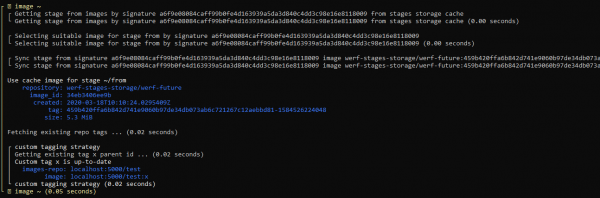
By default, the output contains minimal information:

When using detailed output (--log-verbose) you can track how werf operates:
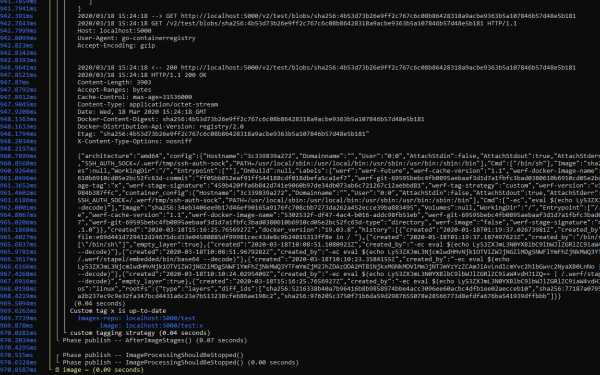
The detailed output (--log-debug), in addition to werf's debugging information, also contains logs from the libraries used. For example, you can see how the interaction with Docker Registry occurs and log instances where significant time is spent:
Future Plans
Attention! The capabilities described below marked v1.1 will become available in this version, many of them — soon. Updates will come through auto-updates . These features do not affect the stable part of v1.1 features, their emergence will not require manual user intervention in existing configurations.
Full support for various implementations of Docker Registry (NEW)
- Version: v1.1
- Timeline: March
The goal is for the user to use any implementation without restrictions when using werf.
Currently, we have identified the following set of solutions for which we intend to guarantee full support:
- Default (library/registry)*,
- AWS ECR,
- Azure*,
- Docker Hub,
- GCR*,
- GitHub Packages,
- GitLab Registry*,
- Harbor*,
- Quay.
The solutions marked with an asterisk are currently fully supported by werf. For the others, support exists but with limitations.
Two main issues can be highlighted:
- Some solutions do not support deleting tags via the Docker Registry API, which prevents users from using the automatic cleanup implemented in werf. This is true for AWS ECR, Docker Hub, and GitHub Packages.
- Some solutions do not support so-called nested repositories (Docker Hub, GitHub Packages, and Quay) or do support them, but the user must create them manually using the UI or API (AWS ECR).
We plan to address these and other issues by using the native APIs of the solutions. This task also includes full-cycle testing coverage of werf for each of them.
Distributed image build (↑)
- Version: v1.2 v1.1 (the priority for implementing this feature has been increased)
- Timeline: March-April March
Currently, werf v1.0 and v1.1 can only be used on a single dedicated host for image building and publishing operations and application deployment in Kubernetes.
To enable distributed work in werf, where building and deploying applications in Kubernetes occurs on multiple arbitrary hosts that do not retain their state between builds (temporary runners), werf requires the ability to use Docker Registry as a stage storage.
Previously, when the werf project was still called dapp, this capability existed. However, we encountered several issues that need to be considered in the implementation of this feature in werf.
Note. This capability does not imply the operation of the builder within Kubernetes pods, as this would require eliminating the dependency on the local Docker server (there is no access to the local Docker server in a Kubernetes pod because the process itself runs in a container, and network interaction with the Docker server is not supported by werf and will not be supported). Support for operation in Kubernetes will be implemented separately.
Official support for GitHub Actions (NEW)
- Version: v1.1
- Timeline: March
Includes werf documentation (sections reference and guide), as well as the official GitHub Action for working with werf.
Additionally, this will allow werf to run on ephemeral runners.
The user interaction mechanics with the CI system will be based on labeling pull requests to initiate specific build/deploy actions for the application.
Local development and deployment of applications with werf (↓)
- Version: v1.1
- Timeline: January-February April
The main goal is to achieve a single unified config for deploying applications both locally and in production, without complex actions, 'out of the box'.
werf also requires an operational mode that facilitates convenient code editing and instant feedback from the running application for debugging.
New cleanup algorithm (NEW)
- Version: v1.1
- Deadlines: April
In the current version of werf v1.1, the procedure Cleanup does not include cleanup of images for content-based tagging — these images will accumulate.
Also, in the current versions of werf (v1.0 and v1.1), different cleanup policies are used for images published under tagging schemes: Git branch, Git tag, or Git commit.
A new unified cleanup algorithm for all tagging schemes has been developed based on Git commit history:
- Store no more than N1 images related to the last N2 commits for each git HEAD (branches and tags).
- Store no more than N1 stage images related to the last N2 commits for each git HEAD (branches and tags).
- Store all images that are used in any Kubernetes cluster resources (all kube contexts and namespaces in the configuration file are scanned; this behavior can be limited with specific options).
- Store all images that are used in resource configuration manifests saved in Helm releases.
- An image can be deleted if it is not associated with any HEAD from git (for instance, because the respective HEAD itself was deleted) and is not used in any manifests in the Kubernetes cluster and in Helm releases.
Parallel image builds (↓)
- Version: v1.1
- Deadlines: January-February April*
The current version of werf builds images and artifacts described in werf.yaml, sequentially. It is necessary to parallelize the process of building independent stages of images and artifacts, as well as ensure convenient and informative output.
* Note: the deadline has been shifted due to the prioritization of implementing distributed builds, which will add more capabilities for horizontal scaling, as well as using werf with GitHub Actions. Parallel builds are the next step in optimization, providing vertical scalability when building a single project.
Transition to Helm 3 (↓)
- Version: v1.2
- Deadlines: February-March May*
Includes a transition to a new codebase and a tested, user-friendly method for migrating existing installations.
* Note: transitioning to Helm 3 will not add significant features to werf, as all key features of Helm 3 (3-way merge and the absence of tiller) are already implemented in werf. Moreover, werf has beyond those mentioned. However, this transition remains in our plans and will be carried out.
Jsonnet for describing Kubernetes configuration (↓)
- Version: v1.2
- Timeline: January-February April-May
Werf will support configuration description for Kubernetes in Jsonnet format. At the same time, werf will remain compatible with Helm, and there will be an option to choose the description format.
The reason is that Go templates are considered by many to have a high entry threshold, and the readability of code in these templates also suffers.
The possibility of implementing other configuration description systems for Kubernetes (such as Kustomize) is also being considered.
Working within Kubernetes (↓)
- Version: v1.2
- Timeline: April-May May-June
Goal: to enable image builds and application delivery using runners in Kubernetes. That is, the building of new images, their publication, cleanup, and deployment can occur directly from Kubernetes pods.
To implement this capability, the ability for distributed image builds is first required (see the previous point).
Support for a builder mode without a Docker server (i.e., Kaniko-like build or build in userspace) is also required.
Werf will support building in Kubernetes not only using Dockerfile but also with its own builder Stapel, featuring incremental rebuilds and Ansible.
Step towards open development
We love our community (, ) and want more people to help make werf better, understand the direction we are moving in, and participate in development.
Recently, it was decided to switch to to open up our team's workflow. You can now see the upcoming plans and current works in the following areas:
- ;
- ;
- ;
- .
A significant amount of work has been done on issues:
- Outdated ones have been removed.
- Existing ones have been standardized to a common format with sufficient detail and thoroughness.
- New issues with ideas and suggestions have been added.
How to enable version v1.1
The version is currently available in (in channels stable and rock-solid releases will appear as stabilization occurs, however, ea it is already stable enough for use, as it has passed through the channels. alpha and beta). Activated as follows:
source $(multiwerf use 1.1 ea)
werf COMMAND ...
Conclusion
The new architecture of stage storage and optimization of the build system for Stapel and Dockerfile builders opens up opportunities for implementing distributed and parallel builds in werf. These features will soon be available in the same release v1.1 and will become automatically accessible via the auto-update mechanism (for users ).
This release has added a content-based image tagging strategy — content-based tagging, — which has become the default strategy. The log of main commands has also been redesigned: werf build, werf publish, werf deploy, werf dismiss, werf cleanup.
The next significant step will be the addition of distributed builds. Since v1.0, distributed builds have become a higher priority than parallel builds because they add more value to werf: vertical scaling of builders and support for ephemeral builders in various CI/CD systems, as well as the ability to provide official support for GitHub Actions. Therefore, the timeline for implementing parallel builds has been shifted. However, we are working to implement both capabilities as soon as possible.
Stay tuned for updates! And don't forget to visit us at , to create an issue, find an existing one and upvote it, create a PR, or just watch the project's progress.
P.S.
Also read in our blog:
- «»
- «»;
- Cycle of release notes for new features in werf:
- «»;
- «»;
- «»;
- «».
Source: habr.com
