

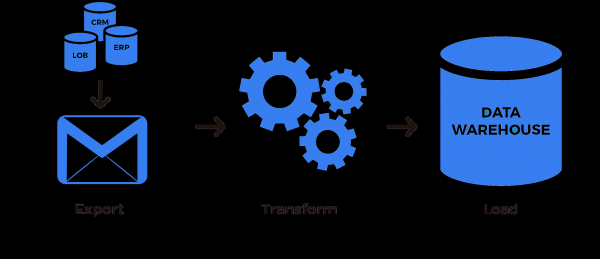
Regardless of how advanced technology becomes, outdated approaches often linger behind. This can be due to a gradual transition, human factors, technological necessities, or other reasons. In the field of data processing, the most illustrative examples relate to data sources. No matter how much we wish to eliminate this, part of the data is still sent via messengers and emails, not to mention more archaic formats. I invite you to delve into one of the options for Apache Airflow, illustrating how data can be retrieved from emails.
Background
Many data transfers still occur via email, ranging from interpersonal communications to standards of interaction between companies. It's beneficial when one can write an interface to obtain data or have people in the office who can input this information into more convenient sources, but often such opportunities are simply unavailable. The specific task I faced was connecting a well-known CRM system to a data warehouse, and subsequently, to an OLAP system. Historically, our company found using this system convenient in a specific business area. Thus, everyone was eager to leverage data from this external system as well. First and foremost, we explored the possibility of retrieving data from the open API. Unfortunately, the API did not cover all the necessary data retrieval, and, to put it plainly, it had many flaws, while technical support was either unwilling or unable to offer a more comprehensive functionality. However, this system provided the opportunity for periodic retrieval of missing data via email in the form of a link to download an archive.
It should be noted that this was not the only case where the business wanted to gather data from emails or messengers. However, in this instance, we could not influence the third-party company that provides part of the data only in this manner.
Apache Airflow
To build ETL processes, we most often use Apache Airflow. In order for the reader, unfamiliar with this technology, to better understand how it looks in context, I will describe a couple of introductions.
Apache Airflow is an open-source platform used for building, executing, and monitoring ETL (Extract-Transform-Load) processes in Python. The main concept in Airflow is the directed acyclic graph, where the nodes of the graph represent specific processes, and the edges represent the flow of control or information. A process can simply call any Python function or have a more complex logic of sequentially calling multiple functions within a class context. For the most common operations, there are already many ready-made solutions that can be used as processes. Such solutions include:
- operators — for transferring data from one place to another, for example, from a database table to a data warehouse;
- sensors — for waiting for a specific event to occur and directing the flow of control to subsequent nodes of the graph;
- hooks — for lower-level operations, for example, to retrieve data from a database table (used in operators);
- etc.
It would be impractical to describe Apache Airflow in detail in this article. Brief introductions can be found or .
Hook for data retrieval
First of all, to solve the task, we need to write a hook that would allow us to:
- connect to the email;
- find the necessary email;
- retrieve data from the email.
from airflow.hooks.base_hook import BaseHook
import imaplib
import logging

class IMAPHook(BaseHook):
    def __init__(self, imap_conn_id):
        """
           IMAP hook for fetching data from email

           :param imap_conn_id:       Email connection ID
           :type imap_conn_id:        string
        """
        self.connection = self.get_connection(imap_conn_id)
        self.mail = None

    def authenticate(self):
        """
            Connect to the email
        """
        mail = imaplib.IMAP4_SSL(self.connection.host)
        response, detail = mail.login(user=self.connection.login, password=self.connection.password)
        if response != "OK":
            raise AirflowException("Sign in failed")
        else:
            self.mail = mail

    def get_last_mail(self, check_seen=True, box="INBOX", condition="(UNSEEN)"):
        """
            Method for retrieving the ID of the last email that matches the search criteria

            :param check_seen:      Mark the last email as read
            :type check_seen:       bool
            :param box:             Mailbox name
            :type box:              string
            :param condition:       Email search conditions
            :type condition:        string
        """
        self.authenticate()
        self.mail.select(mailbox=box)
        response, data = self.mail.search(None, condition)
        mail_ids = data[0].split()
        logging.info("The following emails were found in the mailbox: " + str(mail_ids))

        if not mail_ids:
            logging.info("No new emails found")
            return None

        mail_id = mail_ids[0]

        # if there are multiple emails
        if len(mail_ids) > 1:
            # mark the others as read
            for id in mail_ids:
                self.mail.store(id, "+FLAGS", "\Seen")

            # return the last one
            mail_id = mail_ids[-1]

        # should the last one be marked as read
        if not check_seen:
            self.mail.store(mail_id, "-FLAGS", "\Seen")

        return mail_id
The logic is this: we connect, find the latest most relevant email, and if there are others, we ignore them. This function is specifically used because later emails contain all the data from earlier ones. If this is not the case, we could return an array of all emails or process the first one, leaving the others for the next pass. In general, it all depends on the task at hand.
We add two helper functions to the hook: one for downloading a file and another for downloading a file from a link in an email. By the way, they can be moved to an operator, which depends on how often this functionality is used. What else to include in the hook again depends on the task: if files are coming in the email, then applications can be downloaded, and if data comes in the email, it needs to be parsed, etc. In my case, the email arrives with a single link to an archive that I need to place in a specific location and start the subsequent processing.
    def download_from_url(self, url, path, chunk_size=128):
        """
            Method for downloading a file

            :param url:              Download address
            :type url:               string
            :param path:             Where to place the file
            :type path:              string
            :param chunk_size:       How many bytes to write
            :type chunk_size:        int
        """
        r = requests.get(url, stream=True)
        with open(path, "wb") as fd:
            for chunk in r.iter_content(chunk_size=chunk_size):
                fd.write(chunk)

    def download_mail_href_attachment(self, mail_id, path):
        """
            Method for downloading a file from a link in an email

            :param mail_id:         Email identifier
            :type mail_id:          string
            :param path:            Where to place the file
            :type path:             string
        """
        response, data = self.mail.fetch(mail_id, "(RFC822)")
        raw_email = data[0][1]
        raw_soup = raw_email.decode().replace("r", "").replace("n", "")
        parse_soup = BeautifulSoup(raw_soup, "html.parser")
        link_text = ""

        for a in parse_soup.find_all("a", href=True, text=True):
            link_text = a["href"]

        self.download_from_url(link_text, path)
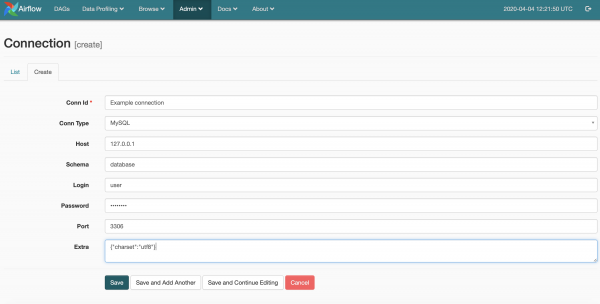
The code is simple, so it hardly needs additional explanations. I will only mention the magical line imap_conn_id. Apache Airflow stores connection parameters (login, password, address, and other parameters), which can be accessed by a string identifier. Visually, managing connections looks like this
Sensor for waiting for data
Since we can already connect to and retrieve data from email, we can now write a sensor to wait for this data. I wasn't able to write an operator that would process the data immediately because, based on the data received from the email, other processes also operate, including those that collect related data from other sources (API, telephony, web metrics, etc.). Let me give you an example. A new user appears in the CRM system, and we don’t yet know their UUID. Then, when trying to retrieve data from SIP telephony, we will get calls linked to their UUID, but we won't be able to properly save and use them. In such cases, it’s important to consider data dependencies, especially when they are from different sources. These are certainly insufficient measures to maintain data integrity, but they are necessary in some cases. It’s also not rational to occupy resources unnecessarily.
Thus, our sensor will trigger subsequent nodes in the graph if there is fresh information in the email and will also mark the previous information as outdated.
from airflow.sensors.base_sensor_operator import BaseSensorOperator
from airflow.utils.decorators import apply_defaults
from my_plugin.hooks.imap_hook import IMAPHook

class MailSensor(BaseSensorOperator):
    @apply_defaults
    def __init__(self, conn_id, check_seen=True, box="Inbox", condition="(UNSEEN)", *args, **kwargs):
        super().__init__(*args, **kwargs)
        self.conn_id = conn_id
        self.check_seen = check_seen
        self.box = box
        self.condition = condition

    def poke(self, context):
        conn = IMAPHook(self.conn_id)
        mail_id = conn.get_last_mail(check_seen=self.check_seen, box=self.box, condition=self.condition)

        if mail_id is None:
            return False
        else:
            return True
Retrieving and using data
To retrieve and process data, one can write a separate operator or use existing ones. Since the logic is straightforward—getting data from an email—I suggest using the standard PythonOperator as an example.
from airflow.models import DAG

from airflow.operators.python_operator import PythonOperator
from airflow.sensors.my_plugin import MailSensor
from my_plugin.hooks.imap_hook import IMAPHook

start_date = datetime(2020, 4, 4)

# Standard DAG configuration
args = {
    "owner": "example",
    "start_date": start_date,
    "email": ["home@home.ru"],
    "email_on_failure": False,
    "email_on_retry": False,
    "retry_delay": timedelta(minutes=15),
    "provide_context": False,
}

dag = DAG(
    dag_id="test_etl",
    default_args=args,
    schedule_interval="@hourly",
)

# Define the sensor
mail_check_sensor = MailSensor(
    task_id="check_new_emails",
    poke_interval=10,
    conn_id="mail_conn_id",
    timeout=10,
    soft_fail=True,
    box="my_box",
    dag=dag,
    mode="poke",
)

# Function to fetch data from the email
def prepare_mail():
    imap_hook = IMAPHook("mail_conn_id")
    mail_id = imap_hook.get_last_mail(check_seen=True, box="my_box")
    if mail_id is None:
        raise AirflowException("Empty mailbox")

    conn.download_mail_href_attachment(mail_id, "./path.zip")

prepare_mail_data = PythonOperator(task_id="prepare_mail_data", default_args=args, dag=dag, python_callable=prepare_mail)

# Description of other graph nodes
...

# Define the relationships in the DAG
mail_check_sensor >> prepare_mail_data
prepare_data >> ...
# Description of other control flows
By the way, if your corporate email is also on mail.ru, you won't be able to search for emails by subject, sender, etc. They promised to introduce this back in 2016, but apparently changed their minds. I solved this problem by creating a separate folder for the necessary emails and setting up a filter for those emails in the web interface. This way, only the relevant emails go into that folder, making the search conditions simply (UNSEEN).
In summary, we have the following sequence: check for new emails that match the conditions; if there are any, download the archive from the link in the latest email.
The ellipses at the end imply that this archive will be unpacked, the data from the archive will be cleaned and processed, and ultimately all of this will go further down the ETL pipeline, but that is beyond the scope of this article. If you found this interesting and useful, I would be happy to continue describing ETL solutions and their components for Apache Airflow.
Source: habr.com
