

This article is dedicated to the specifics of monitoring network equipment using the SNMPv3 protocol. We will discuss SNMPv3, I will share my experience in creating full-fledged templates in Zabbix, and show what can be achieved in organizing distributed alerting in a large network. The SNMP protocol is essential for monitoring network equipment, and Zabbix is well-suited for monitoring a large number of objects and aggregating significant volumes of incoming metrics.
A few words about SNMPv3
Let's start with the purpose of the SNMPv3 protocol and the features of its use. The tasks of SNMP are monitoring network devices and basic management by sending simple commands to them (for example, enabling and disabling network interfaces or rebooting the device).
The main difference between the SNMPv3 protocol and its previous versions is the classic security features [1-3], namely:
- authentication, which determines that the request is received from a trusted source;
- encryption, to prevent the disclosure of transmitted data when intercepted by third parties;
- integrity, which guarantees that the packet was not tampered with during transmission.
SNMPv3 implies the use of a security model, where the authentication strategy is set for a given user and the group to which they belong (in previous versions of SNMP, the request from the server to the monitoring object only compared the 'community', a text string with a 'password' transmitted in plain text).
SNMPv3 introduces the concept of security levels—permissible security levels that define the configuration of the equipment and the behavior of the SNMP agent of the monitoring object. The combination of the security model and the security level determines which security mechanism is used when processing an SNMP packet [4].
The table describes the combinations of SNMPv3 security models and levels (I decided to keep the first three columns as in the original):
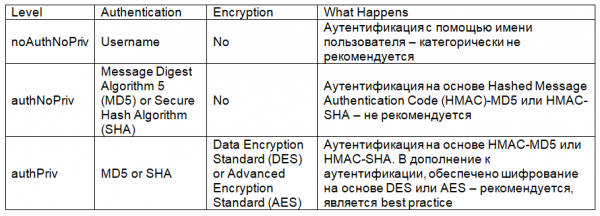
Accordingly, we will use SNMPv3 in authentication mode with encryption.
Configuring SNMPv3
Monitoring network equipment requires the same configuration of the SNMPv3 protocol both on the monitoring server and on the observed object.
Let's start with the configuration of the Cisco network device. Its minimum required configuration looks as follows (we will use CLI for configuration; I've simplified names and passwords to avoid confusion):
snmp-server group snmpv3group v3 priv read snmpv3name
snmp-server user snmpv3user snmpv3group v3 auth md5 md5v3v3v3 priv des des56v3v3v3
snmp-server view snmpv3name iso included
The first line, snmp-server group, defines the SNMPv3 users group (snmpv3group), the read mode (read), and the group's rights to access certain branches of the MIB tree for monitoring object (snmpv3name later in the configuration specifies which branches of the MIB tree the snmpv3group group will be allowed to access).
The second line, snmp-server user, defines the user snmpv3user, their membership in the snmpv3group, as well as using md5 authentication (password for md5 is md5v3v3v3) and des encryption (password for des is des56v3v3v3). Of course, it's better to use aes instead of des, I'm just providing it as an example here. You can also add an access control list (ACL) when defining the user to regulate the IP addresses of monitoring servers that are allowed to monitor this device — this is also a best practice, but I won't complicate our example.
The third line, snmp-server view, defines the code name which specifies the branches of the MIB tree snmpv3name, so that they can be queried by the snmpv3group user group. ISO, instead of strictly defining a single branch, allows the snmpv3group user group to access all objects in the MIB tree of the monitoring object.
The equivalent setup for Huawei equipment (also in CLI) looks as follows:
snmp-agent mib-view included snmpv3name iso
snmp-agent group v3 snmpv3group privacy read-view snmpv3name
snmp-agent usm-user v3 snmpv3user group snmpv3group
snmp-agent usm-user v3 snmpv3user authentication-mode md5
            md5v3v3v3
snmp-agent usm-user v3 snmpv3user privacy-mode des56
            des56v3v3v3
After configuring the network devices, it is necessary to verify access from the monitoring server over SNMPv3 protocol. I will use snmpwalk:
snmpwalk -v 3 -u snmpv3user -l authPriv -A md5v3v3v3 -a md5 -x des -X des56v3v3v3 10.10.10.252 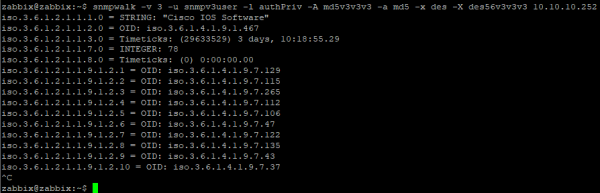
A more visual tool for querying specific OID objects, using MIB files, is snmpget:

Now let's move on to setting up a typical data item for SNMPv3 within the Zabbix template. For simplicity and independence from MIB, I will use numeric OIDs:
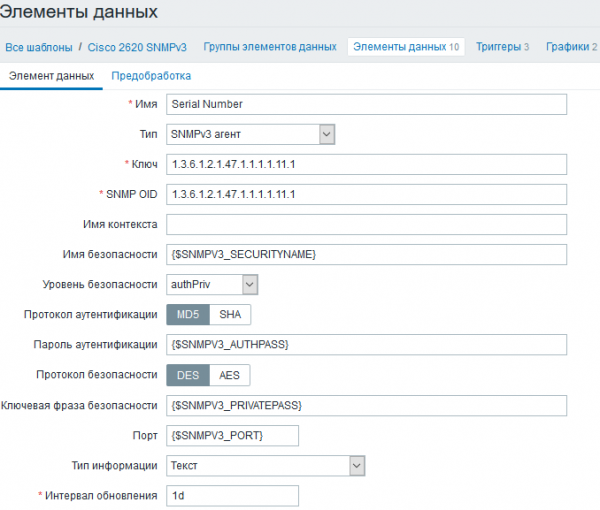
I use user macros in key fields as these will be the same for all data elements in the template. They can be set within the template if all network devices in your network have the same SNMPv3 parameters, or at the network node level if the SNMPv3 parameters differ for various monitoring objects:
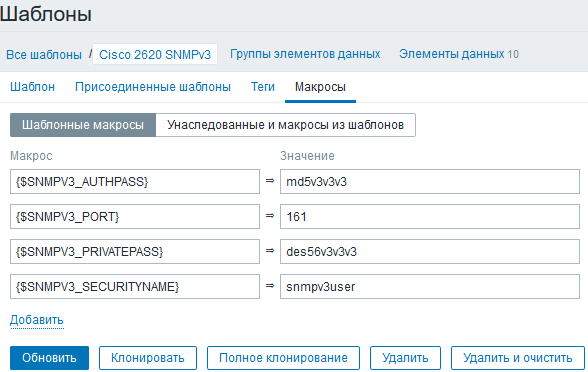
Please note that the monitoring system only has the username and passwords for authentication and encryption. The user group and the MIB object area to which access is allowed are specified at the monitoring object.
Now, let's move on to filling out the template.
Zabbix Survey Template
A simple rule when creating any survey templates is to make them as detailed as possible:
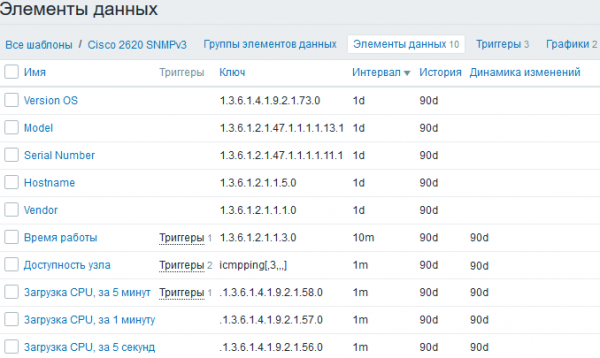
I pay close attention to inventory management so that it is easier to work with a large network. More on this later, but for now – triggers:

For easier visualization, the titles of the triggers include system macros {HOST.CONN}, so that the dashboard in the alerting section displays not only device names but also IP addresses. Although this is more about convenience than necessity. To determine device unavailability, in addition to a standard echo request, I use SNMP protocol checks to see if the node is reachable by ICMP but does not respond to SNMP requests. This situation can occur, for example, when there are duplicate IP addresses across different devices, due to misconfigured firewalls, or incorrect SNMP settings on monitoring objects. If availability checks are performed solely via ICMP, during incident investigations in the network, monitoring data may be missing, so their inflow needs to be monitored.
Let's move on to discovering network interfaces – this is the most important monitoring function for network equipment. Since there can be hundreds of interfaces on a network device, it is essential to filter out the unnecessary ones to avoid cluttering the visualization and overloading the database.
I use the standard discovery function for SNMP, with a large number of discoverable parameters, for more flexible filtering:
discovery[{#IFDESCR},1.3.6.1.2.1.2.2.1.2,{#IFALIAS},1.3.6.1.2.1.31.1.1.1.18,{#IFADMINSTATUS},1.3.6.1.2.1.2.2.1.7] 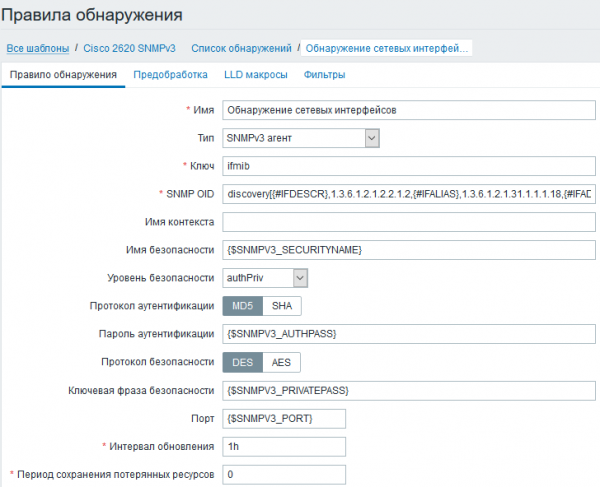
With such detection, network interfaces can be filtered by type, user-defined descriptions 'description', and administrative port statuses. The filters and regular expressions for filtering in my case look as follows:
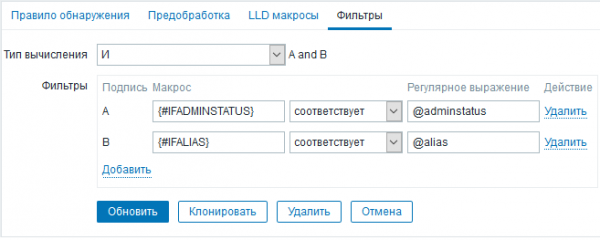
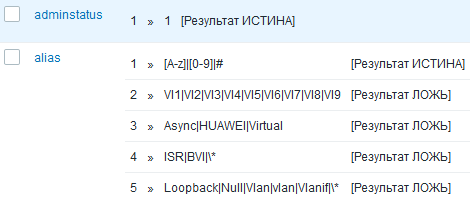
The following interfaces will be excluded upon detection:
- manually disabled (adminstatus1), due to IFADMINSTATUS;
- those without a text description, due to IFALIAS;
- those with a text description containing the character *, due to IFALIAS;
- those that are administrative or technical, due to IFDESCR (in my case, in the regular expressions, IFALIAS and IFDESCR are checked by one regular expression alias).
The template for collecting data via SNMPv3 is almost ready. We won't go into detail on data element prototypes for network interfaces and will move on to the results.
Monitoring Results
To start – inventorying a small network:
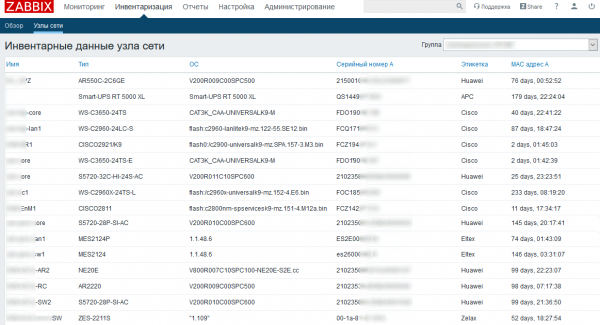
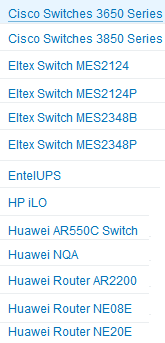
If templates are prepared for each series of network devices, a layout convenient for analyzing summary data on current software, serial numbers, and notifications about the arrival of a cleaner in the server room (due to low Uptime) can be achieved. An excerpt from my list of templates is below:
And now – the main monitoring panel, with triggers distributed by levels of importance:
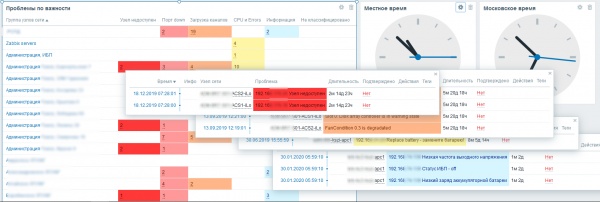
Thanks to a comprehensive approach to templates for each model of devices in the network, it is possible to create a tool for predicting failures and accidents within a single monitoring system (if appropriate sensors and metrics are available). Zabbix is well-suited for monitoring network, server, and service infrastructures, and the task of maintaining network equipment clearly demonstrates its capabilities.
List of sources used:1. Hucaby D. CCNP Routing and Switching SWITCH 300-115 Official Cert Guide. Cisco Press, 2014. pp. 325-329.
2. RFC 3410.
3. RFC 3415.
4. SNMP Configuration Guide, Cisco IOS XE Release 3SE. Chapter: SNMP Version 3.
Source: habr.com
