

I present to you a tutorial for generating access to a Kubernetes cluster using Dex, dex-k8s-authenticator, and GitHub.
A local meme from a Russian-language Kubernetes chat in
Introduction
We use Kubernetes to create dynamic environments for our development and QA teams. Therefore, we want to provide them access to the cluster both for the dashboard and for kubectl. Unlike OpenShift, vanilla Kubernetes does not have native authentication, which is why we use third-party tools for this.
In this configuration, we use:
- — a web application for generating kubectl config
- — an OpenID Connect provider
- GitHub — simply because we use GitHub in our company
We tried to use Google OIDC, but unfortunately, we set them up with groups, so integration with GitHub was quite suitable for us. Without group mapping, it is impossible to create RBAC policies based on groups.
So, how does our authorization process in Kubernetes work, visually:
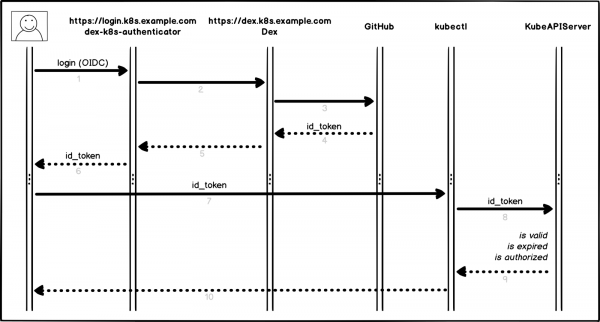
Authorization process
A bit more detail, step by step:
- The user logs in to dex-k8s-authenticator (
login.k8s.example.com) - dex-k8s-authenticator redirects the request to Dex (
dex.k8s.example.com) - Dex redirects to the GitHub authorization page
- GitHub generates the necessary authorization information and returns it to Dex
- Dex passes the received information to dex-k8s-authenticator
- The user receives an OIDC token from GitHub
- dex-k8s-authenticator adds the token to kubeconfig
- kubectl sends the token to KubeAPIServer
- KubeAPIServer returns access to kubectl based on the provided token
- The user receives access from kubectl
Preparatory actions
Naturally, we already have a Kubernetes cluster (k8s.example.com), as well as HELM pre-installed. We also have an organization in GitHub (super-org).
If you do not have HELM, installing it is .
First, we need to set up GitHub.
Go to the organization settings page, (https://github.com/organizations/super-org/settings/applications) and create a new application (Authorized OAuth App):
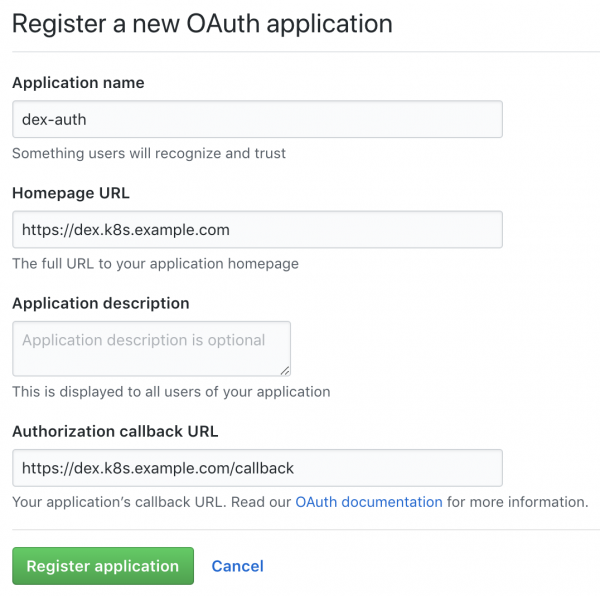
Creating a new application in GitHub
Fill in the fields with the necessary URLs, for example:
- Homepage URL:
https://dex.k8s.example.com - Authorization callback URL:
https://dex.k8s.example.com/callback
Be careful with the links; it's important not to lose the slashes.
In response to the filled form, GitHub will generate Client ID and Client secret, save them in a secure place, as we will need them (for instance, we use for secret storage):
Client ID: 1ab2c3d4e5f6g7h8
Client secret: 98z76y54x32w1
Prepare DNS records for the subdomains login.k8s.example.com and dex.k8s.example.com, as well as SSL certificates for the ingresses.
We will create SSL certificates:
cat <<EOF | kubectl create -f -
apiVersion: certmanager.k8s.io/v1alpha1
kind: Certificate
metadata:
  name: cert-auth-dex
  namespace: kube-system
spec:
  secretName: cert-auth-dex
  dnsNames:
    - dex.k8s.example.com
  acme:
    config:
    - http01:
        ingressClass: nginx
      domains:
      - dex.k8s.example.com
  issuerRef:
    name: le-clusterissuer
    kind: ClusterIssuer
---
apiVersion: certmanager.k8s.io/v1alpha1
kind: Certificate
metadata:
  name: cert-auth-login
  namespace: kube-system
spec:
  secretName: cert-auth-login
  dnsNames:
    - login.k8s.example.com
  acme:
    config:
    - http01:
        ingressClass: nginx
      domains:
      - login.k8s.example.com
  issuerRef:
    name: le-clusterissuer
    kind: ClusterIssuer
EOF
kubectl describe certificates cert-auth-dex -n kube-system
kubectl describe certificates cert-auth-login -n kube-system
The ClusterIssuer named le-clusterissuer must already exist; if not, we will create it using HELM:
helm install --namespace kube-system -n cert-manager stable/cert-manager
cat << EOF | kubectl create -f -
apiVersion: certmanager.k8s.io/v1alpha1
kind: ClusterIssuer
metadata:
  name: le-clusterissuer
  namespace: kube-system
spec:
  acme:
    server: https://acme-v02.api.letsencrypt.org/directory
    email: k8s-admin@example.com
    privateKeySecretRef:
      name: le-clusterissuer
    http01: {}
EOF
KubeAPIServer Configuration
To operate the kubeAPIServer, it is necessary to configure OIDC and update the cluster:
kops edit cluster
...
  kubeAPIServer:
    anonymousAuth: false
    authorizationMode: RBAC
    oidcClientID: dex-k8s-authenticator
    oidcGroupsClaim: groups
    oidcIssuerURL: https://dex.k8s.example.com/
    oidcUsernameClaim: email
kops update cluster --yes
kops rolling-update cluster --yes
We leverage for deploying clusters, but this works similarly for .
Dex and dex-k8s-authenticator Configuration
To operate Dex, a certificate and key from the Kubernetes master are required; let's extract them from there:
sudo cat /srv/kubernetes/ca.{crt,key}
-----BEGIN CERTIFICATE-----
AAAAAAAAAAABBBBBBBBBBCCCCCC
-----END CERTIFICATE-----
-----BEGIN RSA PRIVATE KEY-----
DDDDDDDDDDDEEEEEEEEEEFFFFFF
-----END RSA PRIVATE KEY-----
Clone the dex-k8s-authenticator repository:
git clone git@github.com:mintel/dex-k8s-authenticator.git
cd dex-k8s-authenticator/
Using values files, we can flexibly configure variables for our .
Let's describe the configuration for Dex:
cat < values-dex.yml
global:
  deployEnv: prod
tls:
  certificate: |-
    -----BEGIN CERTIFICATE-----
    AAAAAAAAAAABBBBBBBBBBCCCCCC
    -----END CERTIFICATE-----
  key: |-
    -----BEGIN RSA PRIVATE KEY-----
    DDDDDDDDDDDEEEEEEEEEEFFFFFF
    -----END RSA PRIVATE KEY-----
ingress:
  enabled: true
  annotations:
    kubernetes.io/ingress.class: nginx
    kubernetes.io/tls-acme: "true"
  path: /
  hosts:
    - dex.k8s.example.com
  tls:
    - secretName: cert-auth-dex
      hosts:
        - dex.k8s.example.com
serviceAccount:
  create: true
  name: dex-auth-sa
config: |
  issuer: https://dex.k8s.example.com/
  storage: # https://github.com/dexidp/dex/issues/798
    type: sqlite3
    config:
      file: /var/dex.db
  web:
    http: 0.0.0.0:5556
  frontend:
    theme: "coreos"
    issuer: "Example Co"
    issuerUrl: "https://example.com"
    logoUrl: https://example.com/images/logo-250x25.png
  expiry:
    signingKeys: "6h"
    idTokens: "24h"
  logger:
    level: debug
    format: json
  oauth2:
    responseTypes: ["code", "token", "id_token"]
    skipApprovalScreen: true
  connectors:
  - type: github
    id: github
    name: GitHub
    config:
      clientID: $GITHUB_CLIENT_ID
      clientSecret: $GITHUB_CLIENT_SECRET
      redirectURI: https://dex.k8s.example.com/callback
      orgs:
      - name: super-org
        teams:
        - team-red
  staticClients:
  - id: dex-k8s-authenticator
    name: dex-k8s-authenticator
    secret: generatedLongRandomPhrase
    redirectURIs:
      - https://login.k8s.example.com/callback/
envSecrets:
  GITHUB_CLIENT_ID: "1ab2c3d4e5f6g7h8"
  GITHUB_CLIENT_SECRET: "98z76y54x32w1"
EOF
And for dex-k8s-authenticator:
cat < values-auth.yml
global:
  deployEnv: prod
dexK8sAuthenticator:
  clusters:
  - name: k8s.example.com
    short_description: "k8s cluster"
    description: "Kubernetes cluster"
    issuer: https://dex.k8s.example.com/
    k8s_master_uri: https://api.k8s.example.com
    client_id: dex-k8s-authenticator
    client_secret: generatedLongRandomPhrase
    redirect_uri: https://login.k8s.example.com/callback/
    k8s_ca_pem: |
      -----BEGIN CERTIFICATE-----
      AAAAAAAAAAABBBBBBBBBBCCCCCC
      -----END CERTIFICATE-----
ingress:
  enabled: true
  annotations:
    kubernetes.io/ingress.class: nginx
    kubernetes.io/tls-acme: "true"
  path: /
  hosts:
    - login.k8s.example.com
  tls:
    - secretName: cert-auth-login
      hosts:
        - login.k8s.example.com
EOF
We will install Dex and dex-k8s-authenticator:
helm install -n dex --namespace kube-system --values values-dex.yml charts/dex
helm install -n dex-auth --namespace kube-system --values values-auth.yml charts/dex-k8s-authenticator
Let's check the services' functionality (Dex should return code 400, while dex-k8s-authenticator should return code 200):
curl -sI https://dex.k8s.example.com/callback | head -1
HTTP/2 400
curl -sI https://login.k8s.example.com/ | head -1
HTTP/2 200
RBAC configuration
Creating a ClusterRole for the group, in our case with read-only access:
cat << EOF | kubectl create -f -
apiVersion: rbac.authorization.k8s.io/v1
kind: ClusterRole
metadata:
  name: cluster-read-all
rules:
  -
    apiGroups:
      - ""
      - apps
      - autoscaling
      - batch
      - extensions
      - policy
      - rbac.authorization.k8s.io
      - storage.k8s.io
    resources:
      - componentstatuses
      - configmaps
      - cronjobs
      - daemonsets
      - deployments
      - events
      - endpoints
      - horizontalpodautoscalers
      - ingress
      - ingresses
      - jobs
      - limitranges
      - namespaces
      - nodes
      - pods
      - pods/log
      - pods/exec
      - persistentvolumes
      - persistentvolumeclaims
      - resourcequotas
      - replicasets
      - replicationcontrollers
      - serviceaccounts
      - services
      - statefulsets
      - storageclasses
      - clusterroles
      - roles
    verbs:
      - get
      - watch
      - list
  - nonResourceURLs: ["*"]
    verbs:
      - get
      - watch
      - list
  - apiGroups: [""]
    resources: ["pods/exec"]
    verbs: ["create"]
EOF
Let's create the configuration for ClusterRoleBinding:
cat <<EOF | kubectl create -f -
apiVersion: rbac.authorization.k8s.io/v1beta1
kind: ClusterRoleBinding
metadata:
  name: dex-cluster-auth
  namespace: kube-system
roleRef:
  apiGroup: rbac.authorization.k8s.io
  kind: ClusterRole
  name: cluster-read-all
subjects:
  kind: Group
  name: "super-org:team-red"
EOF
Now we are ready for testing.
Tests
Let's go to the login page (https://login.k8s.example.com) and log in using our GitHub account:
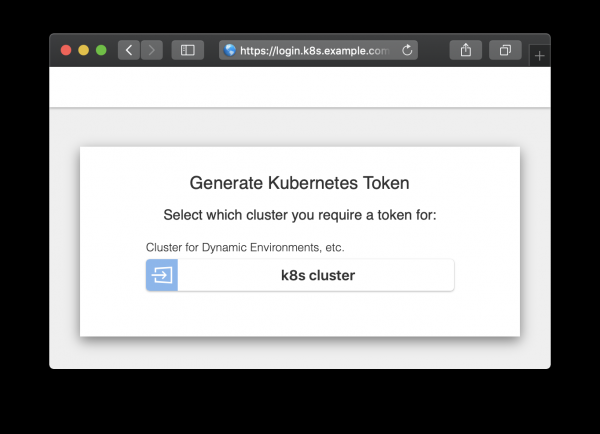
Authorization Page
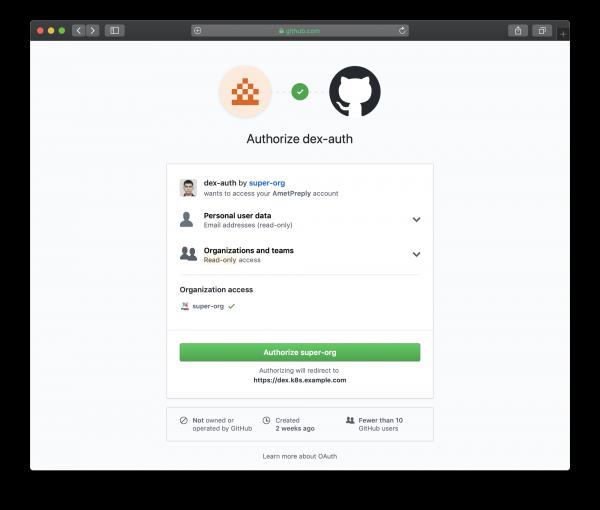
Authorization Page redirected to GitHub
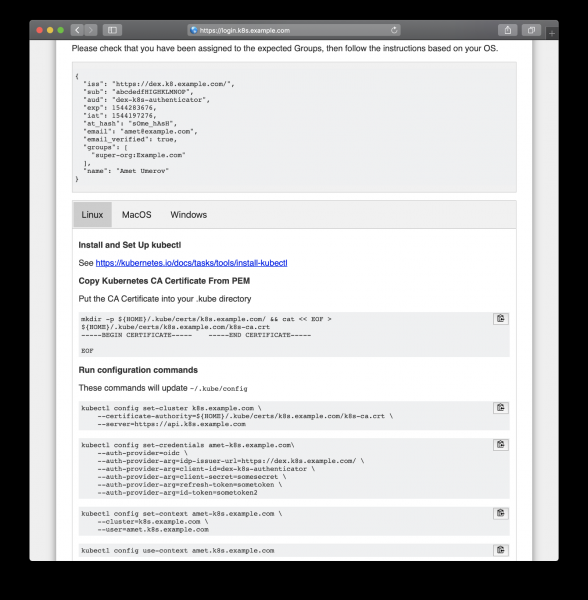
Follow the generated instructions to obtain access
After copying from the webpage, we can use kubectl to manage our cluster resources:
kubectl get po
NAME                READY   STATUS    RESTARTS   AGE
mypod               1/1     Running   0          3d

kubectl delete po mypod
Error from server (Forbidden): pods "mypod" is forbidden: User "amet@example.com" cannot delete pods in the namespace "default"
And it's working, all GitHub users in our organization can see resources and access pods, but they don't have permissions to modify them.
Source: habr.com
