

Continuing the series of articles on the organization of Remote-Access VPN access, I cannot help but share an interesting experience in deploying a high-security VPN configuration. A non-trivial task was suggested by one client (there are dreamers in Russian villages), but Challenge Accepted and creatively executed. As a result, an interesting concept emerged with the following characteristics:
- Several protective factors against device spoofing (with strict user binding);
- Assessment of the user's PC compliance with the assigned UDID of the authorized PC in the authentication database;
- With MFA, using the UDID from the certificate for secondary authentication via Cisco DUO (Any SAML/Radius compatible can be integrated);
- Multi-factor authentication:
- User certificate with field validation and secondary authentication based on one of them;
- Login (immutable, taken from the certificate) and password;
- Assessment of the connecting host's state (Posture)
Components used in the solution:
- Cisco ASA (VPN Gateway);
- Cisco ISE (Authentication / Authorization / Accounting, Posture Assessment, CA);
- Cisco DUO (Multi-factor Authentication) (Any SAML/Radius compatible can be integrated);
- Cisco AnyConnect (Multi-purpose agent for workstations and mobile OS);
Let’s start with the customer's requirements:
- The user must be able to download the AnyConnect client from the VPN gateway upon their authentication using Login/Password, all necessary AnyConnect modules should automatically install according to the user's policy;
- The user must be able to automatically issue a certificate (for one of the scenarios, the main scenario is manual issuance and upload to the PC), I implemented auto-issuance for demonstration (it’s never too late to remove).
- The main authentication must go through several stages, starting with certificate authentication with the analysis of required fields and their values, followed by login/password, but this time the login window must display the username specified in the certificate field Subject Name (CN) without the possibility of editing.
- It is necessary to ensure that the device used for login is the corporate laptop issued to the user for remote access, and not anything else. (Several options have been created to meet this requirement)
- An assessment of the connecting device should be conducted (at this stage, the PC) with a thorough check against the comprehensive requirement table from the client (to summarize):
- Files and their properties;
- Registry entries;
- OS patches from the provided list (further integration with SCCM);
- Presence of antivirus software from a specific vendor and the currency of signatures;
- Activity of certain services;
- Presence of certain installed programs;
To begin, I suggest we take a mandatory look at the video demonstration of the implemented solution on YouTube (5 minutes).
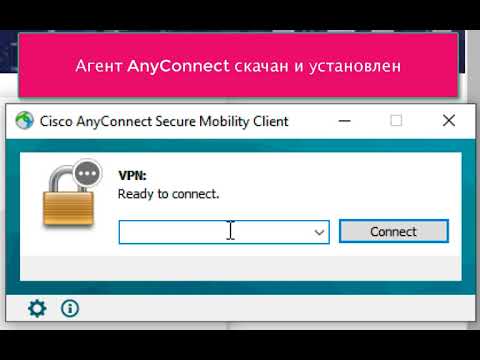
Now, let's consider the details of the implementation that were not covered in the video.
We will prepare the AnyConnect profile:
An example of profile creation (from the menu point in ASDM) was previously provided in my article on configuring Now, I want to highlight the options we will need:
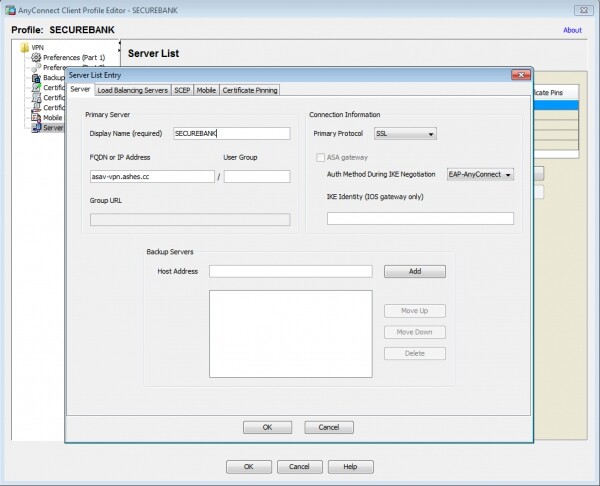
In the profile, we will specify the VPN gateway and the profile name for the endpoint client:
We will configure the automatic certificate issuance from the profile, specifying, in particular, the certificate parameters and notably, we will pay attention to the field Initials (I), where a specific value is manually entered UDID of the test machine (Unique Device Identifier generated by the Cisco AnyConnect client).
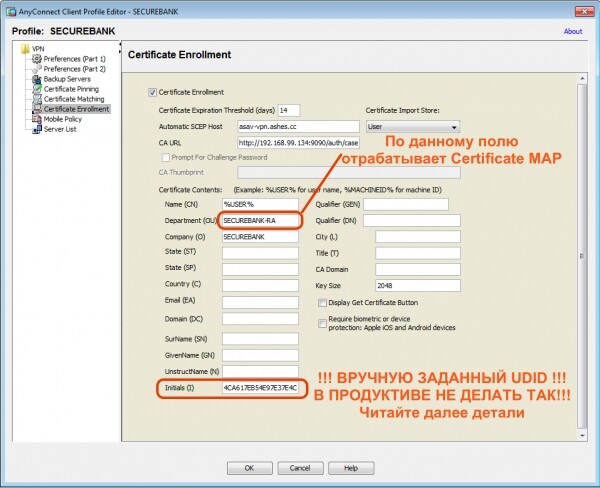
Here I want to make a lyrical digression, as this article describes the concept; for demonstration purposes, the UDID for the certificate issuance is filled in the Initials field of the AnyConnect profile. Of course, in real life, if you do this, all clients will receive a certificate with the same UDID in this field and nothing will work for them, as they need the UDID specific to their PC. Unfortunately, AnyConnect does not currently implement substitution in the profile for the UDID certificate request via an environment variable, as it does with the variable %USER%.
It is worth noting that the client (for this scenario) initially plans to issue certificates with a specified UDID manually for such Protected PCs, which is not a problem for them. However, for most of us, automation is desired (at least for me =).
Here’s what I can offer in terms of automation. While dynamically generating a certificate for AnyConnect using a UDID might not be possible, there is another approach that requires some creative thinking and skilled hands – I’ll explain the concept. First, let’s examine how the UDID is formed on different operating systems by the AnyConnect agent:
- Windows — SHA-256 hash of the combination of the DigitalProductID registry key and the Machine SID
- OSX — SHA-256 hash of the PlatformUUID
- Linux — SHA-256 hash of the UUID of the root partition.
- Apple iOS — SHA-256 hash of the PlatformUUID
- Android – See the document on
Therefore, we create a script for our corporate Windows OS, using this script to locally compute the UDID based on known inputs and form a request for certificate issuance by entering this UDID in the required field; by the way, it’s also possible to use a machine certificate issued by AD (adding a dual authentication scheme based on the certificate) Multiple Certificate).
Let's prepare the settings on the Cisco ASA side:
We will create a TrustPoint for the ISE CA server, which will issue certificates to clients. I will not cover the Key-Chain import procedure; an example is described in my article on configuration. .
crypto ca trustpoint ISE-CA
 enrollment terminal
 crl configure
We configure the distribution by Tunnel-Group based on the rules according to the fields in the certificate used for authentication. Here we also set up the AnyConnect profile that we created in the previous step. I want to emphasize that I am using the value SECUREBANK-RA, for redirecting users with issued certificates to the tunnel group SECURE-BANK-VPN, please note that this field is set in the AnyConnect profile certificate request.
tunnel-group-map enable rules
!
crypto ca certificate map OU-Map 6
 subject-name attr ou eq securebank-ra
!
webvpn
 anyconnect profiles SECUREBANK disk0:/securebank.xml
 certificate-group-map OU-Map 6 SECURE-BANK-VPN
!
We configure the authentication servers. In my case, this is ISE for the first stage of authentication and DUO (Radius Proxy) as MFA.
! CISCO ISE
aaa-server ISE protocol radius
 authorize-only
 interim-accounting-update periodic 24
 dynamic-authorization
aaa-server ISE (inside) host 192.168.99.134
 key *****
!
! DUO RADIUS PROXY
aaa-server DUO protocol radius
aaa-server DUO (inside) host 192.168.99.136
 timeout 60
 key *****
 authentication-port 1812
 accounting-port 1813
 no mschapv2-capable
!
We create group policies and tunnel groups along with their auxiliary components:
Tunnel Group DefaultWEBVPNGroup will primarily be used for downloading the AnyConnect VPN client and issuing the user certificate using the SCEP-Proxy function of ASA; for this, we have activated the appropriate options both on the tunnel group and the associated group policy. AC-Download, as well as on the downloaded AnyConnect profile (certificate issuance fields, etc.). We also specify in this group policy the necessity of downloading. ISE Posture Module.
Tunnel Group SECURE-BANK-VPN will be automatically used by the client during authentication with the issued certificate from the previous step, as per the Certificate Map, the connection will indeed belong to this tunnel group. I will discuss interesting options here:
- secondary-authentication-server-group DUO # Задаем вторичную аутентификацию на сервере DUO (Radius Proxy)
- username-from-certificate CN # Используем для первичной аутентификации поле CN сертификата для наследования логина пользователя
- secondary-username-from-certificate I # Для вторичной аутентификации на сервере DUO используем имя пользователя, извлеченное и поля Initials (I) сертификата.
- pre-fill-username client # делаем предзаполненным имя пользователя в окне аутентификации без возможности изменения
- secondary-pre-fill-username client hide use-common-password push # Прячем окно ввода логина/пароля для вторичной аутентификации DUO и используем для запроса аутентификации вместо поля пароля метод уведомления (sms/push/phone) – дока
!
access-list posture-redirect extended permit tcp any host 72.163.1.80
access-list posture-redirect extended deny ip any any
!
access-list VPN-Filter extended permit ip any any
!
ip local pool vpn-pool 192.168.100.33-192.168.100.63 mask 255.255.255.224
!
group-policy SECURE-BANK-VPN internal
group-policy SECURE-BANK-VPN attributes
 dns-server value 192.168.99.155 192.168.99.130
 vpn-filter value VPN-Filter
 vpn-tunnel-protocol ssl-client
 split-tunnel-policy tunnelall
 default-domain value ashes.cc
 address-pools value vpn-pool
 webvpn
  anyconnect ssl dtls enable
  anyconnect mtu 1300
  anyconnect keep-installer installed
  anyconnect ssl keepalive 20
  anyconnect ssl rekey time none
  anyconnect ssl rekey method ssl
  anyconnect dpd-interval client 30
  anyconnect dpd-interval gateway 30
  anyconnect ssl compression lzs
  anyconnect dtls compression lzs
  anyconnect modules value iseposture
  anyconnect profiles value SECUREBANK type user
!
group-policy AC-DOWNLOAD internal
group-policy AC-DOWNLOAD attributes
 dns-server value 192.168.99.155 192.168.99.130
 vpn-filter value VPN-Filter
 vpn-tunnel-protocol ssl-client
 split-tunnel-policy tunnelall
 default-domain value ashes.cc
 address-pools value vpn-pool
 scep-forwarding-url value http://ise.ashes.cc:9090/auth/caservice/pkiclient.exe
 webvpn
  anyconnect ssl dtls enable
  anyconnect mtu 1300
  anyconnect keep-installer installed
  anyconnect ssl keepalive 20
  anyconnect ssl rekey time none
  anyconnect ssl rekey method ssl
  anyconnect dpd-interval client 30
  anyconnect dpd-interval gateway 30
  anyconnect ssl compression lzs
  anyconnect dtls compression lzs
  anyconnect modules value iseposture
  anyconnect profiles value SECUREBANK type user
!
tunnel-group DefaultWEBVPNGroup general-attributes
 address-pool vpn-pool
 authentication-server-group ISE
 accounting-server-group ISE
 default-group-policy AC-DOWNLOAD
 scep-enrollment enable
tunnel-group DefaultWEBVPNGroup webvpn-attributes
 authentication aaa certificate
!
tunnel-group SECURE-BANK-VPN type remote-access
tunnel-group SECURE-BANK-VPN general-attributes
 address-pool vpn-pool
 authentication-server-group ISE
 secondary-authentication-server-group DUO
 accounting-server-group ISE
 default-group-policy SECURE-BANK-VPN
 username-from-certificate CN
 secondary-username-from-certificate I
tunnel-group SECURE-BANK-VPN webvpn-attributes
 authentication aaa certificate
 pre-fill-username client
 secondary-pre-fill-username client hide use-common-password push
 group-alias SECURE-BANK-VPN enable
 dns-group ASHES-DNS
!
Next, we move on to ISE:
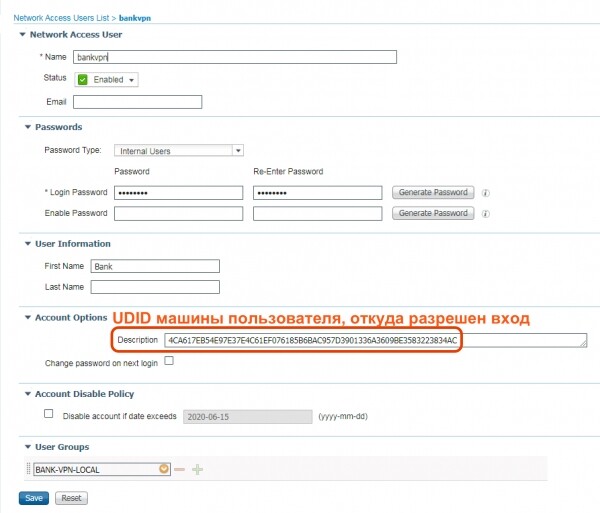
We set up a local user (AD/LDAP/ODBC can also be used, etc.), for simplicity, I've created a local user directly in ISE and assigned in the field description PC UDID from which VPN access is allowed. In the case of using local authentication on ISE, I will be limited to just one device, as there aren't many fields available, but I won't have such restrictions with external authentication databases.
Let's look at the authorization policy, which is divided into four connection stages:
- Stage 1 — Policy for downloading the AnyConnect agent and issuing the certificate
- Stage 2 — Primary authentication policy Login (from certificate)/Password + Certificate with UDID validation
- Stage 3 — Secondary authentication through Cisco DUO (MFA) using UDID as the username + Status assessment
- Stage 4 — Final authorization in the state:
- Compliant;
- UDID validation (from certificate + tied to the login),
- Cisco DUO MFA;
- Username authentication;
- Certificate authentication;
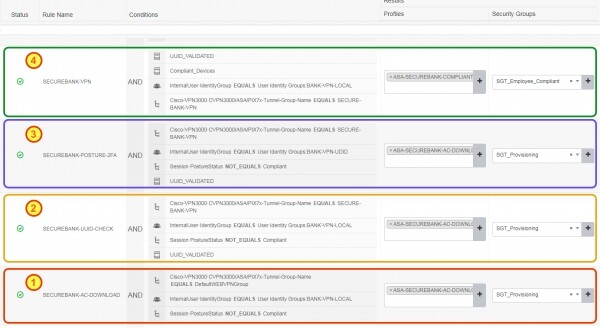
Let's look at an interesting condition UUID_VALIDATED, which checks that the authenticating user really came from a PC with an allowed UDID associated in the field Description of the account. The condition looks like this:

The authorization profile used in stages 1, 2, and 3 looks as follows:

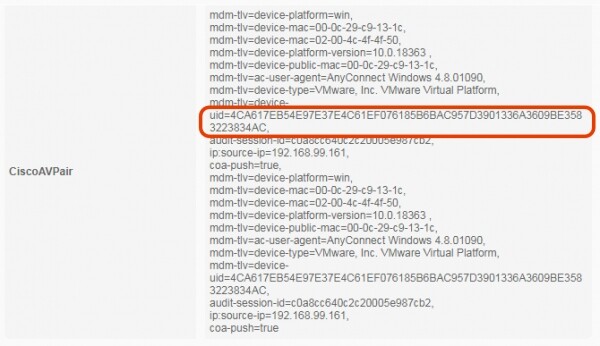
To check how exactly the UDID comes from the AnyConnect client, we can look at the session details in ISE. In the details, we will see that AnyConnect sends not only platform data but also the device UDID as ACIDEX We note the certificate issued to the user and the field , which is used to take it as the login for the secondary authentication MFA in Cisco DUO::
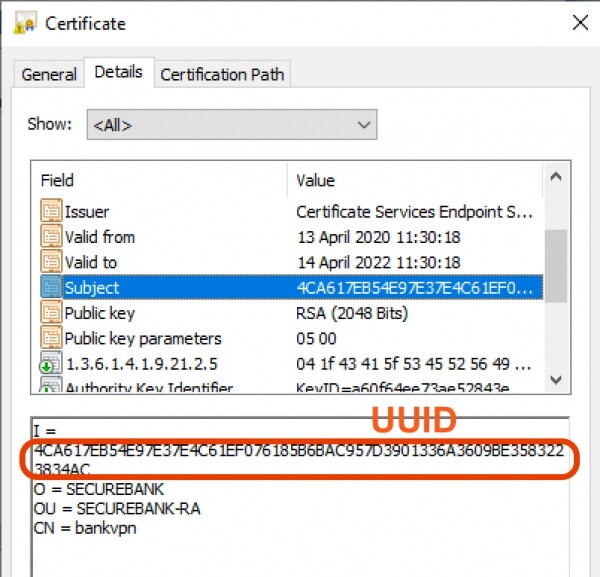
From the DUO Radius Proxy side in the log, we clearly see how the authentication request is made, it uses UDID as the username: Initials (I)From the DUO portal side, we see a successful authentication event:
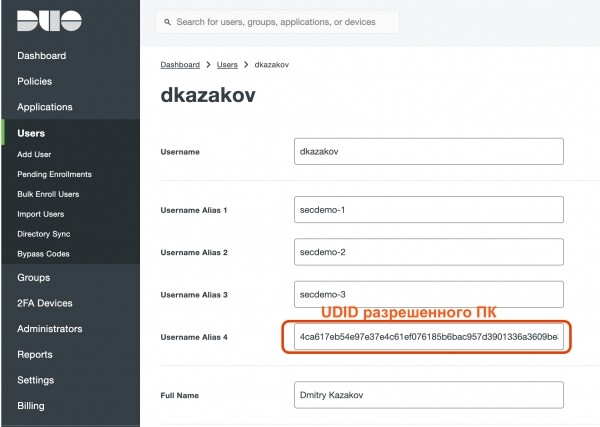
And in the user's properties, I have set

ALIAS
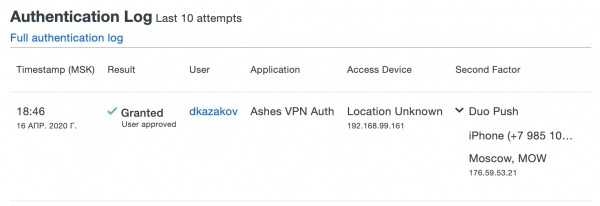
, which I used for login, in turn, this is the UDID allowed for login from the PC: As a result, we achieved:Multi-factor authentication for users and devices;
Protection against device spoofing;
- Device state assessment;
- Potential for enhanced control with a machine certificate from the domain, etc.;
- Device condition assessment;
- Potential for enhanced control with machine domain certificate, etc.;
- Comprehensive security for remote workstations with automatically deployable security modules;
Links to Cisco VPN series articles:
Source: habr.com
