

The article material is taken from my .

Data Transfer Mechanism
- Data Block dblk_t
- Message mblk_t
- Functions for working with messages mblk_t
- Queue queue_t
- Functions for working with queues queue_t
- Filter Connections
- Signal Point of the Data Processing Graph
- Behind-the-Scenes Activity of the Ticker
- Buffer (MSBufferizer)
- Functions for working with MSBufferizer
Previously we developed our own filter. In this article, we will dedicate ourselves to the inner mechanism of data transfer between media streamer filters. This will allow us to write sophisticated filters with less effort in the future.
Data Transfer Mechanism
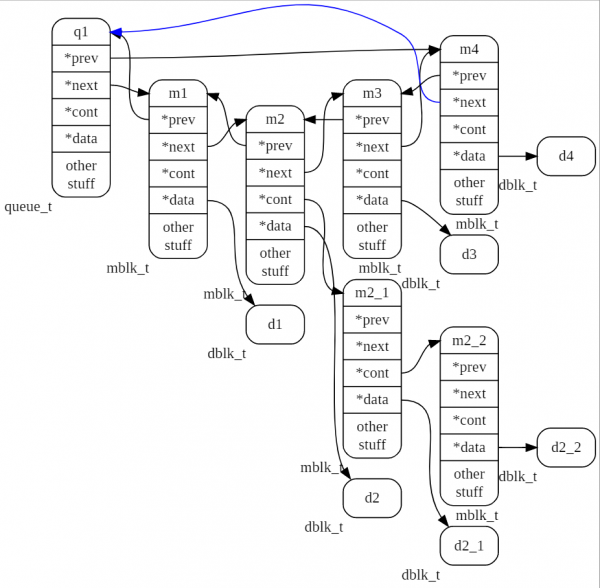
Data transfer in the media streamer is performed using queues described by the structure queue_t. Data is transferred through queues in streams of messages of type mblk_t, which themselves do not contain signal data but only references to the previous and next message and to the data block. Additionally, I want to emphasize that there is a field to reference another message of the same type, which allows us to organize a singly linked list of messages. We will call a group of messages linked in this way a tuple. Thus, any element of the queue can be a single message mblk_t, or it can be the head of a tuple of messages mblk_t. Each message in a tuple may have its own associated data block. We will discuss the purpose of tuples a bit later.
As mentioned earlier, a message does not contain a data block; instead, it holds only a pointer to a memory area where the block is stored. In this part, the overall picture of media streamer operation resembles the warehouse of doors in the animated film "Monsters, Inc.", where doors (links to data — rooms) move at breakneck speed along suspended conveyors while the rooms themselves remain stationary.
Now, moving up the hierarchy from bottom to top, let us examine in detail the entities of the data transfer mechanism in the media streamer.
Data Block dblk_t
A data block consists of a header and a data buffer. The header is described by the following structure,
typedef struct datab
{
unsigned char *db_base; // Pointer to the start of the data buffer.
unsigned char *db_lim;  // Pointer to the end of the data buffer.
void (*db_freefn)(void*); // Memory release function when deleting the block.
int db_ref; // Reference counter.
} dblk_t;
The structure fields contain pointers to the start of the buffer, the end of the buffer, and the function for deleting the data buffer. The last element in the header db_ref — reference counter; when it reaches zero, it signals the deletion of this block from memory. If the data block was created by the function datab_alloc() , then the data buffer will be located in memory immediately after the header. In all other cases, the buffer may be located separately. The data buffer will contain signal counts or other data that we want to process with filters.
A new instance of a data block is created using the function:
dblk_t *datab_alloc(int size);The size of the data that the block will store is passed to it as an input parameter. More memory is allocated so that at the beginning of the allocated memory, the header— the structure datab, can be placed. However, when using other functions, this does not always happen; in some cases, the data buffer may be located separately from the data block header. The structure fields are set during creation so that its field db_base points to the start of the data area, and db_lim to its end. The reference counter db_ref is set to one. The data cleanup function pointer is set to zero.
Message mblk_t
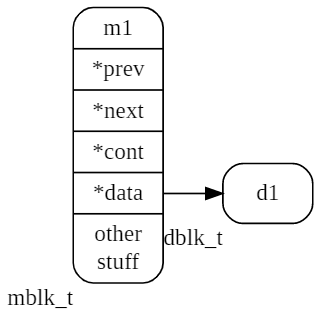
As mentioned, queue elements are of type mblk_t, which is defined as follows:
typedef struct msgb
{
  struct msgb *b_prev;   // Pointer to the previous list element.
  struct msgb *b_next;   // Pointer to the next list element.
  struct msgb *b_cont;   // Pointer to attach other messages to the message, to create a tuple of messages.
  struct datab *b_datap; // Pointer to the data block structure.
  unsigned char *b_rptr; // Pointer to the start of the data area for reading data from the b_datap buffer.
  unsigned char *b_wptr; // Pointer to the start of the data area for writing data to the b_datap buffer.
  uint32_t reserved1;    // Reserved field 1, the media streamer places control information there.
  uint32_t reserved2;    // Reserved field 2, the media streamer places control information there.
  #if defined(ORTP_TIMESTAMP)
  struct timeval timestamp;
  #endif
  ortp_recv_addr_t recv_addr;
} mblk_t;
Structure mblk_t at the beginning contains pointers b_prev, b_next, which are necessary for organizing a doubly linked list (which is the queue queue_t).
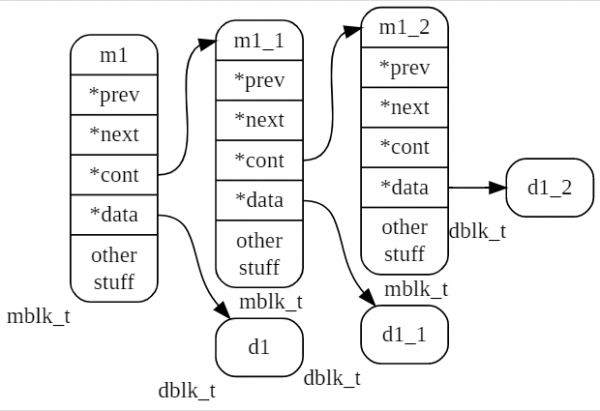
Then there is the pointer b_cont, which is only used when the message enters the tuple. For the last message in the tuple, this pointer remains null.
Next, we see a pointer to the data block b_datap, for which the message exists. Following this are pointers to the area within the data buffer of the block. The field b_rptr indicates the location from which data will be read from the buffer. The field b_wptr indicates the location from which data will be written to the buffer.
The remaining fields are for internal use and do not relate to the operation of the data transfer mechanism.
Below is a single message named m1 and a data block d1.
The next figure shows a tuple of three messages m1, m1_1, m1_2.
Message handling functions mblk_t
A new message mblk_t is created by the function:
mblk_t *allocb(int size, int pri); it allocates a new message in memory mblk_t with a data block of the specified size size, the second argument — pri is not used in this version of the library. It should remain null. During the function's operation, memory will be allocated for the new message structure, and the function mblk_init(), which will reset all fields of the created structure instance, will then, using the aforementioned datab_alloc(), create the data buffer. After that, the fields in the structure will be set up:
mp->b_datap=datab;
mp->b_rptr=mp->b_wptr=datab->db_base;
mp->b_next=mp->b_prev=mp->b_cont=NULL;
The output is a new message with initialized fields and an empty data buffer. To add data to the message, it is necessary to copy them into the data block's buffer:
memcpy(msg->b_rptr, data, size);where data — pointer to the data source, and size — their size.
Then, it is necessary to update the write pointer so that it again points to the start of the free area in the buffer:
msg->b_wptr = msg->b_wptr + sizeIf it is required to create a message from an already existing buffer, without copying, then the function used is:
mblk_t *esballoc(uint8_t *buf, int size, int pri, void (*freefn)(void*)); The function, after creating the message and the data block structure, will adjust its pointers to the data at the address buf. That is, in this case, the data buffer does not follow the fields of the data block header, as it did when the data block was created by the function. datab_alloc()The buffer passed to the function will stay where it is, but with the help of pointers, it will be linked to the newly created header block, which in turn links to the message.
A single message mblk_t can have multiple data blocks consecutively attached to it. This is done using the function:
mblk_t * appendb(mblk_t *mp, const char *data, int size, bool_t pad); mp — the message to which an additional data block will be added;
data — a pointer to the block, a copy of which will be added to the message;
size — the size of the data;
pad — a flag indicating that the allocated memory size should be aligned to a 4-byte boundary (padding will be performed with zeros).
If there is enough space in the existing message data buffer, the new data will be appended behind the existing data there. If there is less free space in the message data buffer than size, a new message is created with a sufficient buffer size, and the data is copied into its buffer. This new message is linked to the original message through the pointer b_cont. In this case, the message turns into a tuple.
If another data block needs to be added to the tuple, the function should be used:
void msgappend(mblk_t *mp, const char *data, int size, bool_t pad);it will locate the last message in the tuple (which will have b_cont zero) and call the function for that message appendb().
The data size in a message or a tuple can be determined using the function:
int msgdsize(const mblk_t *mp);it will traverse all messages in the tuple and return the total amount of data in the data buffers of these messages. For each message, the amount of data is calculated as follows:
mp->b_wptr - mp->b_rptrTo concatenate two tuples, the function is used:
mblk_t *concatb(mblk_t *mp, mblk_t *newm);it attaches the tuple newm to the end of the tuple mp and returns a pointer to the last message of the resulting tuple.
If necessary, a tuple can be turned into a single message with one data block using the function:
void msgpullup(mblk_t *mp,int len);if the argument len is -1, then the size of the allocated buffer is determined automatically. If len If a positive number is provided, a buffer of that size will be created, and the data from the tuple messages will be copied into it. If the buffer runs out, the copying will stop. The first message of the tuple will receive a new size buffer with the copied data. The remaining messages will be discarded, and the memory will be returned to the heap.
When deleting the structure mblk_t the reference counter of the data block is considered if upon calling freeb() it equals zero, the data buffer is deleted along with the instance mblk_t, to which it points.
Initialization of the new message fields:
void mblk_init(mblk_t *mp);Adding another portion of data to the message:
mblk_t * appendb(mblk_t *mp, const char *data, size_t size, bool_t pad);If the new data does not fit in the free space of the message data buffer, a separately created message with the required buffer size is attached to the message (a pointer to the added message is set in the first message), turning it into a tuple.
Adding a portion of data to the tuple:
void msgappend(mblk_t *mp, const char *data, size_t size, bool_t pad); The function calls appendb() in a loop.
Merging two tuples into one:
mblk_t *concatb(mblk_t *mp, mblk_t *newm);Message newm will be appended to mp.
Creating a copy of a single message:
mblk_t *copyb(const mblk_t *mp);Complete copying of the tuple with all data blocks:
mblk_t *copymsg(const mblk_t *mp);The elements of the tuple are copied by the function copyb().
Creating a lightweight copy of the message. In this case, the data block is not copied, but its reference counter is increased. mblk_tmblk_t *dupb(mblk_t *mp); db_ref:
Creating a lightweight copy of the tuple. Data blocks are not copied, only their reference counters are increased.mblk_t *dupmsg(mblk_t* m); db_ref:
Concatenating all messages of the tuple into a single message:void msgpullup(mblk_t *mp,size_t len);
If the argumentequals -1, the size of the allocated buffer is determined automatically. len Deletion of the message, tuple:
void freemsg(mblk_t *mp);
The reference counter of the data block is decreased by one. If it reaches zero, the data block is also deleted.Counting the total volume of data in the message or tuple.
size_t msgdsize(const mblk_t *mp);
Extracting a message from the tail of the queue:mblk_t *ms_queue_peek_last (q);
Copying the contents of the reserved fields from one message to another (actually, these fields contain flags used by the media streamer):mblk_meta_copy(const mblk_t *source, mblk *dest);
QueueQueue queue_t
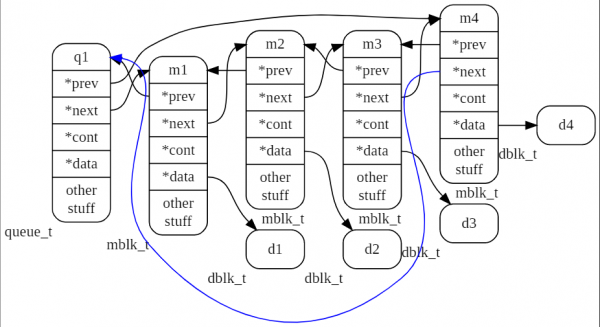
The message queue in the media streamer is implemented as a circular doubly linked list. Each element of the list contains a pointer to a data block with signal readings. This means that only the pointers to the data blocks are moved in sequence, while the actual data remains stationary. In other words, only the references to them are moved.
Structure describing the queue queue_t, shown below:
typedef struct _queue
{
   mblk_t _q_stopper; /* "Empty" element of the queue, does not point to data, used only for managing the queue. During queue initialization (qinit()), its pointers are set to point to itself. */
   int q_mcount;       // Number of elements in the queue.
} queue_t;
The structure contains a field — pointer _q_stopper of type *mblk_t, which points to the first element (message) in the queue. The second field of the structure is a counter of messages in the queue.
The figure below shows the queue named q1, containing 4 messages m1, m2, m3, m4.
The next figure shows the queue named q1, containing 4 messages m1, m2, m3, m4. Message m2 is the head of the tuple, which includes two more messages m2_1 and m2_2.
Functions for working with queues queue_t
Initializing the queue:
void qinit(queue_t *q);Field _q_stopper (hereafter referred to as "stopper") is initialized by the function mblk_init(), its previous and next element pointers are configured to point to itself. The element count in the queue is reset to zero.
Adding a new element (message):
void putq(queue_t *q, mblk_t *m);The new element m is added to the end of the list, the element pointers are configured so that the stopper becomes the next element for it, and it becomes the previous one for the stopper. The element count in the queue is incremented.
Extracting an element from the queue:
mblk_t * getq(queue_t *q); the message that stands after the stopper is extracted, and the element count is decremented. If there are no elements in the queue apart from the stopper, 0 is returned.
Inserting a message into the queue:
void insq(queue_t *q, mblk_t *emp, mblk_t *mp); Element mp is inserted before the element emp. If emp=0, then the message is added to the tail of the queue.
Extracting a message from the head of the queue:
void remq(queue_t *q, mblk_t *mp); The element count is decremented.
Reading the pointer to the first element in the queue:
mblk_t * peekq(queue_t *q); Removing all elements from the queue with the removal of the elements themselves:
void flushq(queue_t *q, int how);Argument how is not used. The queue element counter is set to zero.
Macro for reading the pointer to the last element of the queue:
mblk_t * qlast(queue_t *q);When working with message queues, it should be noted that when calling ms_queue_put(q, m) with a null pointer for the message, the function enters an infinite loop. Your program will hang. The same behavior occurs with ms_queue_next(q, m).
Filter Connections
The queue described above is used to transfer messages from one filter to another or from one to several filters. Filters and their connections form a directed graph. The input or output of a filter will be referred to as the generalized term "pin". To describe the order of connections between filters, the concept of a "signal point" is used in the media streamer. A signal point is a structure _MSCPoint, which contains a pointer to the filter and the number of one of its pins; thus, it describes the connection of one of the filter's inputs or outputs.
Signal Point of the Data Processing Graph
typedef struct _MSCPoint{
struct _MSFilter *filter; // Pointer to the media streamer filter.
int pin;                        // The number of one of the filter's inputs or outputs, i.e., the pin.
} MSCPoint;
The pins of the filters are numbered starting from zero.
The connection of two pins by a message queue is described by the structure _MSQueue, which contains the message queue and pointers to two signal points that it connects:
typedef struct _MSQueue
{
queue_t q;
MSCPoint prev;
MSCPoint next;
}MSQueue;
We will call this structure a signal link. Each media streamer filter contains a table of input links and a table of output links (MSQueue). The size of the tables is specified when creating the filter, which we already did using the exported variable of type MSFilterDesc, when developing our own filter. Below is the structure describing any filter in the media streamer, MSFilter:
struct _MSFilter{
    MSFilterDesc *desc;    /* Pointer to filter descriptor. */
    /* Protected attributes, they cannot be moved or removed, otherwise it will interfere with plugin operation. */
    ms_mutex_t lock;      /* Semaphore. */
    MSQueue **inputs;     /* Table of input links. */
    MSQueue **outputs;    /* Table of output links. */
    struct _MSFactory *factory; /* Pointer to the factory that created this filter instance. */
    void *padding;              /* Not used, will be utilized if protected fields are added. */
    void *data;                 /* Pointer to arbitrary structure for storing filter's internal state data and intermediate computations. */
    struct _MSTicker *ticker;   /* Pointer to ticker object, which must not be NULL when process() is called. */
    /*private attributes, they can be moved and changed at any time*/
    MSList *notify_callbacks; /* List of callbacks used for handling filter events. */
    uint32_t last_tick;       /* Number of the last tick when process() was called. */
    MSFilterStats *stats;     /* Filter operation statistics.*/
    int postponed_task; /* Number of postponed tasks. Some filters may delay data processing (process() call) for several ticks.*/
    bool_t seen;  /* Flag used by ticker to mark that this filter instance has already been serviced in this tick.*/
};
typedef struct _MSFilter MSFilter;
Once we have connected the filters in our C program according to our design (but not connected the ticker), we have thereby created a directed graph, where the nodes are instances of the structure MSFilter, and the edges are instances of the links MSQueue.
Behind-the-Scenes Activity of the Ticker
When I told you that the ticker is a source tick filter, that was not the whole truth about it. The ticker is an object that triggers the execution of functions process() for all the filters in the scheme (graph) to which it is connected. When we connect the ticker to a filter in the graph in a C program, we indicate to the ticker the graph it will manage from that point until we disconnect it. After connecting, the ticker starts surveying the entrusted graph, compiling a list of filters that it contains. To avoid "counting" the same filter twice, it marks discovered filters by setting a flag seen. The search is conducted through the link tables that each filter has.
During its introductory tour of the graph, the ticker checks if there is at least one filter among the filters that acts as a source of data blocks. If none are found, the graph is deemed incorrect, and the ticker terminates its operation.
If the graph turns out to be "correct," the initialization function is called for each found filter. preprocess(). Once the time arrives for the next processing cycle (default every 10 milliseconds), the ticker calls the function process() for all previously found source filters, and then for the remaining filters in the list. If a filter has input links, the function invocation process() is repeated until the input link queues are empty. After that, it moves on to the next filter in the list and "polls" it until the input links are cleared of messages. The ticker moves from filter to filter until the list is exhausted. This concludes the processing cycle.
Now let’s return to tuples and discuss why such an entity was added to the media streamer. In general, the volume of data required by the algorithm operating inside the filter does not match and is not a multiple of the size of the data buffers arriving at input. For example, we're writing a filter that performs a fast Fourier transform, which by definition can only process data blocks whose size is a power of two. Let’s say this is 512 samples. If the data is generated by a telephone line, the data buffer of each incoming message will bring us 160 samples of the signal. There is a temptation not to retrieve data from the input until the necessary amount is available. But in this case, there will be a collision with the ticker, which will unsuccessfully attempt to poll the filter until the input link is exhausted. We previously outlined this rule as the third principle of the filter's operation. According to this principle, the filter's process() function must retrieve all data from the input queues.
In addition, only 512 samples can be retrieved from the input, as samples can only be taken in whole blocks, i.e., the filter will have to retrieve 640 samples and after using 512 of them, the remainder will wait until new data is collected. Thus, our filter, aside from its primary function, must provide auxiliary actions for temporarily storing incoming data. The developers of the media streamer and the solution to this common task designed a special object — MSBufferizer, which tackles this using tuples.
Buffer (MSBufferizer)
This is an object that will accumulate incoming data within the filter and will start delivering it for processing as soon as the amount of information is sufficient to run the filter algorithm. While the bufferizer is accumulating data, the filter will run in idle mode, not expending CPU processing power. But as soon as the read function from the bufferizer returns a non-zero value, the filter's process() function begins retrieving and processing data from the bufferizer in the required size batches until they are depleted.
The currently unused data remains in the bufferizer as the first element of the tuple, to which subsequent blocks of incoming data are attached.
The structure that describes the bufferizer:
struct _MSBufferizer{
queue_t q; /* Message queue. */
int size; /* Total size of data in the bufferizer at this moment. */
};
typedef struct _MSBufferizer MSBufferizer;
Functions for working with MSBufferizer
Creating a new instance of the bufferizer:
MSBufferizer * ms_bufferizer_new(void);Memory is allocated, initialized in ms_bufferizer_init() and a pointer is returned.
Initialization function:
void ms_bufferizer_init(MSBufferizer *obj); The queue q, field size is set to zero.
Adding a message:
void ms_bufferizer_put(MSBufferizer *obj, mblk_t *m); Message m is added to the queue. The calculated size of data blocks is added to size.
Transferring all messages from the link's data queue to the bufferizer q:
void ms_bufferizer_put_from_queue(MSBufferizer *obj, MSQueue *q); Messages from the link q to the bufferizer are transferred using the function ms_bufferizer_put().
Reading from the bufferizer:
int ms_bufferizer_read(MSBufferizer *obj, uint8_t *data, int datalen); If the size of the accumulated data in the bufferizer is less than the requested amount (datalen), the function returns zero, and data copying to data is not performed. Otherwise, sequential data copying occurs from the tuples present in the buffer. After copying, the tuple is removed and memory is freed. The copying ends when datalen bytes have been copied. If space runs out in the middle of a data block, the data block will be truncated to the remaining uncopied portion. The next call will continue copying from this point.
Reading the amount of data currently available in the buffer:
int ms_bufferizer_get_avail(MSBufferizer *obj); Returns the field size of the buffer.
Discarding part of the data in the buffer:
void ms_bufferizer_skip_bytes(MSBufferizer *obj, int bytes);The specified number of bytes of data is extracted and discarded. The oldest data is discarded.
Removing all messages in the buffer:
void ms_bufferizer_flush(MSBufferizer *obj); The data counter is reset to zero.
Removing all messages in the buffer:
void ms_bufferizer_uninit(MSBufferizer *obj); Resetting the counter is not performed.
Removing the buffer and freeing memory:
void ms_bufferizer_destroy(MSBufferizer *obj); Examples of using the buffer can be found in the source code of several media streamer filters. For example, in the filter MS_L16_ENC, which performs byte rearrangement in the samples from network order to host order:
In the next article, we will discuss load assessment on the ticker and ways to combat excessive computational load in the media streamer.
Source: habr.com
